
Fail2ban on Ubuntu 26.04: SSH Setup, Unban, Tested Fixes
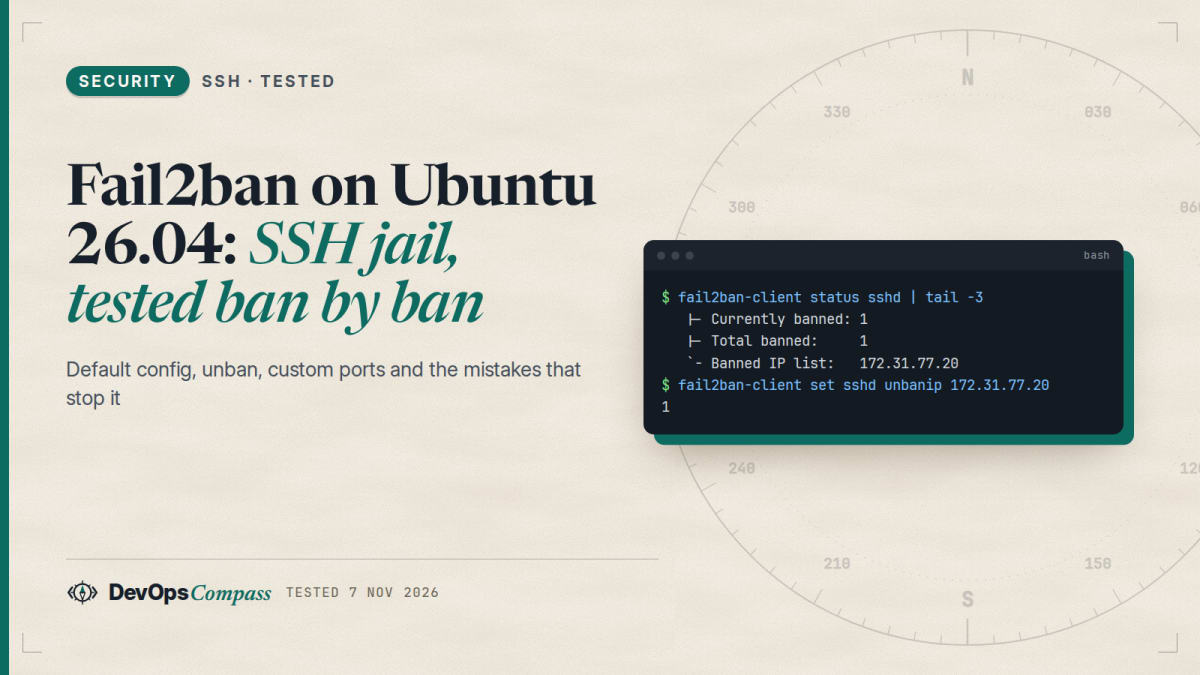
Short answer: on Ubuntu 26.04, apt install fail2ban is enough to protect SSH. The package enables the sshd jail, reads the systemd journal, and bans with nftables. In our test, it blocked an address after a few failed logins with no configuration at all. Unban with fail2ban-client set sshd unbanip ADDRESS. If SSH is not on port 22, you must set port = in jail.local, or the ban looks fine but blocks nothing.
How this was made: on 7 November 2026 we ran two labs with a throwaway ubuntu:26.04 systemd container as the server and a second container as the attacker (arm64, fail2ban 1.1.0, OpenSSH 10.2p1, nftables 1.1.6). The container used a test user and a private test network.
How do you install fail2ban on Ubuntu 26.04?
sudo apt update
sudo apt install fail2ban
The service starts and is enabled at boot. Check it:
sudo fail2ban-client ping
sudo fail2ban-client status sshd
ping should reply Server replied: pong, and the second command shows the jail. Before you turn anything on, add your own address to ignoreip (below) so that a typo cannot lock you out.
What does the default config do?
The package ships one small file, /etc/fail2ban/jail.d/defaults-debian.conf:
[DEFAULT]
banaction = nftables
banaction_allports = nftables[type=allports]

[sshd]
backend = systemd
journalmatch = _SYSTEMD_UNIT=ssh.service + _COMM=sshd
enabled = true
Those lines matter more than the large jail.conf. That file still says banaction = iptables-multiport and backend = auto, and many older guides quote those values. On 26.04, the small file overrides them.
With no other changes, fail2ban-client reported these values: maxretry 5, findtime 600 seconds, and bantime 600 seconds. So five failures inside 10 minutes earn a 10-minute ban. Our server also had no /var/log/auth.log at all, which matters later.
Does the sshd-session change break fail2ban on 26.04?
Since OpenSSH 9.8, login attempts are logged by a process called sshd-session, not sshd. That broke the journal filter in fail2ban on some distributions, and Fedora needed a fix. The line above only names _COMM=sshd, so we expected a problem.
It did not happen. In the journal, every failure came from sshd-session on OpenSSH 10.2p1:
sshd-session[175]: Failed password for alice from 172.31.77.20 port 38754 ssh2
Fail2ban still counted them. The + in a journal match means "or", so _SYSTEMD_UNIT=ssh.service catches all messages from the unit, whichever process wrote them. The filter's own regex already includes sshd(?:-session)?. If you are chasing a "not banning" problem on 26.04, this is not the cause. If you run a custom journal match without the unit line, it may be.
Test the ban
Do not test from the only connection you have. We sent wrong passwords from the second container:
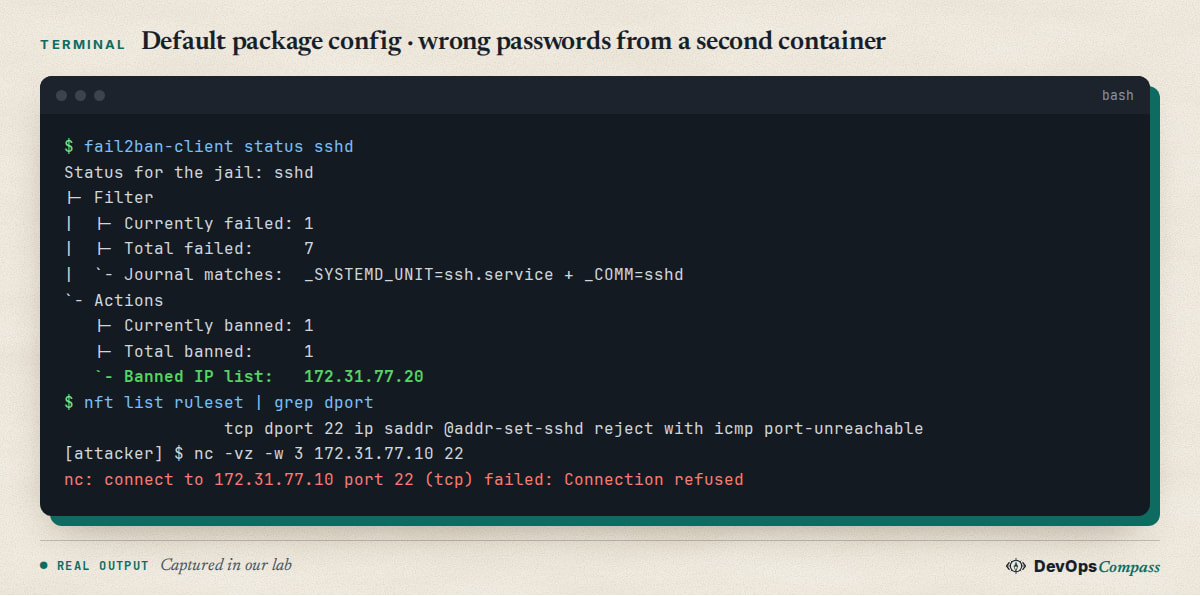
The status showed one banned address, and fail2ban added this rule through nftables. The client then got Connection refused on port 22. The ban landed within seconds: the first failures in our log were at 01:04:08 and the ban at 01:04:12.
To follow it live on your own server:
sudo tail -f /var/log/fail2ban.log
Look for lines such as [sshd] Found 172.31.77.20 and then [sshd] Ban 172.31.77.20. A useful side result: when we stopped fail2ban, made failed logins and started it again, it read those recent failures from the journal and banned the address right after starting.
How do you see banned IPs and unban one?
These are the commands you will use most. We ran all of them in the lab:
sudo fail2ban-client banned
sudo fail2ban-client status sshd
sudo fail2ban-client get sshd banip --with-time
sudo fail2ban-client set sshd unbanip 203.0.113.7
sudo fail2ban-client unban --all
banned prints a short list per jail, and get sshd banip --with-time shows when each ban ends. Our output was 172.31.77.20 2026-11-07 01:04:11 + 600 = 2026-11-07 01:14:11. unbanip printed 1, and the next connection from that address worked.
If you locked yourself out, use your provider's web console, or wait for the ban to end. Restarting fail2ban does not clear a ban. We checked this: after a restart, the address was still listed, because bans are stored in /var/lib/fail2ban/fail2ban.sqlite3.
Make your own jail.local
Never edit jail.conf, since package updates can change it. Create /etc/fail2ban/jail.local:
[DEFAULT]
ignoreip = 127.0.0.1/8 ::1 203.0.113.7

[sshd]
enabled = true
maxretry = 3
findtime = 10m
bantime = 1h
Then test before you restart:
sudo fail2ban-client -t
sudo systemctl restart fail2ban
sudo fail2ban-client get sshd maxretry
-t printed OK: configuration test is successful, and the values changed as expected. With our test address in ignoreip, five failures produced no ban, and the log recorded [sshd] Ignore 172.31.77.20 by ip. If your own address changes, use a VPN or a small range instead of a single IP.
Longer bans for repeat offenders
A short first ban that grows on repeats limits the damage from a typo. Add this under [DEFAULT]:
bantime.increment = true
bantime.factor = 2
bantime.formula = ban.Time * (1<<(ban.Count if ban.Count<20 else 20)) * banFactor
bantime.maxtime = 1w
With a base of 6 seconds for the test, the first ban lasted 6 seconds. The second lasted 24 seconds, and the log showed Increase Ban 172.31.77.20 (2 # 24s ...). The growth is steeper than "double each time", because bantime.factor multiplies the formula. Set bantime.maxtime to a value you are happy with.
Aggressive mode
mode = aggressive in the jail also counts probes that never try a password. We connected six times with junk data and no login attempt. The log showed lines such as banner exchange: ... invalid format, and the address was banned. It stops scanners sooner. The trade-off is that a health check or monitoring tool that opens the SSH port can get banned too, so add those addresses to ignoreip.
Why a custom SSH port leaves the door open
This was the most useful result of the lab. We moved SSH to port 2222 and left the jail alone. Failed logins were detected, and the address was banned:
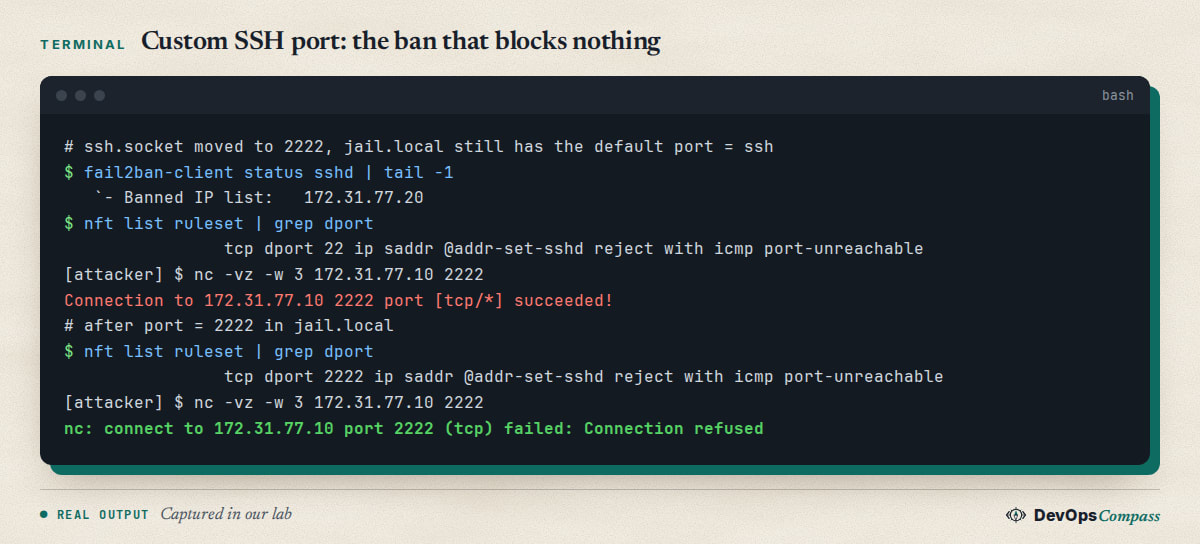
Fail2ban reported one banned address. But the rule only covers tcp dport 22, so the attacker could still connect on 2222. port = ssh is the default in jail.conf, and ssh resolves to 22 no matter what your server listens on. The status command gives no warning.
The fix is one line in jail.local:
[sshd]
enabled = true
port = 2222
After that, the rule said tcp dport 2222, and the banned client got Connection refused. If you changed your SSH port, check with sudo nft list ruleset | grep dport after the first ban. Our guide to changing the SSH port on Ubuntu 26.04 explains the socket side. We also confirmed its warning: a bare ListenStream=2222 drop-in listened on IPv6 only, and IPv4 clients were refused until we wrote 0.0.0.0:2222 and [::]:2222.
Do you still need fail2ban with OpenSSH penalties?
OpenSSH now has its own defence. sshd -T on 26.04 listed:
persourcepenalties crash:90 authfail:5 noauth:1 grace-exceeded:10 refuseconnection:10 max:600 min:15 ...
During eight wrong passwords with fail2ban stopped, sshd logged activating ipv4 penalty of 17 seconds for penalty: failed authentication. All eight attempts still reached the password stage in our run, so a burst like ours was not stopped by that alone. See the sshd_config manual for the settings.
Our view is to keep both. Penalties need no setup and no log parser. Fail2ban gives you a long ban at firewall level, a list you can read, and jails for other services. Neither one replaces key-only logins, which stop password guessing completely. Set PasswordAuthentication no once keys work.
Common errors
Have not found any log file for sshd jail. This is the classic break on 26.04. We put backend = auto in jail.local, as older guides do. Since there is no /var/log/auth.log, the configuration test failed and the service stopped:
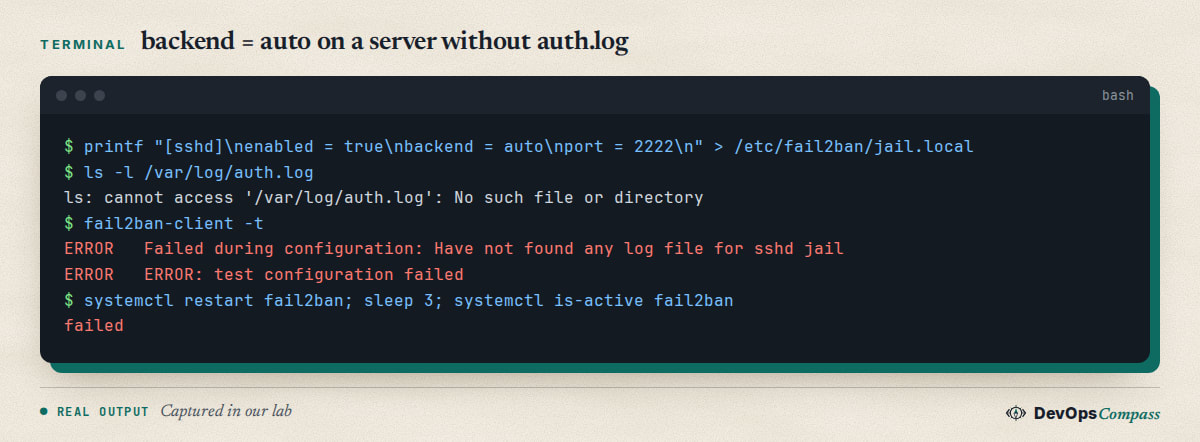
Remove the backend line from jail.local, and the package default of systemd applies. Note the risk: when the configuration fails, fail2ban is not running, so nothing is being banned. Check systemctl is-active fail2ban after every change.
Not banning, and the jail shows Total failed: 0. Fail2ban sees no matching logs. Test the filter against the journal:
sudo fail2ban-regex systemd-journal sshd
In our lab it reported 21 matched of 91 lines. If it says 0 matched while real failures are in journalctl -u ssh, check for a custom journalmatch.
Banned, but the client can still connect. Check the port in the nftables rule, as in the custom port section. Also check that you are not on an existing connection, since we only tested new ones.
Your own address gets banned. Add it to ignoreip and restart. ignoreip replaces the list for that scope, so keep 127.0.0.1/8 ::1 in it.
Invalid command (no get action or not yet implemented). fail2ban-client get sshd backend gave this on 1.1.0, because not every option can be read back. It is not a sign that the jail is broken.
A ban does not stop traffic to a Docker container. The fail2ban rule sits on the input hook, while published container ports go through FORWARD, as shown in our Docker on Ubuntu 26.04 guide. We did not test a fail2ban jail against a container. For that case, fail2ban's chain setting is the place to start, with DOCKER-USER in mind.
FAQ
What does sshd aggressive mode do?
It also counts connections that never try a password, such as scanners. In our test, six junk connections earned a ban. Add monitoring tools to ignoreip, since a health check on the SSH port can trip it.
How do I see which IPs fail2ban has banned?
Run sudo fail2ban-client banned for all jails or sudo fail2ban-client status sshd for one. sudo fail2ban-client get sshd banip --with-time adds the time each ban ends, and all three worked on 1.1.0.
What is the default ban time on Ubuntu 26.04?
Ten minutes. We read bantime 600, findtime 600 and maxretry 5 from fail2ban-client on an unchanged install. These values are the defaults from jail.conf, unless you override them.
Why does fail2ban fail with no log file for the sshd jail?
Something set a file-based backend, usually backend = auto copied from an older guide. Ubuntu 26.04 had no /var/log/auth.log in our test, so the service failed. Remove that line so the package's systemd backend applies.
Fail2ban or CrowdSec?
We did not test CrowdSec. Fail2ban is the simpler choice for one server, since it is in the Ubuntu archive and works with no config. CrowdSec adds shared reputation lists, so it may suit a fleet. Compare them yourself before you switch.
Does fail2ban need ufw?
No. On 26.04 it uses its own nftables table named f2b-table, and it worked in our lab with no ufw installed. We did not test both together. If you use ufw too, the order of the rules can matter, so check it with nft list ruleset.
Related guides
- Change SSH Port on Ubuntu 26.04: Why Restart Fails (Fix): the socket unit and how to change the port safely.
- SSH Warning: Not Using a Post-Quantum Key Exchange (Fix): another SSH change to check after an upgrade.
- sudo-rs on Ubuntu 26.04: What Breaks and How to Switch Back: access changes on the same release.
- DNS on Ubuntu 26.04: another guide tested in a real systemd container.
Sources
- Fail2ban: project repository and documentation.
- Red Hat Bugzilla: Bug 2315252, update for OpenSSH 9.8.
- Fedora dist-git: journalmatch patch for sshd-session.
- OpenBSD: sshd_config manual, PerSourcePenalties.
- SSD Nodes: Fail2ban on Ubuntu 24.04, for the backend advice in older guides.
- Google autocomplete for "fail2ban ubuntu 26.04", "fail2ban not working" and "fail2ban sshd" (7 November 2026).
Last verified: November 2026 (7 November 2026, fail2ban 1.1.0-9, OpenSSH 10.2p1, nftables 1.1.6 on ubuntu:26.04, arm64, systemd in a throwaway container). A full VM, x86-64, IPv6 bans, ufw together with fail2ban, Docker jails and CrowdSec were not tested.
Header image: Image: DevOpsCompass.
Comments
Post a Comment