
sudo-rs on Ubuntu 26.04: What Breaks and How to Switch Back
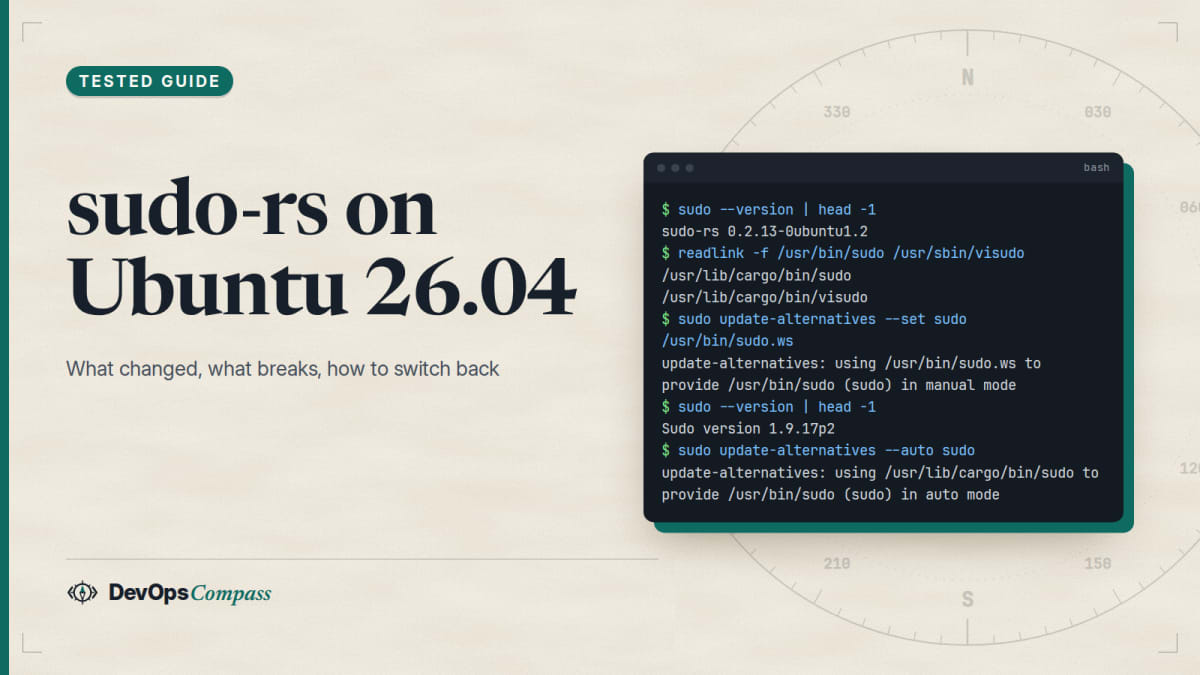
Short answer: Ubuntu 26.04 LTS uses sudo-rs (a Rust rewrite of sudo, version 0.2.13 in our test) as the default sudo. Your /etc/sudoers file and NOPASSWD rules keep working, but three things we reproduced can bite: Ansible's password-based become times out on older ansible-core versions, wildcards are allowed only in the last argument of a sudoers command, and a few Defaults settings such as requiretty and log_output are rejected. The classic sudo package installs next to it, and one command, update-alternatives --set sudo /usr/bin/sudo.ws, switches back.
How this was made: we installed sudo-rs and sudo from apt in an ubuntu:26.04 container on 1 November 2026 and ran every command below on both. We did not test a real terminal password prompt, sudoedit, LDAP or an upgrade from 24.04, and we say so where it matters.
If you upgraded a server to Ubuntu 26.04 and a sudo rule, a script or an Ansible run stopped working, this page is the checklist. It shows how to see which sudo you are running, what is different in practice, and how to go back without breaking the system.
What changed: sudo-rs is the default sudo on Ubuntu
Ubuntu announced in May 2025 that it would adopt sudo-rs by default starting with 25.10, and 26.04 LTS is the first long-term release that ships it. The announcement on the Ubuntu Discourse calls it "a drop in replacement" for most users, and also says the project takes a "less is more" approach: features of the original sudo that serve niche or outdated practices may not be reimplemented. That second sentence explains everything below.
Facts from our ubuntu:26.04 container (1 November 2026):
| Item | Value |
|---|---|
Default sudo |
sudo-rs 0.2.13-0ubuntu1.2 |
| Classic sudo in the archive | sudo 1.9.17p2-1ubuntu3.2, installable beside sudo-rs |
| Real binaries | /usr/lib/cargo/bin/sudo (sudo-rs) and /usr/bin/sudo.ws (classic) |
| Config files | same as before: /etc/sudoers and /etc/sudoers.d/ |
| Upstream latest | sudo-rs 0.2.15 (31 August 2026) |
Ubuntu's version is a little behind upstream, but it is patched: the 27 August 2026 update fixes a sudoedit race (see the security section below).
How do I check which sudo I am running?
sudo --version tells you in one line, and readlink shows which binary the system links to:
sudo --version | head -1
readlink -f /usr/bin/sudo /usr/sbin/visudo
On sudo-rs the first line starts with sudo-rs and both links point into /usr/lib/cargo/bin/. Classic sudo prints Sudo version 1.9.17p2.
How do I switch back to classic sudo on Ubuntu 26.04?
Install the classic package if it is missing, then change the sudo alternative. One call is enough, because visudo and sudoedit are linked to the same alternative group:
sudo apt install sudo
sudo update-alternatives --set sudo /usr/bin/sudo.ws
sudo --version | head -1
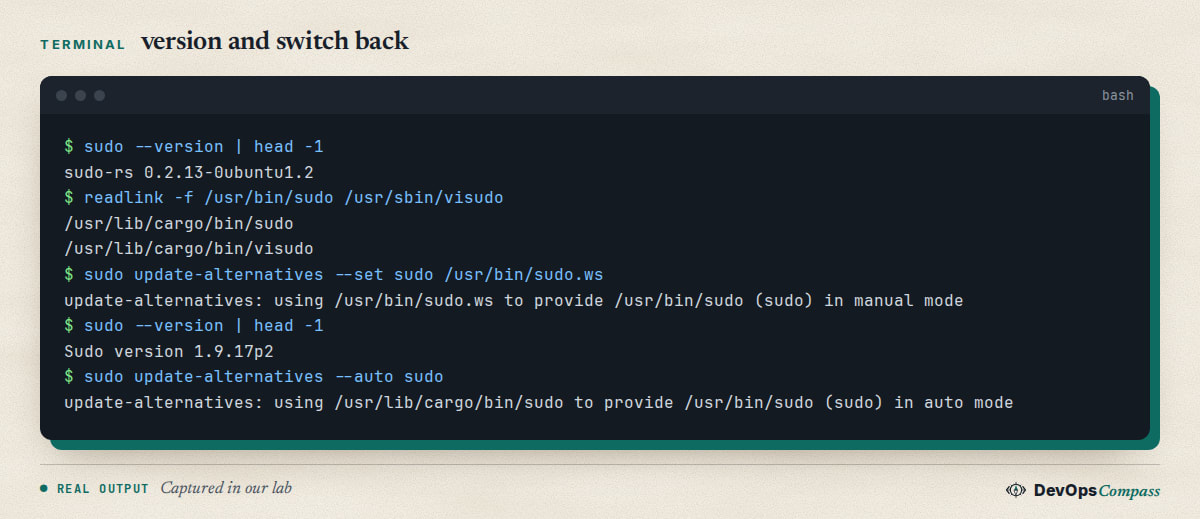
To return to the Ubuntu default run sudo update-alternatives --auto sudo. In our test both directions worked, and visudo followed sudo each time. You will see harmless warnings about missing man page links.
Two cautions. First, apt -s remove sudo on our container showed it would remove only the sudo package, so removing classic sudo is safe while sudo-rs is installed; never remove both. Second, switching is a workaround, not a plan: the whole point of sudo-rs is a memory-safe program at the privilege boundary, so prefer the targeted fixes below when they fit.
Where is sudo-rs configured, and does my old sudoers file still work?
Same place. sudo-rs reads /etc/sudoers and the files in /etc/sudoers.d/, and visudo edits and checks them. In our lab these all worked the same on both implementations:
@include,#include,@includedirand#includedirlines.- A
NOPASSWDrule for one command: the user ran it withsudo -n, and any other command was refused. - Files in
/etc/sudoers.d/whose names contain a dot were ignored, as before. User_Alias,Cmnd_Alias,Host_Alias, negated commands and per-userDefaults:alicelines.
So a normal cloud-image setup, such as a NOPASSWD: ALL file for the admin user, needs no change. The differences are at the edges.
Why does sudo-rs reject wildcards in sudoers?
Because sudo-rs allows a wildcard only as the final argument of a command. A user on Ask Ubuntu hit this after an upgrade from 24.04 to 26.04: a rule like /sbin/ipset add blacklist \* stopped working, and the workaround used was NOPASSWD: ALL, which is much weaker (question 1568873). We tested what is accepted:
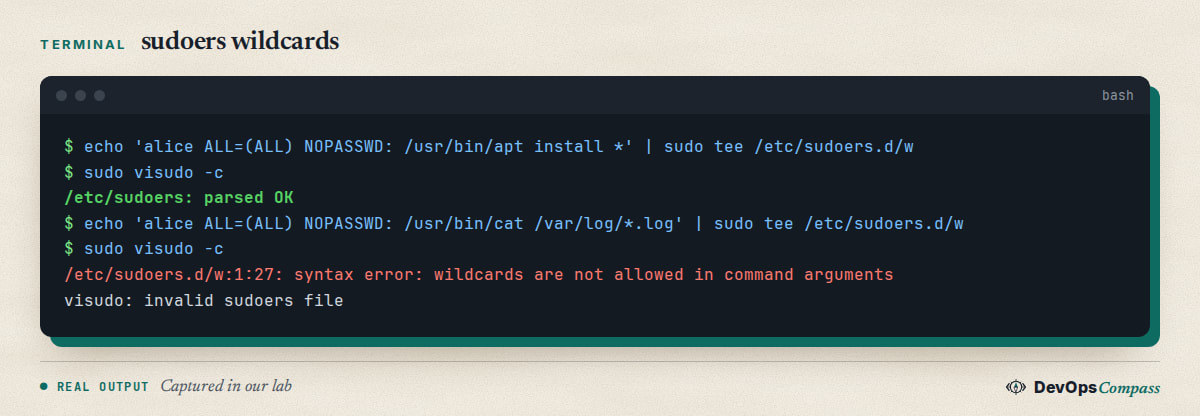
| Rule | Result with visudo-rs 0.2.13 |
|---|---|
/usr/bin/apt install * |
accepted |
/usr/bin/apt * install |
rejected: "wildcards are not allowed in command arguments" |
/usr/bin/cat /var/log/*.log |
rejected (wildcard is not the whole last argument) |
/usr/bin/systemctl restart nginx* |
rejected |
/usr/bin/id -* |
rejected |
Fix options, safest first:
- Put the variable part last and keep the fixed part exact: a rule shaped like
/sbin/ipset add blacklist *follows the same pattern as the acceptedapt install *. Note that a final*still matches extra arguments, which we confirmed at runtime:sudo id -u root extrawas allowed byid *and failed only becauseidrejected the extra word. - Give sudo a small wrapper script with fixed arguments and allow only that script. Validate the input inside the script.
- List the exact commands you need, even if there are many.
Avoid ALL as a shortcut unless the account is already fully trusted.
Why does Ansible become fail with sudo-rs?
The symptom is Timed out waiting for become success or become password prompt followed by a strange prompt in standard error. Ansible's sudo plugin passes its own prompt with -p and waits for it. sudo-rs wraps the prompt as [sudo: <your prompt>] Password:, so older Ansible versions do not recognise it. The sudo-rs maintainers say the problem is the prompt detection on the Ansible side and that -S works (sudo-rs issue 1668, open); Ansible tracked the work in issue 85837, closed on 27 April 2026.
We ran ansible localhost -c local -b -m command -a whoami with a become password, as a normal user, against sudo-rs 0.2.13:
| ansible-core | Result |
|---|---|
| 2.20.1 (Ubuntu 26.04 apt package) | fails: timed out waiting for the prompt |
| 2.21.5 (PyPI, 5 October 2026) | fails the same way |
| 2.22.0rc2 (PyPI pre-release) | works, prints root |
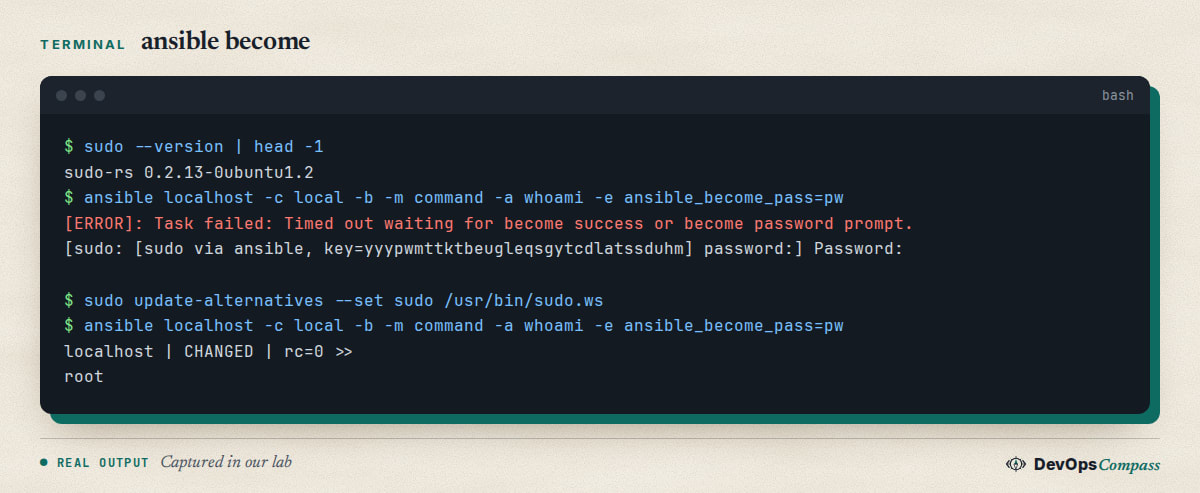
Ways out, all tested on 2.20.1 unless noted:
- Point Ansible at the classic binary for that host:
ansible_become_exe=/usr/bin/sudo.ws. This kept sudo-rs as the system default and the task succeeded. It needs thesudopackage installed on the target. - Use passwordless sudo for the automation account, for example
NOPASSWD: ALLin/etc/sudoers.d/ansible. It worked and avoids the prompt completely, but it is a security trade-off. Key-only logins and a dedicated account make it more acceptable. - Switch the whole host back with
update-alternativesas above. - Upgrade ansible-core to a release with the fix. Ansible merged the sudo-rs prompt support in April 2026, reverted the backports to the older branches in May and has had follow-up work in October; we only confirmed that the 2.22 pre-release works, so check the changelog of your version before relying on it.
A related Ask Ubuntu question, overriding the sudo used by Ansible for one host, points to the same per-host approach.
Why does the password prompt look different?
sudo-rs prints its own prompt text. With sudo -S reading a password from standard input we saw:
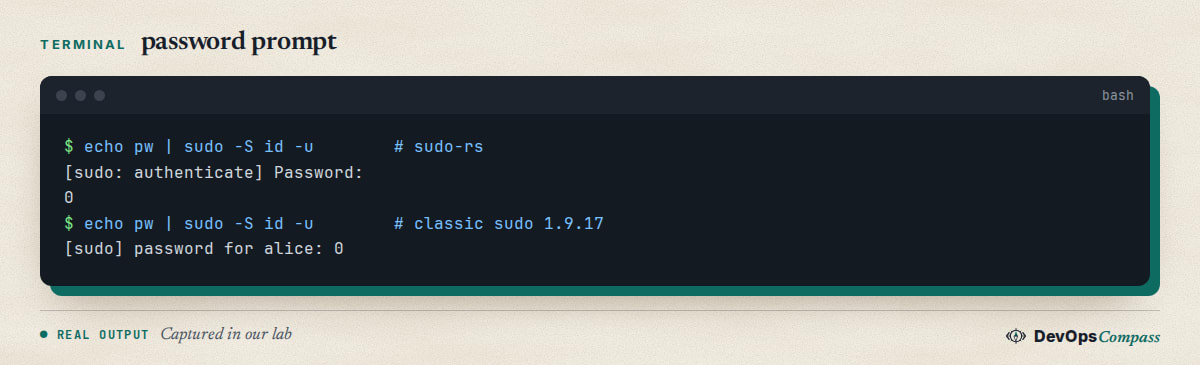
Scripts and expect snippets that wait for [sudo] password for will not match. Match Password: instead, or better, avoid prompts in automation. The same effect explains the Ansible failure above. We did not test the visual password feedback (asterisks) that sudo-rs enables by default, because it needs a real terminal and our container ran without one.
What does "I'm afraid I can't do that" mean?
It is sudo-rs's way of saying the policy does not allow what you asked. In our lab, user bob had NOPASSWD for /usr/bin/id only; sudo -n whoami printed sudo: I'm sorry bob. I'm afraid I can't do that, where classic sudo said a password is required. The text is a joke from the early days of the project, and a sudo-rs issue asking for a clearer message is open: the user may have no sudo rights at all, or rights for other commands only. Check with sudo -l and read the matching rule.
Which sudoers settings does sudo-rs not support?
We put one Defaults line at a time in /etc/sudoers.d/ and ran visudo -c. Rejected as "unknown setting": log_output, iolog_dir, passprompt, requiretty, mailto, logfile, syslog and badpass_message. Accepted: lecture, timestamp_timeout, insults, pwfeedback, env_keep, use_pty, visiblepw, umask and rootpw. A rule with a digest (sha224:... before the command) was rejected with "digest specifications are not supported", and !authenticate was an unknown setting. The accepted list is only what parsed; we did not check that each setting has the same effect.
If your hardening baseline (CIS-style playbooks often add requiretty or logfile) contains a rejected line, remove it for sudo-rs hosts. The classic tools sudoreplay and cvtsudoers come with classic sudo only.
What happens when a sudoers.d file has an error?
Not a lockout, in our test. We wrote a file with a typo (NOPASWD) in /etc/sudoers.d/. visudo -c reported the line and exited 1. Normal sudo calls printed the same error each time, but other rules still worked: bob's valid file and alice's password login both succeeded. Classic sudo behaved the same way in the same test. A bad line in /etc/sudoers itself (we added Defaults requiretty) also printed an error, and alice's normal rule kept working.
Always run sudo visudo -c after editing, and keep a root shell open while you change rules. One difference: a file with mode 644 in /etc/sudoers.d/ passed visudo -c on sudo-rs, while classic visudo reported "bad permissions, should be mode 0440". Set chmod 440 yourself.
Is sudo-rs secure? Vulnerabilities and patches
It is newer code, and it has had advisories. The project lists these on GitHub: two in May 2025 (CVE-2025-46717 and CVE-2025-46718, information leaks), two in November 2025 (CVE-2025-64517 and CVE-2025-64170, timestamp and password handling) and a medium-severity sudoedit race, GHSA-f42v-x7gq-phc8, published on 31 August 2026 and fixed in 0.2.15. That last one affects only setups that grant sudoedit on specific files, which is not the default. Ubuntu shipped the fix for 26.04 in 0.2.13-0ubuntu1.2 on 27 August 2026 (its changelog calls it a "privilege escalation race in sudoedit"). Run sudo apt update && sudo apt upgrade and check apt list --installed 2>/dev/null | grep sudo-rs.
Whether Rust is a net win is a debate; the Hacker News thread from November 2025 has both camps. Our reading: the advisory titles describe logic and information-leak bugs rather than memory corruption, which is the class Rust is meant to remove. We did not audit the code. Still, if your compliance rules need the original sudo, the switch above is supported by the package manager.
What we did not test
- Password feedback and prompts on a real terminal; we used
sudo -Sandsudo -nwithout a tty. sudoedit, NOEXEC, AppArmor profiles, LDAP or SSSD sudoers, PAM modules beyond the default.- An in-place upgrade from 24.04, and sudo-rs 0.2.15 (we used Ubuntu's 0.2.13 build).
- Ansible over SSH; we used a local connection with
become. - Other Ansible releases than 2.20.1, 2.21.5 and 2.22.0rc2.
FAQ
Is sudo-rs the default sudo on Ubuntu 26.04?
Yes. Ubuntu 26.04 LTS ships sudo-rs as /usr/bin/sudo, and the classic sudo 1.9.17 package is still in the archive. Check with sudo --version; the first word shows which one is active.
Does sudo-rs support NOPASSWD?
Yes. In our lab a NOPASSWD: /usr/bin/id rule let the user run that command with sudo -n and refused other commands. Rules are written the same way as before; the differences are wildcards, a few Defaults settings and message text.
How do I switch back from sudo-rs to sudo on Ubuntu 26.04?
Install the sudo package and run sudo update-alternatives --set sudo /usr/bin/sudo.ws. This changes sudo, visudo and sudoedit together. Use --auto to return to sudo-rs.
Does visudo work with sudo-rs?
Yes. visudo is provided by sudo-rs (visudo-rs) and visudo -c checks the main file and the sudoers.d files. Its error messages differ from the classic ones, and it did not flag a 644 file mode in our test.
Can I override the sudo used by Ansible for one host?
Yes. Set ansible_become_exe=/usr/bin/sudo.ws for that host or group. On ansible-core 2.20.1 this made a password-based become succeed while sudo-rs stayed the system default.
Related guides
- Upgrade Ubuntu 24.04 to 26.04 on a Server: the full upgrade path, including what else changes.
- Change the SSH Port on Ubuntu 26.04: another 26.04 change that surprises admins.
- Install Docker on Ubuntu 26.04 Server: the next thing most people set up on a new host.
Sources
- Ubuntu Discourse: Adopting sudo-rs by default in Ubuntu 25.10 (6 May 2025).
- Trifecta Tech Foundation: sudo-rs repository, releases and issues (0.2.13 to 0.2.15), issue 1668, issue 1659 and security advisories, checked 1 Nov 2026.
- Ansible: issue 85837 and pull request 86175 (sudo-rs prompt support).
- Ask Ubuntu: sudo-rs and life without wildcards, where and how to configure sudo-rs and overriding sudo in Ansible.
- Hacker News: Sudo-rs affected by multiple security vulnerabilities (12 Nov 2025).
- Google autocomplete suggestions for "sudo-rs", "ubuntu 26.04 sudo" and "sudo-rs ansible" (1 Nov 2026).
Last verified: November 2026 (1 November 2026, sudo-rs 0.2.13-0ubuntu1.2 and sudo 1.9.17p2 on ubuntu:26.04). Versions and behaviour change quickly; check the sudo-rs release notes before changing production hosts.
Header image: Image: DevOpsCompass.
Comments
Post a Comment