
SSH Warning: Not Using a Post-Quantum Key Exchange (Fix)
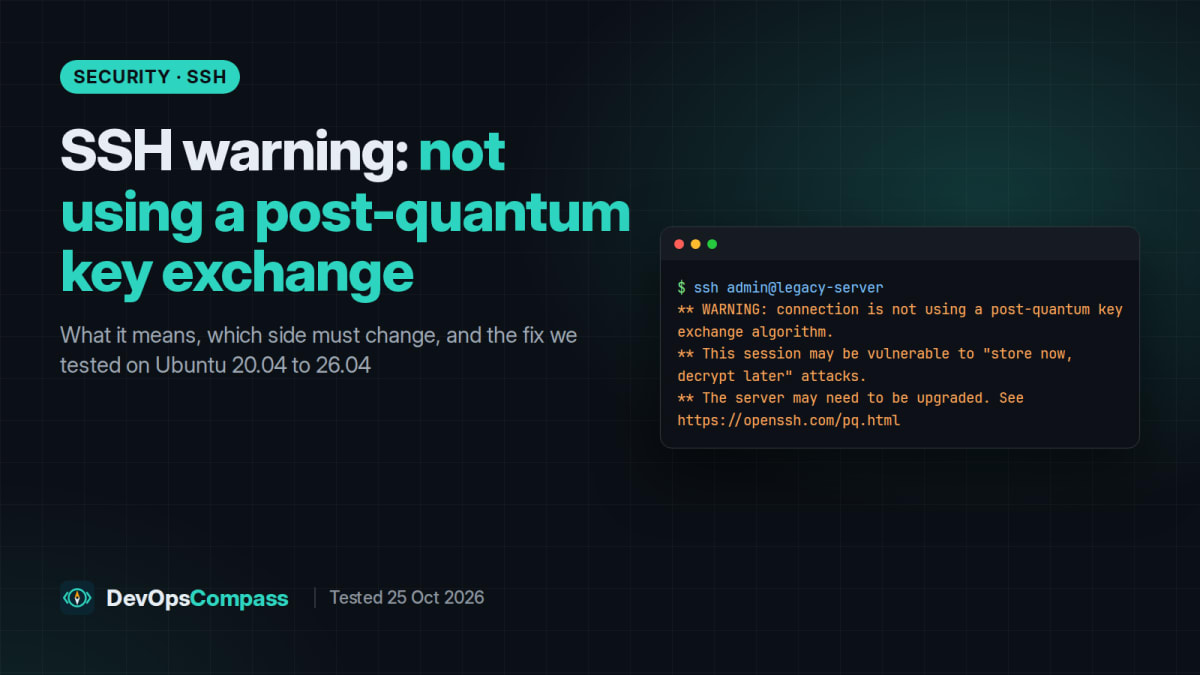
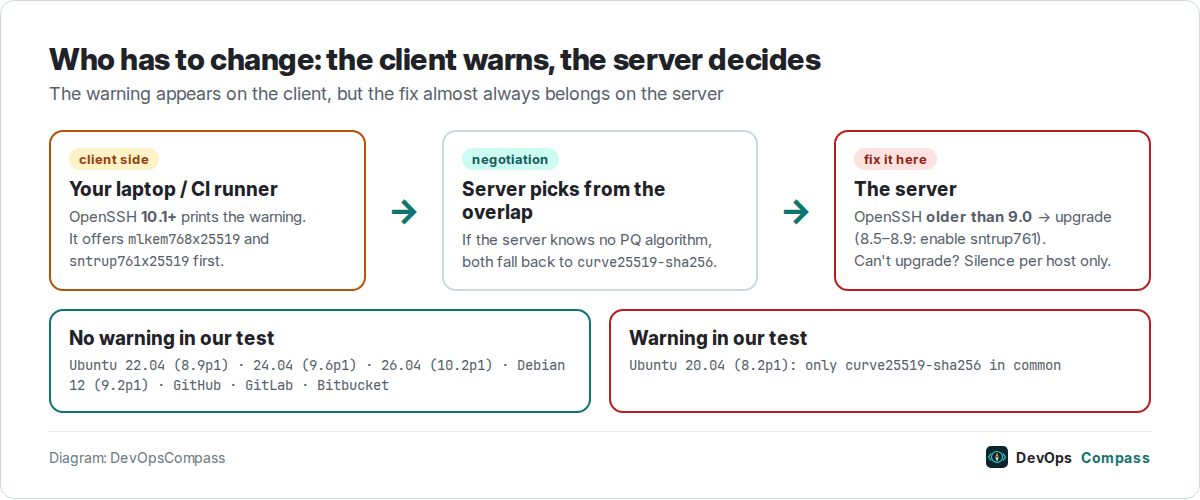
Short answer: the warning comes from your SSH client (OpenSSH 10.1 or newer), but the fix almost always belongs on the server. Your session is still encrypted. The server just could not agree on a post-quantum key exchange, so traffic recorded today could in theory be decrypted later by a quantum computer. In our tests on 25 October 2026, only the Ubuntu 20.04 server (OpenSSH 8.2) triggered it. Ubuntu 22.04, 24.04, 26.04, Debian 12, GitHub, GitLab and Bitbucket did not. Upgrade old servers; silence the warning only per host, never globally.
If you just upgraded your laptop or a jump host to Ubuntu 26.04, or to any system that ships OpenSSH 10.1 or newer, you may suddenly see this on connections that worked silently for years:
** WARNING: connection is not using a post-quantum key exchange algorithm.
** This session may be vulnerable to "store now, decrypt later" attacks.
** The server may need to be upgraded. See https://openssh.com/pq.html
This guide explains what the message means in plain words, shows how to find out which side is responsible, and walks through the fixes we actually tested in throwaway containers: one OpenSSH 10.2 client against servers running Ubuntu 20.04, 22.04, 24.04 and 26.04, plus Debian 12 and the three big Git hosts.
What the warning means
SSH sets up every connection with a key exchange (KEX): both sides agree on a secret session key without ever sending it over the network. For years the default was curve25519-sha256, an elliptic-curve method. It is still secure against today's computers.
The concern is a future, large quantum computer. Such a machine could break elliptic-curve key exchange. An attacker who records your encrypted SSH traffic today could store it and decrypt it years later, once that hardware exists. This is what "store now, decrypt later" means. It matters for traffic that must stay secret for a long time: credentials typed into a session, database dumps, configuration with secrets.
OpenSSH answered this with hybrid key exchanges that combine a post-quantum algorithm with X25519:
sntrup761x25519-sha512(Streamlined NTRU Prime + X25519): default since OpenSSH 9.0 (April 2022).mlkem768x25519-sha256(ML-KEM, the NIST-standardised algorithm, + X25519): available since 9.9 and the default since 10.0 (April 2025).
OpenSSH 10.1 (6 October 2025) added the warning: the client now tells you whenever the negotiated key exchange is not one of these post-quantum methods. It is on by default and controlled by the new WarnWeakCrypto option.
Is my connection insecure right now?
No. A session that shows the warning is still encrypted and authenticated with classical cryptography that nobody can break today. Nothing indicates an attack, a man-in-the-middle or a compromised key. The warning is about future risk to recorded traffic, not about the present.
Still, do not just ignore it: it tells you that a server is running an SSH implementation that is at least four years old. Such servers usually miss other security updates too.
Which side causes it: client or server?
The client prints the warning, but the server decides the outcome. During the handshake, the client sends its list of key-exchange algorithms in order of preference. The SSH protocol (RFC 4253, section 7.1) picks the first algorithm on the client's list that the server also supports. An OpenSSH 10.x client always offers mlkem768x25519-sha256 and sntrup761x25519-sha512 first, so if the result is classical, it is because the server supports neither. The only client-side causes are an old client or a custom KexAlgorithms line in your own ~/.ssh/config that removed the post-quantum methods.
Check which key exchange was negotiated
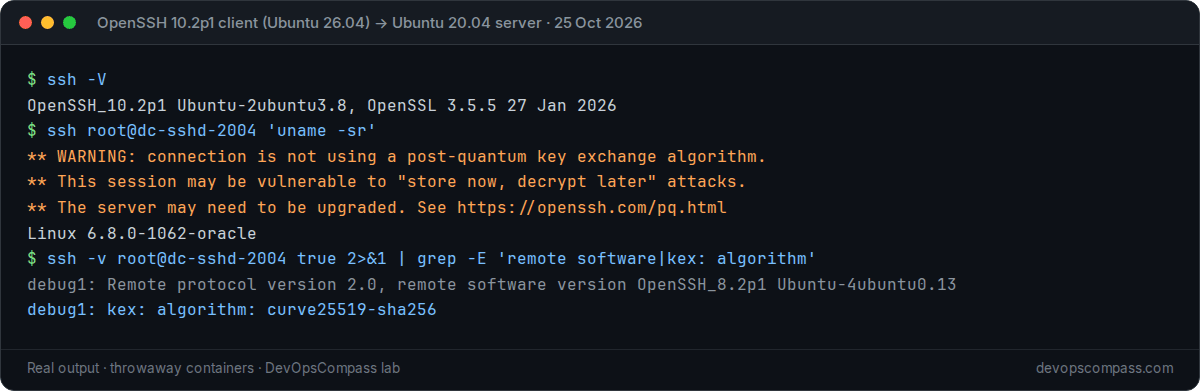
Run the connection once with -v and look for the kex: algorithm line. The remote software version line shows the server's SSH version:
ssh -v user@server true 2>&1 | grep -E 'remote software version|kex: algorithm'
Two more commands help you see both sides of the negotiation:
# Client: which key exchanges does my ssh support? (post-quantum ones should be listed)
ssh -Q kex

# Client: what will it actually offer to this host, after ~/.ssh/config is applied?
ssh -G user@server | grep -i '^kexalgorithms'

# Server (as root): what does sshd accept?
sudo sshd -T | grep -i '^kexalgorithms'
On our Ubuntu 26.04 client (OpenSSH_10.2p1 Ubuntu-2ubuntu3.8), ssh -G showed this default order: mlkem768x25519-sha256,sntrup761x25519-sha512,sntrup761x25519-sha512@openssh.com,curve25519-sha256,... and warnweakcrypto yes.
Which servers trigger the warning (our test)
We started one OpenSSH 10.2p1 client (Ubuntu 26.04) and one stock openssh-server per distribution in throwaway containers, then connected to each with ssh -v. No configuration was changed on the servers for this first run.
| Server image | OpenSSH package | Negotiated key exchange | Warning? |
|---|---|---|---|
| Ubuntu 20.04 | 1:8.2p1-4ubuntu0.13 | curve25519-sha256 | Yes |
| Ubuntu 22.04 | 1:8.9p1-3ubuntu0.18 | sntrup761x25519-sha512@openssh.com | No |
| Debian 12 | 9.2p1 (Debian-2+deb12u10) | sntrup761x25519-sha512 | No |
| Ubuntu 24.04 | 1:9.6p1-3ubuntu13.20 | sntrup761x25519-sha512@openssh.com | No |
| Ubuntu 26.04 | 1:10.2p1-2ubuntu3.8 | mlkem768x25519-sha256 | No |
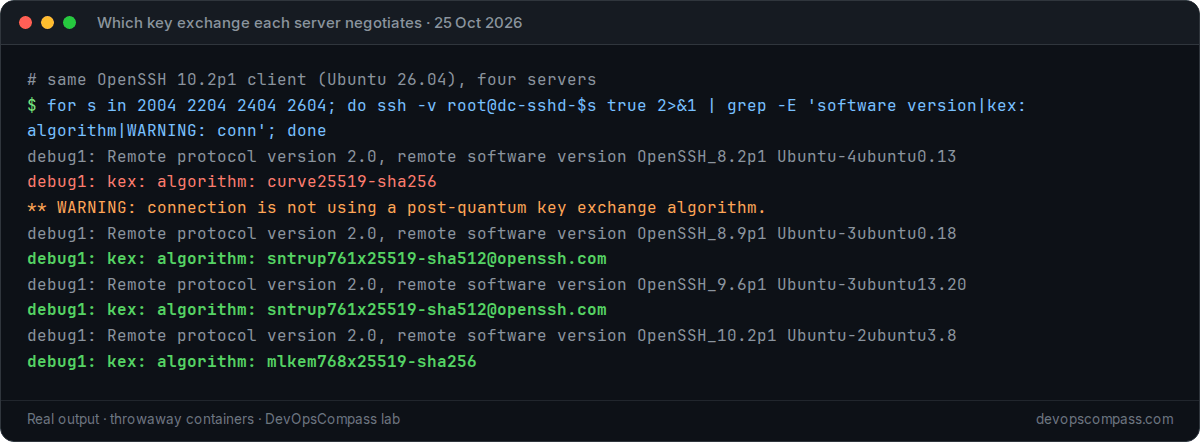
Two results are worth calling out:
- Ubuntu 22.04 is fine out of the box. Upstream OpenSSH 8.5 added sntrup761 but left it disabled by default (per the 8.5 release notes). Ubuntu's 8.9p1 package, however, already lists
sntrup761x25519-sha512@openssh.cominsshd -T, and our 10.2 client negotiated it. If you see the warning against a 22.04 server, check for a customKexAlgorithmsline in/etc/ssh/sshd_configor/etc/ssh/sshd_config.d/. - Ubuntu 20.04 cannot be fixed with configuration. Its OpenSSH 8.2 only knows the old
sntrup4591761x25519-sha512@tinyssh.orgmethod (we checked withssh -Q kex), which OpenSSH 10.2 no longer offers. The only real fix is upgrading the server.
We could not test Debian 11 (OpenSSH 8.4p1): the container failed to install openssh-server from its repositories during our run. Based on the 8.5 release notes it has no sntrup761 support, so expect the warning.
Fix it on the server
1. Best fix: upgrade the server's OpenSSH
Anything at 9.0 or newer negotiates a post-quantum key exchange with a modern client, and 9.9 or newer supports ML-KEM. In practice this means moving the server to a supported distribution release:
- Ubuntu 20.04 reached the end of standard security maintenance in May 2025 (Expanded Security Maintenance with Ubuntu Pro runs until May 2030, but ESM does not bring a newer OpenSSH). Upgrade to 22.04 and then 24.04 (or newer). We documented the 24.04 to 26.04 step, with backups and SSH safety nets, in our Ubuntu 24.04 to 26.04 server upgrade guide.
- Debian 11: upgrade to Debian 12 (OpenSSH 9.2p1, tested above).
- RHEL/Rocky/Alma, appliances, NAS boxes, routers: check
ssh -Von the device (or theremote software versionline fromssh -v). If the vendor ships OpenSSH older than 9.0, look for a firmware or OS update first.
2. OpenSSH 8.5 to 8.9 builds where sntrup761 is disabled
If a server runs OpenSSH 8.5 to 8.9 and sshd -T does not list sntrup761x25519-sha512@openssh.com, you can enable it explicitly. Put the post-quantum method first and keep the classical ones as a fallback for older clients:
# /etc/ssh/sshd_config.d/10-pq-kex.conf
KexAlgorithms sntrup761x25519-sha512@openssh.com,curve25519-sha256,curve25519-sha256@libssh.org,ecdh-sha2-nistp256,ecdh-sha2-nistp384,ecdh-sha2-nistp521,diffie-hellman-group-exchange-sha256,diffie-hellman-group16-sha512,diffie-hellman-group18-sha512,diffie-hellman-group14-sha256
Then test the configuration before reloading, and keep your current session open until a new login works:
sudo sshd -t && sudo systemctl reload ssh   # the unit is "sshd" on RHEL-family systems
ssh -v user@server true 2>&1 | grep 'kex: algorithm'
What we tested: on Ubuntu 22.04 (8.9p1) we added exactly this line; sshd -t passed, sshd reloaded and the client kept negotiating sntrup761x25519-sha512@openssh.com. Because the 22.04 package already had it enabled, this proves the syntax is accepted, not that it fixes a build where it was disabled. That last part is based on the OpenSSH 8.5 release notes.
Do not add mlkem768x25519-sha256 to an older server: OpenSSH older than 9.9 does not know it, and sshd -t will reject the line.
What about GitHub, GitLab and Bitbucket?
Many people see the warning first in git push or git clone output, so we checked the three big hosts. Key exchange happens before authentication, so you can check it without a key and without changing anything:
ssh -v -T git@github.com 2>&1 | grep 'kex: algorithm'
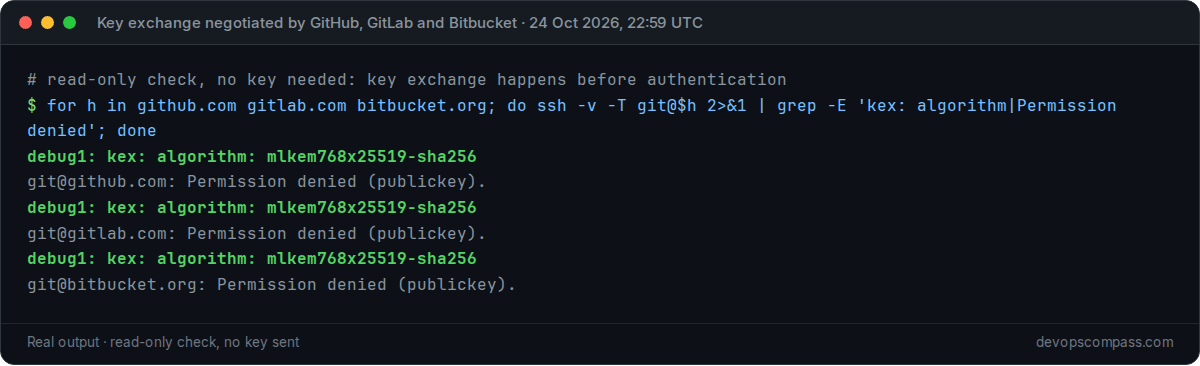
On 24 October 2026 at 22:59 UTC, github.com, gitlab.com and bitbucket.org all negotiated mlkem768x25519-sha256 with our OpenSSH 10.2 client. If your Git client still warns, the cause is usually on your side: an old KexAlgorithms override in ~/.ssh/config, a corporate proxy or jump host in between, or a self-hosted Git server (GitLab, Gitea, Gerrit, an old Bitbucket Server) running an old SSH stack.
Silence the warning only for hosts you cannot fix
Some devices cannot be upgraded soon: a vendor appliance, an old switch, a customer server you do not control. For those, accept the risk explicitly for that host only. The OpenSSH documentation recommends a Match block:
# ~/.ssh/config
Match host old-switch.example.net
    WarnWeakCrypto no-pq-kex

# or inside an existing Host block
Host legacy-box
    HostName 10.0.0.20
    WarnWeakCrypto no
We tested this on OpenSSH 10.2p1: ssh -G accepts both no and no-pq-kex (it reports warnweakcrypto no for each), the legacy-box connection with WarnWeakCrypto no stayed quiet, and connections to other old hosts still warned. For a one-off command you can also use ssh -o WarnWeakCrypto=no host.
Do not put WarnWeakCrypto no under Host * or in /etc/ssh/ssh_config. You would hide the one signal that tells you a new server was deployed with an outdated SSH stack. In CI pipelines and Ansible, prefer upgrading the target over filtering the warning out of logs.
FAQ
Does "not using a post-quantum key exchange algorithm" mean I was hacked?
No. It only means the client and server agreed on a classical key exchange such as curve25519-sha256. The session is still encrypted and the server's host key was still verified. The warning is about future decryption of recorded traffic.
Why did the warning appear only after I upgraded my computer?
Because the warning was added to the client in OpenSSH 10.1 (October 2025). Ubuntu 26.04 ships OpenSSH 10.2p1, so the first connection after a 24.04 to 26.04 upgrade shows the warning for every old server you reach. The servers did not change; your client got stricter.
Which OpenSSH server version do I need to avoid the warning?
OpenSSH 9.0 or newer negotiates sntrup761x25519 with a modern client, and 9.9 or newer also supports mlkem768x25519. Some distribution builds of 8.5 to 8.9 (for example Ubuntu 22.04's 8.9p1) already have sntrup761 enabled. Versions before 8.5, such as Ubuntu 20.04's 8.2p1, need an upgrade.
What is the difference between mlkem768x25519-sha256 and sntrup761x25519-sha512?
Both are hybrids: each combines a post-quantum algorithm with classical X25519, so the result is at least as strong as X25519 alone. ML-KEM is the algorithm NIST standardised in FIPS 203 and is the default since OpenSSH 10.0. sntrup761 (Streamlined NTRU Prime) was the earlier default from OpenSSH 9.0. Either one removes the warning.
How do I turn off the post-quantum warning in OpenSSH?
Set WarnWeakCrypto no (or no-pq-kex, as the OpenSSH page shows) in a Host or Match host block for the specific server in ~/.ssh/config, or pass -o WarnWeakCrypto=no for a single command. Avoid disabling it globally.
I see the warning when connecting to my Ubuntu 22.04 server. Why?
In our test, a stock Ubuntu 22.04 server negotiated sntrup761 and did not trigger the warning. Check sudo sshd -T | grep -i kexalgorithms on the server. If sntrup761 is missing, a hardening guide or a configuration management role probably set an explicit KexAlgorithms list. Add sntrup761x25519-sha512@openssh.com to the front of that list.
Does the warning affect scp, sftp, rsync and Git over SSH?
Yes. They all use the same OpenSSH client and the same key exchange, so the same server needs the same fix. The WarnWeakCrypto setting in ~/.ssh/config applies to them too.
Related guides
- Upgrade Ubuntu 24.04 to 26.04 LTS on a server: the upgrade that brings OpenSSH 10.2 to your client and server, with SSH safety nets during
do-release-upgrade. - Terraform MCP server: setup and safe use: automation that holds credentials should also run on hosts with an up-to-date SSH stack.
Sources
- OpenSSH: Post-quantum cryptography page (pq.html), versions,
WarnWeakCryptoexample. - OpenSSH: Release notes: 9.9 (mlkem768x25519 available), 10.0 (default, 2025-04-09), 10.1 (warning +
WarnWeakCrypto, 2025-10-06); latest release 10.6 (2026-10-06). - OpenSSH: 8.5 release notes (sntrup761 added, disabled by default) and 9.0 release notes (sntrup761x25519 becomes the default).
- NIST: FIPS 203, Module-Lattice-Based Key-Encapsulation Mechanism Standard (ML-KEM).
- Ubuntu: Release cycle (20.04 standard security maintenance ended May 2025, ESM until May 2030).
- IETF: RFC 4253, section 7.1 (algorithm negotiation: the first client algorithm the server supports wins).
- DevOpsCompass lab, 25 October 2026:
ubuntu:20.04,ubuntu:22.04,ubuntu:24.04,ubuntu:26.04,debian:12containers with the distribution'sopenssh-server, OpenSSH 10.2p1 client; read-onlyssh -vto github.com, gitlab.com, bitbucket.org. Commands are shown without thedocker execwrapper we used.
Last verified: October 2026 (25 October 2026; OpenSSH 10.2p1 client on Ubuntu 26.04.1; server versions as listed in the table). Not tested: Windows OpenSSH, macOS, RHEL-family servers, Debian 11.
Header image: Image: DevOpsCompass.
Comments
Post a Comment