
Install Docker on Ubuntu 26.04 Server (Compose v5, ufw Fix)
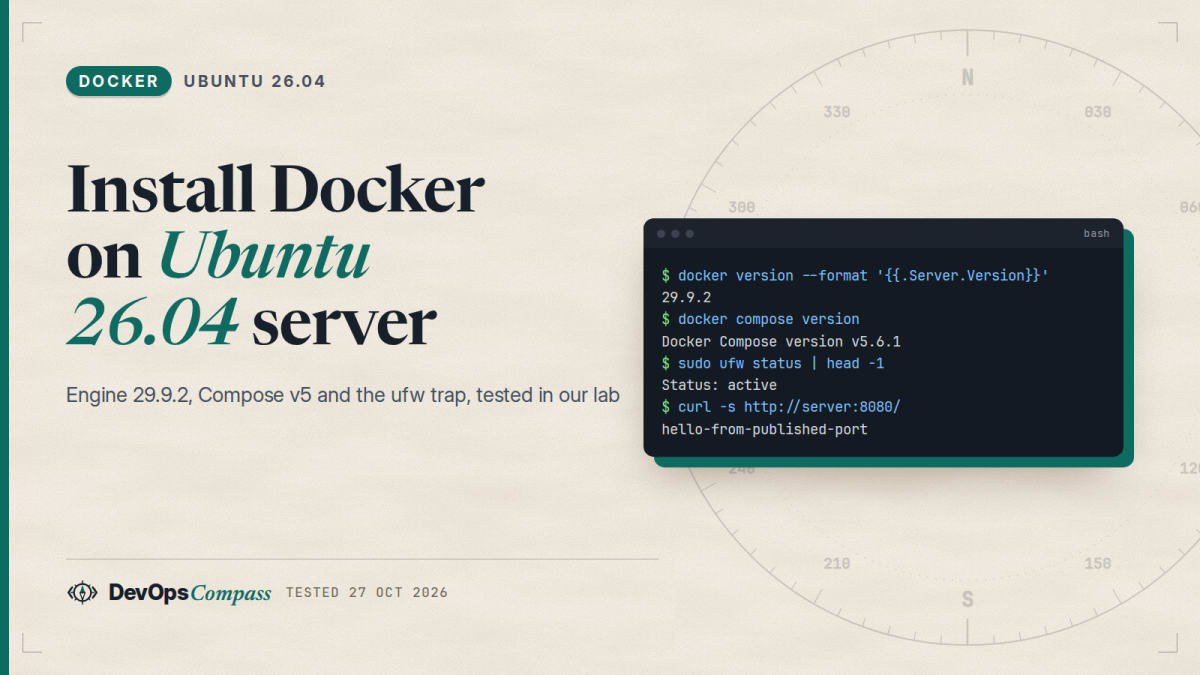
Short answer: Ubuntu 26.04 LTS ("Resolute") is officially supported by Docker. Add Docker's apt repository with the deb822 file from the official docs, then apt install docker-ce docker-ce-cli containerd.io docker-buildx-plugin docker-compose-plugin. On 27 October 2026 this gave us Docker Engine 29.9.2 and Docker Compose v5.6.1 on Ubuntu 26.04.1. Before you publish any port, know this: Docker-published ports bypass ufw. In our test, a port blocked by ufw stayed reachable as soon as a container published it. Bind ports to 127.0.0.1, or filter in the DOCKER-USER chain. Both fixes worked in our lab.
This guide installs Docker on a fresh or freshly upgraded Ubuntu 26.04 server and then covers the three things most tutorials skip: which package to choose, why ufw does not protect your containers, and what changed with Compose v5 and the new nftables backend.
How we tested: every command and output below comes from a throwaway ubuntu:26.04 container (Ubuntu 26.04.1, arm64) running Docker inside it, on 27 October 2026. "Another machine" in the firewall test is our lab host reaching that container over the network. A container is not a full server: there was no systemd, so we started dockerd by hand instead of systemctl. The scripts and raw logs are kept in our lab folder.
Docker CE or Ubuntu's docker.io?
Ubuntu 26.04 ships its own Docker build in the universe component. Docker Inc. publishes Docker CE in its own repository. On the same day, they were far apart:
| Package source | Engine | Compose | Notes |
|---|---|---|---|
Docker repo (docker-ce) |
29.9.2 | v5.6.1 (docker-compose-plugin) |
Same day as upstream releases; Buildx 0.38.1, containerd 2.4.2 |
Ubuntu universe (docker.io) |
29.1.3 | 2.40.3 (docker-compose-v2) |
Security updates from Ubuntu, features frozen for the release |
Both are fine for running containers. Choose Docker CE if you want current Compose and Buildx features and to follow Docker's own docs line by line. Choose docker.io if you prefer everything to come from Ubuntu's archive. Do not mix them: Docker's docs say to remove docker.io, docker-compose, docker-compose-v2, podman-docker, containerd and runc before installing Docker CE.
Install Docker on Ubuntu 26.04 step by step
1. Remove conflicting packages
This is the command from Docker's docs. On a fresh server it simply finds nothing to remove.
sudo apt remove $(dpkg --get-selections docker.io docker-compose docker-compose-v2 docker-doc docker-buildx podman-docker containerd runc | cut -f1)
Removing these packages does not delete images, containers or volumes in /var/lib/docker.
2. Add Docker's apt repository (deb822 format)
sudo apt update
sudo apt install ca-certificates curl
sudo install -m 0755 -d /etc/apt/keyrings
sudo curl -fsSL https://download.docker.com/linux/ubuntu/gpg -o /etc/apt/keyrings/docker.asc
sudo chmod a+r /etc/apt/keyrings/docker.asc

sudo tee /etc/apt/sources.list.d/docker.sources <<EOF
Types: deb
URIs: https://download.docker.com/linux/ubuntu
Suites: $(. /etc/os-release && echo "${UBUNTU_CODENAME:-$VERSION_CODENAME}")
Components: stable
Architectures: $(dpkg --print-architecture)
Signed-By: /etc/apt/keyrings/docker.asc
EOF

sudo apt update
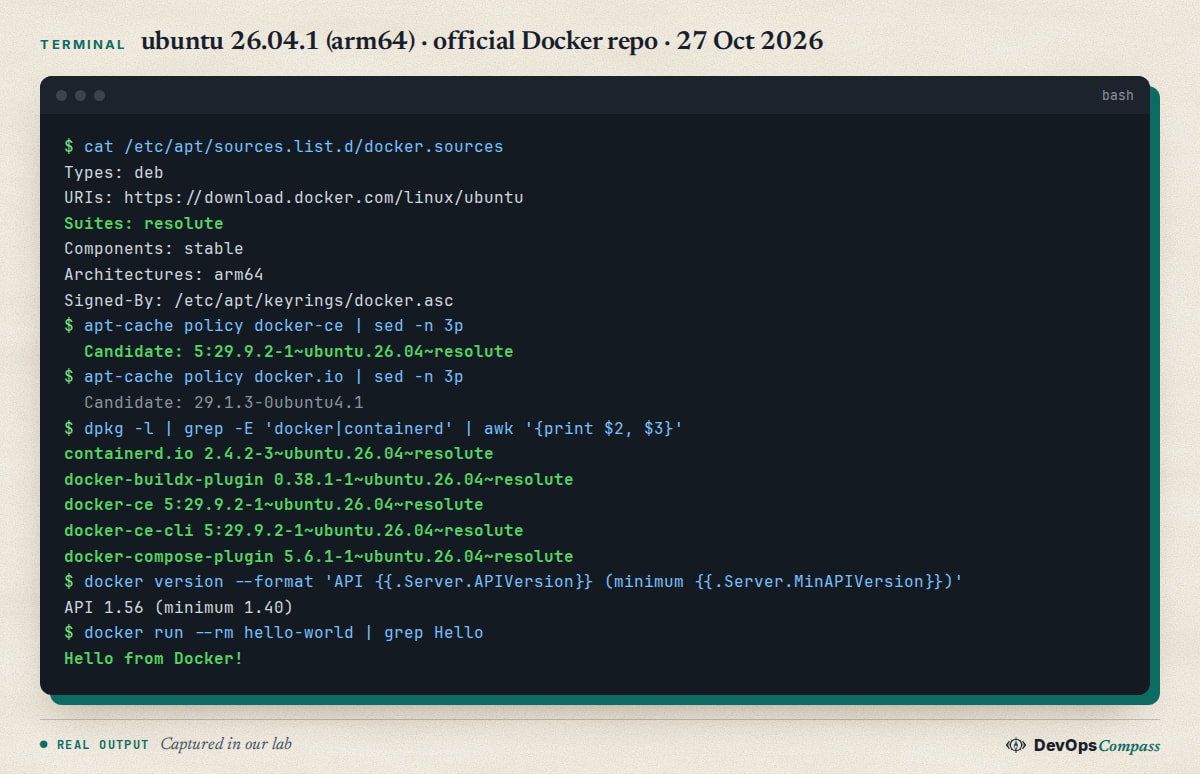
On 26.04 the generated file contains Suites: resolute. Check it with cat /etc/apt/sources.list.d/docker.sources, and confirm that apt-cache policy docker-ce shows a candidate ending in ~ubuntu.26.04~resolute.
3. Install the packages
sudo apt install docker-ce docker-ce-cli containerd.io docker-buildx-plugin docker-compose-plugin
4. Verify
sudo systemctl status docker      # on a normal server; it starts automatically
sudo docker version
docker compose version
sudo docker run --rm hello-world
In our lab, docker version reported client and server 29.9.2, API version 1.56 (minimum version 1.40), containerd v2.4.2 and runc 1.5.2. docker info showed cgroup version 2, the overlayfs storage driver and Firewall Backend: iptables. hello-world printed "Hello from Docker!".
5. Optional: run docker without sudo
sudo usermod -aG docker $USER
# log out and back in, then:
docker ps
Docker's post-install page warns that the docker group grants root-level privileges. Add only people who would get sudo on that server anyway.
Docker bypasses ufw: what we saw
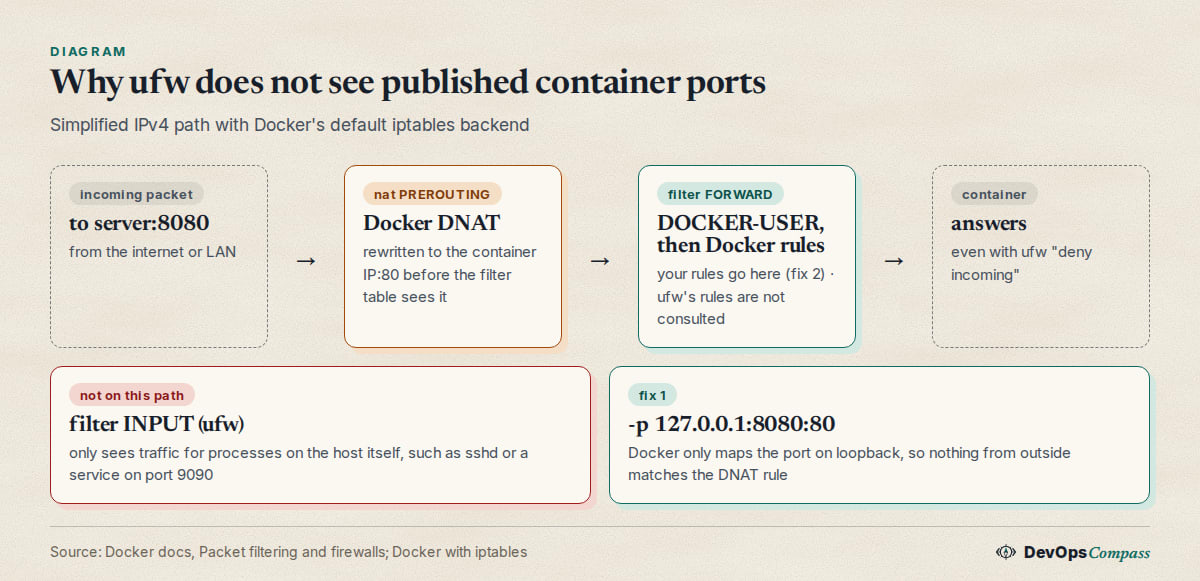
Docker's install page has a warning many people scroll past: ports you publish with Docker bypass ufw and firewalld. Docker routes container traffic in the nat table, before it reaches the INPUT chain where ufw's rules live.
We reproduced it. Inside the 26.04 lab machine we enabled ufw with default deny incoming and no allow rules at all. Then we started two tiny web servers:
- port 9090: a normal service on the host network;
- port 8080: a container started with
docker run -p 8080:80.
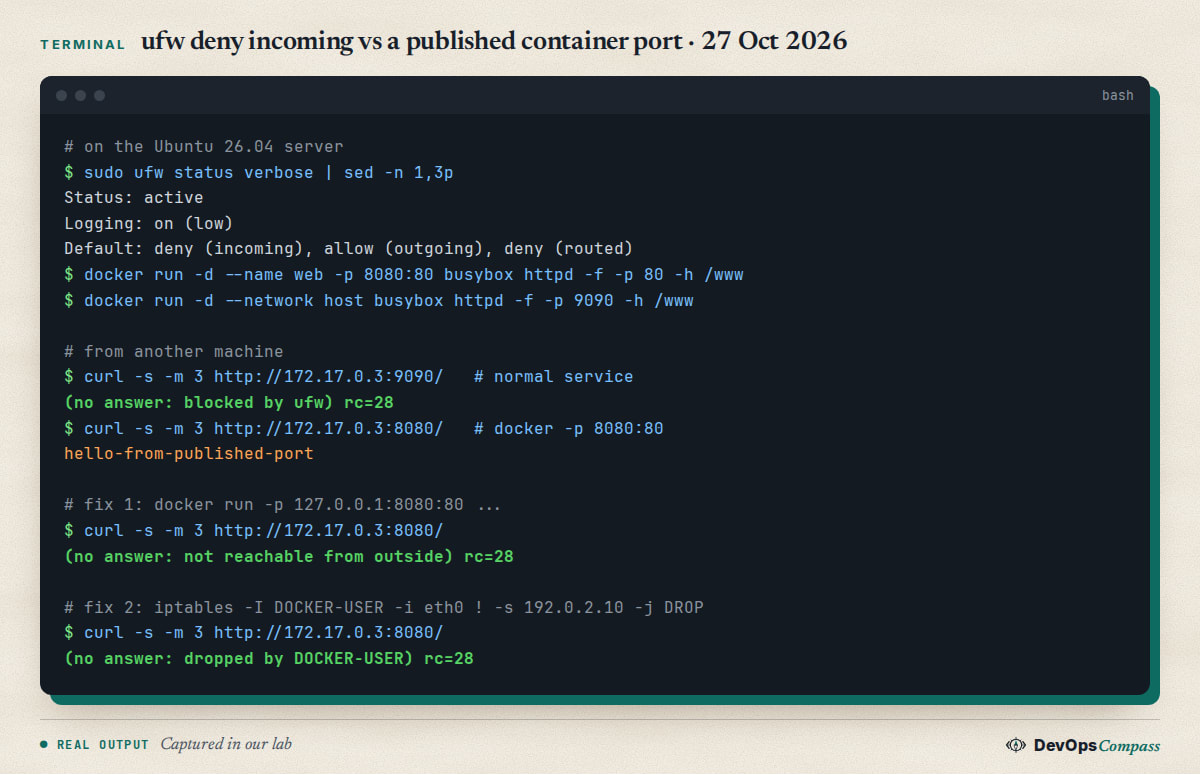
From the other machine, port 9090 timed out, so ufw worked. Port 8080 answered, although ufw denies all incoming traffic. ufw status gives no hint of this.
Fix 1: publish ports on 127.0.0.1
If only a reverse proxy on the same server (nginx, Caddy, Traefik on the host) needs to reach the container, bind the published port to the loopback address:
docker run -d -p 127.0.0.1:8080:80 myimage
In Compose:
services:
  web:
    image: myimage
    ports:
      - "127.0.0.1:8080:80"
Result in our lab: docker ps showed 127.0.0.1:8080->80/tcp, curl http://127.0.0.1:8080/ worked on the server itself, and the request from the other machine timed out. This is the simplest fix and the one we recommend for databases, admin panels and anything behind a proxy. If containers only talk to each other, do not publish the port at all: containers on the same Compose network reach each other by service name.
Fix 2: filter in the DOCKER-USER chain
When a port must be public but only for some sources (an office IP, a VPN range), add rules to DOCKER-USER. Docker creates this chain for your own rules and jumps to it from FORWARD before its own forwarding rules (Docker's iptables docs).
# allow only 192.0.2.10 to reach published container ports via eth0
sudo iptables -I DOCKER-USER -i eth0 ! -s 192.0.2.10 -j DROP
sudo iptables -L DOCKER-USER -n -v
Replace eth0 with your public interface (ip -br addr) and 192.0.2.10 with your trusted address. In our lab the container published on 0.0.0.0:8080 became unreachable from the other machine right after this rule. Two cautions:
- These rules are not saved automatically. Persist them with your own tooling (for example
iptables-persistent), and test after a reboot. - Packets reach
DOCKER-USERafter address translation, so they carry the container address and port, not the published host port: a rule with--dport 8080will not match-p 8080:80. Filter by source and interface, as above, or use theconntrackmatch on the original destination that Docker's docs describe.
The nftables backend (experimental)
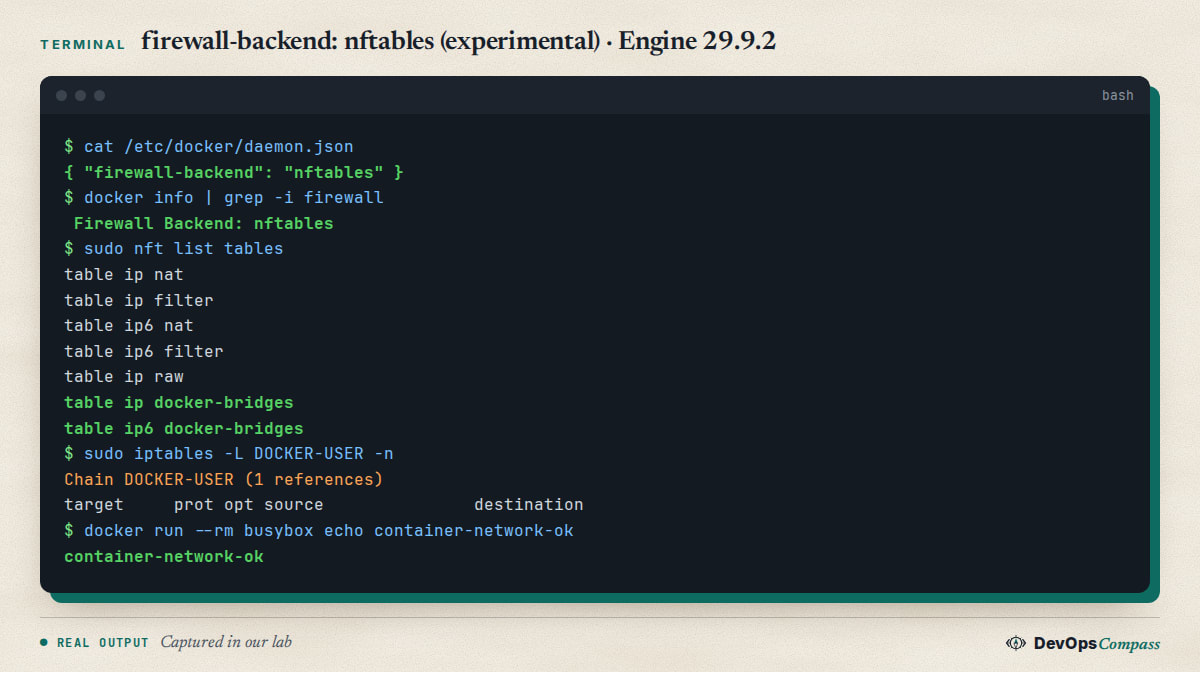
Docker Engine 29.0 added an option to write firewall rules with nftables instead of iptables. Docker's documentation calls it experimental. It cannot be used in Swarm mode, and it has no DOCKER-USER chain: you add your own nftables table with base chains at the right hook priority instead.
echo '{ "firewall-backend": "nftables" }' | sudo tee /etc/docker/daemon.json
sudo systemctl restart docker
docker info | grep -i firewall
sudo nft list tables
In our lab, docker info then showed Firewall Backend: nftables, nft list tables listed the new ip docker-bridges and ip6 docker-bridges tables, and a test container still reached the network. The old iptables DOCKER-USER chain was still there but empty: our rule from Fix 2 did not carry over. Docker's docs say you must migrate such rules yourself and may need to enable IP forwarding (it was already on in our lab).
Our advice: stay on the default iptables backend on production servers for now, especially if you rely on DOCKER-USER rules or ufw-related tooling. We did not test how ufw behaves with the nftables backend.
Docker Compose v5: what changed
If you last used Docker a while ago, two things confuse people:
docker compose(with a space) is the current tool. It is a Docker CLI plugin. The old Pythondocker-compose(with a hyphen) is Compose v1 and is not whatdocker-compose-plugininstalls.- There is no Compose v3 or v4. Compose went from v2 straight to v5.0.0 (2 December 2025). The release notes explain that 3 and 4 were skipped to avoid confusion with the old Compose file format versions 2.x and 3.x. The
version:line at the top of olddocker-compose.ymlfiles is obsolete.
The main technical change in v5 is that the internal builder was removed: docker compose build now delegates to Docker Bake, the same build path as docker build. Compose can also be used as an SDK by other tools. Existing Compose files run unchanged in most cases. If a project has build quirks, check them first.
Upgraded from 24.04? Fix the Docker repository
do-release-upgrade disables third-party repositories, including Docker's, during the upgrade. Afterwards, re-run step 2 above: the snippet reads the codename from /etc/os-release and writes Suites: resolute. Then run sudo apt update && sudo apt full-upgrade. The full pre-flight and post-upgrade checklist is in our Ubuntu 24.04 to 26.04 server upgrade guide.
Gotchas we hit or checked
- arm64 works. Our lab ran on aarch64; Docker's repository has the same 29.9.2 packages for arm64 and amd64.
- Old clients. Engine 29.9.2 reported a minimum API version of 1.40. Very old Docker clients or SDKs that speak an older API will be refused. Upgrade the client rather than pinning an old engine.
- Logs can fill the disk. The default
json-filelog driver does not rotate logs. Set"log-opts": {"max-size": "10m", "max-file": "3"}in/etc/docker/daemon.json(from Docker's logging docs; we did not test rotation). - Do not expose the Docker socket. Never publish the API on TCP without TLS, and do not mount
/var/run/docker.sockinto containers you do not trust: that is root on the host. - Harden SSH too. A new Docker host is usually a new server; our guide to the SSH post-quantum key exchange warning covers a check worth doing on day one.
Test results
| Check | Result (27 Oct 2026, Ubuntu 26.04.1 arm64) |
|---|---|
| Docker repo suite generated by the docs snippet | resolute |
| Installed versions | Engine 29.9.2, Compose v5.6.1, Buildx 0.38.1, containerd 2.4.2, runc 1.5.2 |
Ubuntu's docker.io / docker-compose-v2 |
29.1.3 / 2.40.3 (not installed) |
hello-world |
OK |
| ufw deny incoming, plain service on 9090 | blocked |
ufw deny incoming, -p 8080:80 |
reachable (bypass) |
-p 127.0.0.1:8080:80 |
not reachable from outside, OK locally |
DOCKER-USER drop rule |
not reachable from outside |
| nftables backend | starts, docker-bridges tables created, container networking OK |
Not tested: a real VM or bare-metal server with systemd, firewalld, rootless Docker, Docker Desktop, IPv6 rules, Swarm.
FAQ
How do I install Docker on Ubuntu 26.04?
Add Docker's official apt repository with the deb822 snippet from the docs (it writes Suites: resolute), then run sudo apt install docker-ce docker-ce-cli containerd.io docker-buildx-plugin docker-compose-plugin. Check with sudo docker run --rm hello-world. In our test this installed Engine 29.9.2 and Compose v5.6.1.
How do I install Docker Compose on Ubuntu 26.04?
Install the docker-compose-plugin package from Docker's repository, together with Docker CE, and run it as docker compose with a space. Ubuntu also offers docker-compose-v2 (2.40.3 in our check) if you use Ubuntu's docker.io. You do not need the old Python docker-compose.
Should I install docker.io or docker-ce on Ubuntu 26.04?
Both run containers well. docker-ce from Docker's repository was 29.9.2 on 27 October 2026 and follows upstream releases closely. Ubuntu's docker.io was 29.1.3 and gets security fixes through Ubuntu. Pick one and remove the other's packages first.
Does Docker bypass ufw?
Yes. Ports published with -p or Compose ports: are handled in the nat table before ufw's INPUT rules, so ufw does not block them. In our test a port was reachable even with ufw set to deny all incoming traffic. Bind to 127.0.0.1 or use the DOCKER-USER chain.
How do I fix Docker and ufw?
Publish ports only on 127.0.0.1 when a local reverse proxy fronts the container, or do not publish them at all for container-to-container traffic. If a port must be public for certain sources, add iptables rules to the DOCKER-USER chain, filtering by interface and source address, and persist them yourself.
Why is there no Docker Compose v3?
The Compose team skipped versions 3 and 4 so that the tool's version would not be confused with the old Compose file format versions 2.x and 3.x. Compose went from v2 to v5.0.0 in December 2025. The version: key in Compose files is obsolete.
Should I use the nftables backend in Docker on Ubuntu 26.04?
Not on production servers yet. Docker labels it experimental, it does not work in Swarm mode, and it has no DOCKER-USER chain, so existing filter rules must be migrated by hand. It started and worked in our lab, but we recommend staying on the default iptables backend for now.
Related guides
- Upgrade Ubuntu 24.04 to 26.04 LTS on a server: the upgrade path, including how to re-enable Docker's repository afterwards.
- Run Ollama without a GPU in Docker: a first Compose project for your new Docker host, with ports bound to localhost.
- Fix the SSH post-quantum key exchange warning: another check for a fresh Ubuntu 26.04 server.
Sources
- Docker docs: Install Docker Engine on Ubuntu (supported releases incl. 26.04, conflicting packages, deb822 repository snippet, firewall warning).
- Docker docs: Packet filtering and firewalls: Docker and ufw (why published ports bypass ufw,
DOCKER-USER). - Docker docs: Docker with iptables (
DOCKER-USERchain order, address translation beforeDOCKER-USER, source filtering examples). - Docker docs: Docker with nftables (experimental since 29.0, no Swarm, no
DOCKER-USERchain, migration). - Docker docs: Linux post-installation steps (
dockergroup grants root-level privileges). - Docker Compose: v5.0.0 release notes (2 Dec 2025: internal builder removed, why v3 and v4 were skipped) and v5.6.1 (21 Oct 2026).
- Moby: Docker Engine v29.9.2 release (20 Oct 2026).
- Docker apt repository: dists/resolute (package versions, checked 27 Oct 2026).
- DevOpsCompass lab, 27 October 2026: privileged
ubuntu:26.04container (26.04.1, arm64) with Docker installed from the official repository, ufw, iptables and nftables; commands shown without thedocker execwrapper.
Last verified: October 2026 (27 October 2026; Docker Engine 29.9.2, Compose v5.6.1 on Ubuntu 26.04.1 LTS arm64, in a container). Not tested: systemd hosts, firewalld, rootless mode, IPv6 filtering.
Header image: Image: DevOpsCompass.
Comments
Post a Comment