
DNS on Ubuntu 26.04: Change Servers, Flush Cache (Tested)
Short answer: Ubuntu 26.04 resolves names with systemd-resolved, and you control it with resolvectl. Flush the cache with sudo resolvectl flush-caches (it prints nothing when it works). The old systemd-resolve command is gone. To change DNS servers for good, put them in netplan (nameservers:) or in a drop-in file such as /etc/systemd/resolved.conf.d/dns.conf, then restart systemd-resolved. Do not edit /etc/resolv.conf: it points at a stub on 127.0.0.53.
How this was made: on 5 November 2026 we ran every command below in a throwaway ubuntu:26.04 container with systemd 259.9 as PID 1 (arm64). We did not test a desktop install, NetworkManager, a real DHCP network or a reboot.
You changed a DNS record, or switched DNS provider, and your server still sees the old answer. Or nslookup shows 127.0.0.53 and you want to know where that came from. This page covers each case with the real output from our lab.
How do I see which DNS server Ubuntu 26.04 uses?
Run resolvectl status. The top block is the global configuration, and one block per network link follows. In our lab, with a plain config, the top of the output was:
Global
         Protocols: -LLMNR -mDNS -DNSOverTLS DNSSEC=no/unsupported
  resolv.conf mode: stub
Current DNS Server: 8.8.8.8
       DNS Servers: 8.8.8.8 1.1.1.1
Three facts from that output answer most questions:
- DNSSEC and DNS over TLS are off by default (
DNSSEC=no/unsupported,-DNSOverTLS). You can turn them on (see the DNSSEC section) but nothing is validated or encrypted until you do. - LLMNR and mDNS are off (
-LLMNR -mDNS). Ubuntu ships a file,/usr/lib/systemd/resolved.conf.d/00-disable-mdns.conf, that setsMulticastDNS=no. resolv.conf modetells you how/etc/resolv.confis wired.stubis the normal setup described below.
On a machine with a real network link, look at the Link blocks too. A server given by DHCP or netplan shows up under its interface, not under Global.
How do I flush the DNS cache on Ubuntu 26.04?
sudo resolvectl flush-caches
The command printed nothing and returned 0 in our test. To see that it did something, check the cache size before and after:
resolvectl statistics | grep -E "Current Cache"
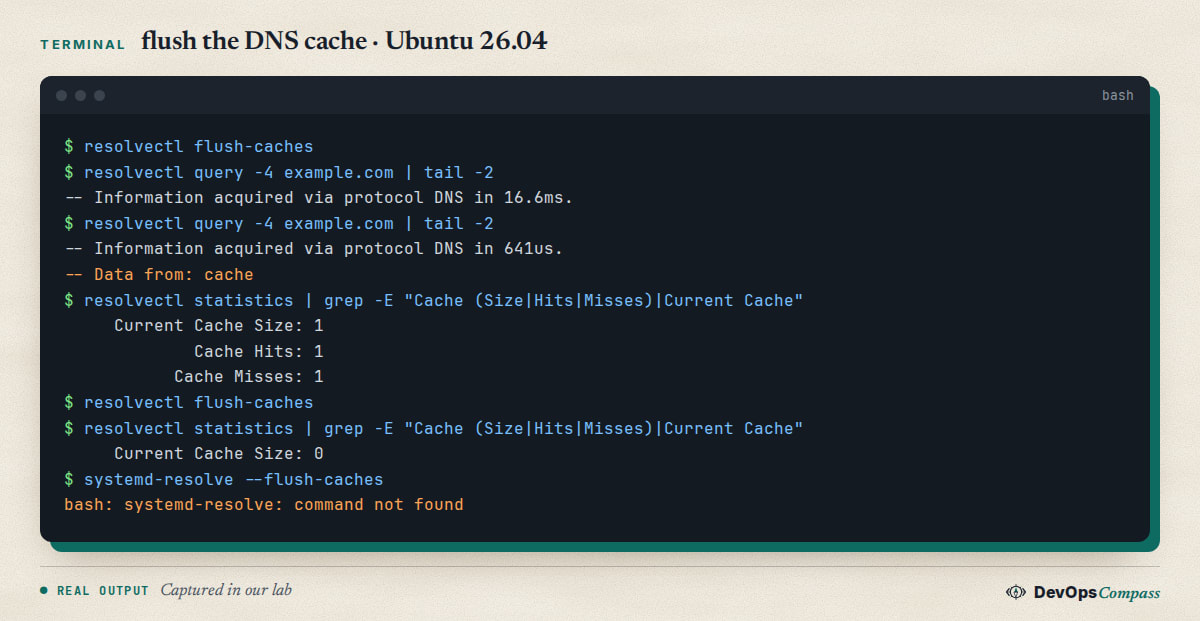
In the screenshot, the first lookup of example.com took 16.6 ms and came from the network. The second one took 641 microseconds and said Data from: cache. The statistics showed a cache size of 1, and after flush-caches it was 0.
What this does not clear: the cache of a browser, of an application (Java and Node.js keep their own), of a local dnsmasq or nscd if you run one, or of your router and your upstream resolver. If a changed record still shows the old IP after a flush, the old answer is probably living upstream until its TTL runs out. We only tested the resolved cache.
Why does systemd-resolve say command not found?
Because the command no longer exists on Ubuntu 26.04. In our lab:
$ systemd-resolve --flush-caches
bash: systemd-resolve: command not found
Only /usr/bin/resolvectl is installed. The old command was renamed and old guides (written for Ubuntu 18.04 to 20.04) still show it. The translation is direct:
| Old command | Use now |
|---|---|
systemd-resolve --flush-caches |
resolvectl flush-caches |
systemd-resolve --status |
resolvectl status |
systemd-resolve --statistics |
resolvectl statistics |
systemd-resolve example.com |
resolvectl query example.com |
One more detail: /usr/sbin/resolvconf exists on 26.04, but it is a symlink to resolvectl (owned by the systemd-resolved package), not the old Debian resolvconf package. We did not test it as a replacement of the classic tool.
Does Ubuntu 26.04 cache DNS answers?
Yes, for successful lookups. Ubuntu also sets Cache=no-negative, which means failed lookups (name not found) are not cached. The file /usr/lib/systemd/resolved.conf.d/cache-no-negative.conf contains a one-line comment: "Ubuntu defaults to Cache=no-negative. See LP: #1668771." In our test a lookup of a name under .invalid failed, and resolvectl show-cache had no entry for it.
So the usual case "I just created the record and my server says it does not exist" is not caused by a cached failure in resolved. It is more likely your upstream resolver, which can cache negative answers according to the zone's SOA settings. We did not test an upstream with negative caching.
If a tool flushes the cache all the time, you lose the cache benefit. A GitHub issue from 4 November 2026 reports that NextDNS CLI 1.49.0 on Ubuntu 26.04 (systemd 259) re-applies its DNS settings every 10 seconds and resolved flushes all caches each time, about 360 flushes an hour; version 1.47.3 did not (nextdns issue 1152). We did not run NextDNS and only read the report.
How do I change the DNS server on Ubuntu 26.04?
Pick one method. They differ in how long the change lasts.
1. Temporary, for testing: resolvectl dns. This changes the server of one link until the network configuration is reapplied:
sudo resolvectl dns eth0 9.9.9.9 149.112.112.112
resolvectl dns eth0
sudo resolvectl revert eth0        # undo
In our lab the first command printed nothing, resolvectl dns eth0 listed both servers, and resolvectl revert eth0 removed them again. We did not reboot, so we did not check the exact moment a change like this is lost; treat it as temporary.
2. Permanent, global: a drop-in file. Do not edit /etc/systemd/resolved.conf itself. Create a drop-in:
sudo mkdir -p /etc/systemd/resolved.conf.d
sudo tee /etc/systemd/resolved.conf.d/dns.conf <<'EOF'
[Resolve]
DNS=1.1.1.1 1.0.0.1
FallbackDNS=9.9.9.9
Domains=~.
EOF
sudo systemctl restart systemd-resolved
resolvectl status
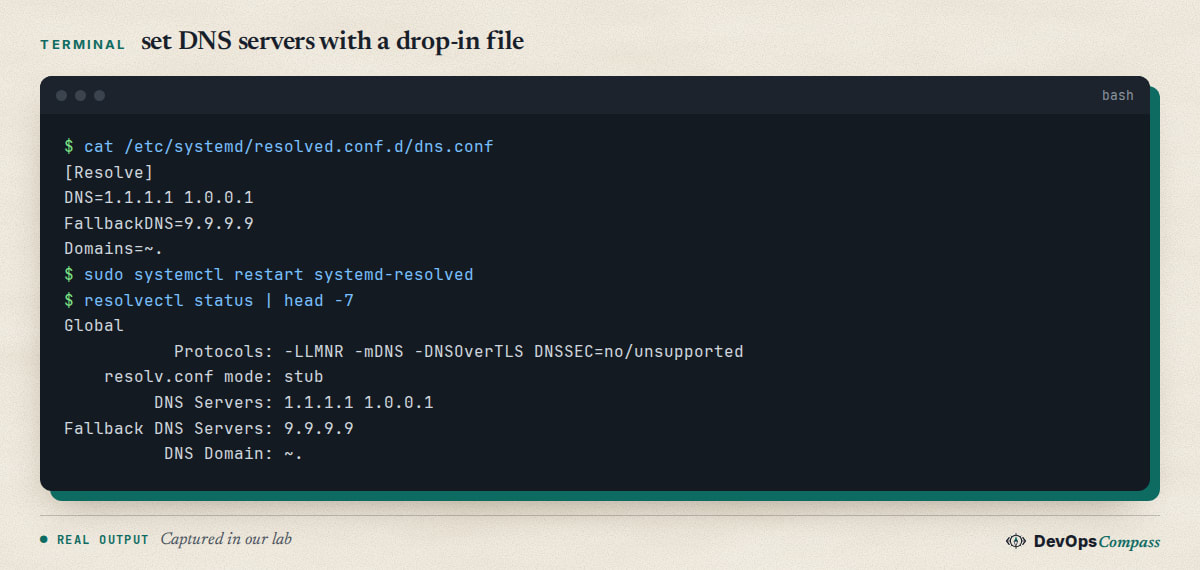
After the restart, resolvectl status listed DNS Servers: 1.1.1.1 1.0.0.1, the fallback server and DNS Domain: ~.. systemd-analyze cat-config systemd/resolved.conf shows the merged result of all files if you want to check what wins.
One caveat that comes from the stock resolved.conf itself: DNS= sets global servers and "does not suppress link-specific configuration". If your network also hands out a DNS server by DHCP, queries go to both. Domains=~. routes all names to the global servers first, but verify with resolvectl query on your own network. Our lab link had no DHCP-supplied server, so we could not show this interaction.
3. Permanent, per interface: netplan. If the server's network is already defined in netplan, set the DNS there so that all tools agree. See our netplan static IP guide for the full file. The DNS part is:
network:
  version: 2
  ethernets:
    eth0:
      dhcp4: true
      dhcp4-overrides:
        use-dns: false
      nameservers:
        addresses: [1.1.1.1, 9.9.9.9]
        search: [lab.example]
netplan generate (run against a test root directory) wrote this into 10-netplan-eth0.network: DNS=1.1.1.1, DNS=9.9.9.9, Domains=lab.example and UseDNS=false. That is what systemd-networkd hands to resolved. We did not apply it on a live link with netplan apply.
How do I set DNS servers in netplan on Ubuntu 26.04?
Use nameservers: under the interface, as above, then sudo netplan apply. A question on Ask Ubuntu (October 2026) shows what people see when it goes wrong: after editing the netplan file on 26.04, resolvectl status listed 8.8.8.8 and 1.1.1.1, the servers could be pinged by IP, but names did not resolve, and apt failed too (Ask Ubuntu 1569941). It had no accepted answer when we checked, and we did not reproduce it, so we cannot tell you the cause. Useful checks in that situation:
resolvectl query example.com: does resolved answer? This separates a resolved problem from a network problem.getent hosts example.com: this is the path most programs use (it goes through/etc/nsswitch.conf, wherehostsisfiles dnsin our lab).ls -l /etc/resolv.conf: is it still the symlink described in the next section?resolvectl status: are the servers under the right link, and is the link up?
What is 127.0.0.53 and can I edit /etc/resolv.conf?
127.0.0.53 is the local stub resolver of systemd-resolved. Programs read /etc/resolv.conf, see nameserver 127.0.0.53, and send queries to resolved, which forwards them to your real servers and caches the answers. On a standard install /etc/resolv.conf is a symlink:
/etc/resolv.conf -> ../run/systemd/resolve/stub-resolv.conf
We built that symlink ourselves in the lab (a Docker container mounts its own resolv.conf, which resolved reports as mode: foreign). The file then had nameserver 127.0.0.53 and options edns0 trust-ad. Resolved listens on both 127.0.0.53 and 127.0.0.54, UDP and TCP, as the ss output below shows.
Do not write your DNS servers into this file. Resolved regenerates it, so an edit is lost or overwrites the symlink and puts the machine out of sync with resolvectl. Use one of the methods in the previous sections. If you really need the real upstream servers listed in /etc/resolv.conf (some tools cannot talk to a stub), the alternative target is /run/systemd/resolve/resolv.conf. We tested that link with the stub turned off and it listed the configured servers; the next section has the details.
How do I free port 53 from systemd-resolved?
You need this to run dnsmasq, unbound, AdGuard Home, Pi-hole or any DNS server on the same host: they cannot bind port 53 while the stub is listening on it. Turn the stub off with a drop-in:
sudo tee /etc/systemd/resolved.conf.d/stub.conf <<'CONF'
[Resolve]
DNSStubListener=no
CONF
sudo systemctl restart systemd-resolved
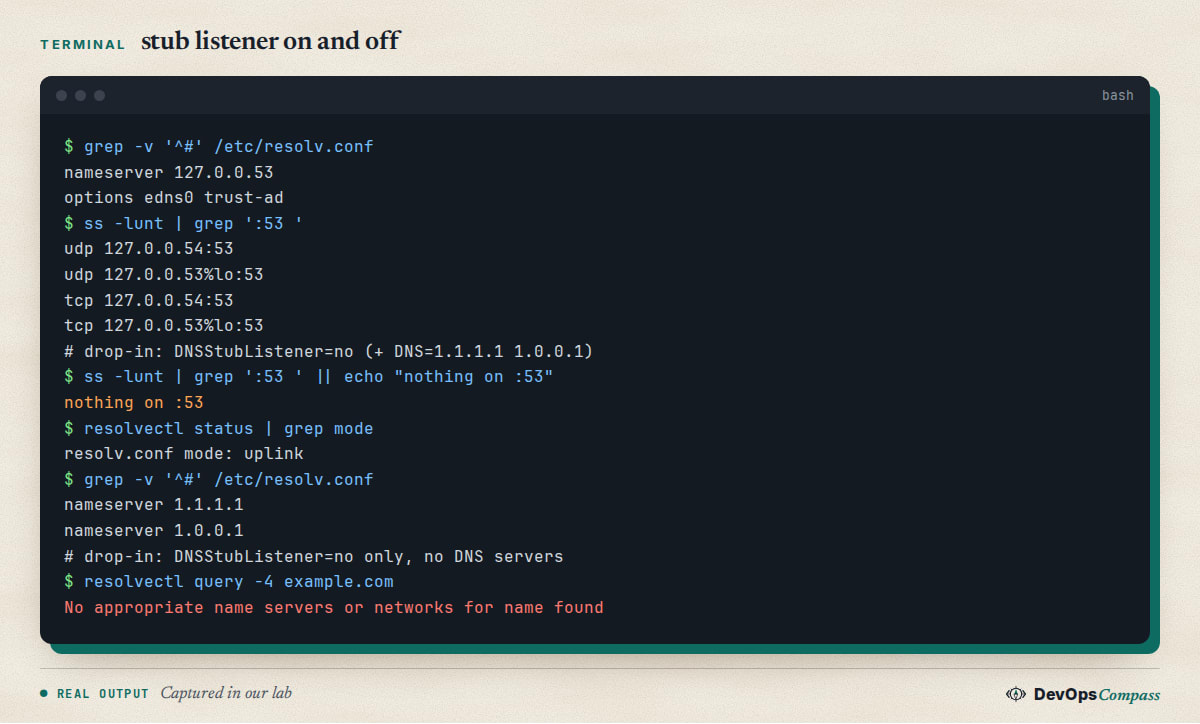
In our lab ss -lunt | grep ':53 ' printed nothing after the restart, and resolvectl status changed to resolv.conf mode: uplink. The important part is the last lines of the screenshot: with the stub off and DNS=1.1.1.1 1.0.0.1 in the drop-in, /etc/resolv.conf (still the same symlink) listed those two servers and lookups worked. With the stub off and no upstream servers configured, the file contained only search . and resolvectl query failed with "No appropriate name servers or networks for name found". So set real upstream servers (DHCP, netplan or DNS=) before you disable the stub.
After that, point your own DNS server at the real upstream servers, and make the machine use it, for example with DNS=127.0.0.1 in the drop-in. We did not install a DNS server in the lab, so this last step is not tested.
What about VPN DNS servers?
On Ubuntu Desktop the DNS of a VPN can be ignored in favour of the main network's. A user on Ask Ubuntu saw this with a WireGuard profile on Ubuntu 25.10 and 26.04 (October 2026). The answer there, which we did not test because we have no desktop or NetworkManager in the lab, is to give the VPN profile a negative DNS priority: nmcli connection modify VPN ipv4.dns-priority -1 (Ask Ubuntu 1566068). On servers that use systemd-networkd, per-link settings such as resolvectl domain eth0 "~." route all names to one link: we confirmed the setting shows up in resolvectl status, but not how it behaves against a second real link.
Why did DNSSEC validation fail after the October 2026 root key rollover?
On 12 October 2026 a question on Ask Ubuntu reported that, after the DNS root key rollover from KSK-2017 to KSK-2024 on 11 October, systemd-resolved as a stub resolver returned SERVFAIL and logged DNSSEC validation failed for question . IN DNSKEY: missing-key (Ask Ubuntu 1570248). This only affects machines that turned DNSSEC validation on, because it is off by default (see the status output above).
The accepted answer explains that resolved does not read the dns-root-data file /usr/share/dns/root.ds, has the root key built in, and does not update it by itself. It gives a temporary workaround (a .positive file in /run/dnssec-trust-anchors.d/), a persistent symlink in /etc/dnssec-trust-anchors.d/, and notes that Ubuntu fixed it in bug #2170538 by adding key tag 38696 to the built-in anchors.
What we checked ourselves: our lab had systemd 259.9-0ubuntu0.1, and after setting DNSSEC=yes the journal's "Positive Trust Anchors" list contained both key tags, 20326 (KSK-2017) and 38696 (KSK-2024). Lookups of cloudflare.com reported Data is authenticated: yes, and dnssec-failed.org, a test domain that is broken on purpose, failed with missing-key. So an up-to-date 26.04 should not hit this; we cannot say which package version first had the fix. If your machine is older, run sudo apt update && sudo apt upgrade first.
We also confirmed one detail of the workaround: after we put only the 38696 line in /run/dnssec-trust-anchors.d/root.positive, the list contained only that key. An explicit file replaces the built-in anchors, as the answer says. We could not test the persistent symlink, because dns-root-data would not install in our lab (our DNS was already broken by an earlier test), so check it on your side before relying on it.
What we did not test
- A real server or desktop install, NetworkManager, VPN clients and a reboot: the lab was a systemd container with no DHCP.
- Applying netplan on a live link (
netplan apply): we only rangenerateagainst a temporary root. - DNS over TLS on the wire (the config was accepted, no query was sent),
dnsmasq,unboundand other local DNS servers. - Caches outside resolved: browsers,
nscd, upstream resolvers. - The persistent DNSSEC trust-anchor symlink and the package version that fixed the root key issue.
- x86-64 behaviour (our host is arm64).
FAQ
How do I flush the DNS cache on Ubuntu 26.04?
Run sudo resolvectl flush-caches. It prints nothing on success. Check the effect with resolvectl statistics, where the current cache size drops to 0. Browser and upstream caches are separate and are not cleared by this command.
Why does systemd-resolve say command not found on Ubuntu 26.04?
The systemd-resolve command no longer exists on Ubuntu 26.04. Use resolvectl instead: resolvectl flush-caches, resolvectl status and resolvectl query example.com replace the old options one to one.
How do I change the DNS server on Ubuntu 26.04?
For a permanent global setting, create a file in /etc/systemd/resolved.conf.d/ with [Resolve] and DNS= lines and restart systemd-resolved. On a netplan-managed interface, use nameservers: in the netplan file instead and run netplan apply.
What is 127.0.0.53 in /etc/resolv.conf?
It is the stub resolver of systemd-resolved. Programs send queries there, and resolved forwards them to the configured servers and caches the answers. Do not edit the file by hand, because resolved manages the symlink and its target.
How do I stop systemd-resolved from using port 53?
Add DNSStubListener=no to a drop-in under /etc/systemd/resolved.conf.d/ and restart the service. Make sure upstream DNS servers are configured first, otherwise /etc/resolv.conf has no nameserver and lookups fail.
Is DNSSEC enabled by default on Ubuntu 26.04?
No. resolvectl status showed DNSSEC=no/unsupported in our lab. You can set DNSSEC=yes or allow-downgrade in a drop-in, but then the root trust anchors matter, as the October 2026 key rollover report shows.
Related guides
- Netplan Static IP on Ubuntu 26.04: Tested Config and Fixes: where the
nameservers:setting lives and how netplan files merge. - Upgrade Ubuntu 24.04 to 26.04 LTS on a Server: Full Guide: the upgrade that brings systemd 259 and the resolved defaults described here.
- Change SSH Port on Ubuntu 26.04: Why Restart Fails (Fix): another service on 26.04 that now needs a different restart step.
Sources
- systemd documentation: resolved.conf, the systemd-resolved configuration file.
- systemd documentation: resolvectl, the command to control systemd-resolved.
- systemd documentation: systemd-resolved service and stub resolver.
- Netplan documentation: netplan YAML reference, nameservers.
- Ask Ubuntu: DNSSEC failure with key tag 38696, name resolution after a netplan update, VPN DNS servers ignored.
- GitHub: NextDNS CLI flushing the resolved cache every 10 seconds.
- Google autocomplete for "ubuntu 26.04 dns", "ubuntu 26.04 flush dns", "ubuntu 26.04 resolv.conf" and "systemd resolved port 53 in use" (5 November 2026).
Last verified: November 2026 (5 November 2026, systemd 259.9 on ubuntu:26.04, arm64, container only). Package versions move with Ubuntu updates; run resolvectl --version on your own system.
Header image: Image: DevOpsCompass.
Comments
Post a Comment