Upgrade Ubuntu 24.04 to 26.04 LTS on a Server: Full Guide
Short answer: since 29 September 2026, Ubuntu 24.04 LTS servers can upgrade directly to 26.04.1 LTS with sudo do-release-upgrade. Take a snapshot first, fully update 24.04 (including phased updates), check that the host boots with cgroup v2, then run the upgrade inside the tool's own screen session and reboot. Plan for these changes: sudo is now sudo-rs, ls/cat and friends come from Rust coreutils, OpenSSH 10.2 drops DSA keys, Python goes from 3.12 to 3.14 (old virtualenvs break), and MySQL 8.4 locks mysql_native_password accounts.
Rebuilding a server from code is cleaner than upgrading it. But many teams still have a box with years of cron jobs and one forgotten systemd unit, and for those an in-place LTS upgrade is the realistic option. This guide is an in-place upgrade procedure for 26.04 "Resolute Raccoon", built from the official documentation and the release notes. For this article we also ran the upgrade end to end in a disposable Ubuntu 24.04.5 container on 24 October 2026, so the version numbers below are ones we saw, not ones we guessed.
Last verified: 24 October 2026, against the Ubuntu 26.04 release notes, the Ubuntu Server documentation and the ubuntu-announce mailing list.
Can I upgrade Ubuntu 24.04 to 26.04 right now?
Yes. The direct upgrade path from 24.04 LTS to 26.04.1 LTS was enabled on 29 September 2026. Ubuntu only opens LTS-to-LTS upgrades after the first point release, and 26.04.1 came out on 27 August 2026. Canonical then held the upgrade for a few more weeks while it backported fixes for regressions in rust-coreutils.
| Date | What happened |
|---|---|
| 23 Apr 2026 | Ubuntu 26.04 LTS released |
| 27 Aug 2026 | 26.04.1 released. Upgrade only possible with do-release-upgrade -d |
| 29 Sep 2026 | Upgrades from 24.04 LTS enabled for everyone: do-release-upgrade |
| May 2029 | End of standard security maintenance for 24.04 LTS |
| May 2031 | End of standard security maintenance for 26.04 LTS (Ubuntu Pro/ESM extends to 10 years) |
So there is no rush: 24.04 is supported until May 2029. The reasons to move now are practical. You get newer kernels and toolchains, and you upgrade on your own schedule instead of at the end of support. Don't plan the upgrade for a Friday afternoon.
Can I go straight from 22.04 to 26.04?
No. You must upgrade 22.04 to 24.04 first, then 24.04 to 26.04. Ubuntu only supports upgrading to the next LTS, and the 26.04 release notes say it directly: from 22.04 or 25.04, first move to 24.04 LTS or 25.10. Each hop is a full upgrade with its own reboot and checks. Two hops in one maintenance window is possible, but we would not do it on anything important.
What should I check before upgrading?
A recent backup or snapshot, a fully updated 24.04, enough free disk space, cgroup v2, a list of third-party repositories, and a way into the machine if SSH breaks. Five minutes of checks saves a night of recovery.
1. Snapshot or back up
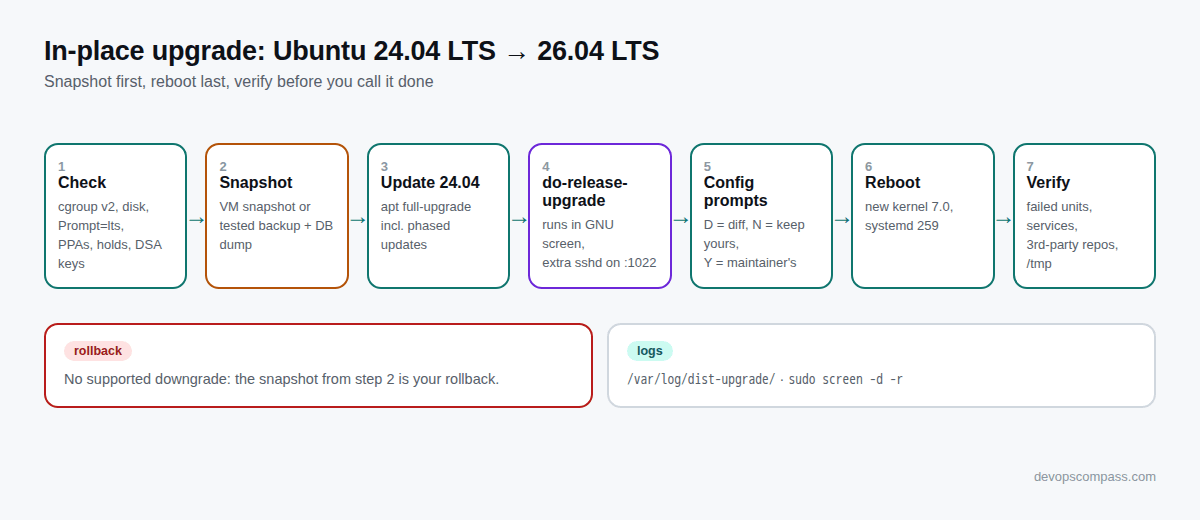
On a VM or cloud instance, take a disk snapshot right before you start. That is your real rollback, because there is no supported downgrade. On bare metal, make sure you have a tested backup of /etc, application data and databases. For databases, a logical dump (pg_dumpall, mysqldump) is worth having in addition to the file-level backup.
2. Confirm the system runs cgroup v2
systemd 259 in 26.04 removed cgroup v1 support entirely. The release notes are explicit: "Ubuntu installations running cgroup v1 will not be allowed to upgrade to Ubuntu 26.04 LTS." Container workloads that need cgroup v1, such as Ubuntu releases older than 18.04 in containers, will not run on a 26.04 host.
stat -fc %T /sys/fs/cgroup
cgroup2fs means you are fine. tmpfs means a v1 or hybrid hierarchy, usually forced by a kernel parameter such as systemd.unified_cgroup_hierarchy=0 in /etc/default/grub. Remove it, run sudo update-grub, reboot, and test your containers on cgroup v2 before you continue.
3. Update 24.04 completely
The Ubuntu Server docs ask for a fully updated system, including phased updates, because they can block the upgrader:
sudo apt update
sudo apt full-upgrade -o APT::Get::Always-Include-Phased-Updates=true
[ -f /run/reboot-required ] && echo "reboot first" || echo "no reboot needed"
If a reboot is required, do it now, not in the middle of the release upgrade.
4. Check disk space and the upgrade prompt setting
df -h / /boot
grep -i '^Prompt' /etc/update-manager/release-upgrades
The upgrade downloads several hundred megabytes on a minimal server and much more on a busy one. Keep a few GB free on / and some room on /boot for the new kernel. The Prompt line must say lts on an LTS server, which is the default on 24.04. If it says never, the upgrader will not offer anything.
5. List third-party repositories and pinned packages
ls /etc/apt/sources.list.d/
apt-mark showhold
The upgrader disables third-party repositories and PPAs during the upgrade. It does not remove the software installed from them, but you will need to re-enable each source with the new codename (resolute) afterwards. Held packages can make the upgrade calculation fail. Release the holds or know why they exist.
6. Make sure you can get in if SSH fails
Have the cloud console, IPMI/iDRAC, or a hosting provider's rescue console ready. Also note that OpenSSH 10.2 no longer supports DSA. If anyone still logs in with an ssh-dss key, replace it before the upgrade:
sudo grep -rl 'ssh-dss' /root/.ssh /home/*/.ssh 2>/dev/null
How do I run the upgrade on a server over SSH?
Run sudo do-release-upgrade from your SSH session and accept the offer to start an extra SSH daemon on port 1022. The upgrader runs itself inside GNU screen, so a dropped connection does not kill it. That second point is the one people do not know: you don't need to start tmux yourself.
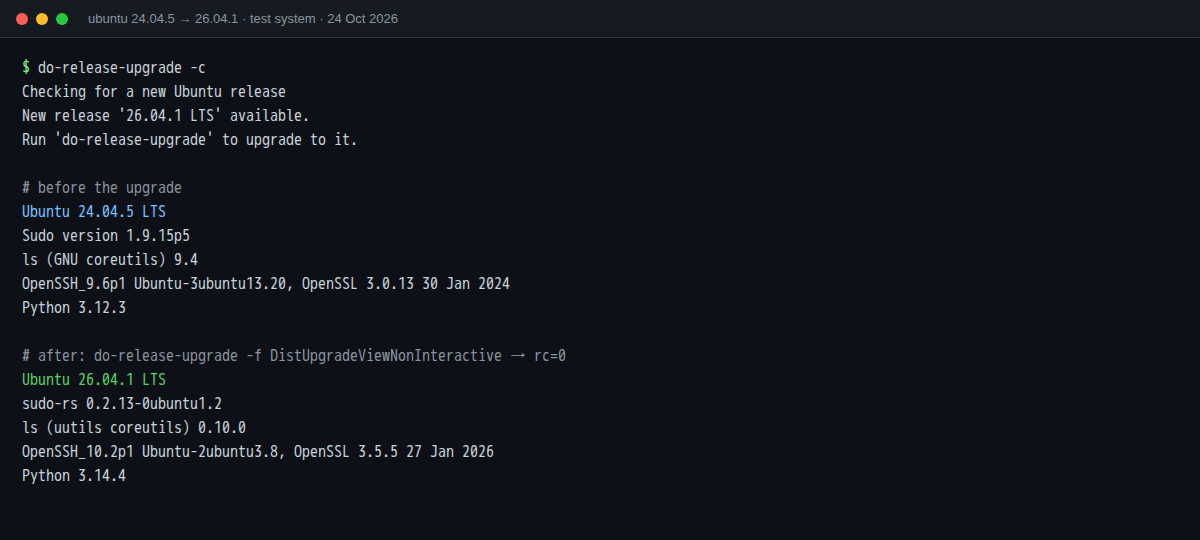
First, check that the new release is visible. This is the real output from our 24.04.5 test system:
$ do-release-upgrade -c
Checking for a new Ubuntu release
New release '26.04.1 LTS' available.
Run 'do-release-upgrade' to upgrade to it.
Then start it:
sudo do-release-upgrade
What happens next, in order:
- SSH warning. The upgrader detects the SSH session and asks whether to continue. It offers to start an additional
sshdon port 1022 as a fallback. Accept, and if a firewall sits in front of the server, allow port 1022 from your IP for the duration of the upgrade. - Third-party sources are disabled, and the tool shows a summary: how many packages will be installed, upgraded and removed, and the download size. Read the "no longer supported" list. It tells you what will lose security updates.
- Download and install. Expect anything from a few minutes on a minimal VM to an hour or more on a large server. Our minimal container needed about two and a half minutes, which is a lower bound, not a benchmark.
- Configuration file prompts appear for every file you have changed that the package also changed (see the next section).
- Obsolete packages: the tool offers to remove packages that no longer exist in 26.04. Read the list before you say yes.
- Restart prompt. The system is not upgraded until it reboots on the new kernel.
If your SSH connection drops, reconnect and reattach to the upgrader's screen session:
sudo screen -list
sudo screen -d -r
Logs go to /var/log/dist-upgrade/ (main.log, apt.log, apt-term.log, history.log). Keep them until you are sure the server is healthy.
Can I run it non-interactively?
You can, with sudo do-release-upgrade -f DistUpgradeViewNonInteractive. That is what we used for the container test. On a real server we don't recommend it, because the non-interactive frontend decides configuration-file conflicts for you, and you lose the chance to review the removal list. Use it for disposable systems, and pre-seed decisions with a configuration management tool when you upgrade a fleet.
How should I answer the configuration file prompts?
Press D to see the diff, then keep your version (N, the default) for files you customised on purpose, and take the maintainer's version (Y) for files you never meant to change. Both choices leave a copy: if you keep yours, the new file is saved as .dpkg-dist. If you take the new one, your old file is saved as .dpkg-old.
A reasonable default for common files:
| File | Usual choice | Why |
|---|---|---|
/etc/ssh/sshd_config |
Keep yours, then merge new defaults by hand | Your auth and port settings matter more. Better still, put changes in /etc/ssh/sshd_config.d/*.conf |
/etc/sudoers |
Keep yours if you edited it, otherwise new | Prefer drop-ins in /etc/sudoers.d/ |
/etc/default/grub |
Keep yours | Kernel parameters you set on purpose |
/etc/nginx/nginx.conf, /etc/apache2/apache2.conf |
Keep yours | Application configuration |
| Files you don't recognise | Take the new one | Usually a default nobody changed on purpose |
After the upgrade, find what you need to merge:
sudo find /etc -name '*.dpkg-dist' -o -name '*.dpkg-old' -o -name '*.ucf-dist'
What changes in 26.04 can break a server?
The changes most likely to affect servers are sudo-rs, Rust coreutils, OpenSSH 10.2, systemd 259 (no cgroup v1, the last release with SysV init script support), Python 3.14, and a few database and web server defaults. Here is what we saw before and after on our test system, followed by the details.
| Component | 24.04 LTS | 26.04 LTS | Watch out for |
|---|---|---|---|
| Kernel (GA) | 6.8 | 7.0 | Out-of-tree modules (DKMS) must rebuild |
| sudo | sudo 1.9.15 | sudo-rs (original available as sudo.ws) |
Unusual sudoers features, sudo-ldap removed |
| coreutils | GNU 9.4 | Rust uutils (cp, mv, rm still GNU) | Scripts relying on GNU-only flags or output format |
| OpenSSH | 9.6p1 | 10.2p1 | DSA removed, post-quantum key exchange warning |
| systemd | 255 | 259 | cgroup v1 gone, SysV scripts deprecated |
| Python | 3.12 | 3.14 | Virtualenvs built on 3.12 break |
| APT | 2.7 / 2.8 | 3.1 | New solver, apt history-list |
| MySQL | 8.0 | 8.4 LTS | mysql_native_password accounts locked |
| PostgreSQL | 16 | 18 | Major-version upgrade; huge pages on Linux 7.0 |
| PHP | 8.3 | 8.5 | Deprecations, Apache mod-php JIT |
| Time sync | systemd-timesyncd | chrony (new installs only) | Upgraded systems keep timesyncd |
sudo is now sudo-rs
sudo is provided by sudo-rs, a Rust rewrite, and the original lives on as sudo.ws. On our upgraded system, sudo --version printed sudo-rs 0.2.13-0ubuntu1.2, and /usr/bin/sudo is an alternatives link. Ubuntu says the change "should be invisible to most users". Still, test your automation (Ansible become, deploy users with NOPASSWD rules, anything that parses sudo output). The sudo-ldap package was removed, so LDAP-based sudo must move to PAM. If something breaks and you need time, you can switch back:
sudo update-alternatives --set sudo /usr/bin/sudo.ws      # back to the original sudo
sudo update-alternatives --set sudo /usr/lib/cargo/bin/sudo  # return to sudo-rs
coreutils are Rust (mostly)
ls --version on the upgraded box said ls (uutils coreutils) 0.10.0. Ubuntu notes that rust-coreutils "are not fully compatible yet", keeps cp, mv and rm from GNU because of open bugs, and lists a set of known CVEs in the release notes. The GNU tools remain available with a gnu prefix (for example gnuls). Our advice: run your shell scripts' test suite, and look hardest at scripts that parse ls, date, stat or sort output. You can switch the whole set back to GNU:
sudo apt install coreutils-from-gnu coreutils-from-uutils- --allow-remove-essential
OpenSSH 10.2
DSA support is gone and no DSA host keys are generated. The client now warns when a connection negotiates a key exchange that is not post-quantum, and the hybrid mlkem768x25519-sha256 algorithm is available by default. sshd.service is now an alias of ssh.service, so both names work with systemctl. Old embedded devices and old clients that only support legacy algorithms are the usual victims. Test a login from your oldest jump host before you close the session you upgraded from.
systemd 259: cgroup v1 removed, SysV scripts on notice
We covered cgroup v1 in the checks above. The second item matters for old in-house software: 26.04 is the last Ubuntu release that runs System V init scripts through systemd's compatibility layer, and systemd 260 has already dropped it. If ls /etc/init.d/ or systemctl list-unit-files --state=generated shows your own scripts, plan unit files now. They will stop working in 26.10 and the next LTS.
/tmp is a tmpfs by default
26.04 ships the upstream tmp.mount, so /tmp is a RAM-backed tmpfs by default. Applications that write large temporary files (backup tools, image processing, some database imports) can run out of space or memory. Check after the reboot:
findmnt /tmp
If you need a disk-backed /tmp, mask the unit (sudo systemctl mask tmp.mount) and reboot, or point the application at a different temporary directory.
Python 3.14 and your virtualenvs
The system Python moves from 3.12 to 3.14, and the upgrader removed the python3.12 packages as obsolete on our test system. Every virtualenv created with the 24.04 system Python points to a python3.12 binary that no longer exists. Recreate them after the upgrade (python3 -m venv --clear and reinstall from your lock file), or use a Python you manage yourself (for example uv or a container) for applications.
Databases and web servers
- MySQL 8.0 to 8.4 LTS: accounts using
mysql_native_passwordare locked out by default. Before the upgrade, list them withSELECT user, host FROM mysql.user WHERE plugin='mysql_native_password';and move them tocaching_sha2_password. - PostgreSQL 16 to 18: a major version, so the data directory does not convert itself. On Ubuntu's packaging, the old cluster keeps running on its old version until you migrate it (
pg_upgradecluster). The release notes also warn about a throughput regression on Linux 7.0 unless huge pages are enabled (huge_pages = on). - Apache with mod-php: the Apache unit now sets
MemoryDenyWriteExecute=yes, which breaks PHP's PCRE JIT and prints "Allocation of JIT memory failed". Switch to php-fpm (recommended), or override the setting withsystemctl edit apache2. - OpenLDAP is built against OpenSSL now, so a leftover GnuTLS cipher string such as
NORMAL:%COMPATpreventsslapdfrom starting.
Docker and other third-party repositories
Docker Engine officially supports Ubuntu 26.04 (Resolute). Because the upgrader disables third-party sources, re-enable Docker's repository with the new codename afterwards. Docker's current instructions write a deb822 file, /etc/apt/sources.list.d/docker.sources, whose Suites: line comes from /etc/os-release. Re-running that snippet on the upgraded system produces resolute. Then sudo apt update && sudo apt full-upgrade brings Docker to the 26.04 build. Do the same for every other vendor repository.
How do I check that the upgrade worked?
Confirm the release and kernel, look for failed units, check the services you care about, and re-enable third-party sources. Our post-upgrade checklist:
cat /etc/os-release | grep PRETTY_NAME       # Ubuntu 26.04.1 LTS
uname -r                                     # a 7.0 kernel after reboot
systemctl --failed
journalctl -b -p err --no-pager | tail -50
sudo --version | head -1                     # sudo-rs ...
ss -tlnp                                     # are your services listening again?
findmnt /tmp
apt-cache policy | grep -o 'http[^ ]*' | sort -u   # which repositories are active now?
Then test the application from the outside, not from the server: an HTTP check, a database connection from the app host, a login with your usual SSH key. Finally, decide about time sync. Upgraded systems keep systemd-timesyncd. New 26.04 installs use chrony with NTS. To move to chrony on an upgraded host, the release notes give:
sudo apt-mark auto systemd-timesyncd
sudo apt install chrony
Keep the pre-upgrade snapshot for a few days. Delete it only when the server has survived its normal weekly cycle (backups, cron jobs, log rotation).
What if the upgrade fails halfway?
Don't reboot a half-upgraded system blindly. First let dpkg finish configuring packages, then fix the specific error from the logs. If the system is beyond repair, restore the snapshot. The usual sequence:
sudo dpkg --configure -a
sudo apt -f install
sudo apt full-upgrade
The cause is almost always in /var/log/dist-upgrade/main.log or apt-term.log. Typical ones are a full /boot, a held or third-party package with an impossible dependency, or a post-install script failing because a service could not start. Fix that, re-run the commands above, and reboot only when dpkg reports nothing left to configure. There is no supported way back to 24.04 in place, which is why the snapshot in step 1 is not optional.
Should I upgrade in place or reinstall?
Reinstall when the server is cattle (built by Terraform, Ansible, cloud-init or an image pipeline). Upgrade in place when it is a pet you cannot rebuild quickly. A fresh 26.04 install also gives you defaults that an upgrade does not apply, such as chrony with NTS instead of systemd-timesyncd. If you manage infrastructure as code, building a new 26.04 image and replacing instances is usually faster and safer than SSH-ing into each one. For the same reason, we don't let automation, or an AI assistant, run destructive commands on production without a human in the loop. Our Terraform MCP server guide explains how we draw that line. If the server is a Kubernetes node that also runs the retired ingress-nginx, plan that migration too: see ingress-nginx to Gateway API.

FAQ
Why does do-release-upgrade say "No new release found"?
Usually because the server is not fully updated, Prompt in /etc/update-manager/release-upgrades is not lts, or you checked before 29 September 2026, when upgrades from 24.04 were enabled. Update fully, check the setting, and try do-release-upgrade -c again.
Do I need the -d flag?
Not any more. -d was the way to upgrade between the 26.04.1 release (27 August 2026) and the general enablement on 29 September 2026. Today the plain do-release-upgrade offers 26.04.1 LTS.
How long does the upgrade take?
It depends on the number of installed packages, disk speed and the mirror. Our minimal test system finished in about two and a half minutes. Servers with a full stack take much longer. Book a maintenance window of at least an hour, plus time to verify.
Is it safe to upgrade over SSH?
Yes, if you accept the extra SSH daemon on port 1022 and have console access as a fallback. The upgrader runs inside GNU screen, so you can reattach with sudo screen -d -r after a disconnect.
Will my Docker containers keep working?
Yes, as long as the host uses cgroup v2 and you re-enable Docker's repository for resolute afterwards. Containers based on very old distributions that require cgroup v1 will not run on a 26.04 host.
Can I switch back to the classic sudo or GNU coreutils?
Yes. Use update-alternatives --set sudo /usr/bin/sudo.ws for sudo, and install coreutils-from-gnu (removing coreutils-from-uutils) for coreutils. Ubuntu does not recommend it long term, but it is supported in 26.04.
When does Ubuntu 24.04 stop getting security updates?
Standard security maintenance for 24.04 LTS ends in May 2029, and Ubuntu Pro extends it further. For 26.04 LTS it runs until May 2031.
Sources
- ubuntu-announce: Ubuntu 26.04.1 LTS released (27 Aug 2026)
- ubuntu-announce: Upgrades from Ubuntu 24.04 LTS to Ubuntu 26.04.1 LTS now enabled (29 Sep 2026)
- Ubuntu: 26.04 LTS release notes, summary for LTS users, changes since 25.10 and known issues
- Ubuntu Server docs: How to upgrade your Ubuntu release, sudo-rs
- Ubuntu: release cycle and support dates
- ubuntu-release-upgrader source: DistUpgradeController.py (port 1022), DistUpgradeMain.py (GNU screen)
- Docker docs: Install Docker Engine on Ubuntu
- OpenSSH: release notes
How we tested: official ubuntu:24.04 image (24.04.5), fully updated, then do-release-upgrade -c and a full do-release-upgrade -f DistUpgradeViewNonInteractive to 26.04.1 LTS on 24 October 2026. A container has no kernel, bootloader or real systemd boot, so kernel, GRUB and reboot behaviour come from the official documentation, not from our test.
Header image: Illustration generated with Google Gemini for DevOpsCompass.
Comments
Post a Comment