
Change SSH Port on Ubuntu 26.04: Why Restart Fails (Fix)
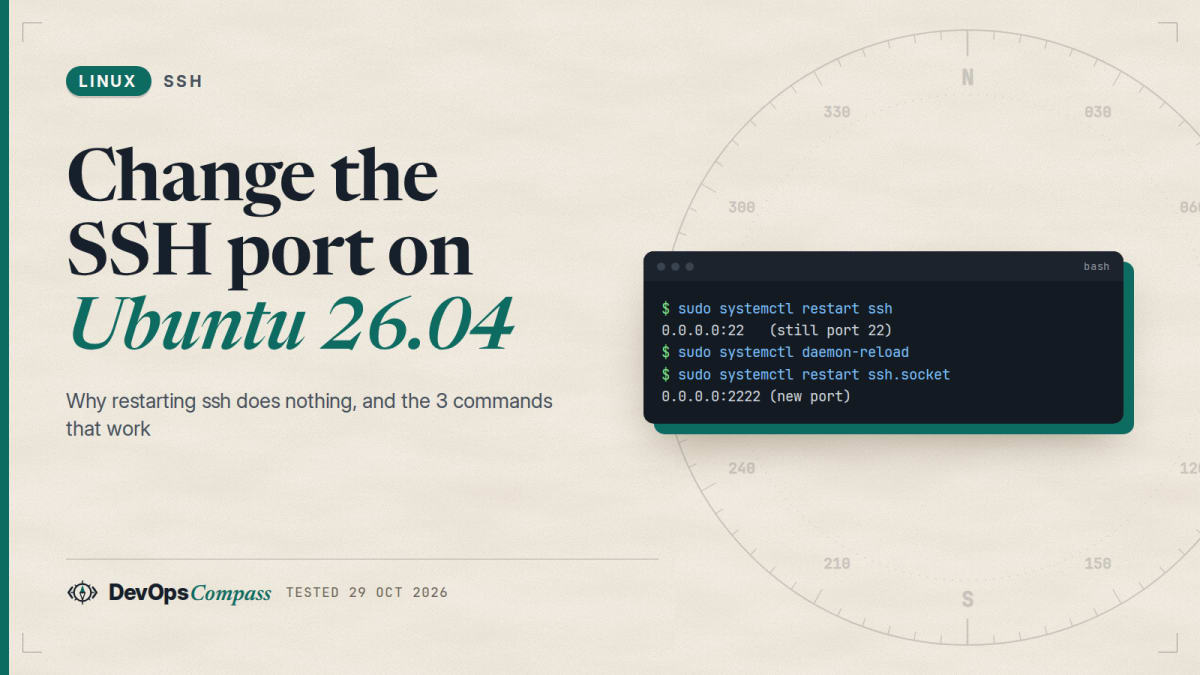
Short answer: on Ubuntu 26.04 the port is held by ssh.socket, not by the running sshd. Put Port 2222 in a file under /etc/ssh/sshd_config.d/, run sudo systemctl daemon-reload, then sudo systemctl restart ssh.socket. In our lab, systemctl restart ssh alone left SSH on port 22, and the reload plus socket restart moved it to 2222, also after a restart of the whole system.
How we tested: a throwaway Ubuntu 26.04.1 container running systemd 259 and OpenSSH 10.2p1 on 29 October 2026, with real key logins on the new port. It was a container, not a physical machine, and we did not touch a firewall, so the ufw part is from the docs.
You edited Port, restarted SSH, and ss still shows port 22. This guide explains why, gives the three commands that work, and covers what the other guides leave out: a typo that makes every login fail, a drop-in that only listens on IPv6, and how to go back.
Why does changing Port and restarting ssh do nothing?
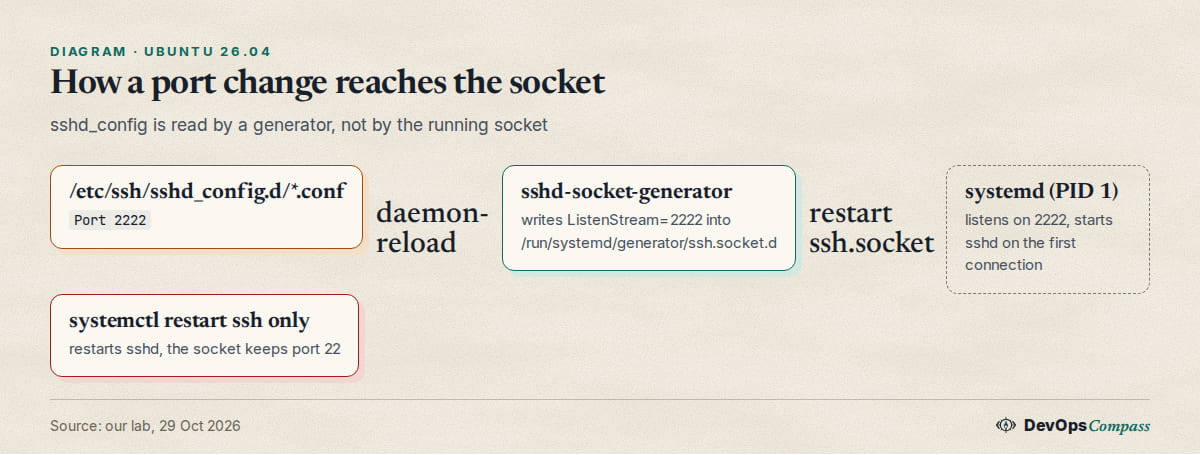
Since Ubuntu 22.10, sshd is started by systemd socket activation. The unit ssh.socket listens on the port, and sshd is only started when a connection arrives. Restarting ssh.service restarts sshd, but the socket keeps its old port.
Canonical's notes say that in 24.04 and later the port and address settings are no longer migrated into a systemd file but read from sshd_config by a generator. The generator runs when systemd reloads its configuration. That is why our default /etc/ssh/sshd_config on 26.04 carries this comment: after changing Port, AddressFamily or ListenAddress, run systemctl daemon-reload and systemctl restart ssh.socket. Launchpad bug 2069041 tracks the surprise that a service restart is not enough.
How do I change the SSH port on Ubuntu 26.04?
Keep your current SSH session open for the whole procedure. Open the new port in your firewall first (see the FAQ), then:
echo "Port 2222" | sudo tee /etc/ssh/sshd_config.d/10-port.conf
sudo sshd -t
sudo systemctl daemon-reload
sudo systemctl restart ssh.socket
ss -tlnp | grep -E 'sshd|systemd'
sshd -t checks the syntax and prints nothing when the file is valid. Do not skip it: see the typo section below. Then, from a second terminal, log in on the new port before you close the first one: ssh -p 2222 user@server.
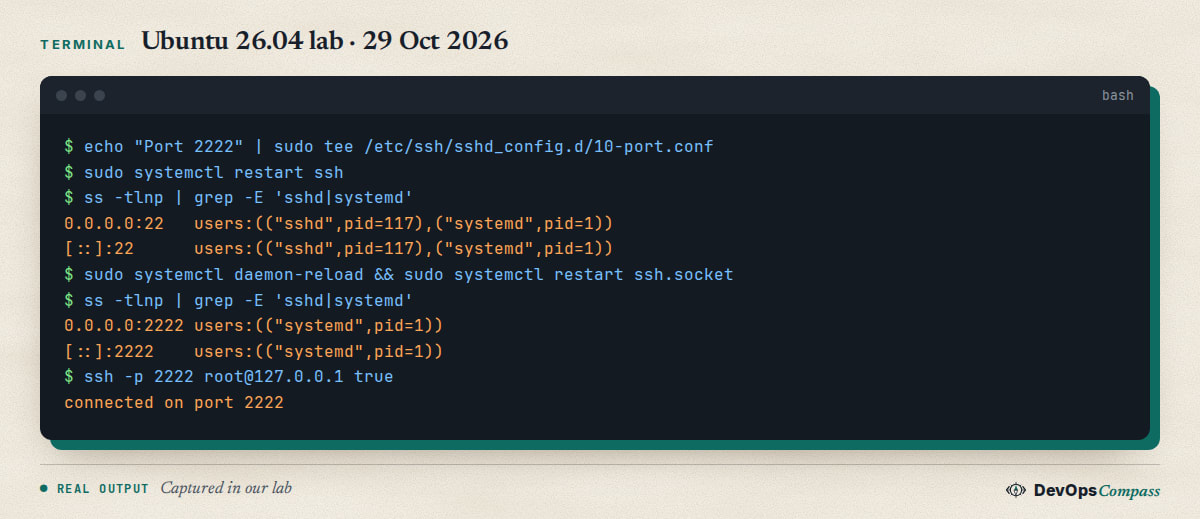
In our lab the only change after restart ssh was nothing: port 22 stayed. After daemon-reload and restart ssh.socket, ss showed 0.0.0.0:2222 and [::]:2222 held by systemd (PID 1), a key login on 2222 worked, and port 22 was refused. The generated file /run/systemd/generator/ssh.socket.d/addresses.conf contained an empty ListenStream= followed by 0.0.0.0:2222 and [::]:2222.
Using a file in sshd_config.d/ keeps the stock sshd_config untouched, so package upgrades do not ask you to merge it. Editing /etc/ssh/sshd_config directly worked the same way in principle, but we tested the drop-in.
Do I need to reboot to change the SSH port?
No, not in our test. A blogger reported in August 2024 that on 24.04 only a reboot applied the change. That fits what we saw: a reboot runs the generator again, so the port from sshd_config is picked up, while restart ssh does not. A reload plus a socket restart does the same without downtime for other services. We cannot say what every 24.04 machine does, because we tested 26.04 only.
Does the new port survive a reboot?
With the sshd_config.d file, yes in our lab: after restarting the whole container with systemd as PID 1, ss showed only 2222 and no manual reload was needed. Note the limit: this was a container restart, not a power cycle of a physical server.
A different story appears with hand-made socket drop-ins. In a May 2025 mailing-list post a user created ssh.socket.d/listen.conf with ListenStream=1234, saw the port change, and found port 22 back after a reboot. We could not confirm the cause, and the page we read shows no final answer. Our advice is to use sshd_config as the single source of truth, as above, so there is nothing to disagree with.
Which wins: sshd_config or an ssh.socket drop-in?
We tested the conflict. With Port 2222 in sshd_config.d and a drop-in at /etc/systemd/system/ssh.socket.d/listen.conf containing ListenStream= and ListenStream=3333, systemctl cat ssh.socket showed both, and systemd listened on 3333. The generated file lives under /run/systemd/generator/, which has lower priority than /etc/systemd/system, so a manual drop-in overrides what the generator wrote from sshd_config.
The result is a trap: sshd -T reports port 2222, ss shows 3333, and nobody connects to either as expected. If a server has an old drop-in from a pre-24.04 guide, delete it (sudo rm -r /etc/systemd/system/ssh.socket.d), run daemon-reload, and restart the socket.
Why does a bare ListenStream=2222 drop-in fail?
In the same test the listener was [::]:3333 only, and ssh -p 3333 127.0.0.1 was refused. The shipped ssh.socket sets BindIPv6Only=ipv6-only, so a bare port number binds IPv6 only. IPv4 clients get "connection refused". If you do write a manual drop-in, spell out both addresses:
[Socket]
ListenStream=
ListenStream=0.0.0.0:2222
ListenStream=[::]:2222
The empty first line clears the default list. Without it the socket keeps port 22 and adds the new one, as the Ubuntu thread explains. With the sshd_config method none of this is needed, because the generator writes both lines for you.
What happens if I make a typo in the port file?
This was the most useful result of the lab. We wrote Portt 2222 (two t). sshd -t caught it at once: Bad configuration option: Portt. We then ignored the warning and ran the reload and socket restart anyway.

ssh.socket came up, and port 22 was open, but every login got Connection reset. The reason: the socket starts ssh.service for each connection, ExecStartPre runs sshd -t, that fails with status 255, and after five quick failures systemd gives up (service-start-limit-hit) and marks the socket failed. Port 22 looked fine in ss while nobody could log in.
Fix: correct the file, then sudo systemctl reset-failed, daemon-reload and restart ssh.socket. We did this in the lab and logins worked again. On a remote server this is the lockout scenario, which is why the open session and sshd -t come first. One user in Canonical's thread reported losing SSH access after changing settings on a system that relied on the old behaviour.
How do I listen on two ports or one address?
Both go through sshd_config and the generator. Two ports, in our lab:
printf 'Port 22\nPort 2222\n' | sudo tee /etc/ssh/sshd_config.d/10-port.conf
sudo systemctl daemon-reload && sudo systemctl restart ssh.socket
ss showed 22 and 2222 on both IPv4 and IPv6, and key logins worked on both. This is a good way to migrate: keep 22 until the new port is confirmed, then remove the line and reload again.
One address only: Port 2222 with ListenAddress 127.0.0.1 produced a single listener 127.0.0.1:2222. Be careful on cloud hosts and DHCP interfaces: the Ubuntu thread warns that a ListenStream address that does not exist at boot can stop the socket from starting. The shipped unit sets FreeBind=yes, which helps, but test it.
How do I go back to the classic ssh.service?
If you want sshd to read Port itself at start-up, as before 22.10, turn socket activation off:
sudo systemctl disable --now ssh.socket
sudo systemctl enable --now ssh.service
In our lab sshd then listened on 2222 directly (the PID in ss was sshd, not systemd), and restart ssh now applied port changes. The price is that sshd runs all the time. To return, disable --now ssh.service and enable --now ssh.socket; we did this too and 2222 stayed.
Why do I get "connection refused" after the change?
Check in this order, each takes seconds:
ss -tlnp | grep -E 'sshd|systemd': which port is really open? If it is still 22, you skippeddaemon-reloador restarted the wrong unit.systemctl status ssh.socket: if it saysfailed, look for a typo withsudo sshd -tand usereset-failed.systemctl cat ssh.socket: an old drop-in from/etc/systemd/system/ssh.socket.d/may override you.- Firewall: a blocked port usually times out instead of refusing, but a host firewall that rejects can show "refused". Open the port first.
- Client:
ssh -p 2222, or setPort 2222in~/.ssh/config. Also see our post-quantum key exchange warning guide if the new login prints a warning.
Test results
| Test (Ubuntu 26.04.1 container, systemd 259, OpenSSH 10.2p1, 29 Oct 2026) | Result |
|---|---|
Port 2222, then systemctl restart ssh |
Still port 22 |
daemon-reload + restart ssh.socket |
Port 2222 on IPv4 and IPv6, login works, 22 refused |
| Restart of the whole container | 2222 still active, no manual step |
Port 22 + Port 2222 |
Both listen, both log in |
ListenAddress 127.0.0.1 |
Only 127.0.0.1:2222 |
Manual drop-in ListenStream=3333 |
Overrides sshd_config, IPv6 only |
Typo Portt |
sshd -t fails, logins reset, socket marked failed |
| Disable socket, enable ssh.service | sshd listens on 2222 itself |
| ufw, a real physical reboot | Not tested |
What this does not do
A non-standard port stops casual scans and shrinks auth.log, but it is not a security control: a port scan finds it in seconds. Use keys, disable password login and keep the server patched. For the next hardening step, see our guide to installing Docker on Ubuntu 26.04 (published ports bypass ufw) and the 24.04 to 26.04 upgrade guide.
FAQ
Do I open the new port in ufw before or after the change?
Before. Run sudo ufw allow 2222/tcp while you are still connected on 22, change the port, test the new login, and only then remove the old rule with sudo ufw delete allow 22/tcp. We did not change a firewall in our lab, so this is the usual procedure and not a tested result.
Which port number should I pick for SSH on Ubuntu?
Any free port from 1 to 65535 works, because systemd binds it as root. Port 22 itself is such a low port, and it worked in our lab. Avoid ports other services use; ss -tlnp shows what is taken, and ports above 1024 are the usual choice.
Why is ubuntu ssh port change not working after I restart the service?
Because systemctl restart ssh restarts sshd but not the socket that owns the port. Run sudo systemctl daemon-reload and sudo systemctl restart ssh.socket, then check with ss -tlnp. In our lab this was the only difference between "still 22" and "now 2222".
Does the ubuntu ssh socket change port method also work on Ubuntu 24.04?
The generator approach is described by Canonical for 24.04 as well, and the reboot report above came from 24.04. We only tested 26.04, so check with ss after the change.
Should I change the ssh port in sshd_config or in a file in sshd_config.d?
Use a file in sshd_config.d/. The main file includes /etc/ssh/sshd_config.d/*.conf, and package updates will not overwrite your file. Note that for most options the first value found wins, so avoid a second Port line elsewhere unless you want two ports.
Related guides
- Fix the SSH post-quantum key exchange warning: what the new warning means for your clients.
- Upgrade Ubuntu 24.04 to 26.04 on a server: the full upgrade checklist, including SSH.
Sources
- Ubuntu Discourse: SSHd now uses socket-based activation (Ubuntu 22.10 and later), checked 29 Oct 2026.
- Launchpad bug mail: Bug 2069041, changing Port in sshd_config and restarting ssh.service without effect (June 2024).
- Community reports: WirelessMoves, 5 Aug 2024 and ubuntu-users list, May 2025.
- systemd documentation: systemd.socket (ListenStream, BindIPv6Only, FreeBind) and OpenSSH sshd_config(5).
- Google autocomplete suggestions for "ubuntu 26.04 ssh port", "ssh.socket port" and "ssh port change not working ubuntu" (29 Oct 2026).
Last verified: October 2026 (29 October 2026, Ubuntu 26.04.1, OpenSSH 10.2p1-2ubuntu3.8, systemd 259.9). Package versions change with updates; re-check the behaviour on your own server.
Header image: Image: DevOpsCompass.
Comments
Post a Comment