
[Solved] E: Unable to locate package in Docker (apt)
Short answer: apt can only install names it finds in its package lists, and a fresh Docker image ships with none. Run apt-get update first, in the same RUN line as apt-get install. If the error stays, the package name is wrong for your release, universe is off, or the package lives in a third-party repository such as Docker's.
How this was made: on 14 November 2026 we reproduced every case in an ubuntu:26.04 (resolute) container on arm64. We did not test other Ubuntu releases, Debian or Raspberry Pi OS.
The error as printed
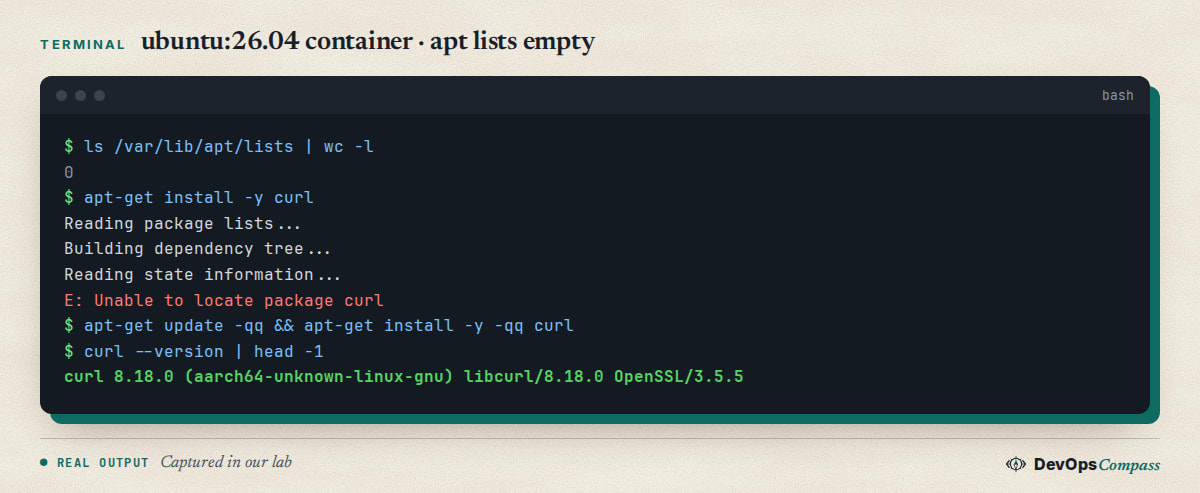
A new image has an empty /var/lib/apt/lists folder: 0 files in our test. The Docker image build removes the lists on purpose to stay small. With nothing to search, apt answers E: Unable to locate package curl and exits with code 100. One apt-get update downloads the lists, and the same install then works.
Why a fresh image has no package lists
The base image only keeps a docker-clean hook that deletes downloaded files after each apt run. Lists are not kept. So every Dockerfile that installs packages must update first. The pattern that lasts is one layer:
RUN apt-get update \
 && apt-get install -y --no-install-recommends curl \
 && rm -rf /var/lib/apt/lists/*
Docker's own build guidance says to combine update and install in one RUN for the same reason. In our lab this Dockerfile built without errors.
Update in an earlier Dockerfile line
The mistake that survives a first fix is deleting the lists in one line and installing in the next:
RUN apt-get update && rm -rf /var/lib/apt/lists/*
RUN apt-get install -y curl
We built it with --no-cache and got E: Unable to locate package curl, then exit code: 100. Each RUN is its own layer, so the cleanup in line 2 removed what line 3 needs. Merge both into one command as shown above.
apt-get update exits 0 with no network
We ran the container with --network none. apt-get update printed W: Failed to fetch ... Temporary failure resolving 'ports.ubuntu.com' and still exited with code 0. The install then failed with Unable to locate package curl. A script that hides the output with apt-get update -qq >/dev/null 2>&1 && echo ok printed ok. So in a CI log, scroll up: the real problem (DNS or proxy) is a warning line above the error, not the error itself.
docker-compose-plugin and docker-ce
Ubuntu's archive does not carry Docker's own packages. In our run docker-compose-plugin gave Unable to locate package, and docker-ce gave Package 'docker-ce' has no installation candidate. Both come from Docker's apt repository. After adding it as the official install guide describes (key in /etc/apt/keyrings/docker.asc, a docker.sources file, then apt-get update), apt-cache policy docker-compose-plugin showed candidate 5.7.1-1~ubuntu.26.04~resolute. Our Docker on Ubuntu 26.04 guide has the whole sequence.
Wrong architecture or release
The Docker repo file has an Architectures: line and a Suites: line taken from your release codename. Our container reported arm64 and resolute, and both matched. On a machine where the repo has no build for your CPU or a brand new codename, apt prints the same error. Check with dpkg --print-architecture and . /etc/os-release; echo $VERSION_CODENAME, then apt-cache policy <package>.
libaio1 and other renamed packages
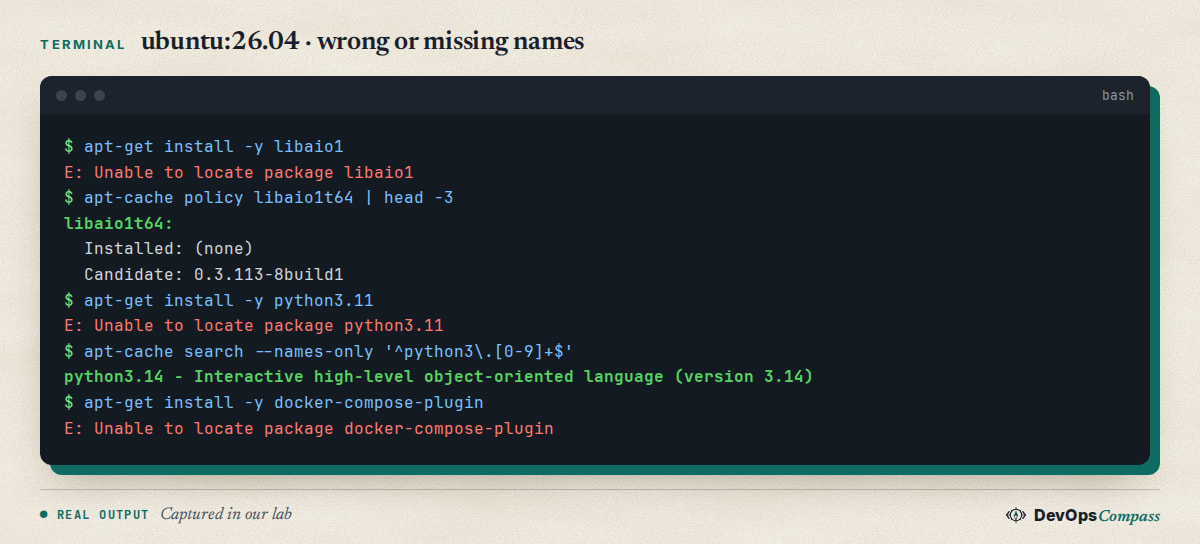
On Ubuntu 26.04 libaio1 is gone and libaio1t64 is the candidate (0.3.113-8build1). The t64 suffix came from the 64-bit time_t transition: many library packages were renamed. Old Dockerfiles that name libaio1 or similar fail until you use the new name.
python3.11 on Ubuntu 26.04
apt-get install python3.11 failed with Unable to locate package python3.11 and two Couldn't find any package by glob lines. The archive offers python3.14 (python3 candidate 3.14.3-0ubuntu2) and no other 3.x. Use the default Python, or a different base image such as python:3.11 or ubuntu:24.04, or a tool like uv. Our Python on Ubuntu 26.04 guide covers pip and venv errors.
Package in universe, but universe is off
Some servers have only main enabled. To simulate that, we edited /etc/apt/sources.list.d/ubuntu.sources to Components: main, ran update, and apt-get install cowsay failed with Unable to locate package cowsay. Setting Components: main universe and updating again installed it. The Docker image already has all four components.
Find the right name
apt-get update
apt-cache search libaio
apt-cache policy htop
search matches names and descriptions. policy shows whether a candidate exists and from which repository. No output from apt-cache policy name means apt cannot see the package at all. Pick the name from search, not from a blog post written for another release.
Undo
Nothing to undo for apt-get update. If you changed the sources to test universe or added Docker's repo, remove the file you added (for example /etc/apt/sources.list.d/docker.sources) and run apt-get update again.
FAQ
Why does apt say Unable to locate package in Docker?
The image has no package lists, so apt knows no names. Run apt-get update before apt-get install, in the same RUN command, and the install will find the package.
Do I still need apt-get update every time?
Yes, in every build that installs packages, unless a previous step in the same layer already ran it. The lists are removed from the image to keep it small.
Why does it fail after apt-get update?
The name is wrong for this release (libaio1, python3.11), the package is in universe and universe is off, or it comes from a third-party repository you have not added.
How do I install docker-compose-plugin?
Add Docker's apt repository first, run apt-get update, then install it. The Ubuntu archive does not contain this package, so apt cannot find it without that repository.
Dockerfile apt-get update: should I rm the lists?
Yes, but in the same RUN line after the install. Deleting it in an earlier line makes the install fail.
Related guides
- Docker on Ubuntu 26.04: install Docker Engine and Compose: the Docker repository, step by step.
- externally-managed-environment in Docker: Dockerfile fixes: another common Dockerfile error on new Ubuntu.
- apt could not get lock lock-frontend: fix it safely: when apt itself is busy.
- Docker exec format error: fix the wrong platform: architecture mismatches in images.
Sources
- Docker documentation: install Docker Engine on Ubuntu.
- Docker documentation: Dockerfile best practices.
- Stack Overflow: Unable to locate package sqlite3 in Dockerfile.
- Stack Overflow: apt unable to locate package python3 on ubuntu:22.04.
- Ask Ubuntu: why can't apt install snort in Ubuntu 24.10.
- Google autocomplete for "docker unable to locate package" (14 November 2026).
Last verified: November 2026 (14 November 2026, ubuntu:26.04 resolute on arm64). Other releases, Debian and Raspberry Pi OS were not tested.
Header image: Image: DevOpsCompass.
Comments
Post a Comment