
Python on Ubuntu 26.04: Fix pip and venv Errors (Tested)
Short answer: Ubuntu 26.04 uses Python 3.14. pip install outside a virtual environment stops with externally-managed-environment, and python3 -m venv fails with ensurepip is not available until you run sudo apt install python3-venv. Use a venv for libraries (python3 -m venv .venv), pipx for command-line tools, and uv python install 3.12 if you need an older Python. Treat --break-system-packages as a last resort.
How this was made: on 4 November 2026 we ran every command below in throwaway ubuntu:26.04 containers (Python 3.14.4, arm64). We also copied a venv built on Ubuntu 24.04 into a 26.04 container to see what an upgrade does to it. We did not run do-release-upgrade, and we did not test a desktop install.
You typed pip install and got a wall of text, or python3 -m venv told you to install a package you thought you already had. Or you upgraded from 24.04 and your project stopped importing anything. This page gives the fix for each, using the exact messages from our lab.
What Python version does Ubuntu 26.04 ship?
Python 3.14. In our container python3 --version printed 3.14.4 after apt install python3; the python3 package is 3.14.3-0ubuntu2 and the interpreter package python3.14 is 3.14.4-1ubuntu0.2. This is the regular build with the GIL enabled (Py_GIL_DISABLED was 0). Ubuntu 24.04 had 3.12.3, so you skip 3.13 completely when you upgrade.
One surprise: the plain ubuntu:26.04 container image has no Python at all. python and python3 were both command not found. Server and cloud images normally include python3, but we only tested the container, so check with python3 --version on yours.
How do I fix "externally-managed-environment" on Ubuntu 26.04?
You are running pip against the system Python, which belongs to apt. Debian and Ubuntu mark it as externally managed (PEP 668), so pip refuses to write into it. This is what we got after sudo apt install python3-pip:
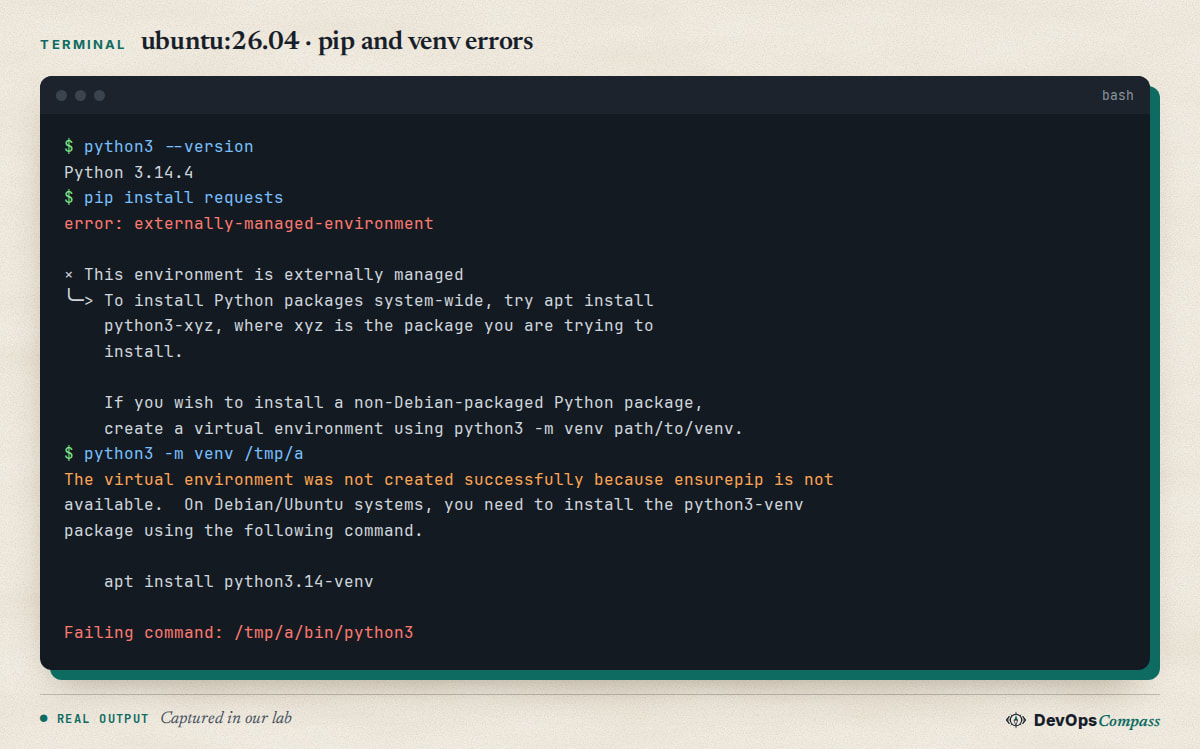
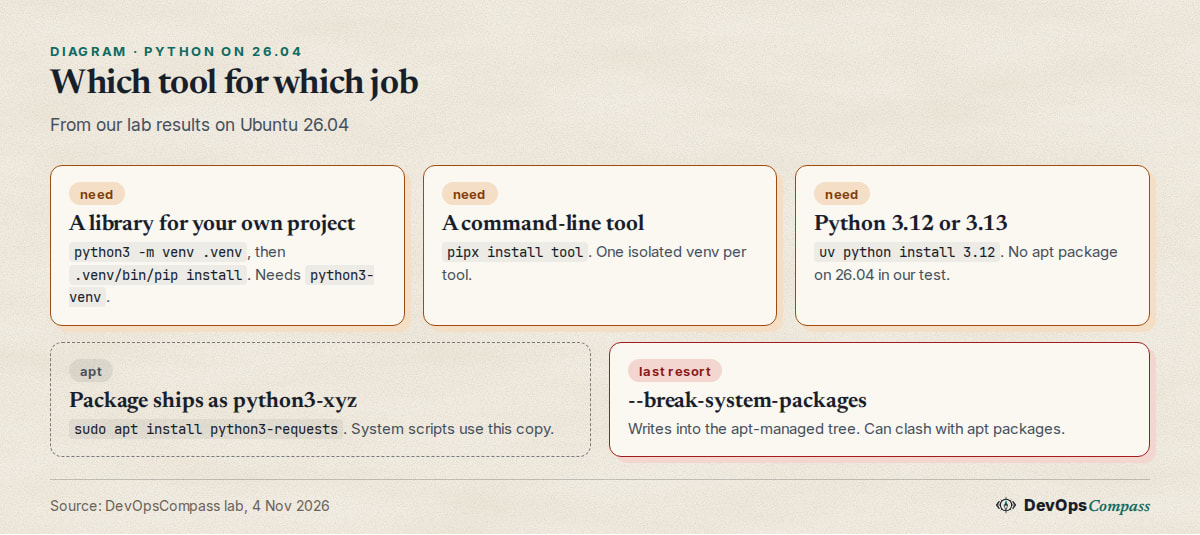
The message offers three ways out, and they are the right ones:
- A library you need for your own code: make a virtual environment (next section).
- A command-line tool: use
pipx(see below). - A package that Ubuntu already ships:
sudo apt install python3-requests. In our test this gaverequests2.32.5, while pip in a venv gave 2.34.2, so apt can be a few releases behind.
The Ask Ubuntu question about gsetwacom on 26.04 (October 2026) hit exactly this error with pip install git+https://github.com/.... The accepted answer was --break-system-packages (Ask Ubuntu 1570567). It works, but it is the riskiest option, and pipx would have been cleaner. A GitHub issue from 28 October 2026 shows the same problem in tooling: the issue title says just payload::toolchain fails on "systems that enforce PEP 668 (current Ubuntu and Debian)" (tinylabscom/mvm issue 4812). We only read the title, not the cause, but any script that calls the system pip needs a venv or pipx.
Why does python3 -m venv say ensurepip is not available?
Because the module that creates the pip inside a venv, ensurepip, is split out of the python3 package on Ubuntu. On a clean 26.04 container with only python3 installed we got:
The virtual environment was not created successfully because ensurepip is not
available.  On Debian/Ubuntu systems, you need to install the python3-venv
package using the following command.

    apt install python3.14-venv
The exit code was 1, and it left a half-made /tmp/a directory behind, so delete it before you retry. The fix is one package:
sudo apt install python3-venv
python3 -m venv .venv
python3-venv is a small meta package; it pulled in python3.14-venv, which holds the real files. The message names python3.14-venv, and either name works. python3-pip does not pull it in: its dependencies were ca-certificates, python3-wheel and python3. So "I installed pip, why does venv fail?" is expected.
Now install into the venv without activating it, which is the most reliable way in scripts and cron jobs:
.venv/bin/pip install requests
.venv/bin/python -c "import requests; print(requests.__version__)"
If you only need a venv without pip (for example to copy wheels in yourself), python3 -m venv --without-pip .venv worked in our test even without python3-venv.
How do I install pip on Ubuntu 26.04?
sudo apt install python3-pip (pip 25.1.1 in our test). That installs pip for the system Python, and it will then refuse to install packages for the reason above. For daily work you rarely call that pip at all: inside a venv the pip is already there, as long as python3-venv is installed.
python3 -m ensurepip is not the answer on Ubuntu. It printed a warning about the system Python and, in our test, did not change what pip does.
How do I install a Python app with pipx on Ubuntu 26.04?
For tools you run from the shell (httpie, yt-dlp, ansible-lint), install pipx from apt and let it keep one venv per tool:
sudo apt install pipx
pipx install httpie
http --version        # 3.2.4 in our test
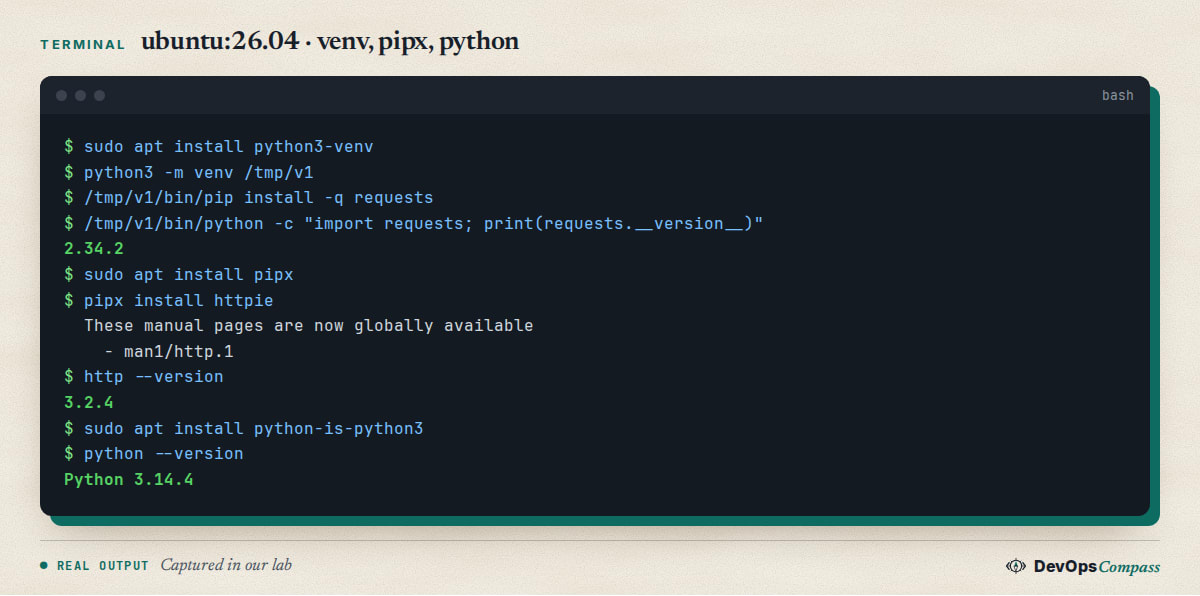
pipx 1.8.0 worked as shown in the screenshot above. It also accepts a Git URL, for example pipx install git+https://github.com/linuxwacom/gsetwacom, which is the command the Ask Ubuntu asker needed. We did not run that one: it was not in our lab and the project may need system libraries. If pipx prints a note that ~/.local/bin is not on your PATH, run pipx ensurepath and open a new shell.
Does pip install --user work on Ubuntu 26.04?
No. pip install --user requests returned the same externally-managed-environment error in our test. The marker applies to the whole interpreter, so --user does not get around it. People still suggest it in older answers written before Ubuntu 23.04, which is why this keeps coming up in searches.
Is pip --break-system-packages safe on Ubuntu 26.04?
It is allowed and it works, but it is the option the error message warns about ("at the risk of breaking your Python installation or OS"). The risk is that pip can overwrite or upgrade a library that an Ubuntu tool depends on. On a desktop or server with system scripts written in Python, that can break apt helpers or other tools.
We only ran it as pip install --break-system-packages --dry-run requests, which resolved and printed Would install ... requests-2.34.2; we did not install over apt packages and cannot show a breakage ourselves. The same flag can be made permanent with break-system-packages = true in /etc/pip.conf; the dry run accepted it. We would only use either in a disposable container or CI image, never on a machine you care about.
Why does Ubuntu say python: command not found?
Ubuntu ships python3 but not a command called python. If you want one, install python-is-python3:
sudo apt install python-is-python3
python --version      # Python 3.14.4 in our test
Its apt version string says 3.13.3, which is only the packaging version: the /usr/bin/python it creates pointed to the system python3, which was 3.14.4. Inside an activated venv you already have python without this package.
How do I get Python 3.12 or 3.13 on Ubuntu 26.04?
Not from the Ubuntu archive, as far as our container showed: apt-cache policy python3.12 and python3.13 returned no candidate, only python3.14. Two options:
- uv downloads a standalone build.
uv python install 3.12installed CPython 3.12.16 in under a second in our lab, anduv venv --python 3.12 .venvmade a venv that reportedPython 3.12.16. - A third-party package source such as the deadsnakes PPA is a common answer, but we did not test it, so we cannot say whether it covers 26.04.
Use an older Python only if your dependencies do not support 3.14 yet. Check the project's supported versions first.
Can I use uv on Ubuntu 26.04?
Yes. We installed it with the official script (read the script before piping it to a shell):
curl -LsSf https://astral.sh/uv/install.sh | sh
uv venv .venv                      # picked the system Python 3.14.4
uv pip install --python .venv/bin/python requests
That gave uv 0.13.7 on arm64 and worked with no externally-managed error, because it installs into the venv. It also did not need python3-venv, since uv creates the environment itself. For the details of the tool see the uv documentation. We did not benchmark it or test uv tool install.
Why did my virtual environments break after upgrading to 26.04?
Because a venv is tied to the Python minor version it was built with. A user on Ask Ubuntu reported empty venvs after do-release-upgrade -d from 24.04 to 26.04 (Python 3.12 to 3.14): nothing but pip could be imported (Ask Ubuntu 1567223). We reproduced the effect by building a venv on 24.04 (Python 3.12.3, with requests and PyYAML) and copying it into a 26.04 container. This is not the same as a real upgrade, but the venv ends up in the same state:
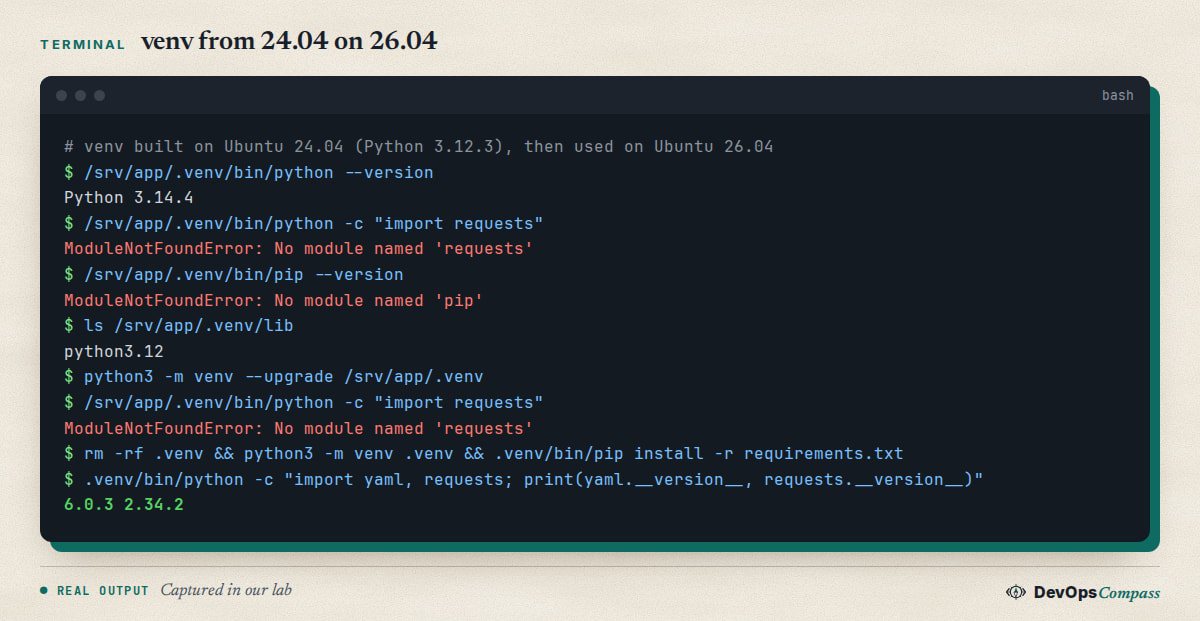
The packages were not deleted. They sit in lib/python3.12/site-packages, but the new interpreter looks in lib/python3.14. Running python3 -m venv --upgrade rewired the interpreter and made a python3.14 folder, yet import requests still failed in our test. The reliable fix is to recreate the venv:
# before the upgrade, on the old Python:
.venv/bin/pip freeze > requirements.txt
# after the upgrade:
rm -rf .venv
python3 -m venv .venv
.venv/bin/pip install -r requirements.txt
If you forgot to freeze first, the folder names in lib/python3.12/site-packages/*.dist-info list what was installed, which is our own workaround and not a tested procedure. Compiled packages must be reinstalled anyway: their files are built for a Python version. The Ask Ubuntu answer instead switched the default python3 back to 3.12 with update-alternatives to export the list, and warns to switch back afterwards because apt depends on the system default. We did not test that and would avoid changing the system python3.
What we did not test
- A real
do-release-upgradefrom 24.04: we copied a venv between containers instead. - A server or desktop install: our lab used the minimal container image, so preinstalled packages may differ.
pip installover an apt-owned package (we only ran a dry run),pipx install git+..., the deadsnakes PPA, anduv tool install.- Packages that need compiling (C headers,
python3-dev), and any x86-64 behaviour (our host is arm64). - Free-threaded Python (
python3.14t).
FAQ
What Python version does Ubuntu 26.04 use?
Python 3.14. In our container python3 reported 3.14.4. Ubuntu 24.04 used 3.12, so scripts and virtual environments built there need to be rebuilt on 26.04 rather than reused.
How do I install Python packages on Ubuntu 26.04 without the externally-managed error?
Create a virtual environment with python3 -m venv .venv and use .venv/bin/pip, or install command-line tools with pipx. Install python3-venv first if venv says ensurepip is missing. Avoid --break-system-packages on machines you rely on.
Why does python3 -m venv fail with ensurepip is not available?
The ensurepip module ships in a separate package on Ubuntu. Run sudo apt install python3-venv, delete the half-created directory, and run the venv command again. Installing python3-pip alone does not provide it.
Is it safe to use pip --break-system-packages?
It can overwrite packages that Ubuntu tools rely on, and pip itself warns about it. It is acceptable in a throwaway container, but on a normal machine use a venv or pipx. We only ran it as a dry run, not against apt-owned packages.
How do I get Python 3.12 on Ubuntu 26.04?
The archive had no python3.12 package in our test. uv python install 3.12 downloaded CPython 3.12.16 and uv venv --python 3.12 created a working venv. A third-party PPA may also work, but we did not test one.
Will my old virtual environments work after upgrading to 26.04?
No. A venv built with Python 3.12 lost its packages and pip when used with 3.14, even after python3 -m venv --upgrade. Freeze the requirements before the upgrade, delete the venv and recreate it.
Related guides
- Upgrade Ubuntu 24.04 to 26.04 LTS on a Server: Full Guide: the upgrade itself, which is when the Python jump from 3.12 to 3.14 happens.
- apt-key: Command Not Found on Ubuntu 26.04 (Fix): another command that older guides still use and 26.04 no longer has.
- Install Docker on Ubuntu 26.04 Server: a clean place to run Python projects without touching the system interpreter.
Sources
- Python Enhancement Proposal: PEP 668, marking Python base environments as externally managed.
- Python documentation: venv, creation of virtual environments.
- pipx documentation: pipx project site.
- uv documentation: uv by Astral.
- GitHub: a script failing on PEP 668 systems.
- Ask Ubuntu: venvs after the 24.04 to 26.04 upgrade, pip, apt and pipx failing on 26.04, installing Python packages on 24.04.3.
- Google autocomplete for "ubuntu 26.04 python", "ubuntu 26.04 python venv", "ubuntu 26.04 uv" and "pip break-system-packages" (4 November 2026).
Last verified: November 2026 (4 November 2026, Python 3.14.4 on ubuntu:26.04, arm64, container only). Package versions move with Ubuntu updates; run apt-cache policy on your own system.
Header image: Image: DevOpsCompass.
Comments
Post a Comment