
Docker exec format error: Fix the Wrong Platform
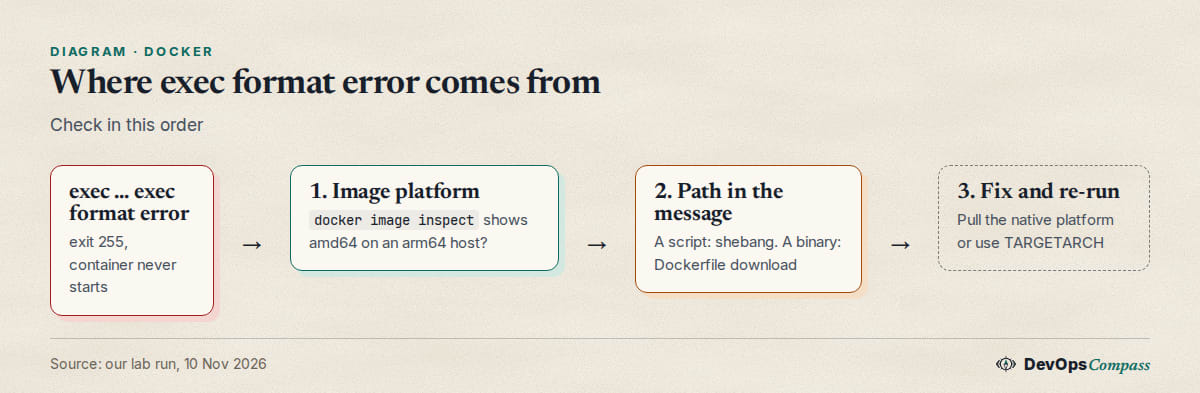
Short answer: the kernel was asked to start a file it cannot run. Either the image was built for another CPU (amd64 image on an arm64 host, or the reverse), or the file named in the message is a script with no #! first line. Run docker image inspect IMAGE | grep -i architecture and compare it with uname -m. If they differ, pull or build the right platform.
How this was made: on 10 November 2026 we reproduced each message below on an aarch64 host with Docker Engine 29.9.3. We did not test an arm64 image on an amd64 host or a Docker Desktop setup.
The error as printed
We pulled the amd64 variant of hello-world on an arm64 machine and ran it:
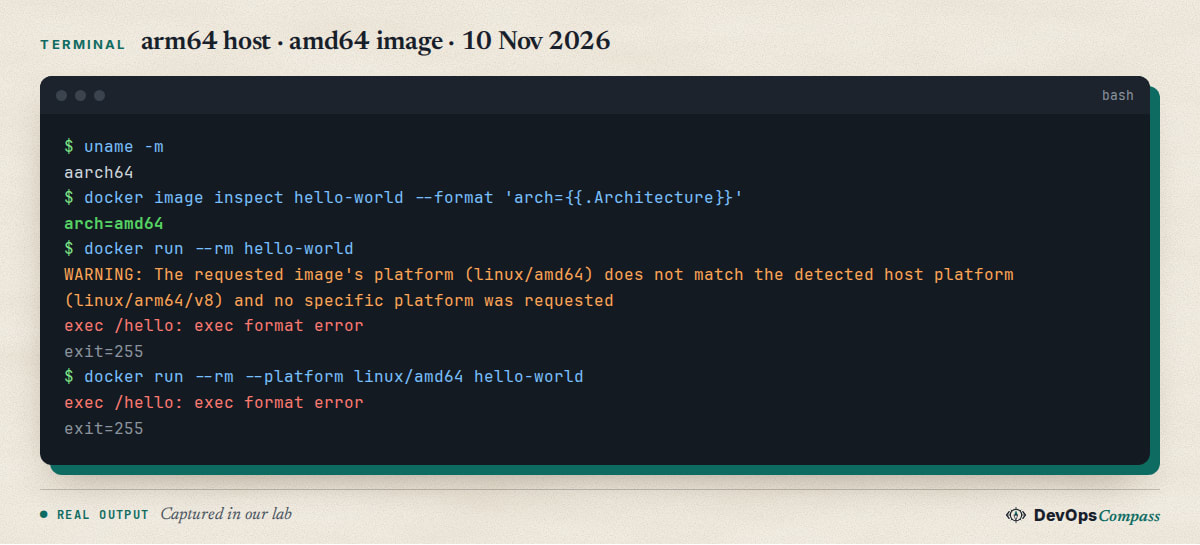
The first run printed a warning, then the error. The second run forced --platform linux/amd64 and printed the same error without the warning. Exit code 255 means the container never started: the program inside was not executed at all. The path in the message (/hello) is the file Docker tried to start.
The platform warning that comes first
WARNING: The requested image's platform (linux/amd64) does not match the detected host platform (linux/arm64/v8) is not a separate problem. It is the same cause, announced early. A Server Fault question from April 2026 asks exactly this and has no answer yet. The warning only appears when you did not pass --platform. Once you pass it, Docker assumes you know what you are doing and prints only the error.
Script or binary: which one is wrong?
Look at the path in the message. If it ends in .sh or is your own entrypoint, suspect the script first. A GitHub issue opened on 10 November 2026 reports exec /app/entrypoint.sh: exec format error on a new arm64 build; it does not say which cause it is. If the path is a real program (/hello, /usr/bin/java, /usr/bin/dotnet), suspect the architecture. A program built on macOS is also the wrong format on Linux: a Stack Overflow question from April 2025 about a Mach-O file in a container is unanswered. We did not test that case.
Check the image architecture
Two commands tell you what you have and what the registry offers:
uname -m
docker image inspect hello-world | grep -iE '"(os|architecture)"'
docker buildx imagetools inspect hello-world | grep Platform
In our lab the host said aarch64, the local image said linux/amd64, and the registry listed amd64, arm/v5, v6, v7, arm64/v8 and 386. So a native image existed: we had simply pulled the wrong one. aarch64 and arm64 are the same CPU family under two names.
Script without a shebang
A script used as ENTRYPOINT needs a first line such as #!/bin/sh. Without it, the kernel does not know what program runs it:
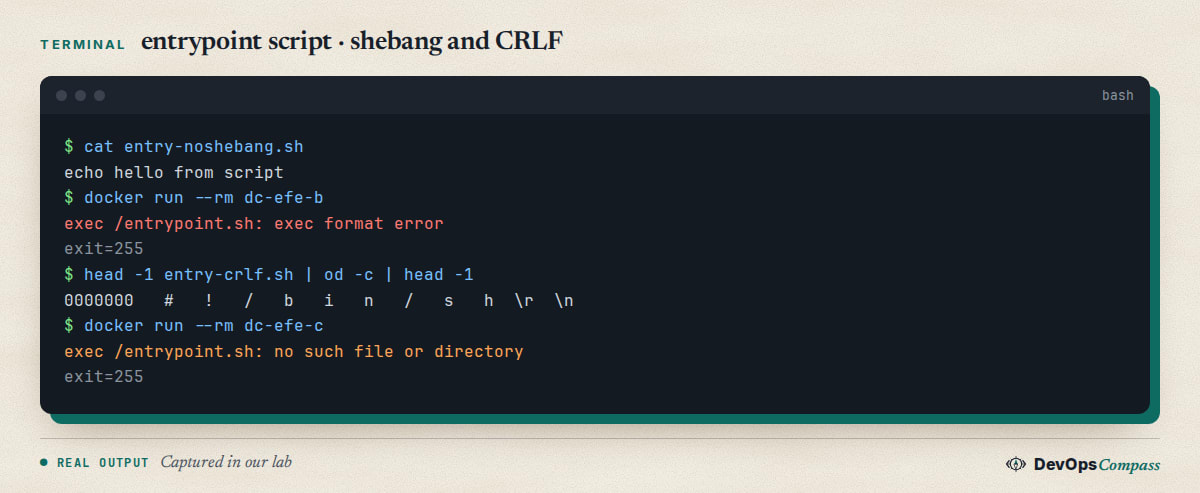
With #!/bin/sh added, the same image printed its message and exited 0. A shell hides this problem by running the text itself; Docker does not.
CRLF gives a different error
A script saved on Windows has \r\n line endings, so the shebang reads /bin/sh\r. In our test that did not give a format error. It gave exec /entrypoint.sh: no such file or directory, although the file exists. The cause is different: the kernel looks for an interpreter named /bin/sh followed by a carriage return. The capture above shows the \r in the first line. Convert the file (sed -i 's/\r$//' entrypoint.sh) or set * text=auto eol=lf in .gitattributes. We tested the symptom, not these two fixes.
Compose: platform linux/amd64
A platform: key in a Compose file forces the platform, the same as --platform:
services:
  hello:
    image: hello-world
    platform: linux/amd64
On our arm64 host docker compose up printed hello-1 | exec /hello: exec format error and exited with code 255. Remove the line, or set it to the host's platform.
Fix 1: pull the right platform
docker pull --platform linux/arm64 hello-world
docker run --rm hello-world
After this the image architecture was arm64, and the container printed its hello message with exit 0. If the registry has no variant for your platform, there is nothing to pull: you need an image built for it, or emulation.
Fix 2: make the Dockerfile follow TARGETARCH
If your own Dockerfile downloads a binary, a hardcoded linux-amd64 in the URL produces this error on arm64. The build arg TARGETARCH holds the architecture being built for:
FROM alpine:3
ARG TARGETARCH
RUN echo "building for TARGETARCH=$TARGETARCH"
In a default build on our host it printed TARGETARCH=arm64. Use the variable in your download URL, and check the tool's release names, because they may say aarch64 or arm64. We tested the variable, not a real download. The Docker docs show the same idea for cross-compiling with TARGETOS and TARGETARCH.
Build works, run fails
This is the confusing one. We ran docker buildx build --platform linux/amd64 on the arm64 host. A RUN step printed uname=x86_64 and the build succeeded. Then docker run of an amd64 image failed. The Docker docs explain it: official BuildKit releases bundle QEMU emulators, so builds can emulate, but the host kernel has no emulator registered for running containers. A successful build tells you nothing about whether you can run the result.
Run amd64 images anyway with QEMU
The Docker docs describe registering emulators on the host:
docker run --privileged --rm tonistiigi/binfmt --install all
This changes the host's binfmt_misc settings, so we did not run it on our server. Emulation is slower, so prefer a native image.
Verify and undo
Verify by running the container again: no exec line, and docker image inspect matches uname -m. Nothing here needs an undo, except that docker rmi IMAGE removes the wrong-platform image you pulled. Do that before pulling the right one if both use the same tag, because the tag points to one image at a time.
FAQ
What does exec format error mean in Docker?
The kernel refused to run the file Docker started: an image for another CPU architecture, or a script without a #! line. The path in the message shows which file.
How do I fix exec format error on an M1, M2 or arm64 server?
Pull or build a linux/arm64 image. Check with docker image inspect IMAGE | grep -i architecture. If only amd64 exists, run it with emulation, as described above, or find another image.
Why does the exec format error only appear in docker compose?
Look for a platform: key in the service. We forced linux/amd64 on an arm64 host and Compose produced the same error.
Does --platform linux/amd64 fix it?
Not by itself. In our test it removed the warning and kept the error. It only helps when the host can emulate amd64.
Why is the script not found when it exists?
Probably CRLF line endings in the shebang. We reproduced no such file or directory this way, and the error was not a format error.
Can I run an arm64 image on an amd64 host?
The Docker docs say a container needs the host's architecture or emulation, so yes with emulation. We tested only amd64 on arm64.
Related guides
- Install Docker on Ubuntu 26.04 Server: the engine setup we used for tests.
- Docker Compose healthcheck and depends_on: Compose files tested the same way.
- externally-managed-environment in Docker: another error that stops a Dockerfile.
Sources
- Docker docs: Multi-platform builds.
- Server Fault: The requested image's platform does not match the detected host platform.
- GitHub: soundbored issue 90, exec /app/entrypoint.sh: exec format error.
- Stack Overflow: exec /usr/bin/make: exec format error when building for host linux/amd64.
- Stack Overflow: Mac M3 exec /usr/bin/java: exec format error.
- Google autocomplete for "exec format error docker" and its entrypoint, compose and dockerfile variants (10 November 2026).
Last verified: November 2026 (10 November 2026, aarch64 host, Docker Engine 29.9.3). QEMU installation, arm64 images on amd64 hosts, Mach-O binaries, the CRLF fixes and a real download with TARGETARCH were not tested.
Header image: Image: DevOpsCompass.
Comments
Post a Comment