
[Solved] Docker Volume Permission Denied (Non-Root User)
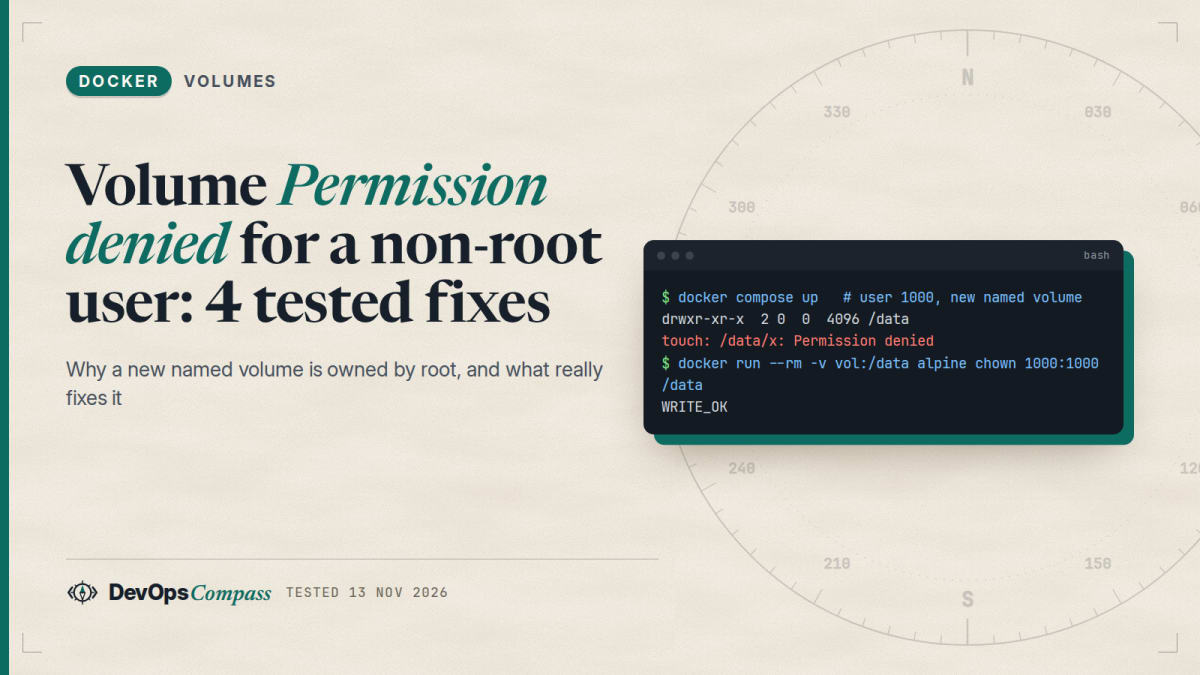
Short answer: A new named volume is created owned by root with mode 755, unless the image already has that folder with another owner. Docker copies the image folder, including its owner, into the volume only when the volume is empty. So a non-root user gets Permission denied when the folder is missing from the image, when the volume already holds data, or when you override user:. Fix it once with docker run --rm -v vol:/data alpine chown 1000:1000 /data, with an init service, with a shared group, or with tmpfs options. A bind mount is different: the host owns the files, and Docker cannot remap the owner.
How this was made: on 13 November 2026 we ran three small checks with Docker 29.9.3 and Compose v5.7.0 on an Ubuntu aarch64 host (overlay2), using only alpine:3 and two tiny images built from it. Raw logs are in our lab folder. Rootless Docker, user namespace remapping, SELinux, Docker Desktop and NFS volumes were not tested.
You start a container as a normal user, mount a named volume, try to write, and get touch: /data/x: Permission denied. The volume is yours, so why is it refused? This guide reproduces the error, shows the one rule that explains it (who owns the folder when the volume is created), and tests the fixes for named volumes, bind mounts and volumes shared by two users.
Why is my new named volume owned by root?
Docker creates the volume directory on the host as root. If the image does not contain the mount path, there is nothing to copy, so the folder inside your container is root:root with mode 755. A user with uid 1000 can read it but not write.
Here is the plain case from our lab, an alpine:3 container run as 1000:1000 with a brand-new volume on /data:
$ docker run --rm -u 1000:1000 -v dc-vp-a:/data alpine:3 sh -c 'ls -ldn /data; touch /data/x && echo WRITE_OK'
drwxr-xr-x    2 0        0             4096 Nov 13 10:00 /data
touch: /data/x: Permission denied
Compose behaves the same. With user: "1000:1000" and a plain named volume, the service printed the same two lines and exited with code 1:
services:
  app:
    image: alpine:3
    user: "1000:1000"
    command: sh -c 'ls -ldn /data; touch /data/x && echo WRITE_OK'
    volumes:
      - data:/data
volumes:
  data:
This is the situation in the long-running Stack Overflow question Docker-compose and named volume permission denied (22 votes) and in question 70686151, where a Node process got EACCES on a named volume.
Why did it work with one image and not with another?
The Docker volumes documentation says that if you mount an empty volume into a directory that already has files, those files are "propagated (copied) into the volume by default", and that volume-nocopy turns this off. The page talks about files. It does not say what happens to the owner. We tested that with a small image that creates user app (uid 1000) and a folder /srv/data owned by it:
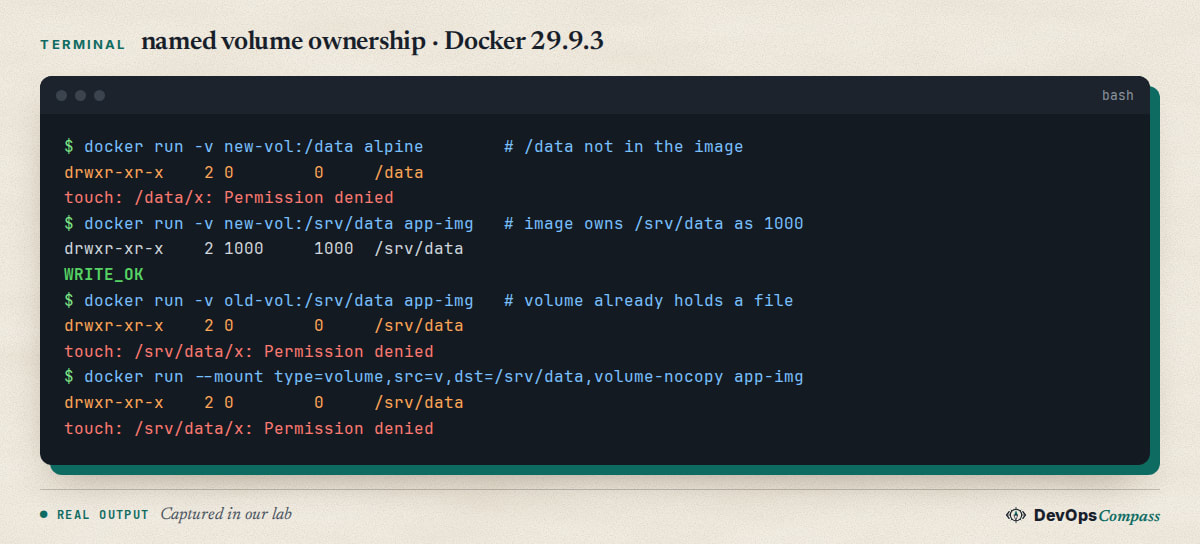
The result, from run1.log:
| Case | Owner of the folder in the container | Write as uid 1000 |
|---|---|---|
| Path not in the image, new volume | 0:0 |
Permission denied |
| Image folder owned by 1000, new volume | 1000:1000, the image's seed.txt appeared |
works |
| Same image, volume created earlier and still empty | 1000:1000 |
works |
| Same image, volume that already holds a file | 0:0 |
Permission denied |
Same image, volume-nocopy |
0:0 |
Permission denied |
So the rule is: on the first mount of an empty volume, Docker copies the image folder with its owner. After that, the volume keeps whatever it has. Two things follow. An image that ships /srv/data owned by its user works with a fresh volume and fails with an old one. And the empty volume we created earlier with a different image was still filled on the next start, so "created as root once" is not the same as "stuck as root". Only data in the volume stops the copy.
Why does chown in my Dockerfile not fix a volume that already exists?
Because of the rule above. Our fourth case shows it: the volume held one file created by a root container, then we mounted it into the image that owns /srv/data as uid 1000. The folder stayed 0:0 and the write failed. Rebuilding the image does not change an existing volume. The same happens when you add user: to a Compose file after the volume was already created by a root process.
There are two ways out: change the owner of the volume once (next section), or delete the volume if the data does not matter. In Compose, docker compose down -v removes the project's named volumes. Check the name with docker volume ls first, because the command deletes data.
How do I chown a named volume?
You need a process that runs as root, changes the owner, and exits. We tested two ways.
One-off command. Run it once, and the volume stays fixed:
$ docker run --rm -u 1000:1000 -v dc-vp-i:/data alpine:3 sh -c 'touch /data/x'
touch: /data/x: Permission denied
$ docker run --rm -v dc-vp-i:/data alpine:3 chown 1000:1000 /data
$ docker run --rm -u 1000:1000 -v dc-vp-i:/data alpine:3 sh -c 'ls -ldn /data; touch /data/x && echo WRITE_OK'
drwxr-xr-x    2 1000     1000          4096 Nov 13 10:01 /data
WRITE_OK
An init service in Compose. Add a service that runs as root, mounts the same volume, and make the app wait for it to finish with service_completed_successfully. This is the Compose answer to the autocomplete query "docker compose volume chown":
services:
  init:
    image: alpine:3
    user: "0:0"
    command: chown -R 1000:1000 /data
    volumes:
      - data:/data
  app:
    image: alpine:3
    user: "1000:1000"
    depends_on:
      init:
        condition: service_completed_successfully
    command: sh -c 'ls -ldn /data; touch /data/x && echo WRITE_OK'
    volumes:
      - data:/data
volumes:
  data:
Compose started init first, it exited with code 0, then app printed drwxr-xr-x 2 1000 1000 /data and WRITE_OK. We ran up a second time on the same volume: init ran again (it is a normal service, so it is cheap but not "once"), and the app still wrote successfully. For -R on a large volume that repeat can be slow, so add a marker check if the volume has millions of files. The ordering rule is the same one we tested in our healthcheck and depends_on guide.
Does the compose user: setting break my volume?
Not by itself, but it removes the help the image would give you. A reader opened docker/compose issue 13758 in April 2026: the Dockerfile created user 1000 and owned its files, and user: "<other uid>" in Compose then failed on those files. The maintainer closed it on 4 May 2026 as "not planned": the image's user is the one the image supports, and overriding it with user: "assumes the image can run with a distinct user".
Our case F shows the volume side of the same thing. The volume was populated for uid 1000, and we ran the same image as -u 1001:1001: the folder was 1000:1000 mode 755 and the write failed. When you change the uid, change the owner of the data too (previous section), or keep the image's own user.
How do two containers with different users share one volume?
A shared named volume with different uids is the open question behind Stack Overflow 70951315, which has no accepted answer. A group is the cleanest answer we found. Give the volume a shared group, make the folder group-writable with the setgid bit, and add the group to both services:
$ docker run --rm -v dc-vp-k:/data alpine:3 sh -c 'chown 0:3000 /data; chmod 2775 /data; ls -ldn /data'
drwxrwsr-x    2 0        3000          4096 Nov 13 10:01 /data
$ docker run --rm -u 1000:1000 --group-add 3000 -v dc-vp-k:/data alpine:3 sh -c 'id; touch /data/from1000 && echo WRITE_OK_1000'
uid=1000 gid=1000 groups=1000,3000
WRITE_OK_1000
$ docker run --rm -u 2000:2000 --group-add 3000 -v dc-vp-k:/data alpine:3 sh -c 'id; ls -ln /data; touch /data/from2000 && echo WRITE_OK_2000'
uid=2000 gid=2000 groups=2000,3000
-rw-r--r--    1 1000     3000             0 Nov 13 10:01 from1000
WRITE_OK_2000
$ docker run --rm -u 2000:2000 -v dc-vp-k:/data alpine:3 sh -c 'touch /data/nogroup || echo DENIED_without_group_add'
touch: /data/nogroup: Permission denied
DENIED_without_group_add
In Compose, the same is group_add: ["3000"] on each service. Note the new file from1000 got group 3000 thanks to the setgid bit, so the second user could also write next to it, but the file's own mode is 644. If the second user must edit the first user's files, set umask 002 in the writing process. We did not test that part. The same group_add idea fixes the Docker socket permission error.
Why does a bind mount say "Permission denied", and can Docker remap the owner?
A bind mount shows the host folder as it is. Our host user has uid 1002, the folder was 755 and owned by 1002, so a container user 1000 could read but not write:
$ docker run --rm -u 1000:1000 -v "$PWD/bm":/data alpine:3 sh -c 'ls -ldn /data; touch /data/x || echo DENIED'
drwxr-xr-x    2 1002     1002          4096 Nov 13 10:01 /data
touch: /data/x: Permission denied
DENIED
$ docker run --rm -u "$(id -u):$(id -g)" -v "$PWD/bm":/data alpine:3 sh -c 'touch /data/x && echo WRITE_OK_hostuid'
WRITE_OK_hostuid
Running as the host uid works, and the file on the host is owned by you. In Compose, pass the ids as variables, for example user: "${UID}:${GID}". Bash does not export UID by default, so put UID=1002 and GID=1002 in .env; our Compose .env guide explains where the variable is read from.
Can Docker map the container uid to the host uid for you? Not for bind mounts. The Compose maintainer wrote in the 13758 thread that bind mounting a host path "is a distinct (known) issue", an engine limitation with no id-remapping, and moby/moby issue 2259 ("Add ability to mount volume as user other than root") is still open, with activity as recent as 10 November 2026. In that thread a maintainer explained the root of the problem in 2018: chown or chmod on a bind mount changes the host folder too, so there is no private view.
Why is the host folder created by Docker owned by root?
If the host path does not exist, the short -v syntax makes the daemon create it, as root. We checked both forms:
$ docker run --rm -v "$PWD/missing":/data alpine:3 true; ls -ldn "$PWD/missing"
drwxr-xr-x 2 0 0 4096 Nov 13 11:01 .../missing
$ docker run --rm --mount type=bind,src=/tmp/sb/nonexist,dst=/data alpine:3 true
docker: Error response from daemon: invalid mount config for type "bind": bind source path does not exist: /tmp/sb/nonexist
The Compose short syntax ./auto:/data also created auto owned by 0:0. So a missing folder gives you a root-owned folder you then cannot write to without sudo. Create the folder yourself first (mkdir -p), or use --mount (or the long type: bind syntax), which fails loudly instead. We removed our test folders with a throwaway container because the host user cannot delete a root-owned folder.
Does chown after VOLUME in a Dockerfile get lost?
Old answers say that changes made after a VOLUME instruction are discarded. We tried it with the current default builder (BuildKit in Docker 29.9.3): an image with VOLUME /srv/data followed by RUN mkdir -p /srv/data && chown app:app /srv/data. A container from it, with or without a named volume, showed the folder owned by 1000:1000 and the write worked. So on this version, with this builder, the old advice did not reproduce. We did not test the legacy builder. Keeping chown before VOLUME is still the safe order and costs nothing.
When is tmpfs the better answer?
For scratch data that you do not need after the container stops, you can skip ownership problems with a tmpfs mount and its options:
$ docker run --rm -u 1000:1000 --tmpfs /data:uid=1000,gid=1000,mode=0750 alpine:3 sh -c 'ls -ldn /data; touch /data/x && echo WRITE_OK'
drwxr-x---    2 1000     1000            40 Nov 13 10:01 /data
WRITE_OK
The folder had the owner and mode we asked for. The data lives in memory and disappears when the container stops, so this is for caches and temp files, not for a database.
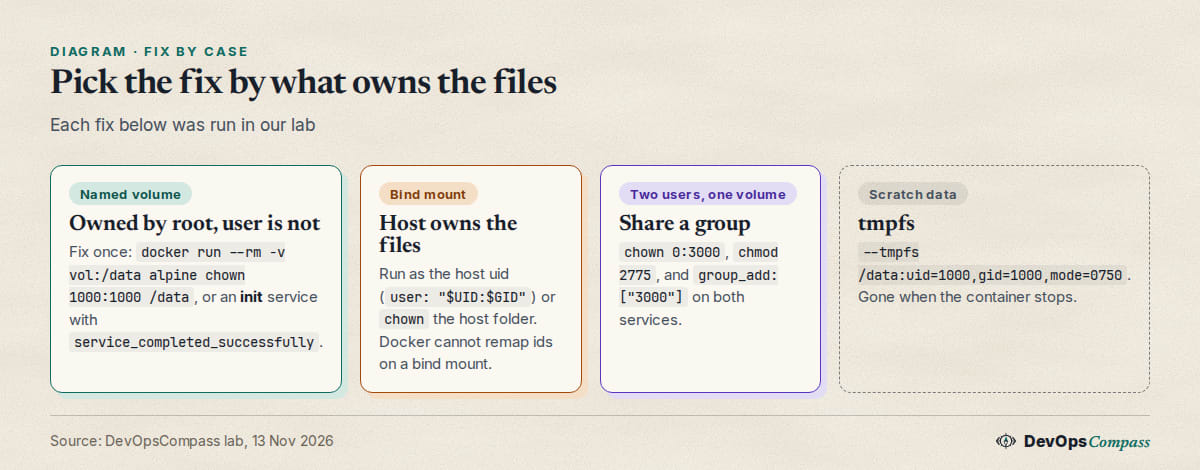
Common errors
| Message or symptom | Cause | Fix |
|---|---|---|
touch: /data/x: Permission denied on a new named volume |
path not in the image, so the volume is root:root 755 |
chown once, or an init service |
| works on a fresh volume, fails on an old one | image owner is copied only into an empty volume | chown the existing volume or recreate it |
fails after adding user: |
uid differs from the one that owns the data | match the uid or chown the data |
| two services, one writes, one cannot | different uids, mode 755 | shared group, chmod 2775, group_add |
| bind mount refused for uid 1000 | host folder is owned by another uid | run as the host uid or chown the host folder |
host folder owned by root after up |
the short syntax created a missing path | mkdir -p first, or use --mount |
bind source path does not exist |
--mount with a missing host path |
create the folder |
FAQ
Why is my Docker volume owned by root?
The daemon creates new volumes as root. If the image has the mount path with another owner, Docker copies that owner into an empty volume on first mount. If the path is not in the image, the volume stays root:root with mode 755, so a non-root user cannot write.
How do I fix Docker volume permission denied for a non-root user?
Run docker run --rm -v vol:/data alpine chown 1000:1000 /data once, or add an init service that does it before the app starts. For bind mounts, run the container as the host uid, or chown the host folder.
How do I run chown on a Docker Compose volume?
Add a service that runs as 0:0, mounts the same volume and runs chown -R, then make the app depend on it with condition: service_completed_successfully. It reruns on every up, so keep the command cheap.
Why does my named volume work for one container and not another?
Docker copies the image folder and its owner only into an empty volume. If the volume already contains data, or the image does not have the path, the owner stays whatever it was.
Can Docker map the container user to my host user on a bind mount?
Not on a normal rootful engine. The Compose maintainers call it an engine limitation, and the upstream request in moby issue 2259 is still open. Use the host uid with user:, or chown the folder.
How can two containers write to the same volume?
Give the volume a shared group, set the folder to mode 2775 with that group, and add the group to both containers with group_add.
What we did not test
We did not test rootless Docker, user namespace remapping (userns-remap), SELinux hosts (the :z and :Z flags), Docker Desktop on macOS or Windows, NFS, CIFS or other volume drivers, or an x86-64 host. We ran on overlay2 with ext4. We did not test umask for shared files, or the legacy builder for the VOLUME order. Images with an entrypoint that fixes ownership itself (some database images chown at start) may behave differently from our alpine:3 checks. We did not run real database or web server images.
Related guides
- Docker Socket Permission Denied: Fix the Group ID: the same
group_addidea for another file. - Docker Compose Secrets: Fix Permission Denied (Tested): the same bind-mount ownership rule for secret files.
- Compose .env vs env_file vs environment: Which Wins?: where
UIDandGIDvariables come from. - Docker Compose healthcheck + depends_on: Tested Guide: ordering a one-shot init service before the app.
Sources
- Docker docs: Volumes (populating an empty volume,
volume-nocopy) and tmpfs mounts. - GitHub: docker/compose 13758 and moby/moby 2259.
- Stack Overflow: question 64027052, question 70951315 and question 70686151.
- Google autocomplete for "docker volume permission denied", "docker compose volume chown" and "docker volume owned by root" (13 November 2026).
Last verified: November 2026 (13 November 2026, Docker 29.9.3, Compose 5.7.0, aarch64, overlay2, alpine:3). Rootless Docker, userns-remap, SELinux, Docker Desktop, NFS and x86-64 hosts were not tested.
Header image: Image: DevOpsCompass.
Comments
Post a Comment