
Docker Compose Secrets: Fix Permission Denied (Tested)
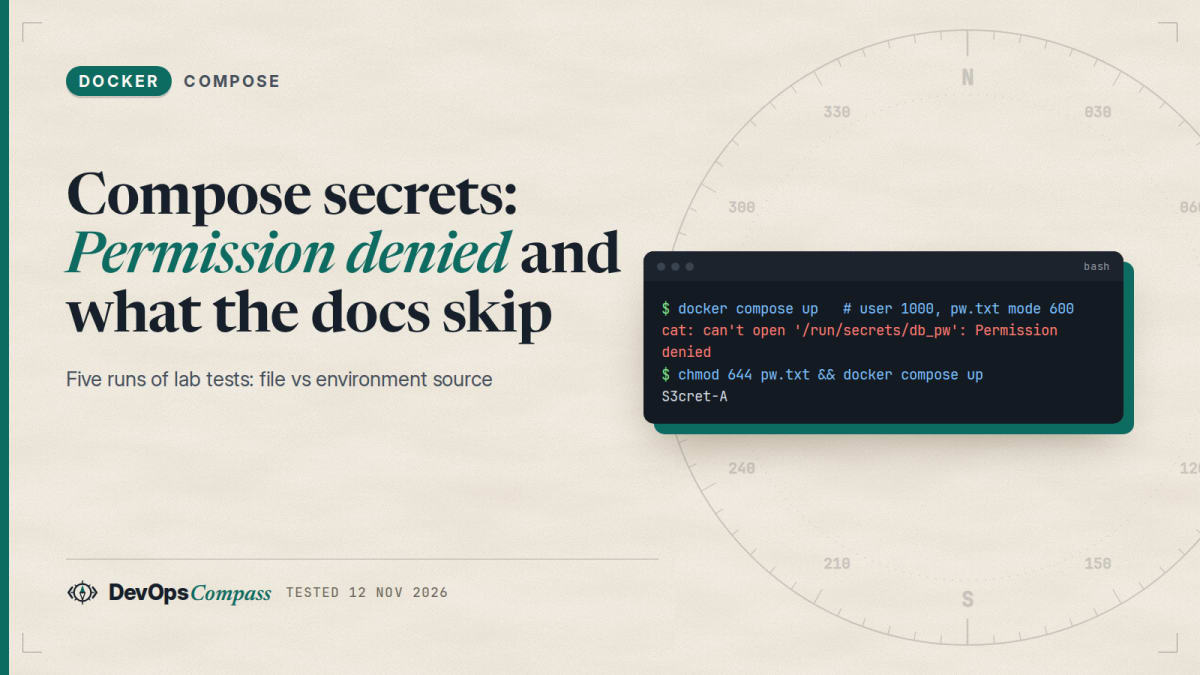
Short answer: A Compose secret from a file: is a read-only bind mount of your host file, so the container sees the host file's owner and mode. A non-root container user with a different uid gets Permission denied. The uid, gid and mode options are ignored for file: sources (Compose only warns). Fix it with chmod 644, with group_add, by running the container as the file's uid, or by switching to environment: as the source, which does honour uid, gid and mode.
How this was made: on 12 November 2026 we ran six small checks with Docker 29.9.3 and Compose v5.7.0 on an Ubuntu 22.04 arm64 host, using alpine:3 and postgres:16-alpine containers. Scripts and raw logs are in our lab folder. Docker Swarm, Docker Desktop, rootless Docker and SELinux hosts were not tested.
Compose secrets look simple in the documentation: define the secret, grant it to a service, read /run/secrets/<name>. Then a container that runs as a normal user prints Permission denied, the uid and mode options you added do nothing, and a changed secret does not show up. This guide explains each of these with real output, and ends with the checks that stop a secret from leaking into an image.
Why does a Compose secret say "Permission denied" for a non-root user?
The Compose secrets guide says secrets are mounted as files under /run/secrets/<secret_name>, and that Compose delivers each secret "by bind-mounting a single file into the container". That last detail explains the error. A bind mount keeps the host file's numeric owner and mode. Nothing in the container remaps it.
Our test file was owned by uid 1002 (the host user) with mode 600. We ran the same service three times:
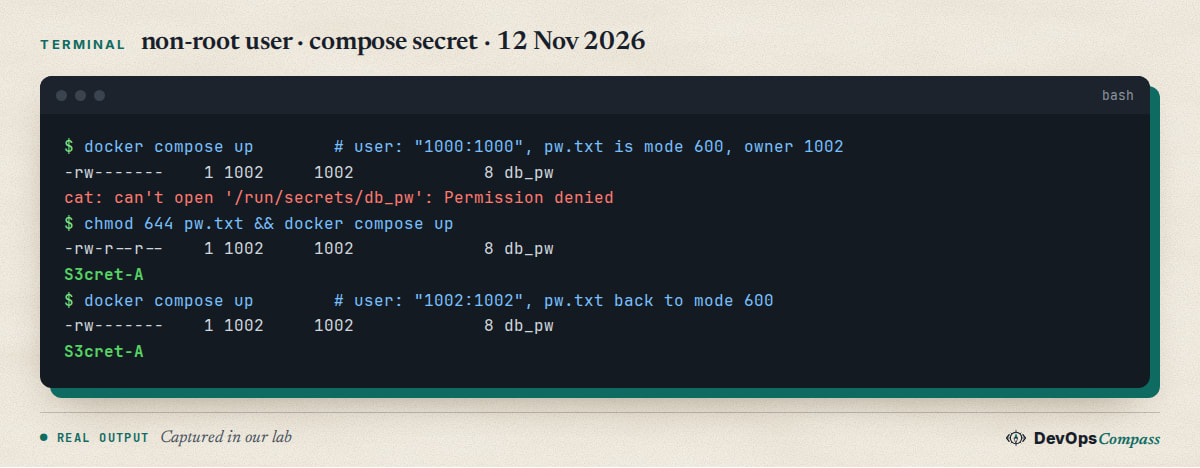
With user: "1000:1000" the file inside the container was owned by 1002:1002 with mode -rw-------, so uid 1000 could not open it. After chmod 644 it worked. With user: "1002:1002", the same uid as the file owner, it worked at mode 600 too.
This is the pattern in the old but still unanswered Stack Overflow question 53385930, where the author tried uid, gid and mode 0444 and still got Permission denied (os error 13). The next section shows why those options had no effect.
There are four fixes. Pick by how much you want to expose on the host.
| Fix | What you do | Our result |
|---|---|---|
| Open the file | chmod 644 pw.txt |
works, but every host user can read the file |
| Match the uid | user: "1002:1002" (the file owner's uid) |
works at mode 600 |
| Share a group | chmod 640 pw.txt and group_add: ["1002"] |
works; id showed groups=1000,1002 |
| Change the source | use environment: plus uid, gid, mode |
works (see below) |
The group variant is the narrowest. At mode 640 without group_add the container user got Permission denied; with group_add: ["1002"] (the file's group id) it read the secret. The same group_add idea fixes the Docker socket permission error.
Why are uid, gid and mode ignored for my secret?
The long syntax looks like it should work:
services:
  app:
    image: alpine:3
    user: "1000:1000"
    secrets:
      - source: db_pw
        uid: "1000"
        gid: "1000"
        mode: 0440
secrets:
  db_pw:
    file: ./pw.txt
Compose 5.7.0 prints three warnings and ignores all three fields:
level=warning msg="service \"app\": secrets.db_pw.gid: gid is not supported outside Swarm mode and will be ignored"
level=warning msg="service \"app\": secrets.db_pw.mode: mode is not supported outside Swarm mode and will be ignored"
level=warning msg="service \"app\": secrets.db_pw.uid: uid is not supported outside Swarm mode and will be ignored"
The container still saw -rw------- 1 1002 1002 and cat failed. The services reference explains it: support for uid, gid and mode is only implemented in Compose "when the source of the secret is environment"; with a file source, Compose uses a bind mount, which does not allow uid remapping, and the attributes "are silently ignored". They are not quite silent in 5.7.0, as the output above shows, but they are ignored.
The Compose maintainer confirmed it on 5 October 2026 in docker/compose issue 14283: uid and gid are not supported when the source is a file, and could be supported later once moby/moby pull request 53368 is merged. A year earlier, in issue 13287 (20 October 2025), the same maintainer wrote that the documented default of "the USER of the container" cannot be implemented by Compose because the Docker Engine does not offer the needed API.
File or environment: which source should I use?
The secrets reference allows two sources: file, and environment (the value of a variable on the host, Compose only). We ran the same non-root service with environment: DB_PW:
services:
  app:
    image: alpine:3
    user: "1000:1000"
    secrets:
      - source: db_pw
        uid: "1000"
        gid: "1000"
        mode: 0440
secrets:
  db_pw:
    environment: DB_PW
The file inside the container was -r--r----- 1 1000 1000 and cat printed the value. Compose still printed the same three "not supported outside Swarm mode" warnings, but this time they were wrong: the options were applied. The same pattern is reported for configs in issue 14283 ("Warns about uid/gid, but with inline configs they do work"). Without uid, gid and mode the file was -r--r--r-- 1 0 0, owned by root but readable by everyone, so user 1000 could read it.
The two sources are delivered differently, and that matters for security:
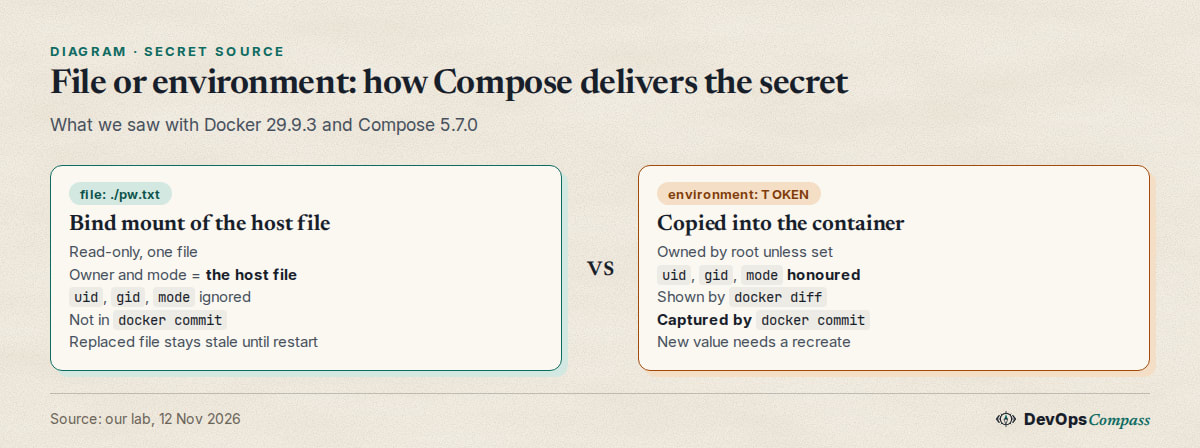
- File source: a read-only bind mount.
docker inspectlists it as a bind mount withrw=false, and/proc/mountsshows the host device mounted at/run/secrets/db_pw. - Environment source: Compose copies the value into the container.
docker inspectshowed no mounts,/proc/mountshad no secrets entry, anddocker difflistedA /run/secrets/tok.
The second case has a side effect we did not find in the docs. We ran docker commit on both containers and searched the saved image for the secret value. The environment-sourced value was in the image (1 match); the file-sourced value was not (0 matches). If you commit or snapshot a running container, an environment secret can end up in the image.
Our rule of thumb: use file: for a long-lived service when you control the file permissions, and environment: when you need uid, gid or mode, or when the value comes from a vault or CI variable and should never be written to disk on the host.
Can I source a secret from my .env file?
Yes, for the environment: source. A reader asked for this in docker/compose issue 14089 (18 August 2026), and the maintainer answered the next day that the variable does not have to be set in the host environment, because Compose resolves it against the environment it assembles, including the project's .env file.
We checked it. With DB_PW=S3cret-from-dotenv only in .env and not exported, the container read exactly that value. When the variable is set nowhere, up stops with a clear message:
environment variable "DB_PW" required by secret "dcsec_db_pw" is not set
Remember that a value in .env is still plaintext on disk. The benefit is that it is not copied into environment: of the service, so docker inspect does not show it. For precedence rules between .env, env_file and environment, see our guide on Compose .env vs env_file vs environment.
Why does the container still show the old secret after I changed the file?
This one has no clear answer in the docs. We changed the secret file of a running container in two ways:
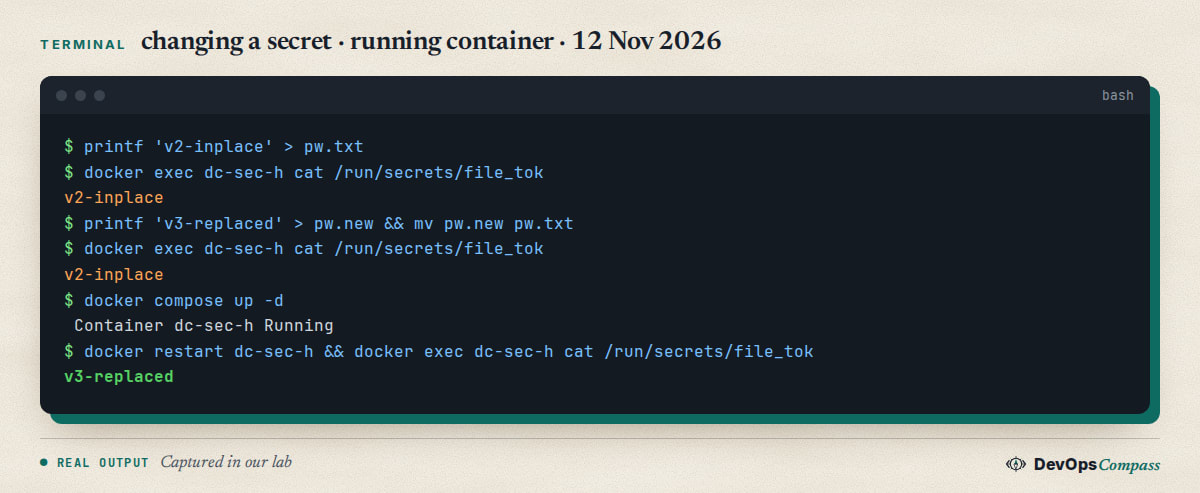
Overwriting the file in place (printf ... > pw.txt) showed up at once, because the bind mount points at the same inode. Replacing the file (mv pw.new pw.txt, which is what many editors and sed -i do) did not: the running container kept the old content. docker compose up -d printed Running and changed nothing, since the service definition had not changed. docker restart re-resolved the mount and the container saw the new value.
The environment source behaved the same way for changes: with TOKEN=first at creation and TOKEN=second on the next up -d, Compose answered Running and the file still held first. To apply a changed secret, restart the container for a replaced file, or run docker compose up -d --force-recreate, which recreated our container and showed the new file content. We did not re-run the recreate for the environment case. Do not expect up -d alone to notice a changed secret.
A related limit: secrets are bind mounts of local files, so a remote DOCKER_HOST or Docker context cannot see them. docker/compose issue 11867 asks for copying instead of mounting and is still open.
Why does my secret end with a newline, and does it matter?
echo 'hunter2' > nl.txt writes 8 bytes, the 7 characters plus \n. printf 'hunter2' > nonl.txt writes 7. Compose delivers the file unchanged, and inside the container wc -c printed 8 and 7, and od -c showed the trailing \n.
Whether it matters depends on the program. The official postgres image reads the file with val="$(< "${!fileVar}")", and command substitution drops trailing newlines. We started postgres:16-alpine with POSTGRES_PASSWORD_FILE pointing at the 8-byte file, connected through the container's IP address (loopback is trusted in that image, so it proves nothing), and hunter2 was accepted while wrong was rejected. A program that reads the whole file without trimming, such as open(path).read() in Python, would keep the newline and fail the comparison. Use printf or echo -n to create secret files, and strip in the reader when you can.
How do I use a secret with an image that has no _FILE variable?
Only some images read VAR_FILE variables. The Docker docs call it "a convention used by some images", with mysql and postgres as examples. For an image that expects APP_PASSWORD, add a tiny wrapper that exports the file content before the real process starts:
services:
  app:
    image: alpine:3
    entrypoint: ["/bin/sh", "-c"]
    command:
      - |
        export APP_PASSWORD="$$(cat /run/secrets/pw)"
        exec your-real-command
    secrets: [pw]
Note the doubled $$, which stops Compose from interpolating the variable itself. In our run the variable was unset before the wrapper, set after it, and visible to child processes. That last point is the trade-off: once the value is an environment variable of the process, it is in /proc/<pid>/environ and is inherited by children, so you give up part of the benefit.
Are Compose secrets really safer than environment variables?
Somewhat, and not against anyone with Docker access. We compared a plain environment: variable with a file secret in the same container:
| Where we looked | environment: variable |
file secret |
|---|---|---|
docker inspect Config.Env |
value shown | not shown (0 matches) |
docker exec ... env |
value shown | not shown |
/proc/1/environ |
value shown | not applicable |
| child processes | inherit it | do not inherit it |
docker exec cat /run/secrets/name |
not applicable | value shown |
So a secret is not hidden from someone who can run docker exec or reach the Docker socket; it just avoids the accidental leaks: docker inspect output pasted into a ticket, env dumps in a crash report, and inherited variables. Treat access to the Docker socket as access to every secret on the host.
How do I pass a build secret without it ending up in the image?
Use a build secret, not a build argument. We built a tiny image twice. The first Dockerfile used ARG LEAKY and RUN --mount=type=secret,id=npm_token. The second used only the secret:
services:
  app:
    image: dc-sec-build:test
    build:
      context: .
      secrets: [npm_token]
secrets:
  npm_token:
    environment: NPM_TOKEN
With the ARG, docker history --no-trunc showed the value 4 times and docker save contained it once. With only the secret, both searches returned 0, and /run/secrets did not exist in the final image. During the build the secret was a 22-byte file -r-------- root that vanished afterwards. The value came from .env, as in the earlier section.
Does docker compose config print my secret?
For an environment: secret, no: docker compose config printed environment: API_KEY, the variable name, not the value. For a file: secret it printed the absolute path of the file. What config does print are variables that you interpolate elsewhere. A reader asked for automatic redaction in issue 14356 (17 October 2026); the maintainer answered on 20 October that config shows the real model and the default will not change. Run it with a clean environment, such as env -i PATH="$PATH" HOME="$HOME" docker compose config, before pasting the output anywhere.
Can I use Compose secrets without Swarm?
Yes, with file and environment sources. The external: true form is the part that needs a secret store Compose cannot reach. Ours stopped like this:
service:app:1 unsupported external secret db_pw
Secrets and configs were designed for Swarm, which is why so much of the vocabulary (uid, gid, mode, "outside Swarm mode") comes from there. For plain Compose on one host, treat them as a controlled way to put a file at /run/secrets/<name>.
What error do I get when the secret file is missing?
Compose warns first and Docker fails second:
level=warning msg="secret file dcsec_db_pw does not exist"
Error response from daemon: invalid mount config for type "bind": bind source path does not exist: /path/to/nope.txt
Note that docker compose config accepted the file with no error; the problem only shows at up. Compose names the secret <project>_<name>, so dcsec_db_pw is the secret db_pw of project dcsec.
We also checked renaming: target: renamed mounted /run/secrets/renamed, and an absolute target: /etc/app/token mounted the file at that path.
Common errors
| Message or symptom | Cause | Fix |
|---|---|---|
cat: can't open '/run/secrets/db_pw': Permission denied |
non-root user, file owned by another uid with no read bit | chmod 644, group_add, match the uid, or use environment: |
secrets.db_pw.uid: uid is not supported outside Swarm mode and will be ignored |
uid, gid, mode on a file: source |
they are ignored; fix the host file or use environment: |
environment variable "DB_PW" required by secret "dcsec_db_pw" is not set |
environment: source, variable in neither shell nor .env |
export it or put it in .env |
bind source path does not exist |
wrong path or missing secret file | create the file before up |
unsupported external secret db_pw |
external: true without a secret store |
use file or environment |
| old value after editing | file replaced (new inode) or environment value changed | restart, or up -d --force-recreate |
| password check fails but value looks right | trailing newline in the file | create it with printf |
FAQ
How do I use Docker Compose secrets?
Declare the secret in the top-level secrets section with a file or environment source, grant it to the service with secrets: [name], and read /run/secrets/name in the container. Create the file with printf, not echo, to avoid a trailing newline.
Why do Docker Compose secrets give permission denied?
For a file: source the mount keeps the host file's owner and mode. If the container user is not the owner and the file has no group or other read bit, the read fails. Use chmod 644, group_add, a matching user:, or an environment: source with uid and mode.
Do Docker Compose secrets work without Swarm?
Yes for file and environment sources. In our test external: true failed with unsupported external secret. The uid, gid and mode options are ignored for file: sources outside Swarm.
Can a Docker Compose secret come from an environment variable?
Yes: secrets: name: environment: VAR_NAME. The variable can come from your shell or from the project's .env file. Compose copies the value into the container, honours uid, gid and mode, and, in our test, the value was captured by docker commit.
Are Docker Compose secrets encrypted?
No. Outside Swarm a secret is a plain file: a read-only bind mount of your host file, or a copy of an environment value inside the container. They stay out of docker inspect output and child processes, but anyone with docker exec access can read them.
Why does my Compose secret not update?
A replaced file keeps the old inode, so the running container sees the old content until it restarts. Changing an environment-sourced value is not noticed by up -d. Restart the container, or run docker compose up -d --force-recreate.
What we did not test
We did not test Docker Swarm, Docker Desktop (it mounts files differently), rootless Docker, user namespace remapping, SELinux hosts, Windows containers (the docs say secrets are Linux-only), or an x86-64 host. We did not test external secrets with a real secret store, or the secrets-engine that a maintainer pointed to in issue 13821 for vault-style references. The file-mode behaviour is what we saw on one ext4 host; a NFS or CIFS bind source may behave differently. The postgres check proves the password is accepted, not that the entrypoint behaves the same in other versions.
Related guides
- Compose .env vs env_file vs environment: Which Wins?: where the variable behind an
environment:secret comes from. - Docker Compose healthcheck + depends_on: Tested Guide: start the database before the app reads its secret.
- Docker Socket Permission Denied: Fix the Group ID: the same
group_addidea for another file. - Claude Code Saved Your Password? Check settings.local.json: what to do when a secret already leaked into a config file.
Sources
- Docker docs: Manage secrets securely in Docker Compose, secrets top-level element and services reference, secrets.
- GitHub: docker/compose 14283, 13287, 14089, 14356, 11867 and moby/moby 53368.
- Stack Overflow: question 53385930 and question 78766147.
- Google autocomplete for "docker compose secrets", "docker compose secrets without swarm" and "docker compose secrets file permissions" (12 November 2026).
Last verified: November 2026 (12 November 2026, Docker 29.9.3, Compose 5.7.0, Ubuntu 22.04 arm64, alpine:3, postgres:16-alpine). Swarm, Docker Desktop, rootless Docker, SELinux and x86-64 hosts were not tested.
Header image: Image: DevOpsCompass.
Comments
Post a Comment