
Docker Socket Permission Denied: Fix the Group ID
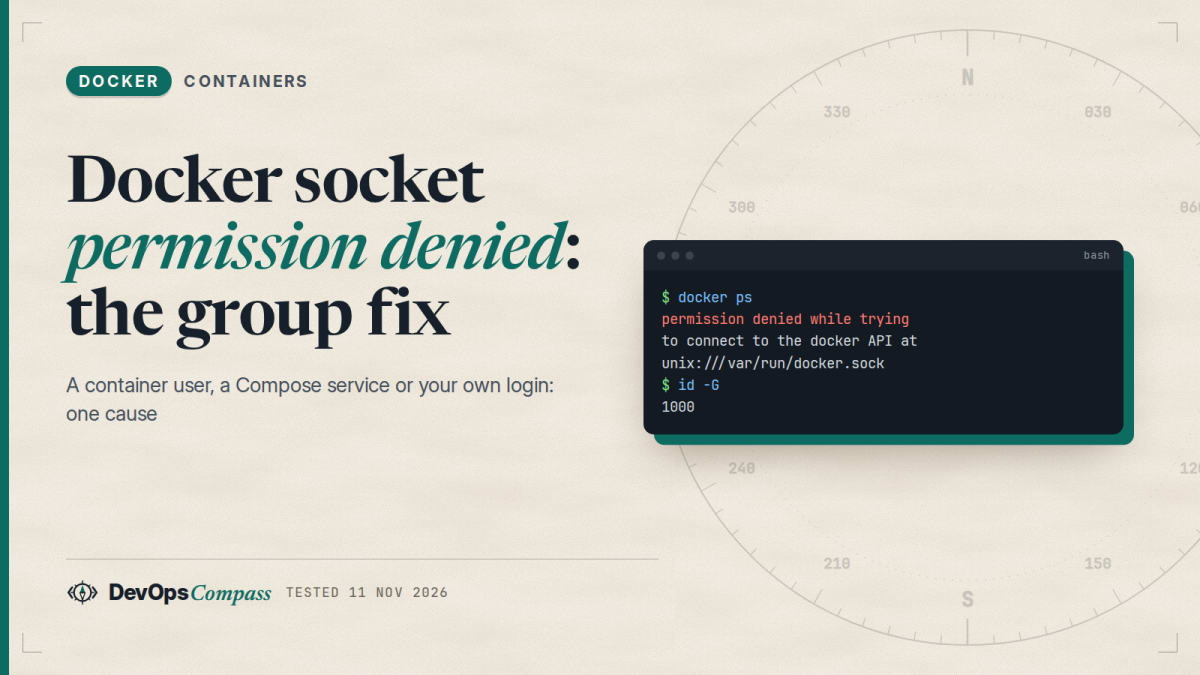
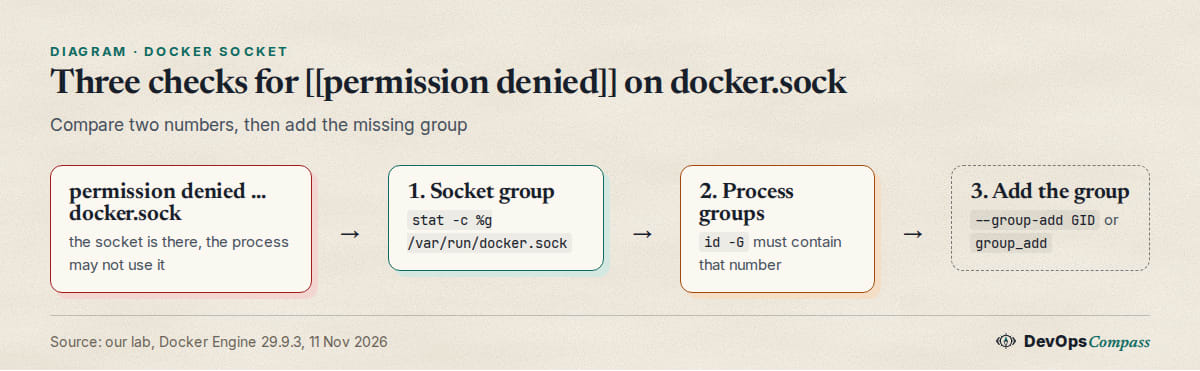
Short answer: the socket /var/run/docker.sock belongs to the group docker, and only that group (and root) may use it. The process that printed the error is not in that group. Read the socket's group ID with stat -c %g /var/run/docker.sock, then add that number: --group-add GID for docker run, group_add in Compose, or usermod -aG docker $USER for your own login.
How this was made: on 11 November 2026 we reproduced the error with a non-root user in a container on an aarch64 host with Docker Engine 29.9.3. We did not test a host login without the group, rootless mode or Docker Desktop.
The error as printed
A container ran as user 1000 with the host socket mounted. Docker found the socket but could not open it:
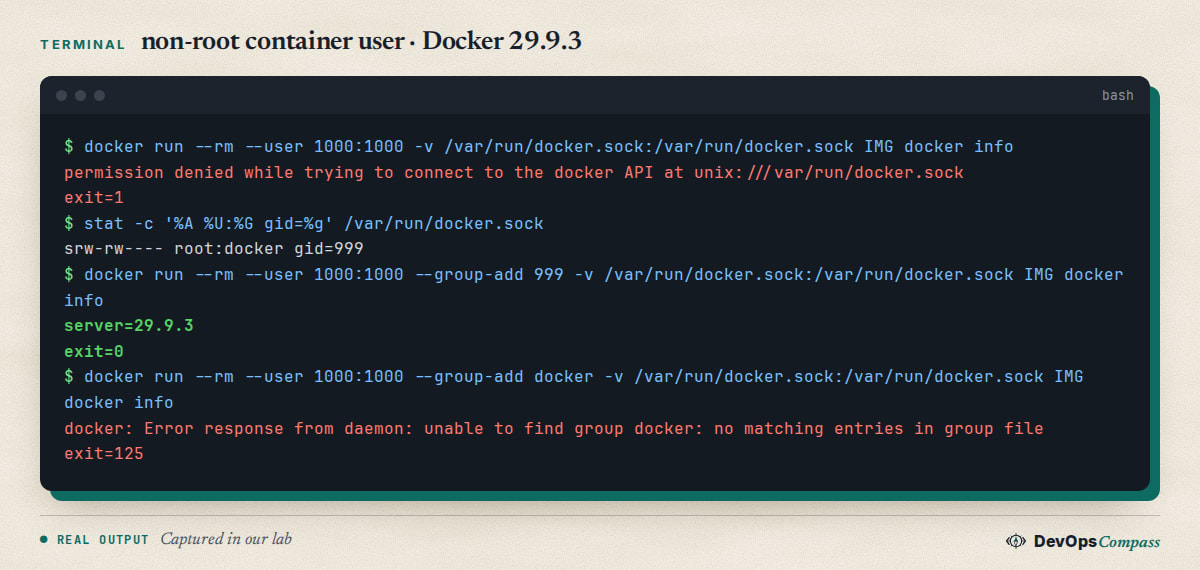
The message in Docker 29 is permission denied while trying to connect to the docker API at unix:///var/run/docker.sock. The socket exists, so this is not the "no such file or directory" error. Tools that talk to Docker (Traefik's Docker provider, Airflow, CI runners) print the same words, often in a loop, while the rest of the tool keeps running. A GitHub change of 11 November 2026 describes exactly that: Traefik ran as non-root, the Docker provider failed, and only routes from files still worked.
Find the socket's group ID
stat -c '%A %U:%G gid=%g' /var/run/docker.sock
id -G
Our host printed srw-rw---- root:docker gid=999. Mode rw-rw---- means root and the group may use it, everyone else gets nothing. The number is what matters: the name docker can mean a different number in another system or image. Now compare it with id -G of the process that fails. If the number is missing, you found the cause.
Host: user not in the docker group
If docker ps fails on the host but sudo docker ps works, your login is not in the group. The Docker docs say to run sudo usermod -aG docker $USER, then log out and back in so the membership is re-evaluated, or run newgrp docker for the current shell. People report that the group is added but docker is still denied: that is a session that started before the change, so id -G still lacks the number. We have no sudo on our lab host, so we did not test this case. Our container tests below show the same mechanism: a process only gets the groups it started with.
Fix 1: --group-add with the numeric GID
For a container that must use the host's Docker, pass the socket's group ID:
docker run --rm --user 1000:1000 --group-add 999 \
  -v /var/run/docker.sock:/var/run/docker.sock IMAGE docker info
In our test the user stayed 1000 and gained group 999. The command printed the server version and exited 0. Setting the group as primary (--user 1000:999) also worked. Use your own number from stat, not 999.
--group-add docker fails
The name looks nicer, but Docker looks it up inside the image, not on the host:
docker: Error response from daemon: unable to find group docker: no matching entries in group file
That was exit 125 on a stock Ubuntu image, which has no docker group. Use the number.
The docker group in the image has the wrong GID
Some images create a docker group at build time. That helps only if its number equals the host's. We built two images that differ in one build argument:
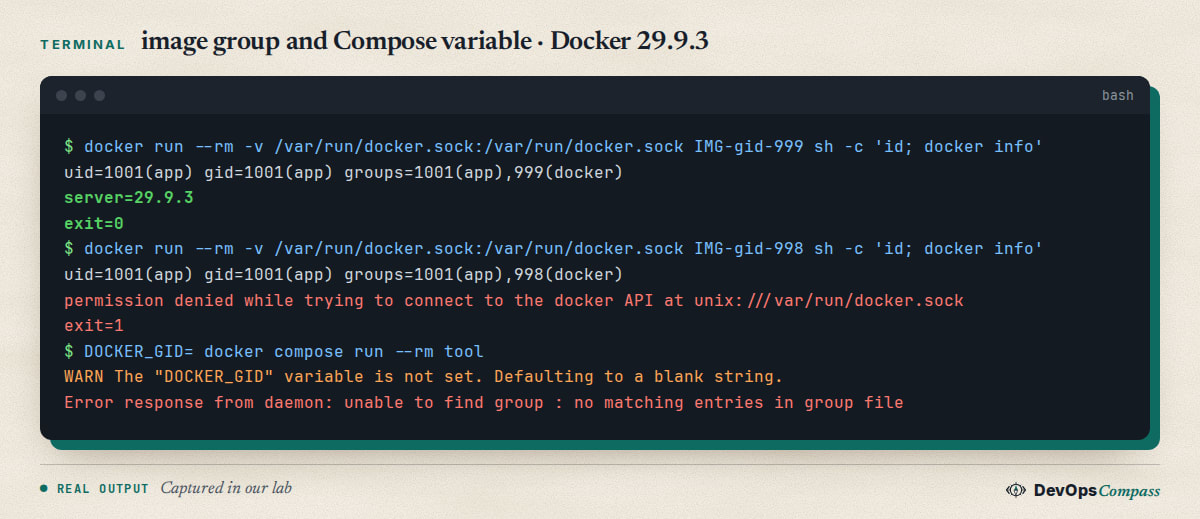
With GID 999 (the host's), docker info worked. With 998, id showed 998(docker) and Docker still said permission denied. A GitHub change of 9 November 2026 fixed a worker that failed for months for this reason. Either pass the host's number at build time or, better, use --group-add at run time.
Fix 2: group_add in Compose
Compose has the same option under the service. Take the number from an environment variable so the file works on more than one host:
services:
  tool:
    image: IMAGE
    user: "1000:1000"
    group_add:
      - "${DOCKER_GID}"
    volumes:
      - /var/run/docker.sock:/var/run/docker.sock
Run it with DOCKER_GID=$(stat -c %g /var/run/docker.sock) docker compose up. In our lab id -G inside the service printed 1000 999 and the command worked. Without group_add, the same service printed 1000 and was denied.
Compose: unable to find group
If DOCKER_GID is not set, Compose only warns and uses an empty string. The failure then looks unrelated to the socket:
WARN The "DOCKER_GID" variable is not set. Defaulting to a blank string.
Error response from daemon: unable to find group : no matching entries in group file
docker compose config showed group_add: [""]. Use ${DOCKER_GID:?set DOCKER_GID} in the file if you want Compose to stop with a clear message instead.
Does :ro protect the socket
No. A Stack Overflow question from May 2024 about giving a non-root user access to the socket has no answer. We mounted the socket with :ro and the container still listed containers and started a new one. The flag only makes the socket file read-only. It does not limit what the Docker API allows.
Is the docker group safe
Treat it as root. The Docker docs warn that the docker group grants root-level privileges. Anything that can use the socket can start a container with the host's disk mounted. Give it to people and tools you would give root to. For everything else, the docs point to rootless mode, which we did not test.
Verify and undo
Verify with docker info | grep -i 'server version' in the failing context: it prints a version, not the error. Undo a container fix by removing --group-add or the group_add lines. Undo a host change with sudo gpasswd -d $USER docker, then start a new login. We did not run that command.
FAQ
What does "permission denied while trying to connect to the docker API" mean?
The Docker CLI reached the socket file but the operating system refused to open it. The calling process is not root and not in the socket's group.
Why do I still get permission denied after adding myself to the docker group?
The running session keeps its old groups. Log out and in, or run newgrp docker, then check id -G. We reproduced the mechanism in containers, not on the host.
How do I use docker.sock from a non-root container?
Add the socket's numeric group ID with --group-add or group_add. In our test the container stayed user 1000 and the command worked.
Why does --group-add docker say unable to find group?
The name is resolved inside the image, which usually has no such group. Use the number from stat -c %g /var/run/docker.sock.
Is a read-only socket mount safe?
No. In our test the :ro mount still allowed listing containers and starting a new one, because the flag only protects the socket file. Treat socket access as root access.
Why does Compose say unable to find group with an empty name?
The DOCKER_GID variable was empty. Compose only prints a warning, then passes a blank group name to Docker, which cannot find it. Set the variable or make it required in the file.
Related guides
- Install Docker on Ubuntu 26.04 Server: the engine setup we used for tests.
- Docker Compose healthcheck and depends_on: Compose files tested the same way.
- Docker bypasses ufw: 4 fixes tested: another security trap in a default Docker setup.
Sources
- Docker docs: Linux post-installation steps, manage Docker as a non-root user.
- GitHub: Traefik non-root with Docker socket group access (DOCKER_GID).
- GitHub: Fix WACZ worker access to docker.sock.
- Stack Overflow: Docker DIND give non-root access to docker.sock.
- Stack Overflow: Accessing the host's Docker socket from a containerized Airflow setup.
- Google autocomplete for "docker permission denied" and its socket, ubuntu and group variants (11 November 2026).
Last verified: November 2026 (11 November 2026, aarch64 host, Docker Engine 29.9.3). Host logins without the group, usermod and newgrp, rootless mode, Docker Desktop and older CLI messages were not tested.
Header image: Image: DevOpsCompass.
Comments
Post a Comment