
Docker Compose healthcheck + depends_on: Tested Guide
Short answer: plain depends_on only waits until the other container is running, so an app can start while the database still refuses connections. Add a healthcheck to the database and use depends_on: db: condition: service_healthy in the app. In our lab this removed the failed connections. Two settings decide how fast it feels: interval (30 s by default) and start_period. A healthcheck never restarts a container by itself.
How this was made: on 8 November 2026 we ran about a dozen small Compose files with Docker 29.9.3 and Compose 5.7.0 on arm64, using postgres:16-alpine, redis:7-alpine and alpine:3. Everything ran in throwaway containers and was removed afterwards.
How do you make Docker Compose wait for a database?
Without a healthcheck, the short syntax is all you get:
services:
  app:
    image: alpine:3
    depends_on:
      - db
The Compose file reference says it plainly: Compose guarantees dependency services have started, and with the short syntax it does not wait for them to be healthy. A database needs a moment after its process starts. In our lab the app tried to reach db:5432 three times in a row and got REFUSED each time.
The fix has two parts. First, tell Docker how to test the database:
name: dc-hc
services:
  db:
    image: postgres:16-alpine
    environment:
      POSTGRES_PASSWORD: labpass
    healthcheck:
      test: ["CMD-SHELL", "pg_isready -U postgres -d postgres"]
      interval: 2s
      timeout: 3s
      retries: 10
      start_period: 3s
  app:
    image: alpine:3
    depends_on:
      db:
        condition: service_healthy
    command: ["sh", "-c", "echo app started; sleep 300"]
Second, make the app wait for it with condition: service_healthy. Here is what we saw on both versions of the file:
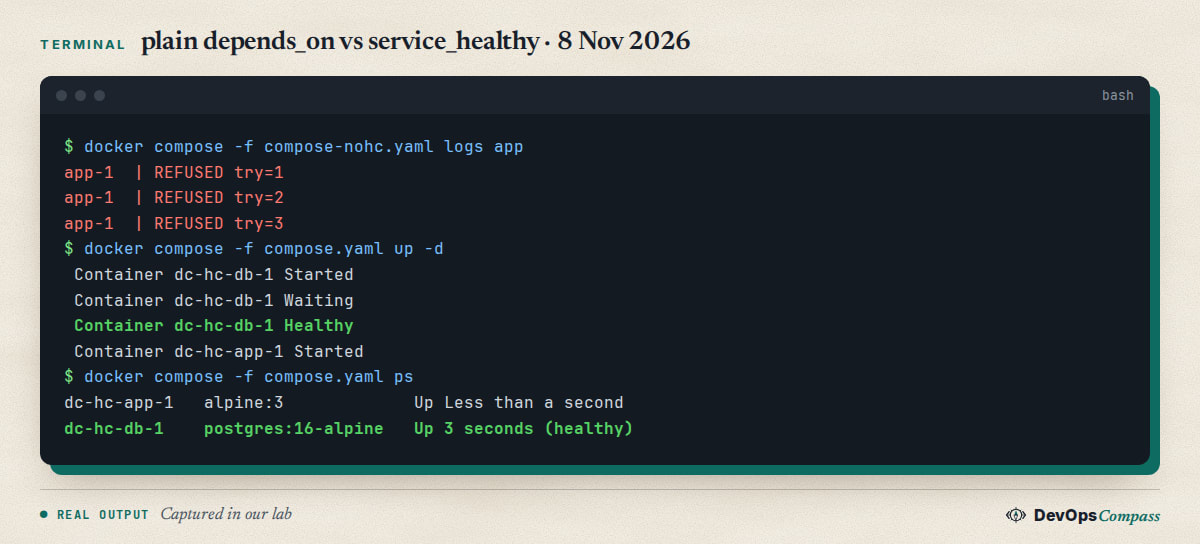
With the condition, Compose printed Waiting, then Healthy, and only then started the app. Four seconds after up -d, the database showed (healthy) and the app was up. The same file without the healthcheck started the app at once, and every connection attempt failed.
Use real credentials from a secret or an .env file in your own setup. labpass is only for a throwaway lab. For a full stack with a web UI, see our Open WebUI and Ollama Compose guide.
What do the healthcheck options do?
These are the defaults from the Dockerfile reference, which Compose follows:
| Option | Default | What it controls |
|---|---|---|
interval |
30s | Time between checks |
timeout |
30s | A check slower than this counts as failed |
retries |
3 | Consecutive failures before unhealthy |
start_period |
0s | Grace time at startup; failures are not counted |
start_interval |
5s | Time between checks during the start period (Engine 25.0 or later) |
The container status is starting first, healthy after one success, and unhealthy after retries failures in a row. The check command signals the result with its exit code: 0 is healthy, 1 is unhealthy, and 2 is reserved.
CMD or CMD-SHELL?
The test field takes a list whose first item is NONE, CMD or CMD-SHELL. A plain string means CMD-SHELL. Use CMD when you can, because it runs the program directly with no shell:
test: ["CMD", "redis-cli", "ping"]            # no shell needed
test: ["CMD-SHELL", "pg_isready -U $$POSTGRES_USER"]   # needs shell variable expansion
In a Compose file, write $$ when you want the container shell to expand a variable. A single $ is replaced by Compose before the container ever sees it.
How do you see what a healthcheck printed?
Docker keeps the last results, including the output of your command (the first 4096 bytes):
docker inspect dc-hc-db-1 | jq '.[0].State.Health'
Ours returned "Status": "healthy", "FailingStreak": 0, and in the log "ExitCode": 0 with "Output": "/var/run/postgresql:5432 - accepting connections". docker compose ps shows the same state in the status column.
One thing we tried and could not reproduce: a pg_isready check that passes too early. We ran it with and without -h 127.0.0.1, and in both cases the app could open a TCP connection on its first try. If you see an early "healthy" on another image, check the same way: connect from a second container after Healthy.
Why is service_healthy so slow?
This is a common complaint. A Stack Overflow question asks why a service takes about 30 seconds to become healthy, and its answer says start_period does not change the first check. That matches the old behaviour, but it is not what we saw on Compose 5.7.0 with Engine 29.9.3.
We started redis:7-alpine, which is ready immediately, with interval: 30s, and timed how long until it showed healthy:
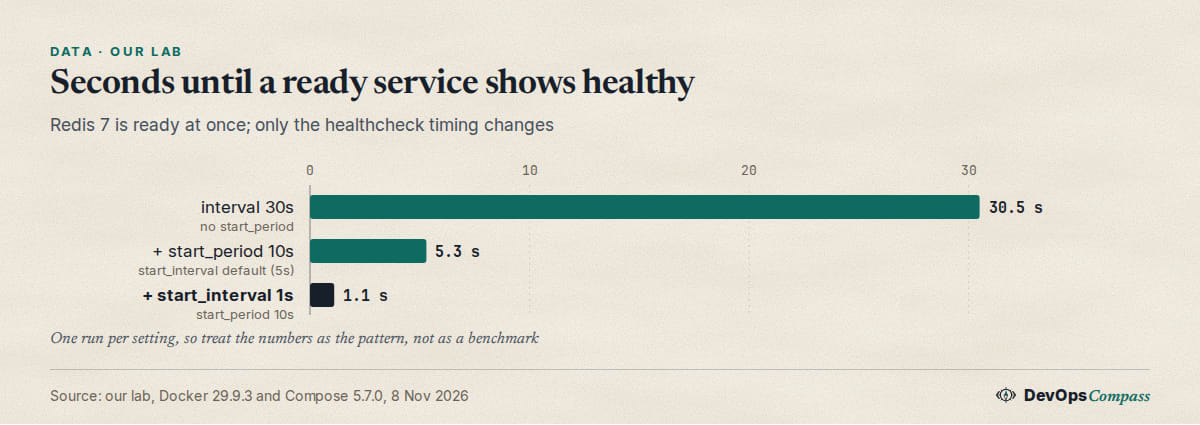
Alone, interval: 30s means a 30-second wait. Adding start_period: 10s cut it to 5.3 seconds, which fits the documented start_interval default of 5 seconds during the start period. Setting start_interval: 1s brought it to 1.1 seconds. So the tuning knob for fast startup is start_interval together with start_period, not a short interval for the whole life of the container.
healthcheck:
  test: ["CMD", "redis-cli", "ping"]
  interval: 30s
  timeout: 2s
  retries: 3
  start_period: 20s
  start_interval: 1s
That gives you quick checks while the service boots and a quiet 30-second rhythm afterwards. start_interval needs Docker Engine 25.0 or later, per the Dockerfile reference. On older engines, a short interval is the only option.
What does start_period really do?
It is a grace period, not a delay. We started a Redis that needs 8 seconds before it listens (interval: 2s, retries: 2) and watched its status:
start_period=0s    t+0s starting   t+4s unhealthy   t+8s healthy
start_period=10s   t+0s starting                    t+10s healthy
With no grace period, the container was labelled unhealthy at 4 seconds, even though it was only slow to boot, and then recovered. With 10 seconds of grace, the early failures were not counted. This matters because Compose treats an unhealthy dependency as a failure. We did not run depends_on on top of this exact case, but the curl example below shows what Compose does once it sees unhealthy.
Docker's own wording adds one detail: if a check succeeds during the start period, the container counts as started, and later failures do count toward retries.
Does an unhealthy container get restarted?
No. People expect it, but Docker only changes the label. We set restart: always on a service, deleted the file its healthcheck looked for, and waited:
running restarts=0 health=unhealthy
dc-hc7-app-1   Up 5 seconds
dc-hc7-web-1   Up 8 seconds (unhealthy)
The container kept running with zero restarts, and the dependent app was not stopped either. depends_on only checks health at startup. If you need self-healing, use an orchestrator, a watcher such as a small script that runs docker restart, or make the application exit when it is broken, so that restart: policies can act.
How do you restart a service when its dependency restarts?
Use the long syntax with restart: true (Compose 2.17.0 or later):
app:
  depends_on:
    web:
      condition: service_healthy
      restart: true
We ran docker compose restart web and the app restarted after web was healthy again (its StartedAt changed, and Compose printed Restarting). The reference says this covers explicit Compose operations only, not a restart by the container runtime after a crash.
How do you run migrations before the app starts?
Use service_completed_successfully for a one-shot service:
services:
  migrate:
    image: alpine:3
    command: ["sh", "-c", "sleep 2; echo migrated"]
  app:
    image: alpine:3
    depends_on:
      migrate:
        condition: service_completed_successfully
The app started only after migrate exited with code 0. If the migration fails, the app does not start. Combine it with a healthy database: the migration service depends on db with service_healthy, and the app depends on the migration.
Does docker compose up --wait work with one-shot services?
Not well. docker compose up --wait blocks until services are running or healthy, which is useful in CI. But with a service that finishes by design, we got this:
 Container dc-hc11-r-1 Healthy
container dc-hc11-setup-1 exited (0)
exit=1
The exit code was 1 even though the one-shot service exited with 0. This is docker/compose issue 10596, open since May 2023, and it still happened on Compose 5.7.0. A maintainer's answer there is that there is no way to declare that a service is not meant to keep running.
What worked for us:
docker compose up -dwith no--wait: exit code 0. Compose still waited forHealthybefore it started the dependent one-shot service.docker compose up -d --wait r, naming only the long-running service: exit code 0.
The Stack Overflow question make docker-compose block until healthy without depends_on gets a shell loop over docker inspect as an answer. With up --wait naming your services, you probably do not need that loop. Do not hide the exit code with || true, because it also hides real failures.
Common errors
dependency failed to start: container ... is unhealthy. Compose saw the dependency become unhealthy and stopped. Look at the health log first:
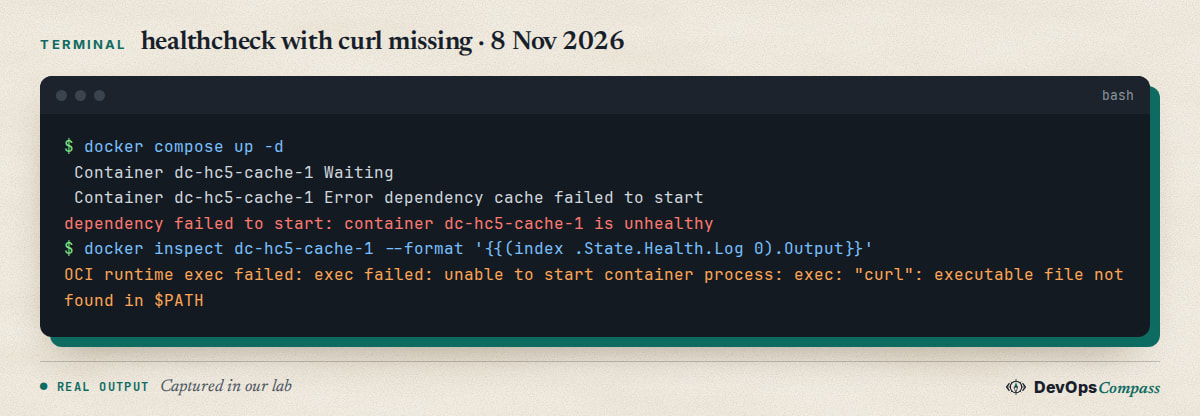
Our check used curl, which redis:7-alpine does not have. The log shows ExitCode: -1 and executable file not found in $PATH, not a connection error. Use a tool that exists in the image (redis-cli ping, pg_isready, or wget -q --spider on Alpine), or install curl in your image. up returned exit code 1.
The app starts, but the first connection still fails. The check passes before the service accepts real traffic. Make the check as close to real use as you can, such as a query or an HTTP path. A TCP port check is the weakest option.
depends_on ignores the condition. The short list form (- db) has no conditions. Switch to the map form shown above. Very old Compose file versions also rejected condition, so use a current Compose v2 or v5 with no version: key.
A hang with --abort-on-container-exit. Issue 14426 (open on 30 October 2026) reports that up --abort-on-container-exit can hang when a dependency exits before the dependent service starts. We did not reproduce it. If your CI hangs there, add a timeout.
Slow up even when everything is healthy. Issue 14384 found a fixed 500 ms sleep before the first dependency check. It was closed on 24 October 2026, and we did not check which release has the fix.
FAQ
Does depends_on wait for the container to be ready?
Not by default. The short syntax waits until the dependency has started, which does not mean it accepts connections. Add a healthcheck to the dependency and condition: service_healthy to the dependent service.
How do I disable a healthcheck that comes from an image?
Set healthcheck: { disable: true } on the service, or use test: ["NONE"]. This removes the check the image defined with HEALTHCHECK. Dependents that use service_healthy can then no longer wait for that service.
How often does a Docker healthcheck run?
Every 30 seconds by default, with a 30-second timeout and three retries. During start_period, the check runs every start_interval (5 seconds by default on Engine 25.0 or later). Our timing run showed the 30-second default delays the first healthy status.
Can I use curl in a healthcheck?
Only if the image contains it. Many slim and Alpine images do not. In our test, a missing curl made the container unhealthy with exit code -1. Use a tool from the image, or add curl in the Dockerfile.
What happens if the healthcheck never passes?
After retries failures, the container is unhealthy. Compose stops a service_healthy dependency chain with dependency failed to start. Docker itself does not restart or stop the container, as our test with restart: always showed.
Does service_healthy work with services outside Compose?
No. Compose can only wait for services in its own project. For an external database, use a wrapper script in the app's entrypoint that retries the connection, or a one-shot Compose service whose job is to test the external address.
Related guides
- Open WebUI + Ollama with Docker Compose: Safe Setup (2026): a complete Compose stack that benefits from health checks.
- Install Docker on Ubuntu 26.04 Server (Compose v5, ufw Fix): get the Docker and Compose versions used here.
- externally-managed-environment in Docker: Dockerfile Fixes: another fix for builds that run in Compose.
- Podman 6 Breaking Changes: What to Check Before Upgrading: if you run Compose files on Podman, check what changed.
Sources
- Docker docs: Compose services reference, depends_on and healthcheck.
- Docker docs: Control startup and shutdown order in Compose.
- Docker docs: Dockerfile reference, HEALTHCHECK.
- Stack Overflow: service_healthy is super slow and block until healthy without depends_on.
- GitHub: docker/compose issues 10596, 14426 and 14384.
- Google autocomplete for "docker compose healthcheck", "docker compose depends_on" and related seeds (8 November 2026).
Last verified: November 2026 (8 November 2026, Docker 29.9.3, Compose 5.7.0, arm64, postgres:16-alpine, redis:7-alpine, alpine:3). Swarm, Podman Compose, Docker Desktop, x86-64, a real application under load and the fixed release of issue 14384 were not tested.
Header image: Image: DevOpsCompass.
Comments
Post a Comment