
Compose .env vs env_file vs environment: Which Wins?
Short answer: Compose reads variables in two different places, and they follow different rules. A value in .env or in your shell fills ${VAR} inside the Compose file, but it does not go into the container by itself. For the container, the order is: docker compose run -e, then values taken from the shell or .env through environment or env_file, then a fixed environment value, then env_file, then the image's ENV. In our lab the shell always beat .env, and an unquoted $ in a value silently cut a password short.
How this was made: on 10 November 2026 we ran about 40 small checks with Docker 29.9.3 and Compose 5.7.0 on arm64, using alpine:3 and a two-line image with ENV VALUE=1.5. Everything ran in throwaway containers that were removed afterwards. Swarm, Docker Desktop and Podman Compose were not tested.
Most "my variable is ignored" problems come from mixing up two features that share a file name. This guide separates them, shows the order that wins with real output, and covers the traps that the official page only mentions in passing: the blank string warning, dollar signs in passwords, restart versus recreate, and which .env file Compose reads when your Compose file is in another folder.
Which value wins: .env, env_file, environment or the shell?
First, the two jobs. Interpolation replaces ${VAR} in the Compose file itself, for example in image: alpine:${TAG}. Its sources are your shell and the .env file. The container environment is what the process inside the container sees. Nothing reaches it unless the service has an environment, an env_file or a run -e entry, as the Docker docs on setting variables explain.
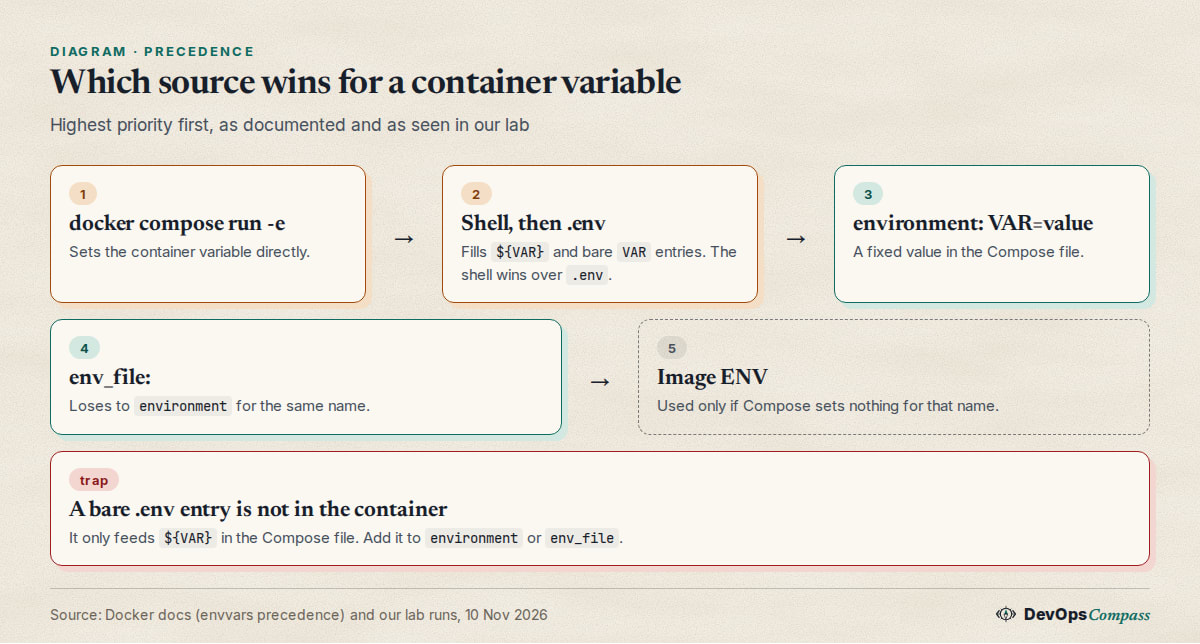
For the container, the precedence page gives this order, highest first:
docker compose run -eenvironmentorenv_fileentries whose value is taken from the shell or.env(a bareVAR, orVAR=${VAR})- a fixed
environment: VAR=value env_fileENVin the image
We checked this with one variable, VALUE. The .env file had VALUE=1.3, app.env had VALUE=1.6, and the image had ENV VALUE=1.5:
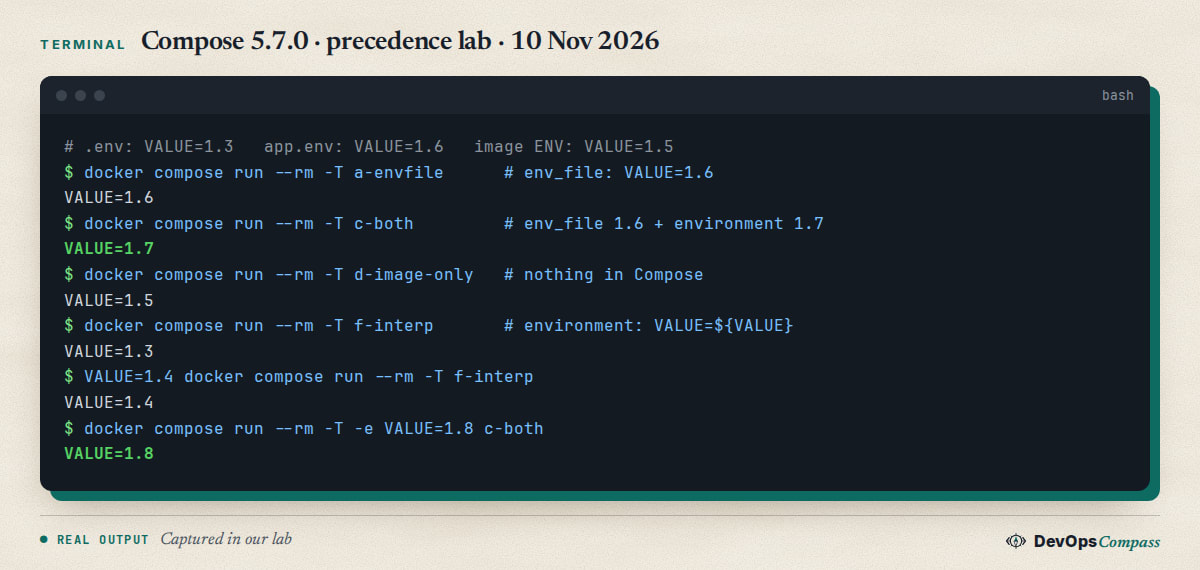
Read the output line by line:
env_filealone gave 1.6, and it beat the image's 1.5.env_fileplusenvironment: VALUE=1.7gave 1.7. A fixedenvironmentvalue beatsenv_file.- With nothing in Compose, the image's 1.5 stayed. The
.envvalue of 1.3 never reached the container. environment: VALUE=${VALUE}gave 1.3 from.env, and 1.4 when we setVALUE=1.4in the shell.run -e VALUE=1.8beat everything.
All of this matches the docs table. The surprising rows are the ones where a bare name is passed through, so the next two sections look at them.
Why does my .env variable not reach the container?
Because .env is not an environment file for the container. It only supplies values for ${...} in the Compose file. We proved it with a Compose file in a deploy/ folder and a project .env containing SECRET=hunter2:
docker compose -f deploy/compose.yaml run --rm -T web
(no SECRET or TAG in container)
The service printed nothing, because no environment or env_file entry mentioned SECRET. There are three ways to make it arrive:
services:
  web:
    image: alpine:3
    environment:
      - SECRET          # takes the value from the shell, then .env
      - API_URL=${API_URL}   # same, but Compose warns if it is missing
    env_file:
      - ./app.env       # a separate file only for the container
Use env_file when many variables should go in, and keep .env for the few values that shape the Compose file, such as image tags and ports. A bare SECRET is quiet when the value is missing. The docs say the same: no warning is issued for a bare name, while VAR=${VAR} warns. That difference decides how fast you find a typo.
Why does the host shell variable override my .env file?
Because the shell is the first source for interpolation, then --env-file, then the project .env. This is by design, and it is the most common reason a value "changes by itself". In the issue where a user asked how to force .env to win, the answer was the precedence page. A later commenter (3 February 2025) called its wording confusing.
Our test used a variable that exists in both places:
echo 'GREETING=from-dotenv' > .env
docker compose config | grep GREETING
GREETING=from-shell docker compose config | grep GREETING
      GREETING: from-dotenv
      GREETING: from-shell
A stale export GREETING=... in your ~/.bashrc, a CI variable or a direnv file can all do this. To see what Compose really used, print its environment, but start from a clean shell. docker compose config --environment lists the whole host environment, which can include tokens. In our first try the output contained one, so we removed it from our logs and re-ran with a clean environment:
env -i PATH="$PATH" HOME="$HOME" docker compose config --environment
If you want .env to win, unset the variable in the shell (unset GREETING) or pass the file explicitly with --env-file, which still loses to the shell. There is no flag that makes .env override the shell. The maintainers' answer in the issue about up -e is the reverse: if you need to override one value, set it in the shell for that command, API_KEY=xxx docker compose up.
Why does Compose say the variable is not set and defaults to a blank string?
The full warning is The "DB_PASSWORD" variable is not set. Defaulting to a blank string. It means Compose found ${DB_PASSWORD} in the file and had no value in the shell, in --env-file or in the project .env. Compose does not stop. It uses an empty string. It is a warning, so scripts that do not read stderr will miss it. This old question has a Stack Overflow thread with 50 votes and the same causes keep coming back.
Check these, in this order:
- The
.envfile is in the wrong folder. Compose reads it from the project directory (see the next heading), not from your current directory. - The variable is written in
env_fileonly. Anenv_filefeeds the container. It does not feed${...}in the Compose file. Put the value in.envfor interpolation. - A typo or a different case. Names are case-sensitive.
- You used
sudo.sudo docker composedoes not pass your shell variables by default, so a value you exported is gone. - You pass a different file.
--env-file prod.envreplaces the default.env; it does not add to it.
The blank value is not always harmless. With image: "alpine:${ALPINE_TAG}" we got image: 'alpine:', which is not a valid reference, and config still exited with code 0. Our own docker compose run for an empty database password also started happily. That is why defaults and required checks matter.
How do I set a default or make a variable required?
Use the braced forms from the interpolation docs:
services:
  web:
    image: alpine:${TAG:-3}
    environment:
      DB_PASSWORD: ${DB_PASSWORD:?DB_PASSWORD must be set in .env}
      MODE: ${MODE-prod}
The colon changes what counts as missing. We set an empty variable and compared:
EMPTY_DEFAULT=fallback      # ${EMPTY:-fallback}: empty counts as unset
EMPTY_DASH=                 # ${EMPTY-fallback}: empty is a real value
And the required form stops the run with a message that names the variable:
error while interpolating services.web.environment.[]: required variable DB_PASSWORD is missing a value: DB_PASSWORD must be set in .env
exit=1
Use :? for secrets and ports, because a blank value there starts a broken container. Use :- for harmless options such as tags.
Why is my password cut off after a dollar sign?
Compose interpolates unquoted and double-quoted values in .env and env_file. A $cd inside a password is read as a variable named cd, which is empty, so you get a warning and a shorter value. This is the topic of a long GitHub thread where users lost database connections after an upgrade.
We wrote the same password in four ways:
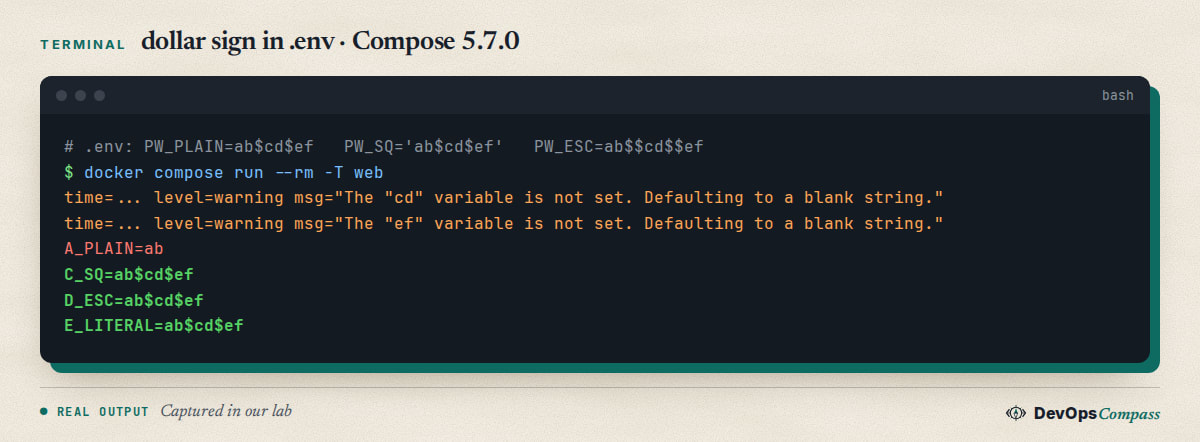
The result:
PW_PLAIN=ab$cd$efgaveab. Silent apart from two warnings.PW_DQ="ab$cd$ef"gaveabtoo. Double quotes still interpolate.PW_SQ='ab$cd$ef'gaveab$cd$ef. Single quotes are literal.PW_ESC=ab$$cd$$efgaveab$cd$ef.$$is an escaped dollar sign.- In the Compose file itself,
ab$$cd$$efalso gaveab$cd$ef.
Two things to watch. First, docker compose config prints $$ for every literal dollar sign, so a correct value can look doubled in its output. The container still received a single $. Second, docker run --env-file does not strip quotes: with the same file it printed G_SQ='ab$cd$ef' with the quotes included. If one file must serve both tools, avoid quotes and $ in values, or generate passwords without symbols that shells use.
Do I have to recreate the container after I change .env?
Yes. The container's environment is fixed when it is created. We started a service with GREETING=one, changed .env to two, and tried both commands:
$ docker compose restart
after restart: one
$ docker compose up -d
 Container dc-env3-web-1 Recreate
 Container dc-env3-web-1 Recreated
after up -d: two
restart keeps the old environment. up -d notices that the resolved configuration changed and recreates only the affected service. The same was true when we edited an env_file: up -d recreated the container and the new value appeared. You do not need --force-recreate for this.
One consequence: docker compose restart after a deploy is not a deploy. If your deploy script ends with a restart, change it to up -d. Related reading: healthchecks and depends_on matter when up -d recreates a service that others wait for.
Does variable substitution work inside an env_file?
In Compose, yes. In docker run --env-file, no. We used the same file in both tools:
TEST=12345
example=${TEST}
from_dotenv=${DOTENV_VAR}
with_default=${NOPE:-dflt}
With env_file: in Compose, the container received example=12345, from_dotenv=hello-from-dotenv (from the project .env) and with_default=dflt. With docker run --env-file, the container received the literal text example=${TEST}. The docs state it: interpolation in env files is a Compose feature.
An older Stack Overflow question reports that a second variable is not expanded, and a GitHub issue from August 2026 was closed after the reporter found that a wrapper tool had altered their file. We could not reproduce a failure on 5.7.0. If it fails for you, run docker compose config and docker compose run --rm web env, and compare the two.
Why does Compose ignore the .env next to my project when I use -f?
Because the project directory is the folder of the first Compose file, not your current directory. Our layout was r4/.env and r4/deploy/.env, with the Compose file in deploy/. Running from r4/:
$ docker compose -f deploy/compose.yaml config
    image: alpine:v1               # TAG=v1 came from deploy/.env
$ docker compose --project-directory . -f deploy/compose.yaml config
    image: alpine:latest           # now r4/.env is read; it has no TAG
When we deleted deploy/.env, Compose did not fall back to the .env in the folder we were standing in. Paths in env_file are relative to the Compose file too. A missing file is an error that names the full path:
env file /.../deploy/app.env not found: stat /.../deploy/app.env: no such file or directory
Mark optional files with required: false (Compose 2.24.0 and later, per the docs). With that, both missing files were silently skipped. A directory in place of a file fails with is a directory.
How do I override one variable on the command line?
There are three options, and one common guess that does not work. docker compose up -e FOO=1 is rejected:
unknown shorthand flag: 'e' in -e
Some older docs examples showed it. The issue was closed without adding the flag. Use one of these:
# 1. For interpolation or pass-through variables: set it in the shell for one command
API_KEY=xxx docker compose up -d

# 2. For a one-off container: run -e (highest precedence of all)
docker compose run --rm -e DEBUG=1 web

# 3. For a whole environment: choose another file
docker compose --env-file .env.staging up -d
run -e is only for run. We confirmed that -e VALUE=1.8 won over env_file and environment, and that -e VALUE without a value copied the shell value, or the .env value when the shell had none.
Why does include with env_file ignore my later env files?
When a top-level include lists several env_file entries, the later file should win, and it does, unless one of them is ./.env. We rebuilt the report from August 2026 with .env, .env.local and .env.dev, each setting TEST_VAL to its own name:
include env_file: .env, .env.local, .env.dev   ->  TEST_VAL: .env
CLI --env-file x3                               ->  TEST_VAL: .env.dev
include env_file without .env in the list       ->  TEST_VAL: .env.dev
... but with a project .env present again       ->  TEST_VAL: from-project-dotenv
The maintainer's closing explanation on 12 August 2026: the project .env is the default file, and it always wins over an env_file set by include, in the same way the shell wins over .env. So do not put .env in that list, and expect the project .env to beat it. It was closed as not a bug.
How should I write the .env file itself?
Our checks of the syntax rules from the docs, on Compose 5.7.0:
H1=value # comment          ->  value
H2=value# not a comment     ->  value# not a comment
H3="value # kept"           ->  value # kept
H4=  spaced value           ->  spaced value
H5=a=b=c                    ->  a=b=c
export H6=exported          ->  exported
A Windows file with CRLF line endings also worked: NAME=alice printed [alice] with no carriage return. A file starting with a UTF-8 byte order mark worked too (NAME: bob). We saw no problem there, so look elsewhere first if a Windows-made file fails. Quote values with spaces or #, never put spaces around = out of habit, and keep one variable per line.
Common errors
| What you see | Cause | Fix |
|---|---|---|
The "X" variable is not set. Defaulting to a blank string. |
No value in shell, --env-file or project .env |
Put it in the right .env, or use ${X:?message} |
Container has no variable that is in .env |
.env is for interpolation only |
Add it to environment or env_file |
Value is the old one after editing .env |
restart keeps the environment |
docker compose up -d |
Password shorter than expected, warnings about cd |
Unquoted $ is interpolated |
Single quotes or $$ |
unknown shorthand flag: 'e' in -e |
up has no -e |
Shell variable, run -e or --env-file |
env file ... not found |
Path is relative to the Compose file | Fix the path or required: false |
required variable X is missing a value |
${X:?} did the job |
Set the variable |
| Value differs between machines | A shell variable beats .env |
env -i plus docker compose config |
FAQ
What is the difference between env_file and environment in Docker Compose?
environment lists variables in the Compose file. env_file loads them from files. If both set the same name, environment wins. Both feed the container, and neither is used for ${VAR} in the Compose file.
Does .env override environment variables set in the shell?
No. The shell wins. Our test with GREETING returned from-shell even though .env had from-dotenv. Unset the shell variable, or run the command with env -i.
Is .env or env_file better for secrets?
Neither is a secret store. The Docker docs advise using secrets for sensitive data. If you must use a file, keep it out of Git and use chmod 600. Remember that any process in the container can read its variables, and docker inspect shows them.
How do I use one env file for both docker run and Compose?
Keep it to plain NAME=value lines without quotes, $ or ${...}. Then docker run --env-file and Compose read it the same way. Compose-only features such as interpolation and quotes are not understood by docker run, as our test showed.
Where does Docker Compose look for the .env file?
In the project directory: --project-directory if set, otherwise the folder of the first -f file, otherwise the current directory. --env-file replaces it.
Can I check what Compose resolved before starting?
Yes. docker compose config prints the final file with all values filled in. Do not paste its output into a public issue if it contains secrets. docker compose config --environment prints the host environment, so run it with env -i.
What we did not test
We did not test Swarm (docker stack deploy does not do .env substitution, per the docs), Docker Desktop, Podman Compose or older Compose 2.x versions, so version-specific claims about 2.24.0 and 2.30.0 come from the docs. We did not run x86-64 hosts, COMPOSE_ENV_FILES, the format: raw option of env_file, build.args interpolation, or secrets with file: sources. Issue 9578's original behaviour was seen by users on Compose 2.9 to 2.10; we only tested 5.7.0.
Related guides
- Docker Compose healthcheck + depends_on: Tested Guide: the next Compose setting that is often wrong.
- Docker Logs Filling the Disk? Set Log Rotation (Tested): another default that surprises people on a Compose host.
- Open WebUI + Ollama with Docker Compose: Safe Setup (2026): a full stack that uses
.envfor ports and keys. - Install Docker on Ubuntu 26.04 Server (Compose v5, ufw Fix): get the Docker and Compose versions used here.
Sources
- Docker docs: Environment variables precedence in Compose.
- Docker docs: Interpolation and
.envfiles and Set environment variables in a container. - Stack Overflow: Docker-Compose Environment-Variables blank string and env_file variable expansion not working.
- GitHub: docker/compose issues 9578, 9716, 11538, 13945 and 14125.
- Google autocomplete for "docker compose env", "docker compose environment variable not" and related seeds (10 November 2026).
Last verified: November 2026 (10 November 2026, Docker 29.9.3, Compose 5.7.0, arm64, alpine:3). Swarm, Docker Desktop, Podman Compose, x86-64 and older Compose 2.x releases were not tested.
Header image: Image: DevOpsCompass.
Comments
Post a Comment