
Ollama Not Using GPU? Checklist for NVIDIA, AMD, Docker
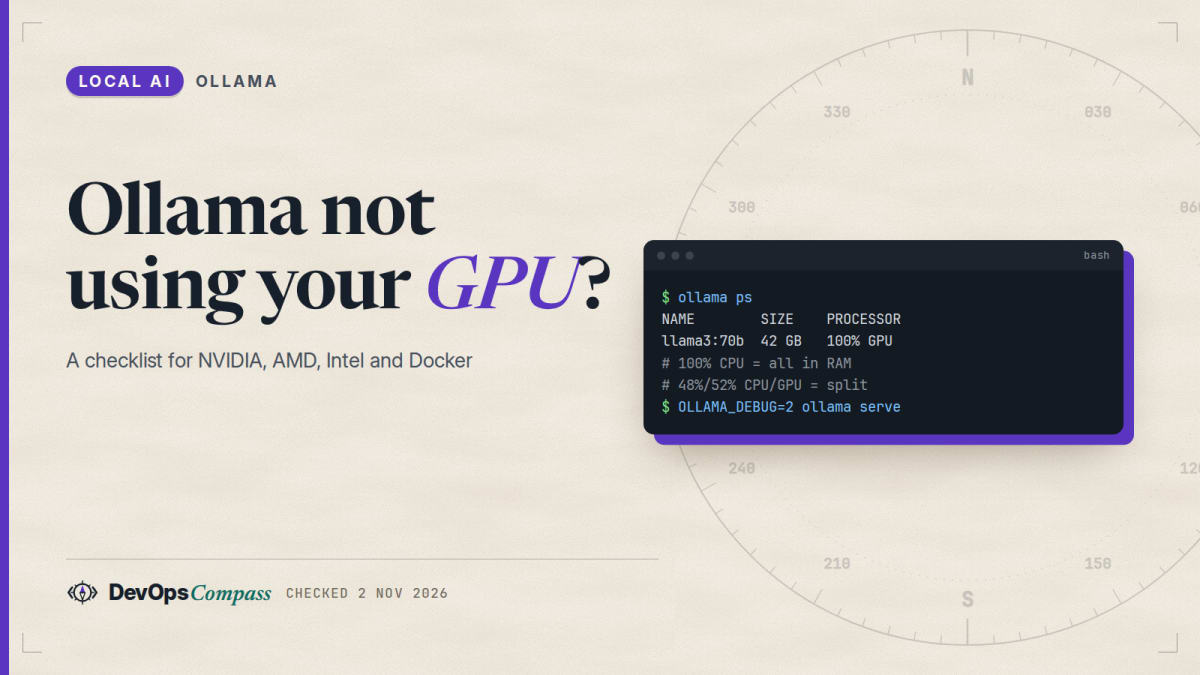
Short answer: run ollama ps and read the PROCESSOR column. 100% GPU is what you want. 100% CPU means Ollama found no usable GPU; a split such as 48%/52% CPU/GPU means the model plus its context did not fit in VRAM. For 100% CPU, read the server log (journalctl -u ollama on Linux, docker logs in a container) and look at the GPU discovery lines. The most common documented causes are an NVIDIA driver older than 550, a missing ROCm 7 driver on AMD, a container started without GPU access, and a GPU lost after suspend or an update.
How this article was made: a compilation of the Ollama GPU, troubleshooting, Docker and FAQ pages plus GitHub issues from July to November 2026, read on 2 November 2026 (Ollama v0.40.13). We did not run Ollama on a GPU for this post, so every command comes from the official docs or a named user report. The ordering and advice are our opinion.
People type this problem in many ways. Google suggests "ollama not using gpu windows", "...linux", "...after update", "...amd", "ollama no gpu detected" and "ollama running on cpu instead of gpu". The causes differ, but the first two checks are always the same, so this guide starts there and then goes through each case with the fix the docs or a user reported.
Official facts
Everything here comes from docs.ollama.com unless a link says otherwise.
How can I tell if Ollama is using the GPU?
The FAQ says to run ollama ps while a model is loaded. The PROCESSOR column shows where the model sits:
100% GPU: the model is entirely in GPU memory.100% CPU: the model is entirely in system memory.48%/52% CPU/GPU: the model is split between system memory and the GPU.
Do this after you sent one request, because a model that is not loaded does not appear. Then open the server log, which the troubleshooting page locates per platform:
| Where Ollama runs | Where the log is |
|---|---|
| Linux with systemd | journalctl -u ollama --no-pager --follow --pager-end |
| Docker or other container | docker logs <container-name> |
| macOS | ~/.ollama/logs/server.log |
| Windows | %LOCALAPPDATA%\Ollama\server.log |
ollama serve in a terminal |
the same terminal |
For more detail during GPU discovery, set OLLAMA_DEBUG=1. A maintainer asked users with discovery problems for OLLAMA_DEBUG=2 in the reports below, which prints more.
Which GPUs and drivers does Ollama support?
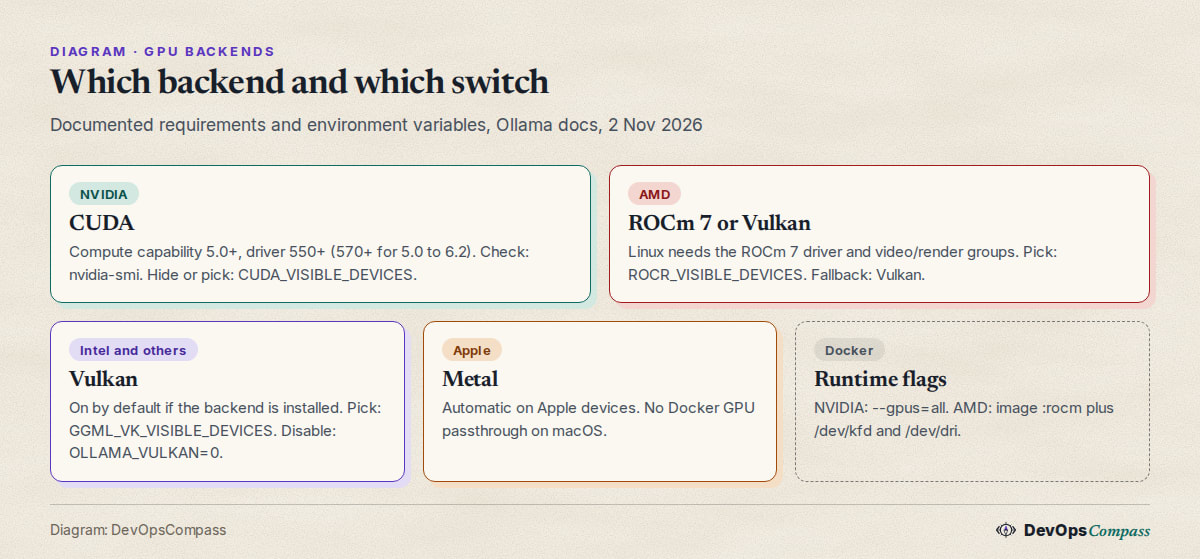
For NVIDIA the hardware page requires compute capability 5.0 or higher and driver version 550 or newer. Cards with compute capability 5.0 through 6.2 (for example GTX 750 Ti, GTX 1060 and 1070, Tesla P100) need driver 570 or newer. Run nvidia-smi to see your driver and check your card on NVIDIA's compute capability list.
If the GPU fails to initialise, the troubleshooting page says the log may show codes such as 3 (not initialised), 46 (device unavailable), 100 (no device) or 999 (unknown). It suggests, in order:
- In a container, check the runtime:
docker run --gpus all ubuntu nvidia-smi. If this fails, Ollama cannot see the GPU either. - Load the uvm driver:
sudo nvidia-modprobe -u. - Reload it:
sudo rmmod nvidia_uvmand thensudo modprobe nvidia_uvm. - Reboot, and use the latest NVIDIA driver.
If that does not help, set CUDA_ERROR_LEVEL=50 for more logs and check sudo dmesg | grep -i nvrm and sudo dmesg | grep -i nvidia.
What about AMD GPUs?
On Linux, Ollama needs the ROCm v7 driver, installed with the amdgpu-install utility from AMD. The docs say Ollama bundles ROCm 7 libraries that require a matching kernel driver. If the log shows failure during GPU discovery with failed to finish discovery before timeout and bootstrap discovery took duration=30s, the driver is too old, discovery hangs, and Ollama falls back to the CPU. The fix is to upgrade to ROCm 7, reboot and restart Ollama.
Other documented AMD points:
- Access to
/dev/kfdnormally needs your user (or theollamauser) in thevideoandrendergroups. - In a container, find the numeric group IDs with
ls -lnd /dev/kfd /dev/dri /dev/dri/*and pass them with--group-add. - On SELinux systems,
sudo setsebool container_use_devices=1lets containers use the devices. - For a card ROCm does not list,
HSA_OVERRIDE_GFX_VERSIONcan force a close LLVM target (for example10.3.0). The docs call this experimental. - Diagnostics:
AMD_LOG_LEVEL=3,OLLAMA_DEBUG=1, anddmesg | grep -i amdgpu.
Does Ollama use Vulkan, Intel GPUs and integrated graphics?
Yes, as a second route. The docs say Vulkan support for Windows and Linux "is enabled by default when the backend is installed". On Windows most GPU drivers bring Vulkan with them. On Linux you usually need extra packages, and you may have a choice between Mesa and vendor drivers; the docs link Intel and AMD instructions. For AMD on some Linux distributions you may need to add the ollama user to the render group.
One detail matters for scheduling: Vulkan needs extra capabilities or root to report free VRAM. Without them Ollama "will use approximate sizes of the models". The docs give sudo setcap cap_perfmon+ep /usr/local/bin/ollama for this. To switch Vulkan off, set OLLAMA_VULKAN=0 or GGML_VK_VISIBLE_DEVICES=-1. On a laptop with an integrated and a discrete GPU, the docs suggest keeping Vulkan on and setting GGML_VK_VISIBLE_DEVICES to the discrete GPU's index.
How do I use Ollama with a GPU in Docker?
The Docker page has three variants:
# CPU only
docker run -d -v ollama:/root/.ollama -p 11434:11434 --name ollama ollama/ollama

# NVIDIA (after installing the NVIDIA Container Toolkit)
sudo nvidia-ctk runtime configure --runtime=docker
sudo systemctl restart docker
docker run -d --gpus=all -v ollama:/root/.ollama -p 11434:11434 --name ollama ollama/ollama

# AMD
docker run -d --device /dev/kfd --device /dev/dri -v ollama:/root/.ollama -p 11434:11434 --name ollama ollama/ollama:rocm
The FAQ adds that GPU acceleration in Docker works on Linux and on Windows with WSL2, but not on Docker Desktop for macOS, which has no GPU passthrough. If you want the CPU-only route on purpose, see our CPU-only Docker guide. For a full stack with a web interface, see Open WebUI with Ollama in Docker Compose.
The troubleshooting page has one more Docker note: if Ollama first works on the GPU in a container but later switches to the CPU with GPU discovery errors in the log, disable systemd cgroup management in Docker by adding "exec-opts": ["native.cgroupdriver=cgroupfs"] to /etc/docker/daemon.json on the host.
How do I force the CPU or pick one GPU?
Each backend has a visible-devices variable, set on the server (not in your client shell):
| Backend | Variable | Force CPU |
|---|---|---|
| NVIDIA | CUDA_VISIBLE_DEVICES (UUIDs from nvidia-smi -L are more reliable than numbers) |
an invalid ID such as -1 |
| AMD ROCm | ROCR_VISIBLE_DEVICES (list with rocminfo) |
an invalid ID such as -1 |
| Vulkan | GGML_VK_VISIBLE_DEVICES |
-1 or OLLAMA_VULKAN=0 |
The troubleshooting page also describes an experimental OLLAMA_LLM_LIBRARY override, for example cpu_avx2, to bypass autodetection. That page's example library names are old, so use the exact library directory name from your install. A maintainer made the same point in a recent report: cuda is not a valid value, but the versioned directory name such as cuda_v13 is (see issue 18581 below).
When several GPUs are present, the FAQ says Ollama loads a model on a single GPU if it fits entirely there, and spreads it over all GPUs only if it does not.
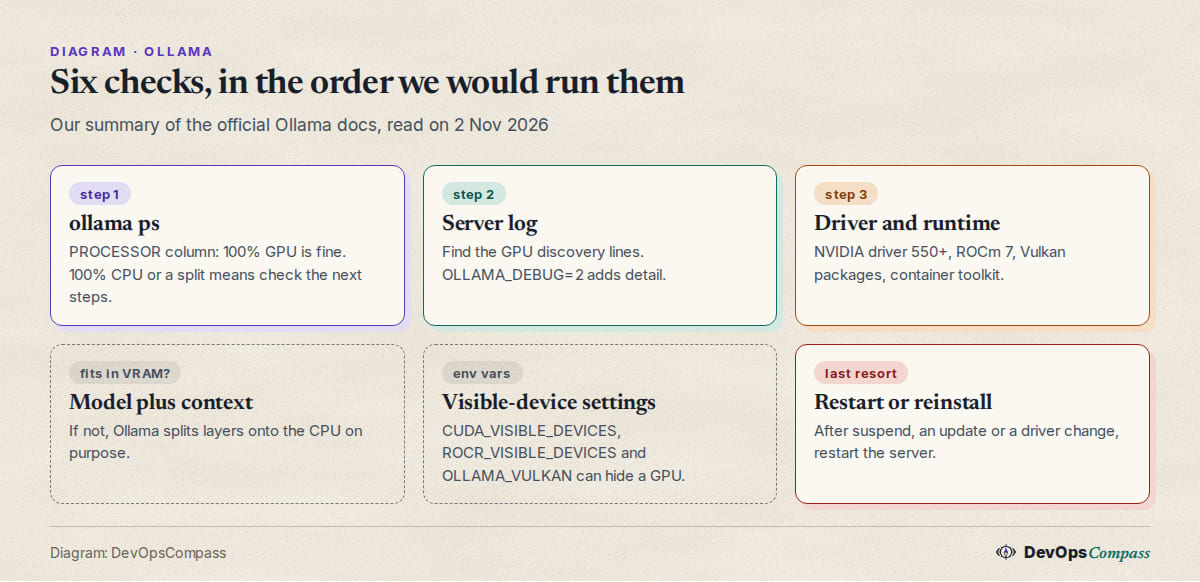
The checklist, in the order we would run it
This is our ordering, built from the documented steps above. Stop at the first step that explains your case.
ollama ps. Is it100% CPU, a split, or100% GPUbut slow?- Log, first GPU lines after startup. Look for the device list and a VRAM figure. In the user reports below, a failed discovery logs
total_vram="0 B",Available devices: (none)andinference compute id=cpu. - Driver version. NVIDIA 550+ (570+ for compute capability 5.0 to 6.2), ROCm 7 for AMD on Linux.
- Does the OS see the GPU?
nvidia-smi,rocminfoorvulkaninfo --summary. - Container flags.
--gpus=all, the:rocmimage,/dev/kfdand/dev/dri, group IDs. - Visible-device variables.
CUDA_VISIBLE_DEVICES,ROCR_VISIBLE_DEVICES,GGML_VK_VISIBLE_DEVICES,OLLAMA_VULKANandOLLAMA_LLM_LIBRARYleft over from earlier experiments. - Does it fit? A model plus context larger than free VRAM gives a split on purpose. See our context length guide and the VRAM table for coding models.
- Restart the server after a suspend, a driver change or an update.
Why did Ollama stop using my GPU after an update?
Two different things have been reported in 2026, and the log tells them apart.
The installer broke the CUDA backend (Windows). In issue 18712 (daleb0203, 30 September 2026, open when we checked) an RTX 5070 Ti stopped being detected after the desktop app updated itself. The log said total_vram="0 B" and inference compute id=cpu, while nvidia-smi worked. The reporter found ggml-cuda.dll missing from the cuda_v12 folder, with a large is-*.tmp file left beside the other DLLs, and says reinstalling Ollama (keeping the models) restored it. Another user in the thread suspected a file lock during the update's rename step; this was not confirmed. If your GPU vanished right after an auto-update, check that the CUDA backend folder under %LOCALAPPDATA%\Programs\Ollama\lib\ollama has the ggml-cuda.dll file.
The backend changed (Windows). In issue 19165 (piotyrgashek, 20 October 2026, closed) three NVIDIA cards were still used at 100% GPU after an update to 0.40.6, but through Vulkan instead of CUDA, with roughly 66 tokens a second instead of 70 to 72 on the reporter's setup. Setting OLLAMA_VULKAN=false brought CUDA and the old speed back. So a drop in speed after an update is worth a look at which backend the log names.
Newer GPU, newer driver (Windows). In issue 18581 (saroshwadia, 22 September 2026, open) two RTX 5060 Ti cards showed total_vram="0 B" on driver 616.92 after previously working. Forcing Vulkan mapped both cards. A maintainer replied that cuda is not a valid library name and that the exact directory name (for example cuda_v13) must be used, and asked why the reporter was not letting autodetection work.
In all three cases the first move was the same: read the log, see which backend was chosen, then change one thing at a time.
Why does Ollama ignore an older NVIDIA driver?
Because newer builds filter out GPUs the bundled CUDA backend cannot use. In issue 17290 (deliarmin, 21 July 2026, closed the next day) two Tesla P40 cards ran models at 100% CPU from Ollama v0.30.0 on, while v0.24.0 used the GPU. The reporter first suspected a regression and bisected versions, tried OLLAMA_FLASH_ATTENTION=0, num_gpu, OLLAMA_SCHED_SPREAD and CUDA_VISIBLE_DEVICES, and none of them changed anything. Then, with OLLAMA_DEBUG=2, the log showed the GPUs were filtered out (supported=map[]). The cause was driver 535, below the 550 minimum. Upgrading to the 580 driver (nvidia-driver-580 on Ubuntu 24.04) fixed it.
The lesson from that thread: nvidia-smi showing the card, and a container passing nvidia-smi, do not prove Ollama can use it. Check the driver number against the 550/570 rule, and read the debug log before trying settings. Our CPU-only Docker setup guide also covers what to do while a driver upgrade is not possible.
Why does the GPU work in Docker for nvidia-smi but not in Ollama?
Because nvidia-smi does not use the same driver path as CUDA compute. In issue 17069 (LynchFender, 7 July 2026, open when we checked) a GTX 1070 in Docker inside a Proxmox LXC container sometimes ran on the CPU because GPU discovery hit a 30-second watchdog timeout (context deadline exceeded) and the container then stayed on the CPU. Restarting the container worked in about one attempt out of fifteen. Another user (ulope, 17 July) reported something similar with an RTX 5090 passed through to an Ubuntu 26.04 VM, where docker run --rm -it --gpus all ubuntu nvidia-smi worked fine.
A maintainer's reading: the discovery step likely failed because the nvidia_uvm path was not working, and nvidia-smi does not exercise it. The suggestions were OLLAMA_DEBUG=2, dmesg lines for NVRM and Xid, ls -l /dev/nvidia* (is /dev/nvidia-uvm present?) and lsmod | grep nvidia. In that thread the second user found the device files present, so the cause stayed open. If you run Ollama in LXC, a VM with passthrough or nested containers, expect to debug the layer below Docker first.
Why does Ollama fall back to CPU after suspend or sleep?
The hardware page documents this for Linux: after a suspend and resume cycle, Ollama sometimes fails to discover the NVIDIA GPU and falls back to the CPU. The documented workaround is to reload the uvm driver with sudo rmmod nvidia_uvm && sudo modprobe nvidia_uvm. The docs call it a driver bug.
A similar case was reported on Windows (issue 18482, TommyLei666, 16 September 2026, open): an Intel Iris Xe laptop had been through several Modern Standby cycles, GPU discovery returned no devices at start, and every model stayed on the CPU until the server was restarted. A plain restart of the same version found the iGPU immediately. The reporter suspects Vulkan enumeration fails around a resume and the empty result is kept for the life of the process. This is their hypothesis, not a confirmed cause.
Why does ollama ps show a CPU/GPU split for a model that fits?
A split is not always a detection problem. By design, if the model and its context do not fit in free VRAM, some layers run from system memory. Context length, parallel requests and other loaded models all take memory; the FAQ says required RAM scales with OLLAMA_NUM_PARALLEL times OLLAMA_CONTEXT_LENGTH. Lower the context, set OLLAMA_NUM_PARALLEL=1, or unload the other model first.
Two open reports say the scheduler's estimate itself can be too high. In issue 19357 (Dinth, 28 October 2026) gemma4:e4b is predicted at 8.1 to 12.2 GiB depending on settings while the reporter's logs show about 3.12 GiB used on the GPU, so other models that would fit get evicted. In issue 19463 (kn1ghtc, 2 November 2026, macOS, Metal) the reporter says KV cache is over-predicted by 4 to 8 times for hybrid models, and evicts a model loaded with keep_alive: -1. We did not verify either. If a model "should" fit, compare the predicted figure in the log with nvidia-smi after loading.
What users report
These are attributed reports from GitHub, read on 2 November 2026. They are not verified by us, and open issues may be fixed in later builds:
- Old driver, CPU only. Two Tesla P40s ran 100% CPU until the driver went from 535 to 580 (deliarmin, issue 17290, July 2026, closed).
- Missing CUDA DLL after auto-update. RTX 5070 Ti on CPU with
total_vram="0 B"until a reinstall (daleb0203, issue 18712, September 2026, open). - Blackwell cards on Windows. Two RTX 5060 Ti cards fell back to CPU on one driver, and Vulkan worked as a bypass (saroshwadia, issue 18581, September 2026, open).
- Silent switch to Vulkan. Three NVIDIA cards ran through Vulkan after an update, a few tokens a second slower, until
OLLAMA_VULKAN=false(piotyrgashek, issue 19165, October 2026, closed). - Intermittent discovery timeouts in nested setups. Docker in LXC and passthrough VMs hit the 30-second watchdog (LynchFender, issue 17069, July 2026, open).
- Intel integrated GPUs on Windows. An Intel UHD GPU that Windows
vulkaninfolisted was reported as "(none)" by Ollama's bundledllama-servereven withOLLAMA_VULKAN=1andOLLAMA_IGPU_ENABLE=1set (PaulAI17, issue 18672, September 2026, closed). Another user saw a CPU fallback after upgrading from 0.32.15 to 0.33.2 that went away after a downgrade (japperJ, issue 18218, September 2026, closed).
The pattern: most reports are Windows or nested virtualisation, most are fixed by a driver, a reinstall or one environment variable, and the answer was almost always in the server log.
Our take
This is opinion, based on the docs and reports above:
- Read the log before changing settings. Almost every case above was solved or explained by the discovery lines, and a maintainer asked for
OLLAMA_DEBUG=2in most threads. Changing several variables at once makes it harder to know what helped. - Check the driver number first on NVIDIA. It is the cheapest check and one of the few that gives a silent CPU fallback.
- Do not set
OLLAMA_LLM_LIBRARYunless you have to. A maintainer asked why a user was overriding detection, and a wrong value makes things worse. Leave autodetection on and use the visible-device variables. - After an auto-update, if the GPU is gone, look at the backend folder and the log before reinstalling. A reinstall helped in one report, but you want to know whether it was the DLL or the driver.
- For nested setups (LXC, VM passthrough, Docker in Docker), treat the host as the first suspect. Fix
/dev/nvidia-uvmanddmesgfirst. - If you have no usable GPU yet, small models on CPU are fine. See the CPU-only Docker setup guide and the VRAM table for coding models to pick a size.
What we did not test
- We ran no Ollama server on a GPU, installed no driver and pulled no model for this post. Every command is from the official docs or a named issue and was not run by us.
- We did not reproduce any of the failures above, on any operating system or hardware.
- We gave no speed or memory numbers of our own. The token rates and VRAM figures belong to the issue reporters.
- We did not cover Jetson, Apple Silicon beyond the Docker note, Intel Arc driver set-up or multi-GPU tuning.
- Issues marked open may be closed by the time you read this; check the links.
FAQ
Why is Ollama using my CPU instead of my GPU?
Usually because it found no usable GPU. Common documented causes are an NVIDIA driver below 550, no ROCm 7 driver on AMD Linux, a container without GPU flags, or a GPU lost after suspend or an update. Run ollama ps and read the server log.
How do I check whether Ollama uses my GPU?
Load a model with one request, then run ollama ps. 100% GPU means fully on the GPU, 100% CPU means system memory only, and a split such as 48%/52% CPU/GPU means it is divided.
What NVIDIA driver version does Ollama need?
The docs say driver 550 or newer, and 570 or newer for GPUs with compute capability 5.0 to 6.2. Run nvidia-smi to see yours.
Does Ollama work with AMD GPUs?
Yes. On Linux it needs the ROCm v7 driver and membership in the video and render groups. In Docker, use the ollama/ollama:rocm image with /dev/kfd and /dev/dri. Vulkan is a second route for some cards.
How do I make Ollama use only the CPU?
Set CUDA_VISIBLE_DEVICES=-1 for NVIDIA, ROCR_VISIBLE_DEVICES=-1 for AMD, or OLLAMA_VULKAN=0 for Vulkan GPUs. Set it on the server process, not in your client shell, and restart the server so it takes effect.
Why does Ollama use the CPU after my computer wakes from sleep?
The docs describe a Linux case where the NVIDIA GPU is not rediscovered after suspend. Reload the driver with sudo rmmod nvidia_uvm && sudo modprobe nvidia_uvm, or restart the Ollama server.
Does Ollama work on Docker Desktop for Mac with a GPU?
No. The FAQ says GPU acceleration is not available there because Docker Desktop for macOS has no GPU passthrough. Run Ollama natively on the Mac to use Metal.
Related guides
- Run Ollama without a GPU: CPU-only Docker setup: the planned CPU route, with limits.
- Ollama context length: default, num_ctx and how to change it: why a model stops fitting in VRAM.
- Ollama models for coding: what fits in 8, 16 and 24 GB VRAM: pick a size for your card.
- Open WebUI and Ollama with Docker Compose: a Compose stack to add GPU flags to.
Sources
- Ollama docs: hardware support, troubleshooting, Docker, Linux install and FAQ (2 Nov 2026).
- Release: Ollama releases, v0.40.13 of 28 Oct 2026.
- GitHub issues: 17069, 17290, 18218, 18482, 18581, 18672, 18712, 19165, 19357 and 19463.
- Google autocomplete suggestions for "ollama not using gpu", "ollama no gpu detected" and "ollama running on cpu" (2 Nov 2026).
Last verified: November 2026 (2 November 2026; Ollama v0.40.13). Drivers, backends and defaults change; check docs.ollama.com.
Header image: Image: DevOpsCompass.
Comments
Post a Comment