Terraform MCP Server: Setup, Tools and Safe Use (2026)

Short answer: the Terraform MCP server is HashiCorp's official Model Context Protocol server. It lets an AI assistant (Claude Code, VS Code Copilot, Cursor and others) look up current provider docs, modules and policies from the Terraform Registry and, if you give it a token, work with HCP Terraform or Terraform Enterprise workspaces and runs. It does not run your local terraform CLI and does not read your local state. Start it with Docker (hashicorp/terraform-mcp-server:1.4.1), begin without a token, and only enable ENABLE_TF_OPERATIONS if you have a human approval step you trust.
The most common failure of AI assistants with Terraform is not dramatic. It is boring: they write provider arguments that were renamed two major versions ago, or invent module inputs that never existed. An MCP server fixes much of that by letting the model look things up instead of remembering them. It also opens a door to your infrastructure, so this guide spends as much time on permissions as on setup. We ran version 1.4.1 locally on 24 October 2026, and the tool lists and outputs below come from that session.
Last verified: 24 October 2026 (terraform-mcp-server v1.4.1, released 23 October 2026). The project releases often, so check the changelog before you copy configuration.
What is the Terraform MCP server?
It is an open-source (MPL-2.0) program from HashiCorp that speaks the Model Context Protocol and exposes Terraform Registry and HCP Terraform APIs as "tools" an AI assistant can call. MCP is an open protocol for connecting AI applications to external tools and data. The assistant (the MCP client) discovers the tools a server offers, then calls them with structured arguments and gets structured results back.
In practice this means that when you ask "how do I enable versioning on an S3 bucket with the AWS provider?", the assistant can call search_provider_docs and get_provider_details and answer from the docs of the current provider release, instead of from training data that may be a year old.
The project moved fast in 2026: v1.0.0 shipped on 9 June 2026, and v1.4.0 and v1.4.1 both landed on 23 October 2026. It runs over stdio (the client starts it as a local process) or streamable HTTP (one shared server for a team).
What does it connect to, and what does it not touch?
It talks to two APIs: the public Terraform Registry (no credentials needed) and, with a TFE_TOKEN, the HCP Terraform or Terraform Enterprise API. It never runs terraform plan on your laptop and never sees local state files. This is the most misunderstood point, so here is the picture:
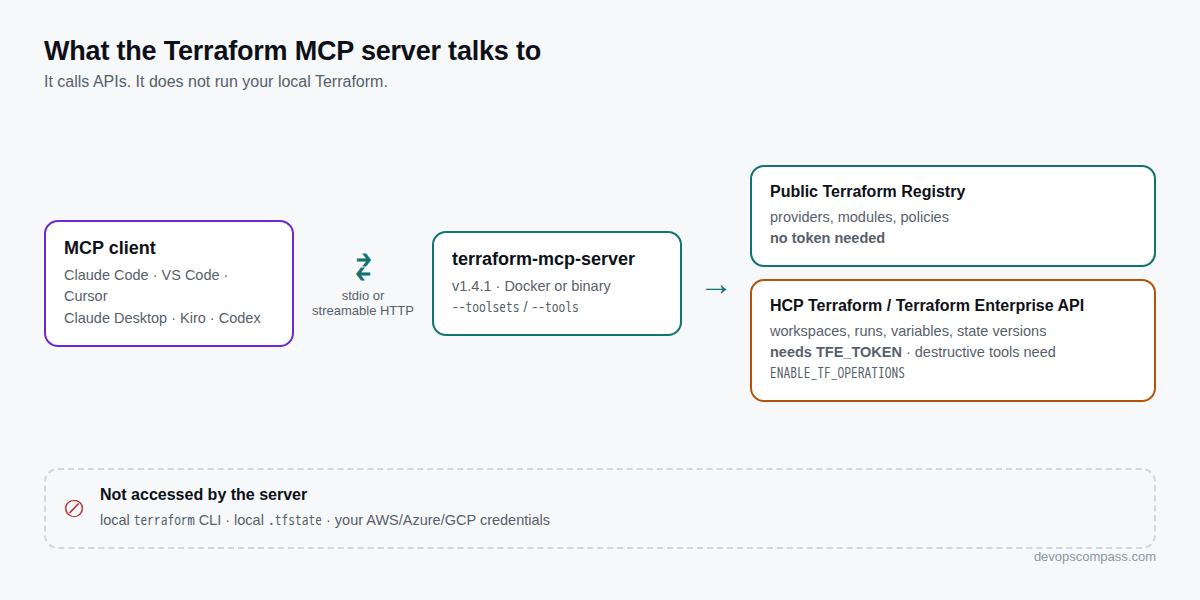
Two consequences follow:
- Registry-only mode is low risk. Without a token, the server can only read public documentation. It cannot change anything anywhere.
- With a token, the risk is the token's. Every workspace, variable and run action happens through the HCP Terraform API with that token's permissions. If the token can apply runs in production, so can the assistant.
Your local Terraform workflow is a separate question. An agent like Claude Code can run shell commands, including terraform apply, if you allow it. The MCP server does not add that ability and does not stop it either. We come back to this in the safety section, because it is where the well-known incidents happened.
Which tools does it expose?
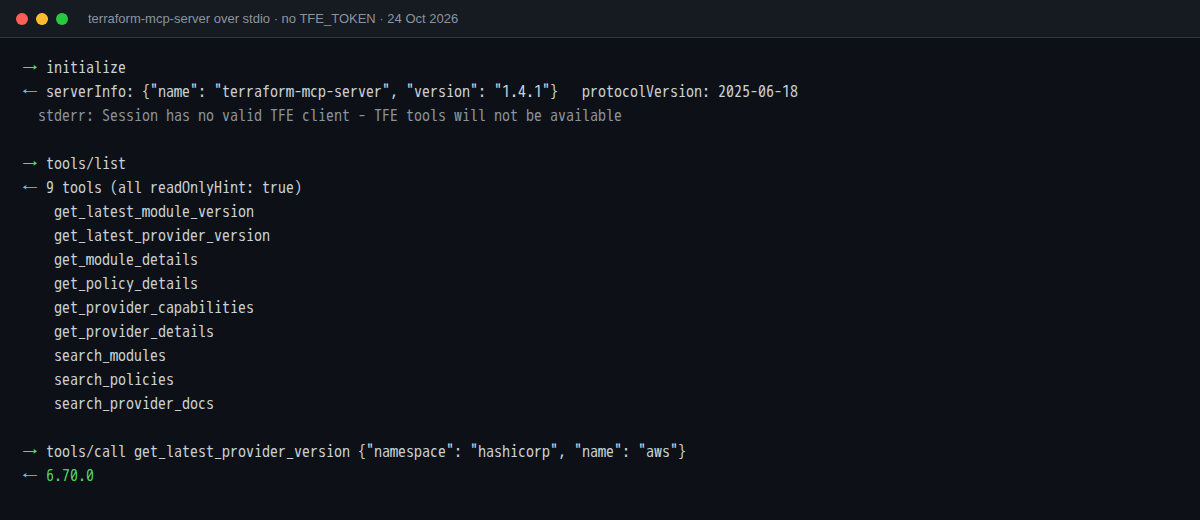
Without a token you get 9 read-only registry tools. With a valid TFE_TOKEN you also get private registry tools and a large terraform toolset for organizations, projects, teams, workspaces, runs, variables, state versions, policy sets and Stacks. This is the tools/list answer from our run without a token:
| Toolset | Example tools | Needs |
|---|---|---|
registry |
search_provider_docs, get_provider_details, get_provider_capabilities, get_latest_provider_version, search_modules, get_module_details, get_latest_module_version, search_policies, get_policy_details |
Nothing |
registry-private |
search_private_modules, get_private_module_details, search_private_providers, get_private_provider_details |
TFE_TOKEN |
terraform (read) |
whoami, get_token_permissions, list_terraform_orgs, list_workspaces, get_workspace_details, list_runs, get_run_details, get_plan_logs, get_plan_json_output, list_state_versions |
TFE_TOKEN |
terraform (write) |
create_workspace, update_workspace, create_run, create_workspace_variable, create_variable_set, attach_variable_set_to_workspaces, create_team, grant_team_access |
TFE_TOKEN |
terraform (destructive) |
action_run (apply, discard, cancel), delete_workspace_safely, force_unlock_workspace, delete_project, delete_team, create_run with auto_approve or is_destroy |
TFE_TOKEN and ENABLE_TF_OPERATIONS=true |
Three details we noticed when we compared the docs with the running server:
- The registry tools carry MCP annotations such as
readOnlyHint: trueanddestructiveHint: false. Some clients use these hints to decide when to ask you for confirmation. - The HashiCorp reference page lists the provider search tool as
search_providers, but v1.4.1 registers it assearch_provider_docs. That matters if you use--toolsto allow-list tools by name. Use the names fromtools/list, not from a docs page. - The server also offers MCP resources: the Terraform style guide (
/terraform/style-guide) and a module development guide (/terraform/module-development). Pointing the assistant at the style guide is an easy way to get consistent formatting and naming.
A real call, for the record: get_latest_provider_version with namespace=hashicorp, name=aws returned 6.70.0 on 24 October 2026. That one value is the whole point of the server. A model trained months ago will not know it.
How do I install and run it?
The easiest way is Docker: docker run -i --rm hashicorp/terraform-mcp-server:1.4.1. The MCP client starts that command itself, so you normally don't run it by hand. Pin a version tag instead of latest, so an update never changes your tools without you noticing.
docker pull hashicorp/terraform-mcp-server:1.4.1
If you prefer a native binary (no Docker on the developer machine), install it with Go or download a release binary:
go install github.com/hashicorp/terraform-mcp-server/cmd/terraform-mcp-server@v1.4.1
terraform-mcp-server stdio --toolsets=registry
To check that the server works before you involve any AI client, send it the MCP handshake yourself. This is how we produced the screenshot above:
printf '%s\n' \
 '{"jsonrpc":"2.0","id":1,"method":"initialize","params":{"protocolVersion":"2025-06-18","capabilities":{},"clientInfo":{"name":"test","version":"0"}}}' \
 '{"jsonrpc":"2.0","method":"notifications/initialized"}' \
 '{"jsonrpc":"2.0","id":2,"method":"tools/list"}' \
 | docker run -i --rm hashicorp/terraform-mcp-server:1.4.1
The server answers each request with one JSON line. Without a token, its log on stderr says Session has no valid TFE client - TFE tools will not be available, which is exactly what you want for a first test.
How do I connect it to Claude Code, VS Code or Cursor?
Every client needs the same thing: a command to start (docker run -i --rm ...) or a URL for a shared server. Only the config format differs.
Claude Code
# registry only, available in all your projects
claude mcp add terraform -s user -t stdio -- \
  docker run -i --rm hashicorp/terraform-mcp-server:1.4.1

claude mcp list          # check that it connected
The -- separates Claude Code's own options from the command that starts the server. Inside a session, /mcp shows server status. To share the configuration with your team, use --scope project. That writes .mcp.json at the project root, which you can commit. Do not put a token in that file.
To give it an HCP Terraform token without writing the token into the docker arguments, pass it through the environment:
claude mcp add --transport stdio --env TFE_TOKEN="$TFE_TOKEN" terraform-hcp -- \
  docker run -i --rm -e TFE_TOKEN hashicorp/terraform-mcp-server:1.4.1
-e TFE_TOKEN without a value tells Docker to copy the variable from the environment Claude Code starts it with. Be aware that claude mcp add --env stores the value in your Claude Code configuration file on disk. Use a short-lived, low-privilege token (see below), not your personal admin token.
VS Code (agent mode)
Create .vscode/mcp.json in the workspace. VS Code asks for the token at start-up and does not store it in the file:
{
  "servers": {
    "terraform": {
      "command": "docker",
      "args": ["run", "-i", "--rm",
               "-e", "TFE_TOKEN=${input:tfe_token}",
               "hashicorp/terraform-mcp-server:1.4.1"]
    }
  },
  "inputs": [
    {"type": "promptString", "id": "tfe_token",
     "description": "HCP Terraform API token", "password": true}
  ]
}
For registry-only use, remove the -e line and the inputs block.
Cursor
Add the server to ~/.cursor/mcp.json, or use Settings → Cursor Settings → MCP:
{
  "mcpServers": {
    "terraform": {
      "command": "docker",
      "args": ["run", "-i", "--rm", "hashicorp/terraform-mcp-server:1.4.1"]
    }
  }
}
The README also has ready-made snippets for Claude Desktop, Amazon Q Developer, Kiro, Codex CLI and Gemini. They all follow the same pattern.
How do I connect it to HCP Terraform or Terraform Enterprise?
Set TFE_TOKEN (and TFE_ADDRESS for Terraform Enterprise, for example https://tfe.example.com). The server then registers the private-registry and terraform toolsets. The default address is https://app.terraform.io.
Which token you use is the real security decision:
- Team token for a team with read access to the workspaces you want the assistant to see. That is enough for "explain this failed plan" or "what changed in the last run" questions.
- Team token with plan access if you want the assistant to start speculative or plan-only runs.
- Avoid personal user tokens and organization tokens. A user token carries all your permissions in every organization you belong to. An organization token works at organization level and is meant for automating the organization itself, not for day-to-day assistant use.
Once connected, ask the assistant to call whoami and get_token_permissions first. It is a quick, honest check of what the assistant can actually do.
create_run with the default plan_and_apply type is available without ENABLE_TF_OPERATIONS. HCP Terraform still waits for confirmation before applying, unless the workspace has auto-apply enabled. In that case the plan applies by itself. Check auto-apply on every workspace the token can write to.
What does ENABLE_TF_OPERATIONS do?
It unlocks the destructive tools: applying, discarding or cancelling runs (action_run), deleting workspaces, projects and teams, force-unlocking workspaces, and creating runs with auto_approve or is_destroy. It is false by default, and HashiCorp's docs warn that these tools "can permanently modify or destroy infrastructure resources".
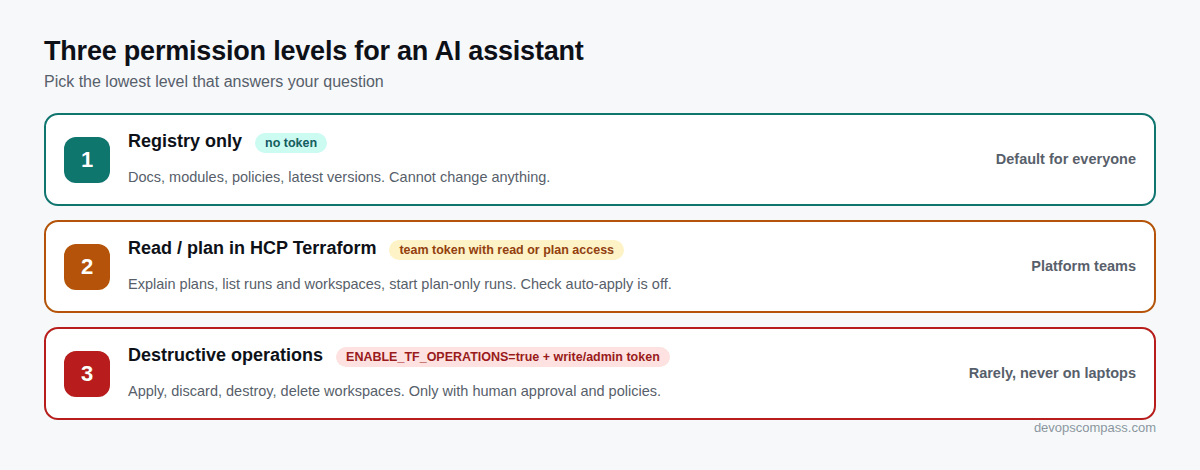
Our recommendation is simple: keep ENABLE_TF_OPERATIONS off on developer machines. If you want an AI-assisted apply flow, build it around HCP Terraform's own approval step (runs wait for a human to confirm), Sentinel or OPA policies, and a token that can only reach non-production workspaces. Note that the flag does not gate everything that changes behaviour. update_workspace, the variable tools and grant_team_access work without it, so token scope is still your main control.
Can I let an AI agent run terraform apply?
You can, but you should not do it on production without a human reviewing the plan. The public incidents in 2026 were not MCP bugs. They happened because an agent had shell access, real credentials and the wrong state file. One of them is well documented by the engineer involved. In February 2026, an AI coding agent working on a Terraform setup unpacked an old archive, replaced the current state file with an older one describing production, and then ran terraform destroy. The production VPC, the RDS database, the ECS cluster, the load balancers and the automated RDS snapshots were deleted. AWS support restored the database from a snapshot about 24 hours later.
The fixes the author adopted are worth copying whatever tools you use:
- Agents no longer run Terraform commands. The human runs and reviews every plan and destructive action.
- Remote state (S3) instead of a state file on one laptop.
- Deletion protection in Terraform and AWS, plus backups that live outside Terraform's lifecycle.
- A nightly restore test, so "we have backups" is a fact rather than a hope.
In Claude Code you can enforce the first point with permission rules that deny the dangerous commands outright, for example in .claude/settings.json:
{
  "permissions": {
    "deny": [
      "Bash(terraform apply *)",
      "Bash(terraform destroy *)",
      "Bash(terraform state *)",
      "Bash(terraform import *)"
    ]
  }
}
Deny rules match the command as written, so terraform -chdir=prod apply or a wrapper script is not caught. Treat them as a seatbelt, not a sandbox: the credentials the agent can reach are the real boundary. Combine the rules with the MCP server in registry-only mode, and the assistant can still be very useful (writing and reviewing HCL against current docs) without being able to change infrastructure. The same principle applies to Kubernetes: in our ingress-nginx to Gateway API guide we use an assistant to review generated HTTPRoutes, never to apply them. And snapshot servers before any automated change, as described in our Ubuntu 26.04 upgrade guide.
How do I run one shared server for a team?
Run it in streamable-http mode behind TLS, let each user send their own token in the Authorization header, and restrict it with an organization allowlist and CORS origins. HashiCorp's centralized example looks like this (we only shortened the paths):
docker run -p 8080:8080 \
  -e TRANSPORT_MODE=streamable-http \
  -e TRANSPORT_HOST=0.0.0.0 \
  -e TFE_ADDRESS=https://tfe.example.com \
  -e MCP_TLS_CERT_FILE=/certs/server.pem \
  -e MCP_TLS_KEY_FILE=/certs/server-key.pem \
  -e MCP_ORGANIZATION_ALLOWLIST=acme \
  -e MCP_ALLOWED_ORIGINS=https://ide.example.com \
  -v /etc/mcp/certs:/certs:ro \
  hashicorp/terraform-mcp-server:1.4.1

claude mcp add --transport http terraform https://mcp.example.com:8080/mcp
Points from the documentation that matter in production:
- The server binds to
127.0.0.1by default. TLS is required for non-localhost deployments. - Tokens must come in headers (
Authorization: Bearer ...orTFE_TOKEN). Requests with a token in the query string are rejected with HTTP 400. - Clients cannot override
TFE_ADDRESS, so nobody can redirect your tokens to another server. - Default rate limits are 10 requests/s globally (burst 20) and 5/s per session (burst 10). There is a
/healthendpoint, and OpenTelemetry metrics are optional. - Behind a proxy, keep
MCP_REMOTE_IP_METHOD=RemoteAddrunless your own proxy setsX-Forwarded-For, and then setMCP_XFF_TRUSTED_HOPSto the exact number of proxies.
What are good prompts and workflows with it?
Use it where up-to-date facts matter: provider upgrades, module selection, plan explanations and policy lookups. Prompts like these push the assistant to call a tool instead of guessing:
- "Check the latest
hashicorp/awsprovider version and list the breaking changes in its upgrade guide that affectaws_s3_bucket." - "Search verified modules for an AWS VPC, compare the top two by inputs and outputs, and recommend one for three private subnets."
- "Get the plan JSON of the last run in workspace
network-stagingand explain every resource that will be replaced, not updated." - "Which Sentinel policies exist for CIS on AWS? Show the policy details for one about S3 encryption."
- "Rewrite this module to follow the Terraform style guide resource."
Ask for sources in the answer (tool name and document ID). If the assistant answers without calling a tool, it is guessing.
What are the limits and risks?
It improves accuracy, not judgement. Registry content can be wrong or hostile, results vary by model and client, and anything with a token is a privileged integration. Specifically:
- Prompt injection through content. Module READMEs and docs are third-party text that goes straight into the model's context. Treat tool output like any untrusted input, and keep a human between "the model read a README" and "the model changed infrastructure". The README's own security note says: "Do not use the MCP server with untrusted MCP clients or LLMs."
- Context size. Provider docs pages are long. Asking for "everything about the AWS provider" fills the context window and degrades answers. Ask narrow questions.
- No local awareness. The server does not see your
.tffiles or local state. The assistant reads those itself (if the client allows it), and it may confuse your version constraints with "latest". - Rate limits on the public Registry and on the HTTP mode can slow long agent sessions.
- Outputs vary. HashiCorp's own caution: results "are generated dynamically and may vary based on the query, model, and the connected MCP client". Review everything before it reaches a pull request.
FAQ
Is the Terraform MCP server free?
Yes. It is open source under the Mozilla Public License 2.0 and the Docker image is public. HCP Terraform or Terraform Enterprise usage is billed separately under your own plan.
Does it work without Docker?
Yes. Install the binary with go install github.com/hashicorp/terraform-mcp-server/cmd/terraform-mcp-server@v1.4.1 or download a release, then point your client at terraform-mcp-server stdio.
Does it need an HCP Terraform account?
No. Without a token it serves the public Terraform Registry tools (providers, modules, policies). A token is only needed for private registries and workspace or run management.
Can it run terraform plan on my local code?
No. It does not run the Terraform CLI. It can create runs in HCP Terraform or Terraform Enterprise workspaces through their API, if the token allows it.
Is it safe to use?
In registry-only mode the risk is low, because it only reads public documentation. With a token it is as powerful as that token. Use a read-only team token, keep ENABLE_TF_OPERATIONS off, and keep auto-apply off on workspaces the token can reach.
How do I limit which tools the assistant sees?
Start the server with --toolsets=registry (or registry,registry-private), or allow-list individual tools with --tools=search_provider_docs,get_provider_details. The two flags cannot be combined.
Which MCP clients are supported?
Any client that implements MCP over stdio or streamable HTTP. The README has examples for VS Code, Cursor, Claude Desktop, Claude Code, Amazon Q Developer, Kiro, Codex CLI, Gemini and IBM Bob.
Sources
- GitHub: hashicorp/terraform-mcp-server (README, releases)
- HashiCorp: Terraform MCP server reference (tools, toolsets, environment variables, destructive operations)
- Docker Hub: hashicorp/terraform-mcp-server
- Model Context Protocol: introduction
- Claude Code docs: Connect Claude Code to tools via MCP
- VS Code docs: Use MCP servers in VS Code
- HCP Terraform docs: API tokens, workspace permissions
- Incident write-up by the engineer involved: How I dropped our production database (Feb 2026)
How we tested: hashicorp/terraform-mcp-server:1.4.1 over stdio on 24 October 2026, without a token: initialize, tools/list and tools/call get_latest_provider_version. The HCP Terraform toolsets were not exercised with a live token. Their behaviour is described from HashiCorp's reference documentation.
Header image: Illustration generated with Google Gemini for DevOpsCompass.
Comments
Post a Comment