
Open WebUI + Ollama with Docker Compose: Safe Setup (2026)
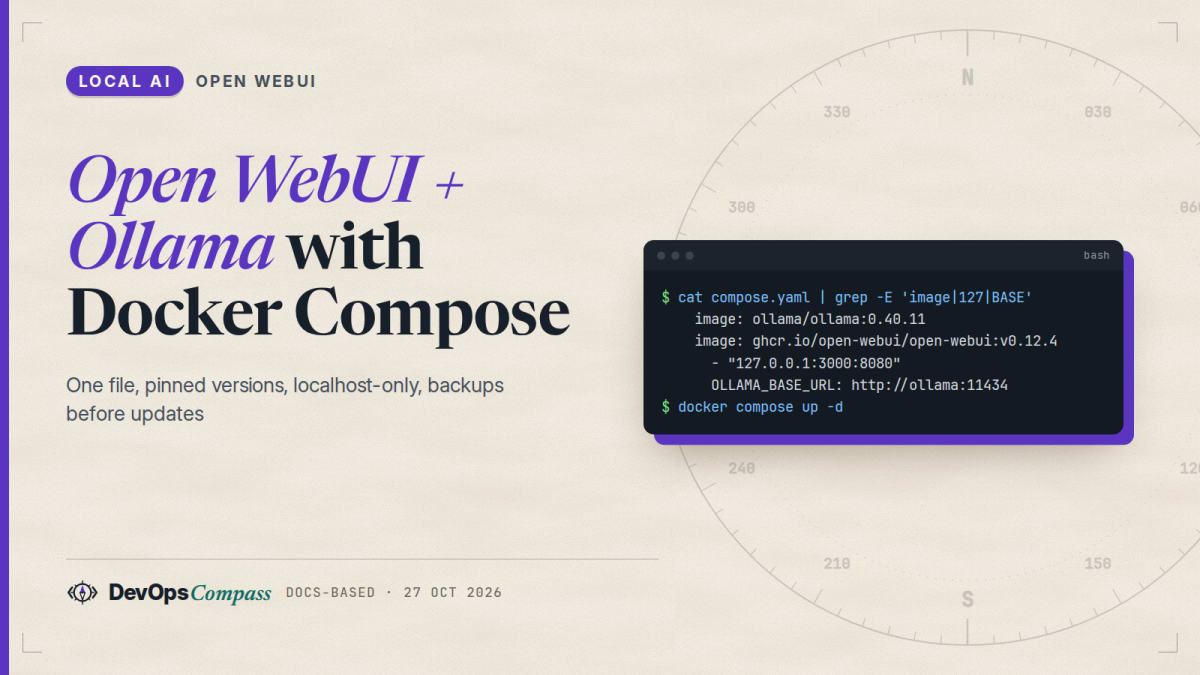
Short answer: put Ollama and Open WebUI in one Compose file, let Open WebUI reach Ollama by service name (OLLAMA_BASE_URL=http://ollama:11434), keep both data folders in named volumes, set a fixed WEBUI_SECRET_KEY, and publish only Open WebUI on 127.0.0.1:3000. Pin versions (Open WebUI v0.12.4 and Ollama 0.40.11 on 27 October 2026), back up the open-webui volume before every update, and create your admin account right after the first start: the first account becomes the admin. How this article was made: a guide built from the official Open WebUI and Ollama docs plus attributed user reports. We only validated the Compose file with docker compose config; we did not pull the images or run a model on our server.
Open WebUI is a widely used browser front end for Ollama: a ChatGPT-style interface for the models on your own machine. The official docs show several ways to install it. This guide picks one, the two-container Compose setup, and explains each line, the security defaults worth changing, and the errors people hit most.
Official facts
Everything in this section comes from the Open WebUI docs, the Ollama docs and the two projects' GitHub releases, checked on 27 October 2026.
Versions and images
| Open WebUI | Ollama | |
|---|---|---|
| Latest release | v0.12.4 (25 Oct 2026) | 0.40.11 (24 Oct 2026) |
| Image | ghcr.io/open-webui/open-webui |
ollama/ollama |
| Tags | :main (latest), :vX.Y.Z (pinned), :cuda, :ollama (bundled Ollama), :dev |
:latest, version tags |
| Data inside the container | /app/backend/data |
/root/.ollama (models) |
| Port inside the container | 8080 | 11434 |
Download sizes matter on a small server. We read them from the registries' image manifests (compressed layers, no pull):

The :ollama tag bundles Ollama inside the Open WebUI image. It is convenient, but you then update both together and cannot pin them separately. We prefer two services.
The Compose file
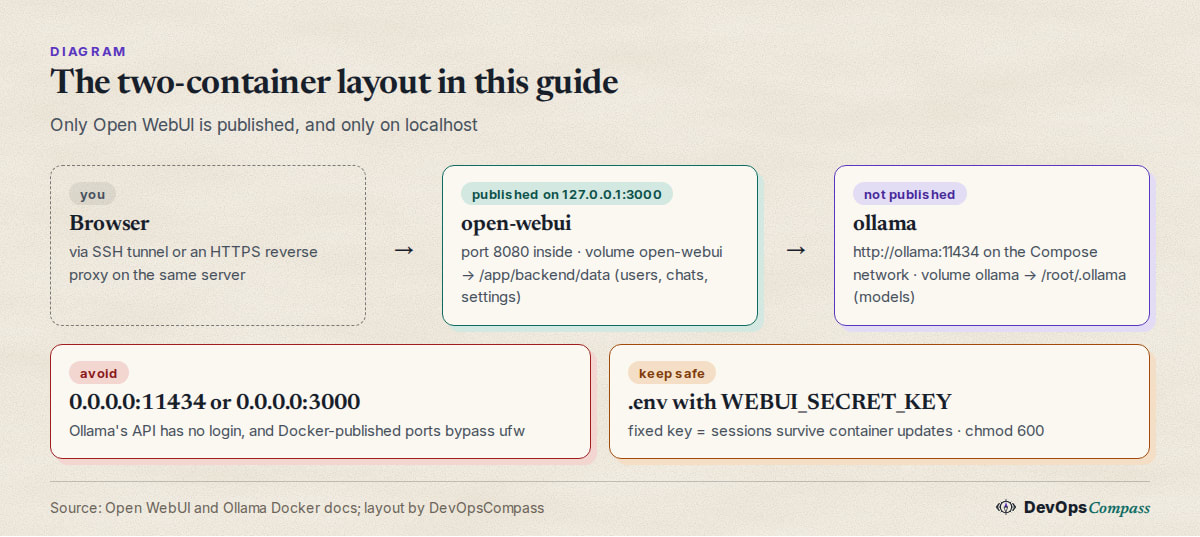
Open WebUI's own repository ships a two-service docker-compose.yaml (Ollama + Open WebUI, named volumes, OLLAMA_BASE_URL=http://ollama:11434, port 3000 to 8080). Our version keeps that structure and changes four things: pinned versions, no published Ollama port, Open WebUI bound to localhost, and a secret key that must be set.
services:
  ollama:
    image: ollama/ollama:0.40.11
    volumes:
      - ollama:/root/.ollama
    restart: unless-stopped
    # no "ports:" on purpose: only Open WebUI talks to Ollama, over the Compose network

  open-webui:
    image: ghcr.io/open-webui/open-webui:v0.12.4
    depends_on:
      - ollama
    ports:
      - "127.0.0.1:3000:8080"
    environment:
      OLLAMA_BASE_URL: http://ollama:11434
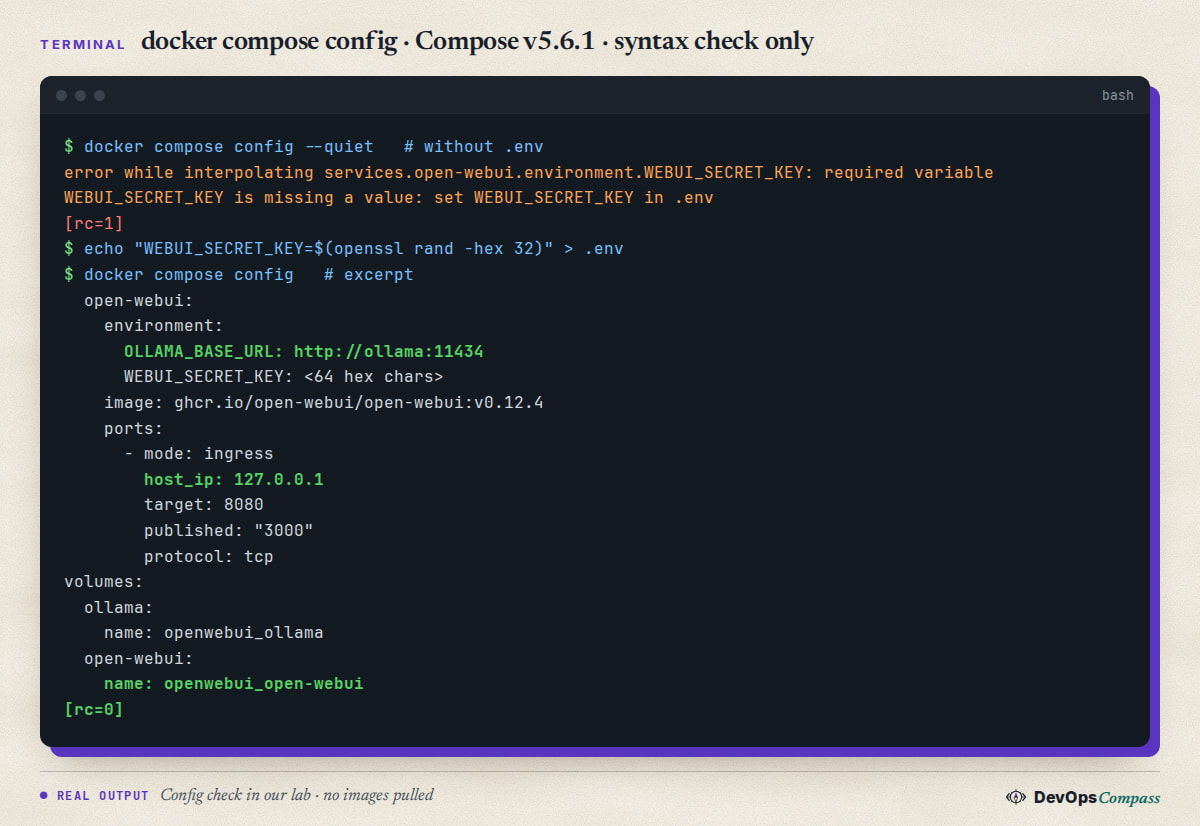
      WEBUI_SECRET_KEY: ${WEBUI_SECRET_KEY:?set WEBUI_SECRET_KEY in .env}
    volumes:
      - open-webui:/app/backend/data
    restart: unless-stopped

volumes:
  ollama:
  open-webui:
Create the secret once and start the stack:
echo "WEBUI_SECRET_KEY=$(openssl rand -hex 32)" > .env
chmod 600 .env
docker compose up -d
What each choice does, according to the docs:
OLLAMA_BASE_URL: where Open WebUI finds Ollama. In Docker the default ishttp://host.docker.internal:11434, which only works when Ollama runs on the host. With both in one Compose project, the service nameollamaresolves on the Compose network.WEBUI_SECRET_KEY: signs login tokens and encrypts stored secrets such as API keys. The Docker image generates one on first start if you do not set it, but the docs warn that without a persistent key you are logged out every time the container is recreated. The:?syntax makes Compose refuse to start without it.- Named volumes: chats, users, settings and uploads live in the
open-webuivolume, models in theollamavolume. Updating means replacing containers, not data. - No Ollama port: Ollama's API has no login. If you need it from the host, publish it as
127.0.0.1:11434:11434, never on all interfaces.
First start and the admin account
Open http://127.0.0.1:3000 (through an SSH tunnel or a reverse proxy if the server is remote). The Open WebUI FAQ says the first account created becomes the admin. New sign-ups after that get the role set by DEFAULT_USER_ROLE, which defaults to pending: an admin must approve them. ENABLE_SIGNUP (default on) controls whether the sign-up form exists at all. If you lose the admin password, the docs describe a reset that edits the SQLite database in the volume; there is no "forgot password" e-mail.
Note that many settings are PersistentConfig: once saved in the admin panel, the value in the database wins over the environment variable (ENABLE_PERSISTENT_CONFIG=true by default).
Get a model
Pull models with Ollama's CLI inside the container, or from the model selector in Open WebUI, which offers to download a model that is not installed yet:
docker compose exec ollama ollama pull llama3.2:3b
docker compose exec ollama ollama list
Pick a size that fits your RAM; our Ollama without a GPU guide lists official download sizes of small models.
GPU
For NVIDIA, Ollama's container needs the NVIDIA Container Toolkit on the host and a GPU reservation in Compose (the deploy.resources.reservations.devices block with driver: nvidia, shown in Open WebUI's Compose docs). The :cuda tag of Open WebUI only moves Open WebUI's own helper models (embeddings, reranking, Whisper) to the GPU; chat models run where Ollama runs.
Update and back up
The Open WebUI docs recommend pinning a version for anything shared and backing up before every update, because some releases run database migrations that are hard to undo. With Compose:
# 1. back up (Compose prefixes volume names with the project name: check with "docker volume ls")
docker run --rm -v openwebui_open-webui:/data -v "$(pwd)":/backup \
  alpine tar czf /backup/openwebui-$(date +%Y%m%d).tar.gz /data

# 2. change the tags in compose.yaml, then
docker compose pull
docker compose up -d
The docs' backup command uses a volume called open-webui. Under Compose the real name is <project>_open-webui (for us openwebui_open-webui, shown by docker compose config). Read the release notes first: v0.12.4, for example, turns personal tool-server connections off until an admin enables Direct Integrations.
What users report
These are other people's experiences, linked so you can read them in context. We have not verified them.
- "Server connection failed" with Ollama on the host. In a long GitHub thread, users running Open WebUI in Docker and Ollama natively found that Ollama listened only on 127.0.0.1, so the container could not reach it. Fixes that worked for them: set
OLLAMA_HOST=0.0.0.0:11434for the Ollama service (ilhooq, GitHub #209; ayang, comment), or change the Ollama URL in Admin Panel > Connections tohttp://host.docker.internal:11434(milkevolii, comment). Note that0.0.0.0exposes Ollama on every interface unless a firewall blocks it. Running both in one Compose project, as above, avoids the issue. - "Network Problem" behind a reverse proxy. After v0.5.0 made WebSockets mandatory, many users behind nginx or Apache saw chats fail. The fix they shared was to proxy WebSocket upgrades (
proxy_http_version 1.1plus theUpgradeandConnectionheaders) (Simi5599 and xmengnet, GitHub #8074). The official connection-error page now lists the same headers. - Updates can break logins. A Debian user on Docker reported loading and login problems after upgrading to 0.9.0 and 0.9.1; the maintainers' advice in the thread included using PostgreSQL for multi-replica setups (Joly0, GitHub #23939). This is why we pin versions and back up.
- Exposed Ollama servers are common. Cisco Talos found 1,139 Ollama instances open on the internet in 2025, 214 of them answering with live models, and recommends authentication, firewalls or a reverse proxy, and restricted access (Cisco blog, 1 Sep 2025).
Our take
This is our opinion:
- Use two services, not the
:ollamabundle, so you can update and roll back each one on its own. - Never publish 11434. Nothing outside the Compose network needs Ollama in this setup. If you need the API from scripts on the host, bind it to
127.0.0.1only. - Bind Open WebUI to localhost and put a reverse proxy with HTTPS in front, or reach it through an SSH tunnel (
ssh -L 3000:127.0.0.1:3000 server). Docker-published ports bypass ufw, as we showed in our Docker on Ubuntu 26.04 install guide, so "ufw is on" is not protection. - Create the admin account immediately after the first start, before anyone else can reach the page, and keep
DEFAULT_USER_ROLE=pending. - Pin, back up, then update.
:mainis fine on a laptop; on a shared server pick a release tag and read its notes.
What we did not test
- We did not pull or run the Open WebUI or Ollama images and did not download any model (our server has no room for models). The only command we ran was
docker compose configon the file above, which checks syntax and variables. - Image sizes come from registry manifests (compressed download), not from disk usage after extraction.
- GPU setup, reverse-proxy configuration, PostgreSQL, SSO and the update path were not tested by us; they are summarised from the docs and the linked reports.
FAQ
How do I run Open WebUI and Ollama with Docker Compose?
Define two services in one compose.yaml: ollama with a volume on /root/.ollama, and open-webui with a volume on /app/backend/data, OLLAMA_BASE_URL=http://ollama:11434 and port 127.0.0.1:3000:8080. Set WEBUI_SECRET_KEY in .env, run docker compose up -d, then open port 3000 and create the admin account.
Can I use Open WebUI in Docker with Ollama installed on the host?
Yes. Run only the Open WebUI service with extra_hosts: host.docker.internal:host-gateway, which the official Compose example includes; Open WebUI then looks for Ollama at http://host.docker.internal:11434. Ollama on the host must listen on an address the container can reach, which users report is the most common stumbling block.
Why does Open WebUI show "Network Problem" or cannot connect to Ollama?
Two causes dominate in user reports: Ollama is unreachable from the container (wrong OLLAMA_BASE_URL, or Ollama listening only on 127.0.0.1 on the host), or a reverse proxy does not pass WebSocket upgrades. Check the Ollama URL under Admin Panel > Connections and add the Upgrade and Connection headers in your proxy.
Which environment variables matter for Open WebUI in Docker Compose?
For a basic setup: OLLAMA_BASE_URL (where Ollama is), WEBUI_SECRET_KEY (keeps sessions valid across restarts), ENABLE_SIGNUP and DEFAULT_USER_ROLE (who may register), and WEBUI_URL if you use a domain with SSO. Remember that values saved in the admin panel override the environment by default.
How do I update Open WebUI in Docker Compose?
Back up the open-webui volume, change the image tag (or keep :main), then run docker compose pull and docker compose up -d. Your chats and settings stay in the volume. Read the release notes first, because some versions run database migrations or change defaults.
How big are the Open WebUI and Ollama Docker images?
On 27 October 2026 the compressed downloads were about 1.6 GB for open-webui:main on amd64 (1.5 GB on arm64), 3.4 GB for the bundled :ollama tag, 5.5 GB for :cuda, and about 3.4 GB for ollama/ollama on amd64 (2.8 GB on arm64). Models come on top of that.
How do I reset the Open WebUI admin password in Docker?
The official guide generates a bcrypt hash with htpasswd and writes it into the auth table of webui.db in the data volume, using a temporary Alpine container. Back up the volume first. There is no password-reset e-mail, so store the admin password in a password manager.
Related guides
- Run Ollama without a GPU: CPU-only Docker setup: Ollama settings, model sizes and what users report about CPU speed.
- Install Docker on Ubuntu 26.04 server: Docker Engine, Compose v5 and why published ports bypass ufw.
Sources
- Open WebUI docs: Docker Compose quick start (compose example,
host.docker.internal, GPU block,:cuda,:dev). - Open WebUI: docker-compose.yaml in the repository (two-service layout,
OLLAMA_BASE_URL=http://ollama:11434). - Open WebUI docs: Environment variable reference (
OLLAMA_BASE_URL,WEBUI_SECRET_KEY,ENABLE_SIGNUP,DEFAULT_USER_ROLE,ENABLE_PERSISTENT_CONFIG). - Open WebUI docs: Updating Open WebUI (pinning, backup and restore, v0.12.4 notes), FAQ (first account is admin), Reset admin password, Connection errors.
- Open WebUI: v0.12.4 release (25 Oct 2026). Ollama: releases (0.40.11, 24 Oct 2026) and Docker docs.
- Image sizes: registry manifests of
ghcr.io/open-webui/open-webuianddocker.io/ollama/ollama(compressed layers, read 27 Oct 2026). - Cisco Talos: Detecting exposed LLM servers: a Shodan case study on Ollama (1 Sep 2025).
- User reports: GitHub issues #209, #8074 and #23939, comments linked above.
Last verified: October 2026 (27 October 2026; Open WebUI v0.12.4, Ollama 0.40.11, Docker Compose v5.6.1 for the config check). Images not pulled, models not run.
Header image: Image: DevOpsCompass.
Comments
Post a Comment