
Ollama Models for Coding: What Fits in 8, 16 and 24 GB VRAM
Short answer: pick the model by its download size on ollama.com, then leave room for context. On 8 GB start with qwen2.5-coder:7b (4.7 GB). On 16 GB use qwen2.5-coder:14b (9.0 GB) or gemma4:12b (8.0 GB). On 24 GB use a 4-bit 27B to 32B model such as qwen3.6:27b-q4_K_M (17 GB) or qwen3-coder:30b (19 GB). Ollama's docs say coding tools need at least 64,000 tokens of context, but the default is only 4k under 24 GiB of VRAM, so set it and check ollama ps.
How this article was made: a compilation of the Ollama library pages, the Ollama docs, GitHub issues and Hacker News comments. We did not download or run any model. Sizes are read from ollama.com on 30 October 2026, and the tier grouping is our own reading of them.
Search suggestions for this topic are full of card sizes: "best ollama model for coding 8gb vram", "...16gb vram", "ollama 24gb vram". The official pages never answer those questions directly. They list a download size per tag and a context rule, and the rest is arithmetic and user experience. This guide puts the numbers in one place and says where they stop being reliable.
Official facts
Everything here comes from the Ollama library tag pages and the Ollama docs, read on 30 October 2026.
Which coding models does Ollama list?
A search for "coder" on ollama.com shows these as the most pulled coding families: qwen2.5-coder (23.1M pulls), qwen3-coder (10.4M) and qwen3-coder-next (2.1M), plus older ones such as codellama, deepseek-coder-v2 and starcoder2. Two general families also advertise coding use: qwen3.6 (with tags that have "coding" in the name) and gemma4. Download sizes at the default 4-bit quantization:
| Tag | Download | Context | Notes |
|---|---|---|---|
qwen2.5-coder:7b |
4.7 GB | 32K | also :3b 1.9 GB, :1.5b 986 MB |
gemma4:e4b |
6.6 GB | 128K | small, general model |
gemma4:12b |
7.7 to 8.0 GB | 256K | 12b-it-qat is 7.2 GB |
qwen2.5-coder:14b |
9.0 GB | 32K | 14b q8_0 is 16 GB |
gemma4:26b-a4b |
16 to 19 GB | 256K | mixture of experts, -it-qat is 16 GB |
qwen3.6:27b-q4_K_M |
17 GB | 256K | 27b-coding tag is 18 to 19 GB |
qwen3-coder:30b |
19 GB | 256K | mixture of experts, q8_0 is 32 GB |
gemma4:31b-it-qat |
19 GB | 256K | |
qwen2.5-coder:32b |
20 GB | 32K | q8_0 is 35 GB |
qwen3.6:35b-a3b |
23 GB | 256K | q8_0 is 39 GB |
qwen3-coder-next |
52 GB | 256K | q8_0 is 85 GB; the page lists no hardware needs |

The same page for qwen3-coder also lists a 480b tag of 290 GB, which is a data-centre model, not a home one.
Is the download size the VRAM I need?
No. Ollama's tag pages give the file size only, and the docs give no formula for total memory. What the docs do say is that the context window costs extra memory: "Larger context needs more memory, so confirm you have enough VRAM first" (context length docs). Our rule of thumb, which is our opinion and not an Ollama figure: pick a tag whose download is clearly smaller than your VRAM, and treat a tag within 2 to 3 GB of your VRAM as "will not fit at a useful context". That is why 8 GB cards sit around 5 GB models, not 8 GB ones.
What context length do coding tools need?
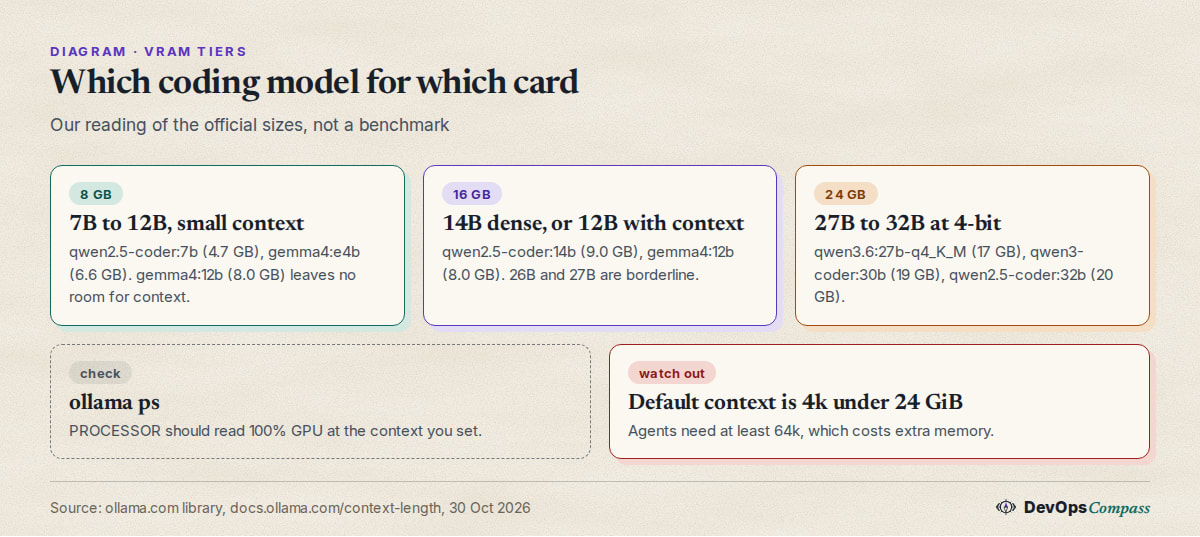
The docs list the defaults by VRAM: under 24 GiB: 4k, 24 to 48 GiB: 32k, 48 GiB or more: 256k. They also say tasks such as web search, agents and coding tools "should be set to at least 64000 tokens". Set it when the server starts:
OLLAMA_CONTEXT_LENGTH=64000 ollama serve
For Claude Code, the Ollama integration page says local models "should support tools and have a context window of at least 64k". Note what that means for a 16 GB card: the default (4k) is 16 times too small for agent work, and raising it grows the memory use. Our Ollama context length guide covers the three places to set it.
How do I check that a coding model really runs on my GPU?
Run ollama ps. The FAQ says the PROCESSOR column shows 100% GPU when the model is fully in GPU memory, 100% CPU when it is in system memory, and a split such as 48%/52% CPU/GPU when it is shared. The CONTEXT column shows the context actually allocated. For best speed, aim for 100% GPU at the context you plan to use. The same FAQ says models stay loaded for 5 minutes by default (OLLAMA_KEEP_ALIVE) and that a model which does not fit one GPU is spread across all available GPUs.
Does a quantized KV cache save memory?
The FAQ documents OLLAMA_KV_CACHE_TYPE (default f16), which needs Flash Attention (OLLAMA_FLASH_ATTENTION=1 forces it on) and applies to all models. A lower-precision cache uses less memory per token, which is how people squeeze in a longer context. The next section shows why that is not free for agents.
What coding model fits in 8 GB of VRAM?
Our reading of the sizes: qwen2.5-coder:7b (4.7 GB, 32K) is the safe pick, and qwen2.5-coder:3b (1.9 GB) is for autocomplete-style use. gemma4:e4b (6.6 GB) fits but leaves little context. gemma4:12b at 8.0 GB does not leave room on an 8 GB card.
What users report: one Hacker News commenter with 8 GB of VRAM and 32 GB of RAM says Qwen3.6 35B "runs nicely" and suggests gemma-4-26B-A4B, noting that "16+8=24gb and Q4 is about 16GB" but "not much context left" (jboss10, HN, 29 June 2026). That relies on spilling into system RAM. Another reports running qwen3-coder:30b on a GTX 1070 with 16 GB of RAM and using it for boilerplate and as a search replacement, not for agents (SupLockDef, HN, 15 June 2026).
What coding model fits in 16 GB of VRAM?
qwen2.5-coder:14b (9.0 GB, 32K context) fits with room for context. gemma4:12b (8.0 GB, 256K) also fits, and its 12b-it-qat tag is 7.2 GB. The 26B and 27B tags (16 to 17 GB) are at or over the limit.
What users report is mixed on exactly that edge. One commenter with an RTX 5080 (16 GB VRAM, 64 GB RAM) gets "a consistent 117-128 t/s with Gemma4:26b-a4b without any tuning" (edb_123, HN, 30 June 2026). In the same thread another commenter doubts the 26B model fits fully in 16 GB and says the current model probably runs partly on the CPU (skolos, HN, 30 June 2026). Both can be true, since the model is a mixture of experts with few active parameters, but check ollama ps instead of trusting either.
There are also reports of trouble. A user on an M4 with 24 GB filed that gemma4:12b was "extremely slow and unreliable" in Ollama, with multi-minute hangs and empty responses (DuckTapeKiller, GitHub #16562, 6 June 2026, open when we checked, Ollama 0.30.5). It is one machine and an old version; check the current release before ruling the model out. Another user on a 16 GB Radeon 6900 XT said models not built for coding often described actions instead of making tool calls, and the coding ones were slow (saghm, HN, 16 June 2026).
What coding model fits in 24 GB of VRAM?
This is the tier where agent-grade models start. From the sizes: qwen3.6:27b-q4_K_M (17 GB), qwen3-coder:30b (19 GB), gemma4:31b-it-qat (19 GB) and qwen2.5-coder:32b (20 GB) all fit, with 4 to 7 GB left for context. qwen3.6:35b-a3b (23 GB) is too tight for a 64k context on a 24 GB card.
What users report: a 4090 owner runs Qwen3.6-27B at 4 bits, which "only uses 18GB", and says the unquantized version would not leave any context room (diseasedyak, HN, 3 August 2026). Another says they run the same model on one 24 GB GPU at 80 tokens per second (WithinReason, HN, 3 July 2026). A third, in October, calls Qwen3.8-27B a "huge step up" from 3.6 (latentsea, HN, 30 September 2026), which is worth checking in the library when you read this, since new tags appear weekly.
Dual-GPU and 48 GB setups unlock larger tags, and qwen3-coder-next (52 GB) needs more than one 24 GB card or a lot of system RAM. The library page gives no hardware requirement for it.
Can I run a bigger model with CPU offload?
Yes, in the sense that Ollama will split a model between GPU and system RAM when it does not fit; the FAQ's 48%/52% CPU/GPU example is exactly that. Speed drops, and how much depends on your RAM bandwidth, so we give no figure. Users describe it as workable for mixture-of-experts models (see the 8 GB case above) and poor for dense ones: one commenter argued that a model has to fit on one GPU, "otherwise the inference is dogshit slow as you are offloading results to ram" (ActorNightly, HN, 22 September 2026, about a Mac-versus-PC comparison). Treat partial offload as a fallback for chat, not a plan for an agent.
Which model works with Claude Code through Ollama?
The docs say ollama launch claude starts Claude Code against your local server, or you can set ANTHROPIC_BASE_URL=http://localhost:11434 and run claude --model <tag>. Pick a model that supports tools, with at least 64k context. The page's own local example is qwen3.5.
One user hit a silent failure: with ollama launch claude --model qwen3-coder:30b on Windows 11 (Ollama 0.32.8), requests were sent and a stream started, but Claude Code never showed a reply (LukaszS999, GitHub #17671, 11 August 2026, closed when we checked). If that happens, check the Ollama and Claude Code versions first and run claude /status to confirm the connection, as the docs advise.
Does a quantized KV cache hurt coding agents?
A detailed report says it can. On an RX 7900 XTX with ROCm and Ollama 0.31.1, quantized KV cache (q8_0 and q4_0) made Qwen3.5 and Qwen3.6 models stop mid-turn instead of emitting a tool call, and the user says severity tracks how aggressive the quantization is (ninjaltd, GitHub #17347, 23 July 2026, open when we checked). It is one setup and one client, so read it as a warning: if an agent stalls after you shrink the cache, set OLLAMA_KV_CACHE_TYPE back to f16 before blaming the model.
What users report
The sections above contain the per-card reports. The overall picture from Hacker News threads is split:
- Enthusiasts: a 24 GB card plus a 27B model is described as a daily driver for boilerplate and edits, and several say it was the first time a local model felt "good enough" (latentsea, HN, 30 September 2026).
- Sceptics: a commenter on a 32 GB / 128 GB system says that when they program with a local model they "end up wasting time compared to a cloud LLM" and calls local models "an expensive toy" outside privacy and blocked use cases (pizza234, HN, 29 June 2026).
- Version risk: one Mac Studio M2 user says Qwen speed dropped after upgrading Ollama from an older version to 0.32.5 and 0.32.6 (72 tokens per second before), and that downgrading restored it (slsalman, GitHub #17583, 6 August 2026, open when we checked).
We have not verified any of these reports.
Our take
This is opinion, based on the sources above:
- Choose by VRAM first, model second. A model that spills to the CPU loses most of the benefit of a GPU, whatever its benchmark says.
- 8 GB: stay at 7B for completion and small edits. Do not expect agent work.
- 16 GB: a 14B dense model with 32K context is the comfortable end. Try a 26B mixture-of-experts only if
ollama pssays 100% GPU at your context. - 24 GB: this is the realistic tier for agents. Take a 4-bit 27B to 32B and keep the context at 64k, then measure.
- Raise the context before judging a model. Many "this model is bad at coding" reports could be a 4k context cutting the prompt, a problem our context length guide explains.
- Re-check the library monthly. The newest tags on this page were new this summer, and the community moves to a new Qwen or Gemma version within weeks.
What we did not test
- We did not download or run any model, so we give no speed, quality or memory-use measurement of our own.
- The VRAM tiers are our reading of download sizes, not measured memory use. Context cache size depends on the model and the settings.
- We did not verify user reports. Several GitHub issues were open when we checked and may be fixed since.
- We did not compare the models on coding quality. No benchmark is quoted.
- We did not test AMD, Apple Silicon or multi-GPU placement.
FAQ
What is the best Ollama model for coding?
There is no single answer: it depends on your VRAM. Among the most pulled coding families on ollama.com are qwen2.5-coder, qwen3-coder and qwen3-coder-next. Pick the largest tag whose download fits your card with a few GB to spare, and set the context to at least 64,000 tokens for agents.
What is the best Ollama coding model for 8 GB of VRAM?
From the sizes, qwen2.5-coder:7b (4.7 GB) is the safe choice, with qwen2.5-coder:3b (1.9 GB) for light completion. A 12B model at 8.0 GB does not leave room for context on an 8 GB card.
What is the best Ollama coding model for 16 GB of VRAM?
qwen2.5-coder:14b (9.0 GB) fits comfortably, and gemma4:12b (8.0 GB) also fits. Larger 26B and 27B tags (16 to 17 GB) are borderline; check ollama ps for 100% GPU.
How much VRAM does Ollama need for a model?
Ollama's tag pages list file sizes only. The model file plus the context cache must fit, so choose a tag a few GB smaller than your VRAM. The default context is 4k under 24 GiB of VRAM, and raising it uses more memory.
Can I run a 30B coding model with 16 GB of VRAM?
Ollama can split a model between GPU and RAM, so it can run, but slower. Users report this works better for mixture-of-experts models than for dense ones. qwen3-coder:30b is 19 GB, so on 16 GB part of it will sit in system RAM.
What context length should I set for coding agents?
The Ollama docs say at least 64,000 tokens for agents and coding tools. Set OLLAMA_CONTEXT_LENGTH=64000 before ollama serve and confirm with the CONTEXT column of ollama ps.
How do I know the model is running on the GPU?
Run ollama ps. 100% GPU in the PROCESSOR column means it is fully in VRAM; a split like 48%/52% CPU/GPU means it is partly in system RAM.
Related guides
- Ollama context length: default, num_ctx and how to change it: how to reach the 64k context that coding tools need.
- llama-server guide: install, port 9931, Docker, API key: the llama.cpp alternative when you want flag-level control.
- Open WebUI and Ollama with Docker Compose: a chat front end for the same models.
Sources
- Ollama library: qwen2.5-coder, qwen3-coder, qwen3-coder-next, qwen3.6, gemma4 and the coder search (30 Oct 2026).
- Ollama docs: context length, FAQ and Claude Code integration (30 Oct 2026).
- GitHub issues: #16562, #17347, #17583 and #17671.
- Hacker News comments: 48724652, 48733270, 48734678, 49156714, 48777865, 49902883, 48545537, 48557648, 48723252 and 49797207.
- Google autocomplete suggestions for "ollama models for coding", "best ollama model for coding", "ollama vram requirements", "ollama 16gb vram" and "ollama 8gb vram" (30 Oct 2026).
Last verified: October 2026 (30 October 2026, Ollama library tags). Tags, sizes and defaults change often; check the tag page for your model.
Header image: Image: DevOpsCompass.
Comments
Post a Comment