
Ollama keep_alive: Keep a Model Loaded or Unload It
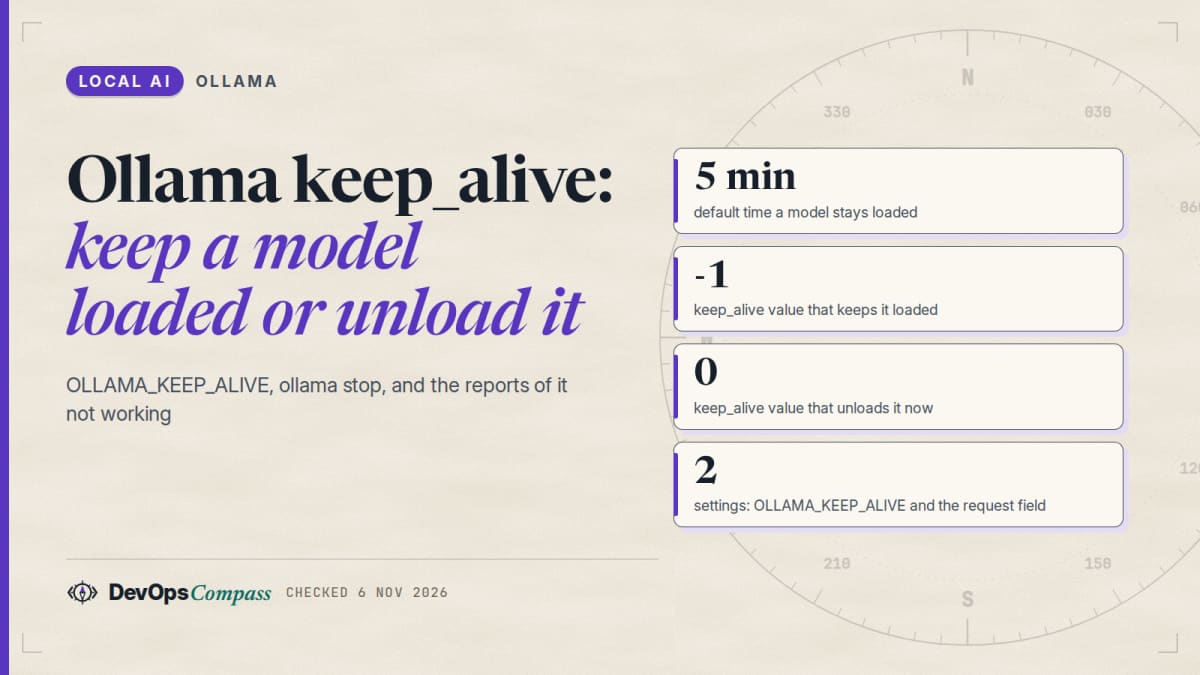
Short answer: by default Ollama keeps a model in memory for 5 minutes after the last request. To change that for every model, set OLLAMA_KEEP_ALIVE on the server (for example -1 to keep models loaded, 24h, or 0 to unload right after each reply). To change it for one call, send keep_alive in the request to /api/generate or /api/chat; it overrides the environment variable. To unload now, run ollama stop <model>. The OpenAI-compatible /v1 endpoint does not list keep_alive among its documented fields.
How this article was made: a compilation of the Ollama docs, GitHub issues and Hacker News comments, read on 6 November 2026. We did not run Ollama or load any model for it. The only check we ran was a syntax check of a Docker Compose snippet with docker compose config. Reports from users are attributed and not verified by us.
If you searched "ollama keep alive forever", "ollama unload model" or "OLLAMA_KEEP_ALIVE not working", you want a setting that fits your server and a reason when it does not behave. The docs cover the settings in a few lines. The "not working" cases live in GitHub issues, so this guide puts them in one place and marks which are still open.
Official facts
How do I keep an Ollama model loaded in memory?
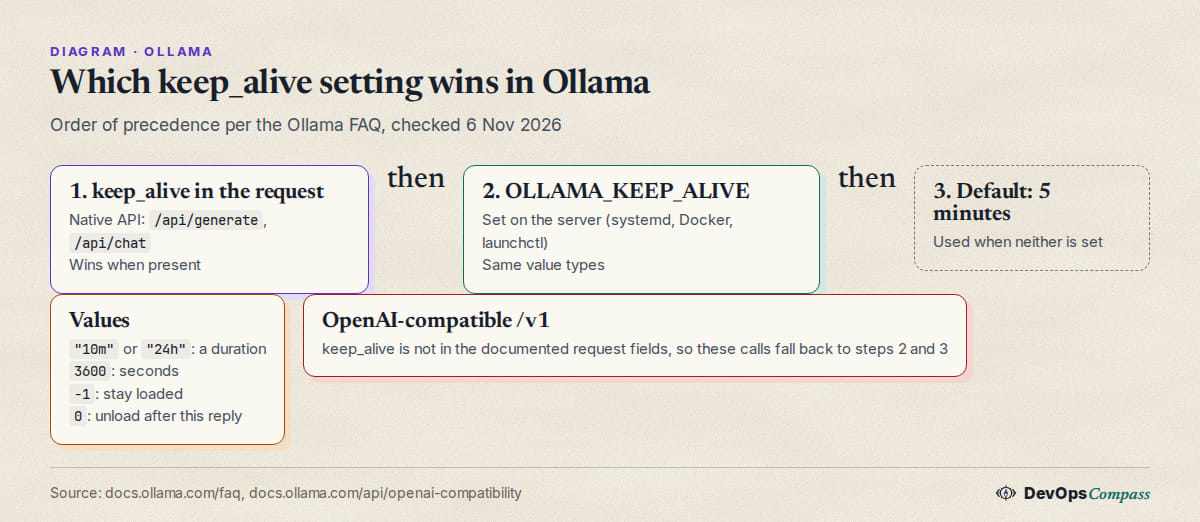
Per the Ollama FAQ, models stay in memory for 5 minutes by default, so repeated requests are fast. The keep_alive parameter of /api/generate and /api/chat accepts:
- a duration string such as
"10m"or"24h" - a number of seconds such as
3600 - any negative number, which keeps the model loaded (for example
-1or"-1m") 0, which unloads the model right after the response
To preload a model and leave it in memory, the FAQ gives this call:
curl http://localhost:11434/api/generate -d '{"model": "llama3.2", "keep_alive": -1}'
To load a model without generating anything, send a request with only the model name, or use ollama run llama3.2 "" from the CLI. The API reference describes the field as "Model keep-alive duration (for example 5m or 0 to unload immediately)".
How do I unload a model from memory?
Two official ways. From the CLI, ollama stop <model> unloads it at once; ollama ps lists what is loaded, as the CLI reference shows. From the API, send the same request with keep_alive set to 0:
ollama ps
ollama stop llama3.2
curl http://localhost:11434/api/generate -d '{"model": "llama3.2", "keep_alive": 0}'
The ollama ps output has an UNTIL column; a model kept with -1 shows Forever there (as in a maintainer's output quoted in a GitHub issue). The /api/ps response also has an expires_at field per model, per the API reference.
How do I set OLLAMA_KEEP_ALIVE on Linux, Docker, Mac and Windows?
OLLAMA_KEEP_ALIVE takes the same values as the request field and applies to all models. The FAQ describes how to set an environment variable per platform:
- Linux (systemd): run
sudo systemctl edit ollama.service, add the lines below, thensudo systemctl daemon-reloadandsudo systemctl restart ollama. - macOS app: run
launchctl setenv OLLAMA_KEEP_ALIVE "-1"and restart the Ollama app. - Windows: quit Ollama, add
OLLAMA_KEEP_ALIVEin the environment variables of your account, start Ollama again.
[Service]
Environment="OLLAMA_KEEP_ALIVE=-1"
For Docker, pass it as an environment variable. This Compose snippet passes docker compose config (Compose v5.7.0, 6 November 2026), which checks the syntax only; we did not start the container:
services:
  ollama:
    image: ollama/ollama
    environment:
      - OLLAMA_KEEP_ALIVE=-1
      - OLLAMA_MAX_LOADED_MODELS=2
    volumes:
      - ollama:/root/.ollama
    ports:
      - "127.0.0.1:11434:11434"
volumes:
  ollama:
The port line binds to localhost on purpose; see our Ollama behind nginx with an API key guide before you expose it.
Which wins, the request field or the environment variable?
The request. The FAQ says the keep_alive API parameter with /api/generate and /api/chat "will override the OLLAMA_KEEP_ALIVE setting". That has a side effect that explains many "it unloads anyway" reports: a client that sends its own keep_alive (or a different one on every call) silently beats your server setting. The next sections show examples.
How many models can be loaded at once?
The FAQ documents OLLAMA_MAX_LOADED_MODELS (default 3 times the number of GPUs, or 3 for CPU inference) and OLLAMA_NUM_PARALLEL (default 1). If memory is not enough for a new model, queued requests wait until idle models are unloaded to make room. On GPU, a new model must fit completely in VRAM to be loaded alongside others. So keep_alive -1 does not mean "never unloaded": a model that is kept forever can still be evicted when another model needs the space, with the caveats in the issues below. For memory sizing see our Ollama context length guide.
Why is Ollama keep_alive not working?
There is no single cause. These are the cases we found in the docs and in GitHub, in the order we would check them. Status is as of 6 November 2026 (Ollama v0.40.15 was the latest release).
Can I set keep_alive on the OpenAI-compatible endpoint?
The OpenAI compatibility page lists supported request fields for each endpoint, and keep_alive is not among them. This has been reported since April 2024: in issue 3645 a user sent "keep_alive": 0 to /v1/chat/completions and the model was not unloaded. The issue was closed as a duplicate of issue 2963 (options on the OpenAI endpoints), which was still open in 2026. A pull request from June 2025 proposes passing keep_alive and think through extra_body and was also still open.
What to do, in our opinion: for tools that only speak the OpenAI API, set OLLAMA_KEEP_ALIVE on the server instead of relying on a per-request value, and unload with ollama stop or a native /api/generate call. Our Ollama API guide shows both endpoints side by side.
Why does a second model wait for the first one to unload?
Issue 19182 (open, 21 October 2026) describes a case with OLLAMA_MAX_LOADED_MODELS=1 on the macOS app, versions 0.40.2 and 0.40.7. When a request for model B arrives, the scheduler marks the loaded model A to expire immediately. If a request for A with keep_alive arrives during that wait, it overwrites the expiry. A then goes idle, arms a timer and does not unload, so the request for B waits for the whole keep_alive. The reporter says requests without keep_alive do not trigger it, and that it caused a 2-hour outage (a client sending "keep_alive": "2h") and a 13-minute one (a health probe).
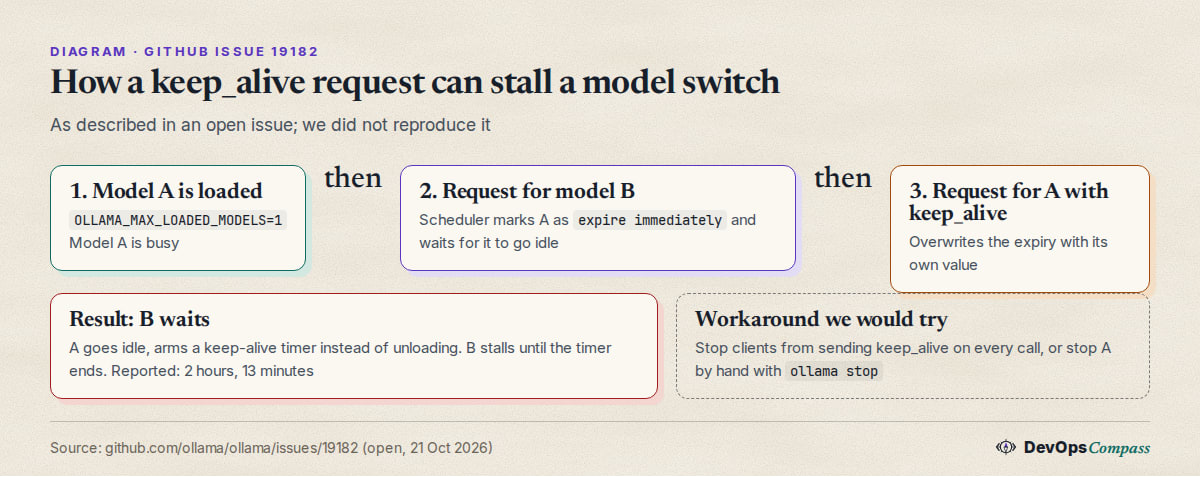
A related case, issue 19245 (closed 23 October 2026), shows the same stall with several clients on a 12 GB RTX 3060. An open pull request makes eviction an explicit state and adds "evicting": true to /api/ps. We did not check whether a release already contains a fix.
Can a huge keep_alive value unload the model?
According to an open pull request (September 2026), a numeric keep_alive large enough to overflow a 64-bit nanosecond counter wraps to a negative number, which the scheduler treats as "expire now". So a very large number meant as "forever" could do the opposite. The author says they found it by reading the scheduler code, not by reproducing it on a running server. Use -1 for forever instead of a big number.
How do I unload all models at once?
The docs show ollama stop <model> for one model at a time. A pull request (September 2026, open when we read it) proposes ollama stop --all and stopping several models in one command. Until it ships, the workaround is to read ollama ps and stop each name; the pull request itself uses /api/ps plus keep_alive: 0 to do it.
Why is memory still used after ollama stop?
In issue 17792 (closed 26 August 2026) a macOS user reported that after ollama stop the runner process for MLX models stayed alive and kept holding RAM, once down to 0.37 GB free. Maintainers could not reproduce it: one saw the runner exit within about half a second, another saw it work on Linux. The reporter later marked it resolved by a fix. An older report in issue 3645 (June 2024) describes WSL still showing the memory used after /api/ps was empty. Check the process list, not only ollama ps, and attach a server log if you file a bug.
Why does Open WebUI reload the model after each reply?
Open WebUI sends background requests (title, tags, follow-up questions) in addition to your chat. In Open WebUI issue 14681 a user set keep-alive to -1 in Open WebUI and saw the model reload after each first reply, then fall back to Ollama's 5-minute default. A maintainer replied on 25 September 2026 that this is how background tasks are documented to work: they never receive the account or chat settings, and "on Ollama a different context length means a reload". The fix they give: set the same num_ctx and keep_alive on the model in Workspace > Models, or under Admin > Interface > Tasks > Task Model Parameters. The issue was closed as not planned. In issue 31832 (closed) a user found that after Eject, automatic follow-up generation loaded the model again; with follow-ups disabled it stayed unloaded. Our Open WebUI with Ollama in Docker Compose guide covers the setup.
Which model does Ollama unload first?
Issue 19326 (open, 27 October 2026) says that when all models share the same keep_alive, the scheduler picks the one to evict by model path, not by size or recency. The reporter's example on a 128 GiB Mac: with a 12 GiB and a 33 GiB model loaded, a new 51 GiB request evicted the 33 GiB one although evicting the 12 GiB one would have been enough. A follow-up pull request was open. Per the reporter, explicit different keep_alive values still decide first, so giving the model you care about a longer value is a possible workaround, but we did not verify that.
Does a second loaded model raise idle power?
Only one report, but relevant if you pin models with -1. Issue 17958 (open, August 2026) describes an AMD Strix Halo machine (Ollama 0.24.0, ROCm) where two or more resident models kept the GPU at 100% busy and about 30 W at idle, while zero or one model idled at about 6 to 8 W. Going back to one model with ollama stop fixed it within about 10 seconds. We have no data for other GPUs.
What users report
Attributed, unverified, read on 6 November 2026.
- Models "taken out every 4 minutes". On Hacker News on 22 May 2025, zackify wrote that Ollama "keeps taking it out of memory every 4 minutes" and that LM Studio with MLX on a Mac could keep a model in RAM indefinitely (comment). That is the 5-minute default at work, plus a context change that forces a reload.
- Three ways, from an Ollama developer. On 1 June 2024, jmorgan of the Ollama team listed
ollama run llama3 --keepalive -1,OLLAMA_KEEP_ALIVE=-1 ollama serve, and the API (comment). The--keepaliveflag also appears in a maintainer reply of November 2024; we did not find it in the current CLI reference, so checkollama run --helpon your version. - A production outage. The reporter of issue 19182 says a client sending
keep_alive: "2h"cost them two hours. - Open WebUI reloads. Reports in Open WebUI issue 14681 and issue 31832 agree that background tasks, not the chat, trigger the reload.
- Idle power with pinned models. The author of issue 17958 calls
OLLAMA_KEEP_ALIVE=-1the standard pattern for always-on assistants on that hardware and reports a cost of about 25 W there.
Our take
Opinion, based on the sources above:
- Set
OLLAMA_KEEP_ALIVEon the server, not in every client. One value is easier to reason about, and it survives clients that cannot sendkeep_alive, such as OpenAI-API-only tools. - Use
-1only for the model you always need. A pinned model blocks VRAM for others, and the eviction issues above show that mixed pinned models are the least predictable setup.30mor1hfits most desktops and small servers. - Do not let clients send
keep_aliveon every call if you useOLLAMA_MAX_LOADED_MODELS=1or tight VRAM. Issue 19182 is the reason. - Use
-1, not a huge number, for "forever". Docs-supported, and it avoids the overflow case. - If a model reloads after each message, compare the load parameters first. A different
num_ctxbetween two clients forces a reload even with a longkeep_alive, as the Open WebUI maintainer says. Our context length guide explains how to set one value. - Check
ollama psbefore you blame keep_alive. The UNTIL column tells you what the server believes. If it says Forever and the model is still gone, look for another model or process taking the memory.
What we did not test
- We did not install or run Ollama, and did not load any model. Every behaviour above comes from the docs or from the named reports.
- The only check we ran is
docker compose configon the Compose snippet, which proves syntax, not behaviour. - The GitHub issues and pull requests were open or closed as noted on 6 November 2026. Several are about the macOS app or MLX runner, and newer releases may behave differently.
- We did not verify the
--keepaliveCLI flag in the current release, the claim that differentkeep_alivevalues decide eviction order first, or the power figures. - We checked only the OpenAI compatibility page for
keep_alive; a field could work without being documented.
FAQ
How long does Ollama keep a model in memory?
Five minutes after the last request by default. Change it with the OLLAMA_KEEP_ALIVE environment variable for all models, or with keep_alive in a single /api/generate or /api/chat request.
How do I keep an Ollama model loaded forever?
Set OLLAMA_KEEP_ALIVE=-1 on the server, or send "keep_alive": -1 with the request. Any negative number works. Restart the service after changing the variable, and note that a request that sends its own keep_alive overrides the server value.
How do I unload an Ollama model?
Run ollama stop <model>, or send a request to /api/generate with "keep_alive": 0. Check with ollama ps that the model is gone from the list.
Does keep_alive work with the OpenAI-compatible API?
It is not listed among the supported request fields on Ollama's OpenAI compatibility page, and a 2024 issue reported that it did not unload the model. Set OLLAMA_KEEP_ALIVE on the server for those clients.
Why does Ollama keep unloading my model?
Common causes: the 5-minute default, a client sending a different keep_alive, a different num_ctx between clients that forces a reload, or another model needing the memory. Open WebUI background tasks are a known trigger.
Can I unload all Ollama models at once?
Not with one documented command. A pull request for ollama stop --all was open on 6 November 2026. For now, list models with ollama ps and stop each one.
Can I run more than one model at the same time?
Yes, if memory allows. The default maximum is 3 times the number of GPUs, or 3 for CPU inference, set by OLLAMA_MAX_LOADED_MODELS. On a GPU each model must fit completely in VRAM.
Related guides
- Ollama context length: default, num_ctx and how to change it
- Ollama API guide: curl, Python, OpenAI endpoint, embeddings
- Open WebUI with Ollama in Docker Compose: safe setup
- Ollama not using the GPU: checklist for NVIDIA, AMD and Docker
Sources
- Ollama docs: FAQ, CLI reference, generate API, ps API
- Ollama docs: OpenAI compatibility
- GitHub issues and pull requests: 3645, 2963, 11249, 19182, 19245, 19190, 19326, 18181, 18665, 17792, 17958
- Open WebUI: issue 14681, issue 31832
- Hacker News comments: 44058487, 40548599
Last verified: November 2026. Ollama docs and GitHub read on 6 November 2026; latest release then was v0.40.15.
Header image: Image: DevOpsCompass.
Comments
Post a Comment