
Ollama Behind Nginx With an API Key: Safe Setup
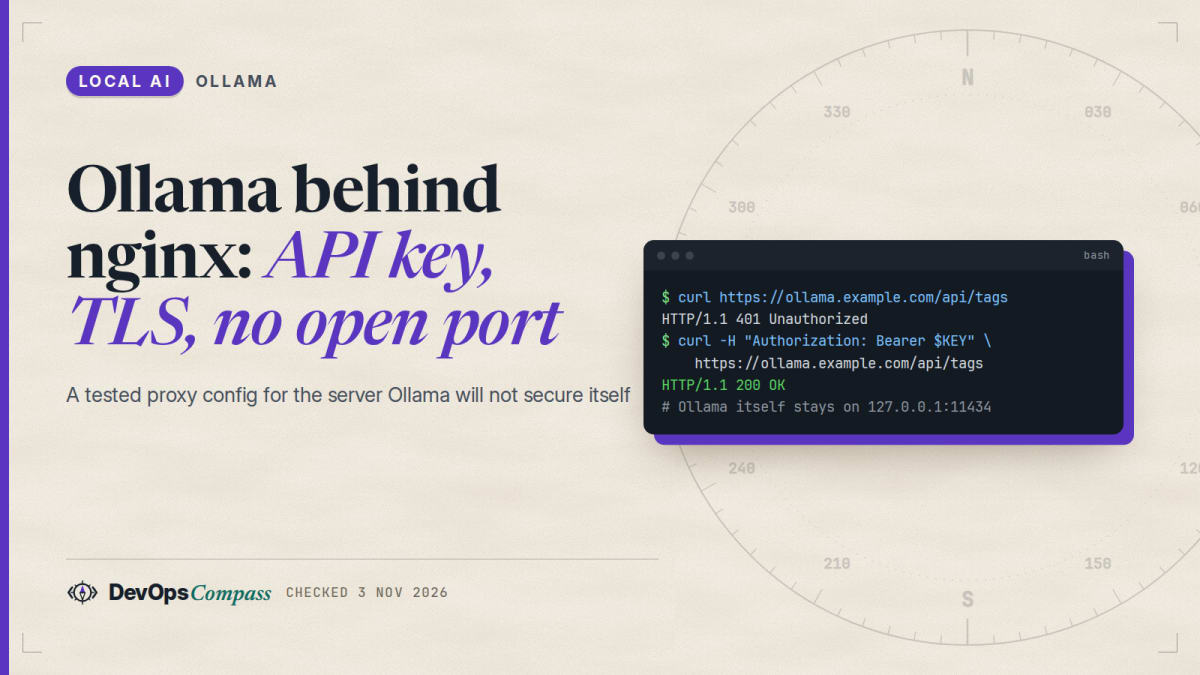
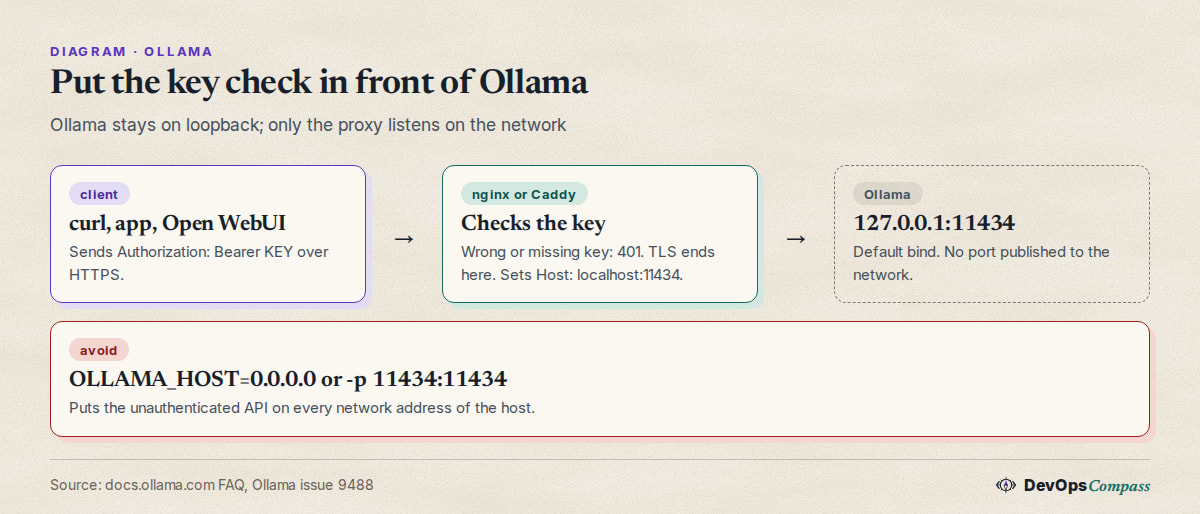
Short answer: Ollama has no API key for a server you run yourself. The docs say the local API at localhost:11434 needs no authentication, and OLLAMA_API_KEY is only for the hosted ollama.com API. So keep Ollama on 127.0.0.1, put nginx (or Caddy) in front, and let the proxy check an Authorization: Bearer key and terminate HTTPS. Two details cause most failures: send Host: localhost:11434 to Ollama, and turn proxy buffering off so answers stream.
How this article was made: a compilation of the Ollama FAQ and authentication docs, the nginx and Docker docs, GitHub issues from 2024 to 2026 and press coverage of exposed servers, read on 3 November 2026 (Ollama v0.40.14). The one thing we ran is a config check of the nginx file below in a small container with a stub in place of Ollama. We did not run Ollama or any model. Advice and ordering are our opinion.
If you searched "ollama nginx api key", "ollama behind nginx" or "ollama authentication", you probably want one thing: reach your own Ollama from another machine without leaving it open to everyone. The official FAQ shows a proxy, but its example has no authentication and no HTTPS. This guide adds both, explains the errors people hit, and says what we did and did not check.
Official facts
Does Ollama have its own API key for a local server?
No. The authentication page opens with "The local API at http://localhost:11434 does not require authentication." The API key it describes is created on ollama.com and is used for direct cloud access at https://ollama.com/api, with the Authorization: Bearer header.
That is why the question is confusing. OLLAMA_API_KEY exists in the docs, and a search for "ollama api key local" finds it, but setting it does not make your own server demand a key. In October 2026 a user filed issue 19238 asking for exactly that, an OLLAMA_API_KEY check for local deployments. The issue was closed, and a maintainer answered with a link to an older comment that shows a proxy setup, covered below.
The maintainers' stance has been stable for a long time. In January 2025 a maintainer wrote that the usual suggestion is a proxy with access controls (issue 8536), and in February 2025 that the core team recommends a proxy because earlier attempts to add an API key had stalled. A pull request for built-in keys, PR 9131, is still open with comments as recent as September 2026.
How can I expose Ollama on my network?
The FAQ says Ollama binds 127.0.0.1 port 11434 by default and that you change the bind address with the OLLAMA_HOST environment variable. It also says Ollama "can be exposed using a proxy server such as Nginx" and gives this example:
server {
    listen 80;
    server_name example.com;  # Replace with your domain or IP
    location / {
        proxy_pass http://localhost:11434;
        proxy_set_header Host localhost:11434;
    }
}
This forwards requests, but it does not check who is asking and it uses plain HTTP. Anyone who can reach port 80 can run models, list them and, on a default install, pull new ones. The FAQ gives similar --host-header="localhost:11434" flags for ngrok and Cloudflare Tunnel.
Does -p 11434:11434 expose Ollama to the internet?
Possibly, yes. The Docker port publishing docs say a published port is reachable on the host's network addresses, and they show how to limit it to loopback with -p 127.0.0.1:8080:80. Applied to Ollama, -p 11434:11434 publishes the API on every address of the host, while -p 127.0.0.1:11434:11434 keeps it local. The docs also warn that on Docker Engine older than 28.0.0, hosts on the same network segment could reach ports published to localhost, so keep Docker current.
Docker also manages its own firewall rules, and its docs say not to modify them. Do not assume a host firewall you configured separately covers a published container port; check from another machine.
The nginx config: API key, Host header and streaming
This is our version of the maintainer's example from issue 9488, with HTTPS, the Host header from the FAQ and streaming settings added. Put the key in a map so the check is a plain string comparison.
map $http_authorization $ollama_key_ok {
    default                            0;
    "Bearer change-me-long-random-key" 1;
}

server {
    listen 443 ssl;
    server_name ollama.example.com;

    ssl_certificate     /etc/nginx/tls/fullchain.pem;
    ssl_certificate_key /etc/nginx/tls/privkey.pem;

    location / {
        if ($ollama_key_ok = 0) { return 401; }

        proxy_pass http://127.0.0.1:11434;
        proxy_set_header Host localhost:11434;
        proxy_http_version 1.1;
        proxy_buffering off;
        proxy_read_timeout 600s;
        client_max_body_size 50m;
    }
}
Generate a key with openssl rand -hex 32, replace change-me-long-random-key, and make sure Ollama itself is not published on the network (OLLAMA_HOST unset, or -p 127.0.0.1:11434:11434 in Docker). Get a certificate for the server_name from your usual source, such as Let's Encrypt. Then call it:
curl https://ollama.example.com/api/tags \
  -H "Authorization: Bearer change-me-long-random-key"
What we checked. We ran this file in a nginx:alpine container with a throwaway self-signed certificate and, in place of Ollama, a stub server on 127.0.0.1:11434 that echoes the Host header it receives. nginx -t passed. A request with no key and a request with a wrong key both got 401. A request with the right key got 200, and the stub reported Host=localhost:11434. That proves the key check and the header rewrite. It does not prove anything about real model traffic (see the last section). The script and log are in our lab folder, and the lines above are the whole check.
Why do streamed answers stall or time out behind nginx?
Two nginx defaults get in the way, both from the proxy module docs:
proxy_bufferingis on by default, so nginx collects the upstream response in buffers before passing it on. For a streamed chat reply that can look like the answer arrives in one piece. We set it tooffin the config above. This is our reading of the docs, not a reproduced result.proxy_read_timeoutdefaults to 60 seconds and counts the gap between two successive reads, not the whole response. A model that takes longer than that to load or to produce its first token can be cut off with a 504. We raised it to 600 seconds.
Raise client_max_body_size too if you send large prompts or base64 images; nginx's default is small.
Caddy instead of nginx
The same maintainer comment shows a Caddy version for Compose. Caddy also fetches HTTPS certificates for a real domain by itself. This is the maintainer's snippet, which we did not run:
:11434
@unauthorized expression ! header({"Authorization": "Bearer {$OLLAMA_API_KEY}"})
respond @unauthorized 401
reverse_proxy ollama-backend:11434
In a Caddyfile that serves a real hostname, add header_up Host localhost:11434 inside reverse_proxy if you see 403 responses. A maintainer gave that exact line for Caddy-based tunnels in issue 3269.
Why do I get 400 or 403 behind a proxy?
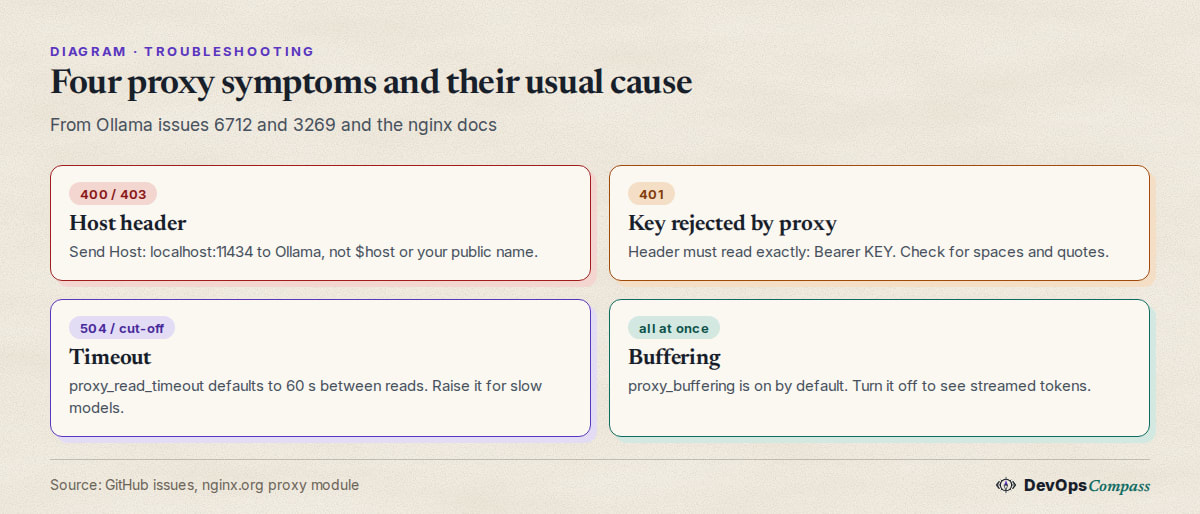
Almost always the Host header. Ollama checks it and rejects names it does not expect. The reports:
- 400 Bad Request behind Nginx Proxy Manager. A user put Ollama behind NPMplus with basic auth and got 400 for every call, while the same call straight to
ip:11434worked. They traced it toproxy_set_header Host $host;, and a second user confirmed the same fix on plain nginx (issue 6712, September 2024, closed). The fix is the FAQ line:proxy_set_header Host localhost:11434;. In Nginx Proxy Manager, put it in the custom location or advanced config. - 403 behind tunnels. After a 2024 release, requests through ngrok, zrok, Cloudflare Tunnel, Pagekite and Tailscale
servereturned 403 while localhost worked (issue 3269). The maintainers added the ngrok and Cloudflare sections to the FAQ. Tailscaleserveusers in that thread said they had no flag to rewrite the header and kept getting 403, so if you use it, put a Caddy or nginx hop in between that sets the header.
If you see a 401 that you did not expect, the proxy is rejecting the key, not Ollama. The header must read exactly Bearer <key>, with one space and no quotes.
Can the ollama CLI use a protected remote server?
This is a gap, and what we found is only partly documented. The official docs describe OLLAMA_API_KEY for ollama.com only. A commenter on PR 9131 wrote that the CLI will not send an Authorization header to a user-owned server, so ollama ps and ollama run do not work against a key-protected remote. We could not confirm this with a run, so treat it as a user claim. A practical workaround is to use curl, an SDK or any HTTP client that lets you set the header for the remote server, and run the ollama CLI on the server itself over SSH. See our Ollama API guide for the request formats.
What users report
These are attributed reports, read on 3 November 2026. We did not verify them.
- Scale of exposure. Researchers from SentinelLABS and Censys counted about 175,000 publicly reachable Ollama hosts in 130 countries, and said more than 48% advertised tool-calling support (The Hacker News, 29 January 2026). The article says the default is loopback and exposure takes "a trivial change" to a public bind address. A Cisco study found over 1,100 servers with Shodan in September 2025, as quoted by simonw in this Hacker News comment.
- Proxy is the right layer. On the Cisco thread, dns_snek wrote that adding "your own proxy which enforces any type of authentication you like" is the more sensible approach, and that they trust nginx to verify client certificates (Hacker News, September 2025). That is an option if you want mTLS rather than a shared key.
- Built-in auth is still wanted. The PR 9131 thread has users who run single-user servers asking for a minimal key, and in September 2026 a commenter said the change "never" gets merged and recommended
llama-server, which supports an API key natively (PR 9131). Our llama-server install and API guide covers the server flags. - Security reports need care. One report in the Ollama tracker claimed the server listens on
0.0.0.0by default. A maintainer replied that the default is127.0.0.1and that deployments that change it must secure it (issue 16236, May 2026). We use only the maintainer's statement from that thread.
Our take
This is opinion, based on the docs and reports above:
- Never publish 11434 directly. Not with
OLLAMA_HOST=0.0.0.0, not with-p 11434:11434. Use127.0.0.1binds, and test from a second machine. - For one user or a small team, a bearer key at nginx or Caddy is enough. It is the setup a maintainer recommends and it takes ten lines. Use a long random key, HTTPS only, and rotate it by editing one file.
- For more than a handful of users, use client certificates or put an identity-aware proxy in front. A shared key cannot be revoked per person.
- Treat the key as a gate, not a fence. Anyone with it can run models and use the machine's compute. Add rate limits at the proxy if the key leaves your hands.
- Do not forward the key to a browser app you do not control. Browser extensions that call Ollama directly need
OLLAMA_ORIGINS, which is a different mechanism from authentication. - If you want a key built in, llama-server is the simpler path. See our vLLM vs Ollama vs llama.cpp comparison for the trade-offs.
- Using Open WebUI? Keep Ollama on the internal Docker network and expose only the web UI; our Open WebUI and Ollama Compose guide shows the layout.
What we did not test
- We did not run Ollama, pull a model or send an inference request through the proxy. The upstream in our check was a stub.
- We used a throwaway self-signed certificate, so real certificate issuance and renewal are untested.
- The Caddy snippet, the Nginx Proxy Manager fix and the Docker port behaviour come from the docs and issue threads and were not run by us.
- We did not check whether the
ollamaCLI can authenticate to a protected remote; the claim is a user comment. - We did not test streaming latency, so the buffering advice is our reading of the nginx docs.
- We did not test mTLS, rate limiting or fail2ban, and we did not scan any server for exposure.
FAQ
Does Ollama support an API key for a self-hosted server?
No. The docs say the local API at localhost:11434 needs no authentication. OLLAMA_API_KEY is for the hosted ollama.com API. To require a key on your own server, put nginx or Caddy in front and check the Authorization: Bearer header there.
How do I put Ollama behind nginx?
Keep Ollama on 127.0.0.1:11434, proxy to it with proxy_pass http://127.0.0.1:11434; and send proxy_set_header Host localhost:11434;. Add a key check, HTTPS and proxy_buffering off; as in the config above.
Why does Ollama return 400 or 403 behind a reverse proxy?
Ollama rejects unexpected Host header values. Set the Host header sent to Ollama to localhost:11434. For tunnels, the FAQ gives --host-header="localhost:11434" for ngrok and --http-host-header for Cloudflare Tunnel.
How do I expose Ollama on my network safely?
Do not change OLLAMA_HOST to a public address. Keep the default bind, publish Docker ports on 127.0.0.1 only, and let a proxy with a key and HTTPS be the only listener. Confirm from another machine that port 11434 is closed.
Does docker run -p 11434:11434 expose Ollama to the internet?
It publishes the port on the host's network addresses, so it can be reachable. Use -p 127.0.0.1:11434:11434 to limit it to the host, and check from another machine.
Why do Ollama answers time out behind nginx?
nginx waits 60 seconds by default between reads from the upstream. A slow model load can exceed that. Raise proxy_read_timeout, and set proxy_buffering off so streamed tokens reach the client as they are produced.
Can I use basic auth instead of a bearer key?
Yes. nginx can do basic auth, and a user in issue 6712 did. Many API clients expect an Authorization: Bearer header though, which is why we use that.
Related guides
- Ollama API guide: curl, Python, OpenAI endpoint, embeddings: the requests you will send through the proxy.
- Open WebUI and Ollama with Docker Compose: keep Ollama on an internal network.
- llama-server guide: install, port and API key: a server with a built-in key flag.
- Ollama not using GPU? Checklist for NVIDIA, AMD, Docker: when the server itself misbehaves.
Sources
- Ollama docs: FAQ and authentication (3 Nov 2026).
- Release: Ollama releases, v0.40.14 of 3 Nov 2026.
- nginx: ngx_http_proxy_module. Docker: port publishing.
- GitHub: issues 3269, 6712, 8536, 9488, 16236, 19238 and PR 9131.
- Press and community: The Hacker News, Hacker News comments 45117591 and 45124884.
- Google autocomplete suggestions for "ollama nginx", "ollama reverse proxy" and "ollama authentication" (3 Nov 2026).
Last verified: November 2026 (3 November 2026; Ollama v0.40.14). Proxy defaults and Ollama behaviour change; check docs.ollama.com.
Header image: Image: DevOpsCompass.
Comments
Post a Comment