
Ollama API Guide: curl, Python, OpenAI Endpoint, Embeddings
Short answer: the Ollama server listens on http://localhost:11434. Native endpoints live under /api (/api/chat, /api/generate, /api/embed), and an OpenAI-compatible set lives under /v1. The local API needs no API key. If you use the OpenAI SDK, pass any string as api_key, because Ollama ignores it. Responses stream by default; add "stream": false to get one JSON object. For embeddings use POST /api/embed with input as a string or a list.
How this article was made: a compilation of the Ollama docs, the ollama-python README, GitHub issues and Hacker News comments, read on 1 November 2026 (Ollama v0.40.13). We did not run a model or send a request, so every command is copied from the official docs. The recommendations are our opinion.
Search suggestions around this topic are very practical: "ollama api endpoints", "ollama api python", "ollama openai compatible", "ollama embeddings api", and even "ollama api embeddings 404". This guide answers them in one place, with the official command for each, and then lists what users have reported going wrong.
Official facts
Everything in this section comes from docs.ollama.com unless a link says otherwise.
What are the Ollama API endpoints and the default URL?
The API introduction lists three base URLs:
| API | Local server | Direct cloud access |
|---|---|---|
| Ollama native | http://localhost:11434/api |
https://ollama.com/api |
| OpenAI compatibility | http://localhost:11434/v1 |
https://ollama.com/v1 |
| Anthropic client base URL | http://localhost:11434 |
https://ollama.com |
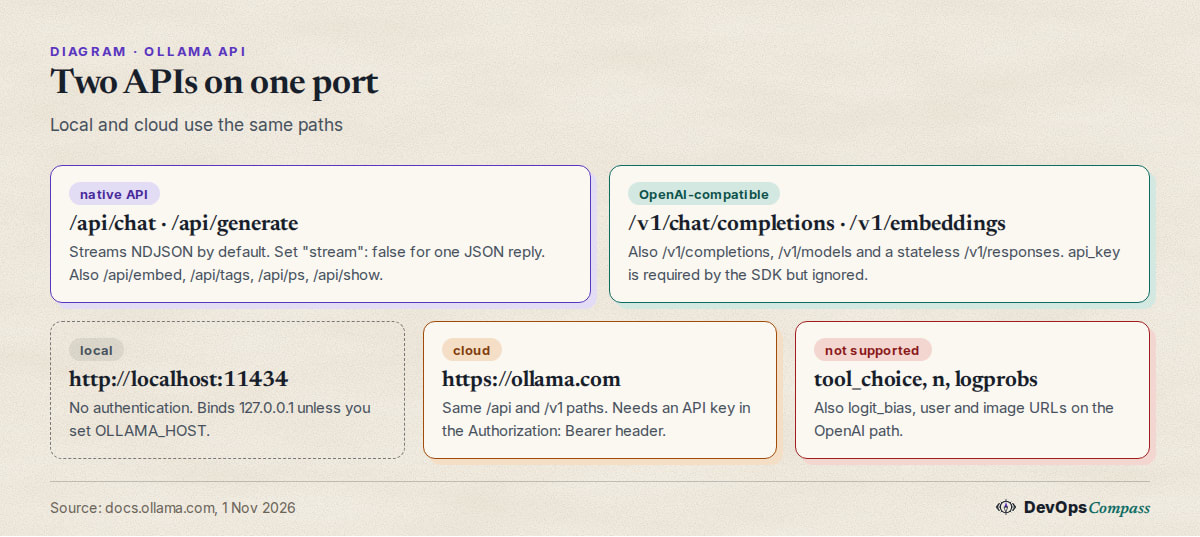
The native API documents these main calls: generate a response (/api/generate), generate a chat message (/api/chat), generate embeddings (/api/embed), list models (/api/tags), list running models (/api/ps), and create, copy, pull, push and delete models. The docs also say the API "isn't strictly versioned" but is expected to be stable and backwards compatible, with deprecations announced in the release notes.
Does the Ollama API need an API key?
Not locally. The authentication page says the local API at http://localhost:11434 "does not require authentication". A key is needed only for direct cloud access to ollama.com, where it goes in an Authorization: Bearer header:
export OLLAMA_API_KEY="your_api_key"
curl https://ollama.com/api/chat \
  -H "Authorization: Bearer $OLLAMA_API_KEY" \
  -H "Content-Type: application/json" \
  -d '{
    "model": "gemma4:31b",
    "messages": [{"role": "user", "content": "Why is the sky blue?"}],
    "stream": false
  }'
The docs say these keys do not expire and can be revoked in the account settings. If you only run models on your own machine, you can ignore keys completely. That also means anyone who can reach the port can use your models, which matters in the "other machine" section below.
How do I call it with curl?
The same call against a local server drops the header and uses a downloaded model. From the docs:
curl http://localhost:11434/api/chat -d '{
  "model": "gemma4",
  "messages": [{"role": "user", "content": "Why is the sky blue?"}],
  "stream": false
}'
The answer is in message.content. /api/generate takes a prompt string instead of messages. The errors page lists the status codes: 400 for a bad request, 404 when a model does not exist, 429 for rate limits, 500 for server errors and 502 when a cloud model cannot be reached. The body is {"error": "..."}.
How do I turn off streaming?
Native endpoints such as /api/generate stream by default as newline-delimited JSON (application/x-ndjson), one small object per chunk, ending with "done": true. Per the streaming page, sending {"stream": false} in the request body returns a single application/json object instead. Use streaming for chat screens and long answers, and non-streaming for short or structured replies.
If an error happens mid-stream, the HTTP status is already 200, so the error arrives as a line like {"error":"an error was encountered while running the model"}. A script that reads a stream should check each line for an error key.
How do I use it from Python?
The ollama-python library installs with pip install ollama and needs Ollama running with the model pulled. The README example:
from ollama import chat

response = chat(
  model='gemma4',
  messages=[{'role': 'user', 'content': 'Why is the sky blue?'}],
)
print(response.message.content)
Add stream=True and loop over the chunks to stream. To talk to another host, create a client:
from ollama import Client

client = Client(host='http://localhost:11434')
If you do not want a dependency, plain requests against /api/chat with "stream": false does the same job. The latest tags on 1 November 2026 were Ollama v0.40.13 (28 October) and ollama-python v0.6.3 (29 September).
How do I use the OpenAI-compatible endpoint?
Point any OpenAI client at /v1. The compatibility page example for a local server:
from openai import OpenAI

client = OpenAI(
    base_url='http://localhost:11434/v1/',
    api_key='ollama',  # required but ignored
)

reply = client.chat.completions.create(
    model='gpt-oss:20b',
    messages=[{'role': 'user', 'content': 'Say this is a test'}],
)
print(reply.choices[0].message.content)
The curl form is POST http://localhost:11434/v1/chat/completions with model and messages. Supported endpoints are /v1/chat/completions, /v1/completions, /v1/models, /v1/embeddings and a stateless /v1/responses, plus audio endpoints in recent versions. Tools written for the OpenAI API often hard-code a model name like gpt-3.5-turbo. The docs' trick: copy one of your models to that name with ollama cp llama3.2 gpt-3.5-turbo.
Which OpenAI features does Ollama not support?
The compatibility page marks these as not supported, so code that sets them may be ignored or fail:
tool_choice,logit_bias,userandnon chat completions;- logprobs on chat and completions;
- image URLs (base64 images work);
best_ofandechoon/v1/completions, which also accepts only a stringprompt;- token arrays as
inputon/v1/embeddings; - stateful Responses requests (
previous_response_idandconversation).
Tools (function calling), JSON mode, reproducible outputs through seed, vision and streaming are supported on chat completions.
How do I get embeddings from Ollama?
The embeddings page uses the /api/embed endpoint:
curl -X POST http://localhost:11434/api/embed \
  -H "Content-Type: application/json" \
  -d '{
    "model": "embeddinggemma",
    "input": "The quick brown fox jumps over the lazy dog."
  }'
Pass a list of strings in input for a batch. In Python, ollama.embed(model='embeddinggemma', input=[...]) returns embeddings, one vector per string. The docs state that /api/embed returns L2-normalised (unit-length) vectors, recommend cosine similarity for most search uses, and say to use the same embedding model for indexing and for querying. The OpenAI-style route is POST /v1/embeddings with model and input (string or list of strings), and optional dimensions.
Pull the model first (for example ollama pull embeddinggemma). These are the sizes of popular embedding models in the official library:
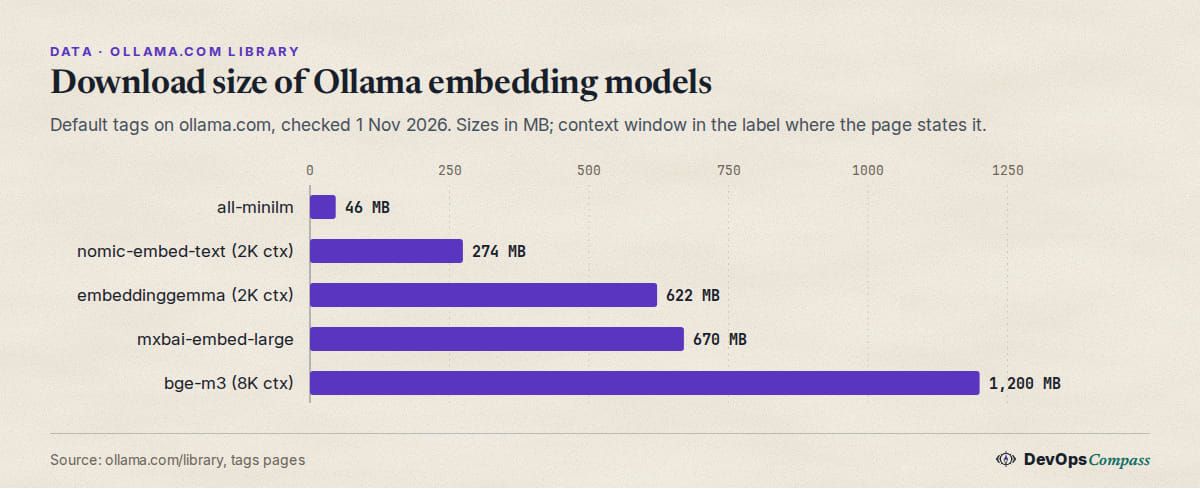
Embedding models are small compared with chat models, so they can sit beside a chat model on modest hardware. Check the model's context window before you chunk documents: nomic-embed-text and embeddinggemma list 2K tokens on their tags pages, bge-m3 lists 8K.
How do I reach the API from another machine or a Docker container?
By default Ollama binds 127.0.0.1:11434. The FAQ says to change the bind address with the OLLAMA_HOST environment variable (for example 0.0.0.0:11434 in a systemd override), and to use a reverse proxy such as Nginx if you want one in front. Browser apps from other origins need OLLAMA_ORIGINS; by default it allows 127.0.0.1 and 0.0.0.0. Because the local API has no authentication, binding to 0.0.0.0 on an untrusted network exposes your models. Put it behind a firewall or a proxy that checks credentials. Our Open WebUI and Ollama Docker Compose guide keeps the port on localhost for this reason.
How do I keep the model loaded between calls?
The FAQ documents a keep_alive parameter on /api/generate and /api/chat. A duration string or number of seconds sets how long the model stays in memory, -1 keeps it loaded, and 0 unloads it. It overrides the server-wide OLLAMA_KEEP_ALIVE setting. For scripts that call the API in bursts, a longer keep_alive avoids reloading the model on each run. Context size also affects memory per request; see our Ollama context length guide.
Why does the embeddings API return 404?
The docs do not list a cause, so this is our reading of the pages above. A 404 on the API means "Not Found (model doesn't exist, etc.)" per the errors page. Three things are worth checking in this order:
- The model is not pulled. Run
ollama listorGET /api/tags. A name that is not there gives a 404 on any endpoint. - The path is wrong. The current endpoint is
/api/embed(singular,input). Older tutorials use/api/embeddingswith apromptfield. Check the model name and the field name, and use the path in the embeddings docs. - Another server is on the port. From a container,
localhostis the container itself. Use the host's address or the compose service name.
We did not try these because we ran no server for this post.
Can embeddings silently come back as all zeros?
One user reports they can. In ollama/ollama issue 17878 (jomei64, 19 August 2026, open when we checked), /v1/embeddings and /api/embed under sustained load returned vectors of all zeros, "HTTP 200, correct dimensionality" and a plausible token count, with nothing in the log. A zero vector scores 0.0 cosine against everything, so the documents become unfindable. The reporter says it sometimes recovered on its own. We did not verify this, but the check is cheap: if you embed in bulk, reject any vector whose norm is zero and retry. Since /api/embed is documented to return unit-length vectors, a norm far from 1.0 is a signal that something is wrong.
Why do OpenAI clients see odd ids or a null model list?
Two open issues describe rough edges in the compatibility layer:
- Response ids from the OpenAI-compatible chat endpoint come from
chatcmpl-plus a random number below 999. The reporter says this makes ids collide and that LiteLLM, which uses the id as a key in its spend log, silently drops most entries after about 999 responses (issue 18655, stevehockey, 25 September 2026, open when we checked). A related report was closed on 14 October. - With no models installed,
GET /v1/modelsreturns"data": nullinstead of an empty list, which strongly typed clients may reject (issue 19381, 1-DARK, 29 October 2026, open).
If you log or deduplicate by response id, generate your own id on the client side.
What users report
These are attributed reports from GitHub issues and Hacker News. We have not verified them, and open issues may be fixed since:
- Bulk embedding on Windows can fail on ports. A user sending batches of 32 inputs to
/api/embedwithbge-m3at about 55 documents a second saw intermittent400errors with "Only one usage of each socket address", and counted 14,552 sockets in TIME_WAIT. They say retrying works and trace it to the internal runner not reusing connections (MEldes0uky, issue 18392, 11 September 2026, open). - Large prompts can reset on Windows. A user on an RTX 3090 with a 65,536 context saw
/api/chatconnections reset after about 15 seconds, from Open WebUI, Chatbox andcurlalike (Eb7CAPJi, issue 19139, 19 October 2026, open). - Embedding length limit. One reporter says
/api/embedreads the wrong metadata keys, so the usable input length can be one or two tokens shorter than needed for some models (1-DARK, issue 19446, 1 November 2026, open). - OpenAI-compatible is the common route. A Hacker News user runs Ollama on a home-network machine and points open-source agent tools at
http://inferencemachine:11434/v1(chr15m, HN, 9 October 2026). Another argues that apps should "just target the OpenAI-compatible API with custom endpoints" rather than special-case Ollama (max-privatevoid, HN, 23 September 2026).
Our take
This is opinion, based on the docs and reports above:
- New script, no dependency:
requestsorcurlagainst/api/chatwith"stream": false. It is the shortest path and uses the best documented API. - Existing OpenAI code: change
base_urltohttp://localhost:11434/v1/and keep the rest. Check the unsupported list first, especiallytool_choice. - Embeddings for RAG: use
/api/embed, one model for both indexing and queries, and validate vector norms. Pick the model by context window and size, not only by name. - Bulk or long-running jobs: retry on
400,500and502, log the response body, and watch the stream for anerrorline. - Exposed port: keep it on localhost. If you must share it, use a reverse proxy with authentication, because the API itself has none.
What we did not test
- We started no Ollama server, pulled no model and sent no request. The commands are from the official docs and were not run by us.
- We did not test Windows, Docker networking, the cloud API or an API key.
- We did not reproduce the 404 causes, the zero-vector issue, the id collision or the Windows resets.
- We ran no latency, throughput or memory check.
- We did not cover the Anthropic-compatible endpoint,
/api/show, structured outputs or tool calling in depth.
FAQ
What is the Ollama API URL?
For a local server it is http://localhost:11434. Native calls go to /api/... and OpenAI-compatible calls to /v1/.... For direct cloud access it is https://ollama.com.
Does the Ollama API need an API key?
Not on your own machine; the docs say the local API does not require authentication. A key is only for cloud access. OpenAI SDKs need some string as api_key, which Ollama ignores.
How do I get a single JSON reply instead of a stream?
Add "stream": false to the request body of /api/generate or /api/chat. Without it, both return newline-delimited JSON chunks, one per piece of text, and the last one has "done": true.
How do I use Ollama embeddings?
Send POST /api/embed with a model such as embeddinggemma and input as a string or a list. Use the same model to index and to query, and compare vectors with cosine similarity.
Is Ollama compatible with the OpenAI API?
Partly. Chat completions, completions, models, embeddings and stateless responses work. Features such as tool_choice, n, logprobs and image URLs are listed as unsupported.
How do I change the Ollama port or address?
Set OLLAMA_HOST, for example 0.0.0.0:11434, and restart the server. The default is 127.0.0.1:11434. Exposing it beyond localhost removes the only protection, since there is no built-in login.
How do I keep a model loaded?
Send keep_alive with -1 in the request, or set OLLAMA_KEEP_ALIVE for the whole server. 0 unloads the model right away.
Related guides
- Ollama context length: default, num_ctx and how to change it: the memory cost behind every request.
- Open WebUI and Ollama with Docker Compose: a safe localhost setup for the same API.
- vLLM vs Ollama vs llama.cpp for a server: when one request at a time is not enough.
Sources
- Ollama docs: API introduction, authentication, streaming, errors, OpenAI compatibility, embeddings and FAQ (1 Nov 2026).
- Libraries and releases: ollama-python README and Ollama releases (1 Nov 2026).
- Model sizes: all-minilm, nomic-embed-text, embeddinggemma, mxbai-embed-large and bge-m3 (1 Nov 2026).
- GitHub issues: 17878, 18392, 18655, 19139, 19381 and 19446.
- Hacker News comments: 50021052 and 49822493.
- Google autocomplete suggestions for "ollama api", "ollama api python", "ollama embeddings api", "ollama openai compatible" and "ollama api stream" (1 Nov 2026).
Last verified: November 2026 (1 November 2026; Ollama v0.40.13, ollama-python v0.6.3). Endpoints and defaults change; check docs.ollama.com.
Header image: Image: DevOpsCompass.
Comments
Post a Comment