
vLLM vs Ollama vs llama.cpp: Which One for a Server?
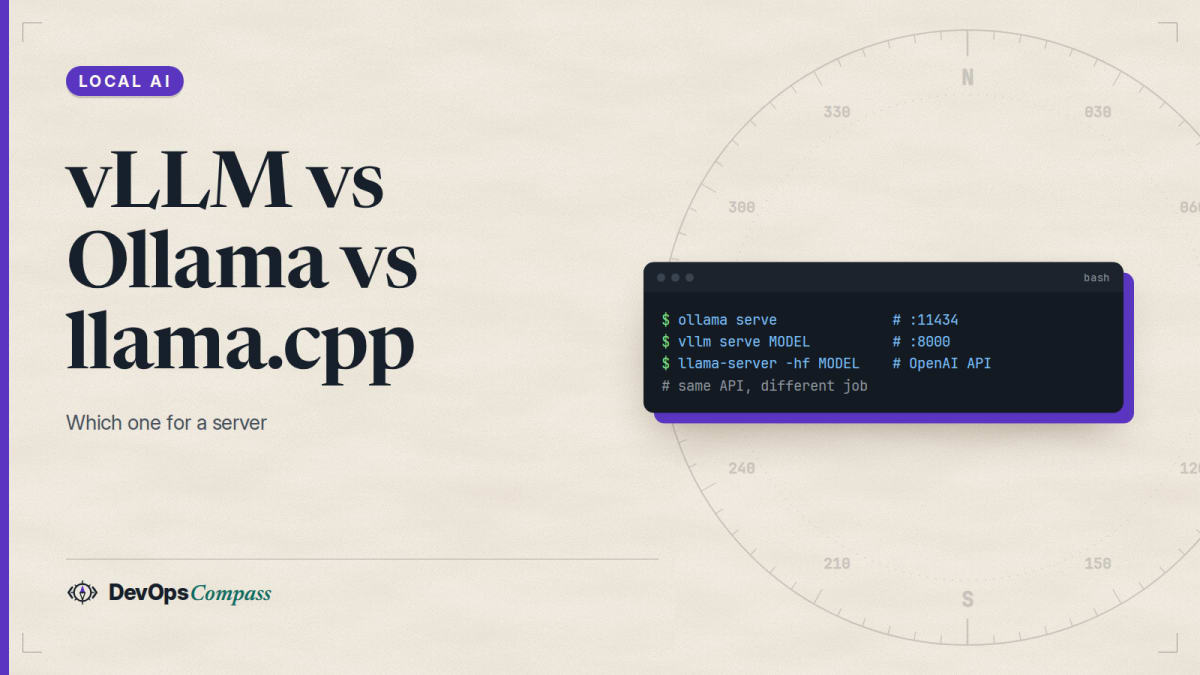
Short answer: use Ollama for one person on any laptop or GPU, llama.cpp (llama-server) when you want flag-level control, GGUF files or a Mac, and vLLM when a Linux server with NVIDIA GPUs must serve many users at the same time. vLLM batches requests continuously and splits a model across GPUs. Ollama runs one request per model by default (OLLAMA_NUM_PARALLEL is 1). Do not expect to reuse Ollama models in vLLM: its GGUF support is documented as "highly experimental".
How this article was made: a compilation of the three projects' docs, GitHub issues and Hacker News comments, read on 31 October 2026. We did not install the three servers or run any benchmark. The recommendations are our opinion.
Search suggestions pair these three tools constantly: "vllm vs ollama", "vllm vs ollama vs llama cpp", "vllm vs ollama performance". Most answers are a single speed chart. The real differences are what each tool needs, how it treats several users, and which model files it can load. This guide collects those from the official pages and from users, and says where the evidence stops.
Official facts
All facts below are from each project's own README and docs, read on 31 October 2026. Latest GitHub release tags that day: vLLM v0.32.0 (18 October), Ollama v0.40.13 and llama.cpp v0.8.0 (both 28 October).
What is each tool built for?
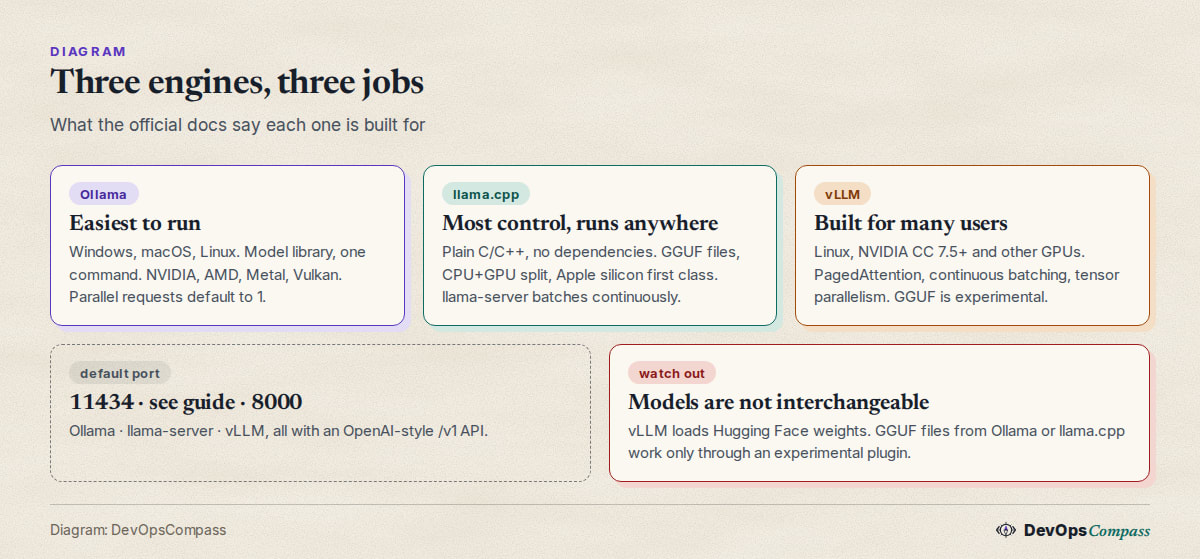
- Ollama is a model runner with a library. It installs on macOS, Windows and Linux, has a Docker image (
ollama/ollama), and serves a REST API on port 11434 plus an OpenAI-compatible/v1/API (OpenAI compatibility). - llama.cpp is an inference engine written in plain C/C++ "without any dependencies", with Apple silicon as "a first-class citizen". It supports CUDA, HIP, Metal, Vulkan, SYCL and CPU+GPU hybrid inference (README). Its
llama-serveroffers an OpenAI-compatible API; we cover it in our llama-server install and Docker guide. - vLLM describes itself as a library for LLM inference and serving. Its README lists PagedAttention, continuous batching, chunked prefill, prefix caching, tensor, pipeline, data and expert parallelism, and an OpenAI-compatible server (README).
What hardware and operating system does each need?
| Ollama | llama.cpp | vLLM | |
|---|---|---|---|
| OS | macOS, Windows, Linux | all major, build or binaries | Linux; no native Windows (use WSL) |
| NVIDIA | compute capability 5.0+, driver 550+ | CUDA | compute capability 7.5+ (T4, RTX 20xx and newer) |
| AMD | ROCm v7 | HIP | ROCm |
| Apple | Metal | Metal, first-class | experimental, from source, FP32/FP16 only |
| CPU only | yes | yes | x86 and Arm, FP32/FP16/BF16; AVX-512 recommended |
Sources: Ollama GPU docs, llama.cpp README, vLLM GPU install and vLLM CPU install. The vLLM GPU page also says Python 3.11 to 3.14 and "vLLM does not support Windows natively", pointing to WSL. That answers "how do I install vLLM on Windows": through WSL, with an NVIDIA GPU, not natively.
How do I start each one?
# Ollama: port 11434
ollama serve

# vLLM: port 8000
uv pip install vllm --torch-backend=auto
vllm serve Qwen/Qwen2.5-1.5B-Instruct

# llama.cpp: see our llama-server guide for port and flags
llama-server -hf ggml-org/gemma-3-4b-it-GGUF
These are the commands from the Ollama docs, the vLLM quickstart and the llama.cpp README. We did not run them. Models differ: Ollama pulls from its own library, vLLM downloads Hugging Face weights, and llama.cpp loads GGUF files.
Can I run vLLM in Docker?
Yes. The vLLM Docker page uses the vllm/vllm-openai image:
docker run --runtime nvidia --gpus all \
  -v ~/.cache/huggingface:/root/.cache/huggingface \
  --env "HF_TOKEN=$HF_TOKEN" \
  -p 8000:8000 \
  --ipc=host \
  vllm/vllm-openai:latest \
  --model Qwen/Qwen3-0.6B
--ipc=host can be replaced by --shm-size, because vLLM uses shared memory for tensor parallel inference. For CPU there is a separate vllm/vllm-openai-cpu image, though the CPU page contradicts itself on Arm images. Ollama and llama.cpp both publish Docker images too; see our CPU-only Ollama in Docker guide.
Does Ollama handle several users at once?
Partly, and the defaults are conservative. The Ollama FAQ documents:
OLLAMA_NUM_PARALLEL: parallel requests per loaded model, default 1. Required RAM "will scale byOLLAMA_NUM_PARALLEL*OLLAMA_CONTEXT_LENGTH".OLLAMA_MAX_LOADED_MODELS: default 3 per GPU (3 for CPU).OLLAMA_MAX_QUEUE: default 512 waiting requests, then a 503 error.
So with defaults, requests to one model queue up. Raising OLLAMA_NUM_PARALLEL lets them run together, but the context memory grows with it. Our context length guide explains the memory side.
What about llama.cpp and several users?
The llama-server README lists "Parallel decoding with multi-user support" and "Continuous batching". Continuous batching is on by default, -np (the number of slots) defaults to auto, and a /slots endpoint shows per-slot state. So llama-server is built for a few concurrent users out of the box.
How do the three engines split a model across several GPUs?
vLLM documents tensor, pipeline, data and expert parallelism. llama.cpp's -sm flag defaults to layer (split layers across GPUs), with row available and tensor marked experimental. The Ollama FAQ says a model that does not fit on one GPU is spread across all available GPUs. In short, vLLM treats multi-GPU as a core feature; the other two treat it as a convenience.
Is vLLM faster than Ollama or llama.cpp?
The official pages give no head-to-head numbers, so we quote none as fact. What exists are user measurements, and they are not like for like.
One Hacker News commenter posted a llama-bench run of Qwen 3.8 27B in a UD-Q4_K_M quant on an RTX PRO 6000: 3,920 tokens per second prompt processing and 81 tokens per second generation. For vLLM with an NVFP4 build they report a prefill of about 13,000 tokens per second and a baseline of 72 tokens per second, rising to 157 and 215 with speculative decoding settings (lhl, HN, 21 September 2026). Note that the quantization formats differ, so the gap in prefill says more about the format and the kernels than about the two engines. Single-stream generation was close.
That matches the general shape: one user chatting sees little difference, and the gap appears under load or with prompts that are long.
Why is vLLM faster with many users?
The vLLM README credits PagedAttention (efficient management of attention key and value memory), continuous batching and prefix caching. In plain words: the server keeps the GPU busy by adding new requests into a running batch and by not wasting memory on reserved but unused cache. A user who moved a coding setup the same way says why: they run llama.cpp now but are switching to vLLM "since it is better for concurrent inference, since it can interleave prompt-processing and decode", after using one agent at a time on an R9700 (skohan, HN, 21 October 2026). Another says vLLM's tool-call parsing feels "much more precise" than llama.cpp or Ollama, yet they still use Ollama because of MLX on a Mac (phegler, HN, 26 October 2026). A third replies that llama.cpp has had a feature vLLM only just added "since forever" (max-privatevoid, HN, 26 October 2026).
Can vLLM use my Ollama or GGUF models?
Not directly. Ollama stores models in its own library format, and vLLM serves Hugging Face weights. For GGUF files, the vLLM GGUF page says support is "highly experimental and under-optimized", "might be incompatible with other features", and now lives in an out-of-tree plugin (vllm-gguf-plugin) that you install first. The example loads one file and tells you to pass the base model's tokenizer:
vllm serve unsloth/Qwen3-0.6B-GGUF:Q4_K_M --tokenizer Qwen/Qwen3-0.6B
The docs say GGUF is "a way to reduce memory footprint", not the intended fast path. For vLLM, plan to use the original Hugging Face weights or a vLLM-native quantization such as FP8, AWQ or GPTQ. One user reports vLLM images failing to serve an NVFP4 GGUF checkpoint without extra packages (vLLM issue 63020, 22 October 2026, open when we checked).
Does vLLM run on a Mac or on CPU only?
On CPU, yes on Linux x86 and Arm. On a Mac, only experimentally. The CPU page lists Apple silicon as experimental, "build from source", FP32 and FP16 only, on macOS Sonoma or later, and notes that "float16 support in torch CPU is unstable". There are open reports: the arm64 CPU image failing to start on an Apple M4 with the error "no support for 'sme' without 'sve2'" (HarshitMalik22, vLLM #60370, 7 October 2026, open when we checked), and a request to publish macOS wheels to PyPI because they are not there yet (Tialo, vLLM #63595, 25 October 2026, open). For a Mac, Ollama and llama.cpp are the supported route.
Why does vLLM start slowly?
The docs do not say, and we did not time it. One Hacker News commenter writes that "vllm is unbelievably slow at model loading compared to llama.cpp" (boredatoms, HN, 4 October 2026). The vLLM docs also say it "pre-allocates GPU cache using" a share of GPU memory, which is a design choice for throughput, so expect a bigger fixed footprint and a longer start than a tool that loads weights on demand. If you restart often (development, many small models), that matters.
Can vLLM replace Ollama behind an Ollama-only client?
Not by itself. vLLM exposes OpenAI-style and Anthropic-style APIs, not Ollama's native API. A user asked for Ollama-style endpoints because GitHub Copilot in VS Code lets you add only Ollama as a custom model source and cannot change the OpenAI base URL (vLLM issue 39769, 14 April 2026). It was closed by the stale-bot without a feature, so there is no official answer. If your client speaks the OpenAI API, point it at http://localhost:8000/v1 for vLLM or http://localhost:11434/v1/ for Ollama.
What users report
Hacker News threads from September and October 2026 give the picture. We have not verified any of it:
- Concurrency is the reason to switch to vLLM. One agent was fine on llama.cpp, concurrent agents are not (skohan, HN, 21 October 2026).
- Python is a cost. One commenter notes that vLLM and similar stacks are Python and need PyTorch, while "you can use
llama.cppon a non-specialized machine" (mdp2021, HN, 20 September 2026). - Offload is a llama.cpp strength. Someone running a diffusion Gemma model says vLLM "can't really offload to host ram", unlike Hugging Face transformers (nolist_policy, HN, 19 October 2026). That fits vLLM's focus on fitting the model in GPU memory.
- Raw speed is a draw for one stream. The only like-for-unlike numbers we found show 81 against 72 tokens per second for generation on one card (lhl, HN, 21 September 2026).
Our take: which one should I use?
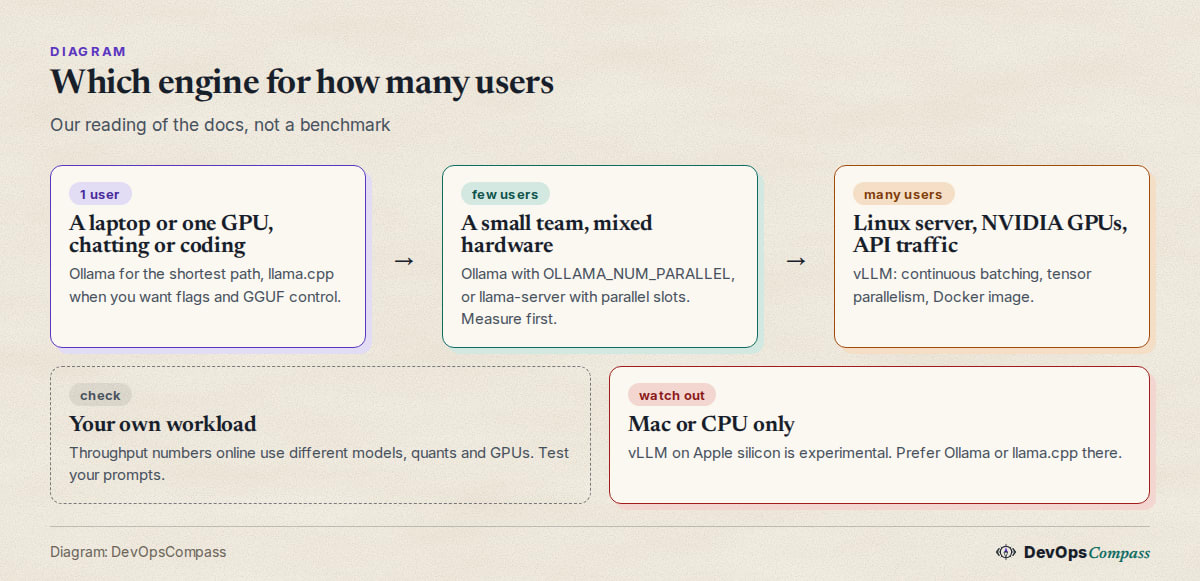
This is our opinion, based on the docs and reports above:
- One person, one machine: Ollama. It is the shortest path, runs on Windows and macOS, and its OpenAI-compatible API works with most tools. If you code with an agent, read our context length guide first.
- Mac, odd hardware, GGUF files, or flag-level control: llama.cpp. It is dependency-free, and
llama-serveralready batches requests. See the llama-server install and Docker guide. - A small team on one GPU: try Ollama with
OLLAMA_NUM_PARALLELorllama-serverslots first. Measure with your own prompts before adding a Python stack. - Many simultaneous users on Linux with NVIDIA GPUs: vLLM. Continuous batching and tensor parallelism exist for exactly that. Use the Docker image and bind it to localhost behind a proxy; do not put the port on the internet without authentication.
- Reusing the same model files across tools: do not plan on it. Keep Hugging Face weights for vLLM and GGUF for the other two.
What we did not test
- We installed none of the three servers and ran no benchmark, so we give no speed, memory or startup-time measurement of our own.
- The commands are from the official docs and were not run by us.
- User reports were not verified. Several GitHub issues were open when we checked and may be fixed since.
- We did not test Windows with WSL, AMD GPUs, multi-GPU setups or the experimental Apple silicon build.
- We did not cover SGLang, LM Studio or TensorRT-LLM, which also appear in the same searches.
FAQ
Is vLLM better than Ollama?
For many simultaneous users on a Linux server with NVIDIA GPUs, vLLM is built for the job: continuous batching and tensor parallelism. For one user, Ollama is simpler and runs on more systems. "Better" depends on how many people use it.
Is vLLM faster than llama.cpp?
Under load, users report vLLM ahead; for a single stream the numbers we found were close, and the quantization formats differed. No official head-to-head exists, so test your own model and prompts.
Can vLLM run on a CPU only?
Yes on Linux x86 and Arm, with FP32, FP16 or BF16 and basic features, using the vllm-openai-cpu image or a CPU build. It is not meant to be fast.
Can I install vLLM on Windows?
Not natively. The docs say "vLLM does not support Windows natively" and point to WSL with a supported Linux distribution and an NVIDIA GPU.
Can vLLM load GGUF models?
Only through an experimental, out-of-tree plugin that the docs call "highly experimental and under-optimized". Use Hugging Face weights when you can.
Can Ollama serve several users at once?
Yes, but by default each model handles one request at a time. Set OLLAMA_NUM_PARALLEL to allow more, remembering that memory scales with parallel requests times context length.
Does vLLM have an OpenAI-compatible API?
Yes. vllm serve <model> listens on port 8000 and exposes /v1 endpoints. Ollama offers /v1/ on port 11434, and llama-server offers its own OpenAI-style endpoints.
Related guides
- Ollama context length: default, num_ctx and how to change it: the memory side of running several requests.
- llama-server guide: install, port 9931, Docker, API key: the llama.cpp option in detail.
- Run Ollama without a GPU: CPU-only Docker setup: a lighter way to start.
Sources
- vLLM: README, GPU install, CPU install, Docker, quickstart, GGUF and optimization (31 Oct 2026).
- Ollama: FAQ, GPU and OpenAI compatibility (31 Oct 2026).
- llama.cpp: README and server README (31 Oct 2026).
- GitHub issues: vLLM #60370, #63595, #39769 and #63020.
- Hacker News comments: 49793700, 50177840, 50246895, 50245393, 49957924, 49776583 and 50157162.
- Google autocomplete suggestions for "vllm vs ollama", "vllm vs llama.cpp", "vllm docker", "vllm cpu" and "how to vllm" (31 Oct 2026).
Last verified: October 2026 (31 October 2026; vLLM v0.32.0, Ollama v0.40.13, llama.cpp v0.8.0). Defaults and platform support change often; check each project's docs.
Header image: Image: DevOpsCompass.
Comments
Post a Comment