
Claude Code Saved Your Password? Check settings.local.json
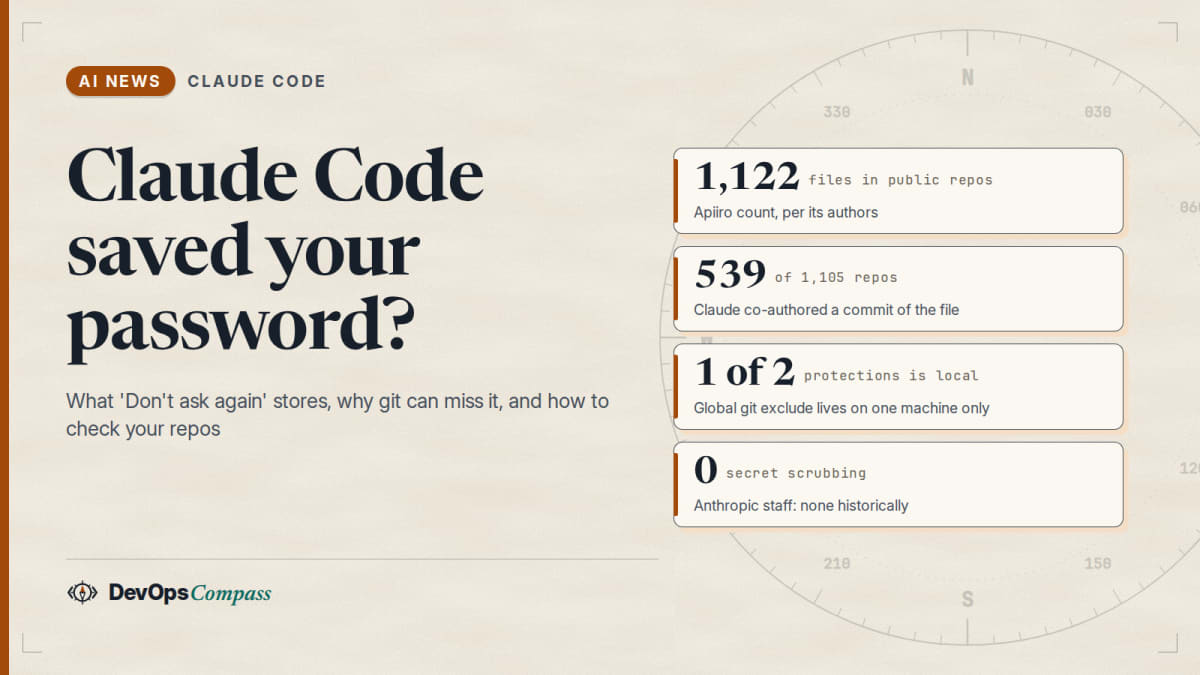
In short: when you choose "Yes, and don't ask again" for a shell command, Claude Code saves the command as you approved it in .claude/settings.local.json. If that command contains a password or token, the secret is now in a file. Apiiro reported on 7 November 2026 that it found 1,122 such files in public GitHub repositories; Anthropic staff say the file is meant to stay local and that Claude Code has "historically" not scrubbed secrets. The docs show why git can still pick the file up: Claude Code protects it with a global git exclude on your machine, not with the repository's own .gitignore. What to do: add the file to the repo's .gitignore, list tracked copies with git ls-files, rotate any secret you find, and turn on secret scanning. How this article was made: we read the Hacker News thread, the Claude Code docs and two GitHub issues, and ran one small git check in a throwaway directory. We could not open Apiiro's own article, so its numbers come from its authors' replies.
The questions are: does the button really store a password, why does git not stop it, is it a bug or user error, how do I check my repositories, and what do I do if I already pushed one? Official facts, user reports and our opinion are kept apart.
Official facts
Checked on 8 November 2026. Anthropic has no news post on this; its statements are a staff comment on Hacker News and its documentation.
| Item | Fact | Source |
|---|---|---|
| Where approvals go | "Yes, and don't ask again" saves an allow rule in .claude/settings.local.json at the root of the git repository |
permissions docs |
| What is saved | The approved command pattern; for a compound command, one rule per subcommand, up to 5 | permissions docs |
| How git is told to ignore it | On first write, Claude Code adds **/.claude/settings.local.json to your global git excludes file |
settings docs |
| If you create the file by hand | "Add it to .gitignore yourself" |
settings docs |
| If the file is tracked | The workspace trust step applies to its allow rules too | settings docs |
| Secret scrubbing | None historically, per an Anthropic staff comment; "looking into" prevention | HN comment by bcherny |
| Apiiro count | 1,122 files, all in public repositories | Apiiro authors on HN |
Does "Yes, and don't ask again" save my password in a file?
Yes, if the password is part of the command you approved. The rule is the command text, not a reference to it. If Claude proposes mysql -uroot -pSecret -e "select 1" and you pick the permanent option, the rule contains the whole string. Nothing in the docs says Claude Code removes secrets from it, and an Anthropic staff member wrote that it "historically has not done secret scrubbing". The button is fine for npm test. It is the wrong choice for any command that carries a credential in its arguments or in an inline environment variable.
Is settings.local.json ignored by git automatically?
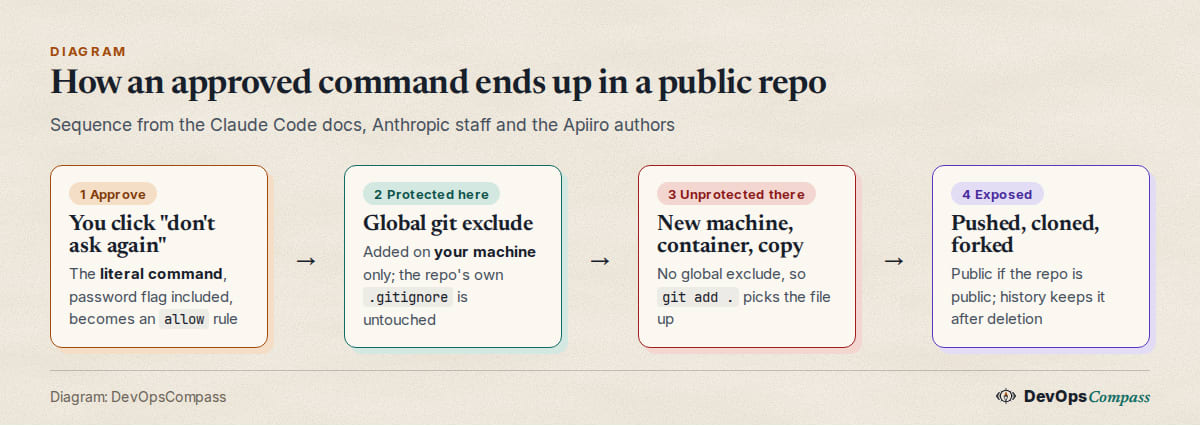
Only on the machine where Claude Code wrote it. The docs say the first write adds **/.claude/settings.local.json to your global git excludes file (core.excludesFile, or ~/.config/git/ignore). That is a per-user setting. It is not a line in the repository's .gitignore, so it does not travel with a clone, a container image, a copied folder or a second computer.
We checked this in a throwaway directory with git 2.34.1. With the documented global exclude, git add . skipped the file. After we removed the global file, standing in for a new machine or container, git add . staged .claude/settings.local.json like any other file.
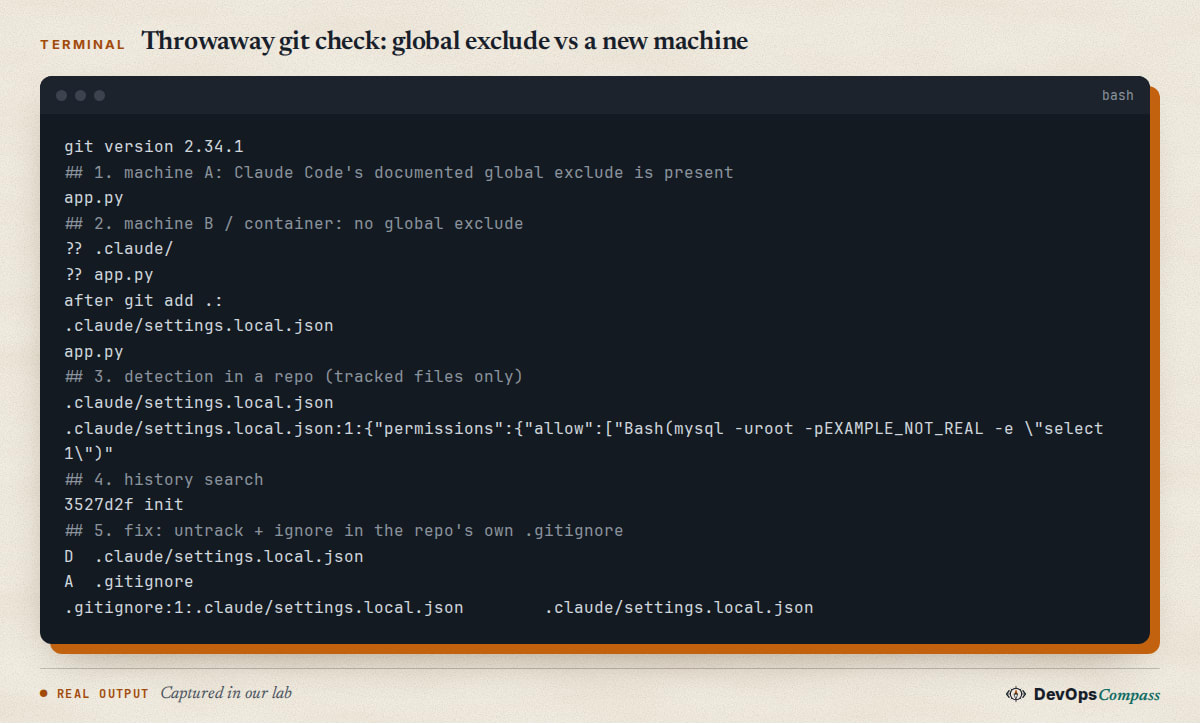
Two commenters on Hacker News said the file is "gitignored by default". That is true only in the sense above. The Apiiro author first wrote that a "fresh clone" would commit the file and then corrected himself: the file does not come with a clone, but it appears on a new machine or container without the global ignore, in a copied project folder, or once it is tracked, since ignore rules do not apply to tracked files.
Is this a Claude Code bug or user error?
Both camps have a point, and the facts support a middle reading. Anthropic's position is that the file "is meant to stay local" and that the committed files "were manually created and checked in". Apiiro's reply is that the file is created inside the project and in 539 of the 1,105 repositories it traced with a real secret, a commit co-authored by Claude itself changed the file. Those commits name every recent model, from Sonnet 4.5 to Opus 5.5. We could not check those numbers ourselves. Either way, the design means one extra step (a repo-level ignore) is needed in any team where more than one machine touches the project. A December 2025 GitHub issue (13106) described a user whose key leaked this way, so the pattern is not new.
What users report
These are statements by named commenters, not verified facts. Reddit blocks our tools, so this covers Hacker News and GitHub only. The thread had 296 points and about 200 comments when we read it.
- "Not Claude's doing." happyopossum wrote that Claude Code "didn't publish these secrets, the users did by committing their Claude Code settings to public repos". Aurornis called the headline confusing: the button alone exposes nothing; committing the file does.
- "Bad default." toppa33: "One click shouldn't put passwords in files people commit." JohnMakin wrote that "day 1 security best practices say you don't write secrets to files, ever", and described the risk for admins managing fleets of machines even when the files never leave.
- It is easy to miss. doginasuit pointed out that the file "gets created on the fly", so unless you know it is possible, it can slip by.
- Workarounds. cobbzilla wraps
gitso an agent'sadd -Afails with a message, and binarymax keeps credentials in a password manager and has scripts fetch them on demand. stogot pointed to the freegit-secretsfrom AWS Labs instead of paid scanning. - Anthropic's reply. bcherny, who wrote that he is from the Claude Code team, said Claude Code does not scrub secrets, they are looking at prevention, the file should not be checked in, permission rules are "old hat" next to auto mode, and everyone should enable secret scanning on their git host.
- Press and counts elsewhere. Lakera reported, per a search summary we could not open ourselves, that 428 of roughly 46,500 npm packages it monitored contained a
.claude/settings.local.json. We cite it as reported and have not verified it.
How do I check my repositories and organization?
Start with what is tracked, because ignore rules do not apply to tracked files. In every repository you own:
git ls-files '.claude/settings*.json' '**/.claude/settings*.json'
git log --oneline --all -- '.claude/settings.local.json'
The first command lists tracked copies. The second shows whether the file was ever committed, which matters because deleting it later does not remove it from history. To look for secret-shaped text in what is tracked, a rough pattern is enough to start (it will miss many shapes):
git grep -n -i -E '(-p|--password[= ]|password=|token=|Bearer )[^ "]+' -- '.claude/*.json'
For a GitHub organization, search for the file name across repositories in code search (path:.claude filename:settings.local.json), and turn on secret scanning with push protection in the organization settings; Anthropic's own advice, and GitHub's, is to rely on that rather than on a client-side tool. We did not test GitHub's search syntax or push protection today.
I already committed it. What now?
Treat any secret in it as compromised, in this order:
- Rotate first. Change the password, revoke the token or key. This is the only step that closes the exposure.
- Stop tracking the file:
git rm --cached .claude/settings.local.json, then add.claude/settings.local.jsonto the repository's own.gitignore. We ran this andgit check-ignore -vconfirmed the rule. - Clean history only if you must, with a tool such as
git filter-repo, and tell everyone with a clone to re-clone. A public repo may already have been scraped, so history cleaning is not a substitute for step 1. We did not test a rewrite here. - Review the allow rules left behind. A committed allow rule like
Bash(python:*)also grants broad permission to everyone who clones the project, subject to the trust step.
Does this affect private repositories?
Yes, in a smaller way. The 1,122 files Apiiro counted are all in public repositories. In a private repository only people with access can read the file, but the Apiiro authors point out that it still spreads with every clone and fork and becomes public if the repository does. Inside a company, the question is whether every developer should know the production database password.
Does auto mode avoid this?
Anthropic staff say so: bcherny wrote that auto mode "does not require manually maintaining finicky allow/deny lists" and is on by default on all plans. We did not test it, and the docs we read do not say whether auto mode ever writes to settings.local.json. Commenters disagreed: OJFord argued that nobody should use auto mode without sandboxing, and 80fj0348i said it blocks safe commands in their pipelines. Even if auto mode asks you less often, it does not make a password in a command line safe.
Do other coding agents do the same?
We do not know. We did not test Codex, Cursor or others. Any agent that remembers approved commands can store the literal text, so ask the same question of each: where are approvals kept, and is that location ignored by the repository itself?
Our take
Thesis: the risk is not the button, it is that the only guard lives outside the repository. Claude Code's design puts the ignore rule in a place that git users do not look at and that cannot be reviewed in a pull request. For a solo developer on one laptop that works. For a team, a container build, a second workstation or a copied folder it fails quietly, and the fix is a single line in .gitignore that nobody is told to add.
Both sides of the argument are right. Anthropic is correct that the file is documented as local and that committing it is a mistake, and the commenters who said "the users did it" are correct. But a tool that writes a file likely to contain secrets should make that file safe where it matters, which is the repository. A repo-level ignore entry, or a refusal to save a rule that looks like it carries a credential, would cost very little. Anthropic says it is "looking into" prevention; we would watch for a changelog line about it.
What it changes for people running or paying for these tools:
- Teams: put
.claude/settings.local.jsonin the shared.gitignoretemplate today, and add a CI check that fails if the file is tracked. That is cheaper than one credential rotation. - Individuals: never choose the permanent option for a command with a password, token or inline
KEY=value. Use an environment variable the shell already has, or a script that reads from a password manager. - Everyone: secret scanning with push protection catches this class whatever the agent. It is the control that does not depend on remembering the right click.
We would not read the Apiiro count as a measure of how many people are at risk. It counts public files that match, not people harmed, and the headline wording overstates what the button alone does. It is, though, a useful reminder that agent config files are now part of the attack surface of every repository.
What we did not test
- We did not read Apiiro's article (it blocked our tools), so the numbers are its authors' statements on Hacker News and are unverified by us.
- We did not run Claude Code, and we did not confirm which versions write the file, whether auto mode writes it, or what a new file looks like on your system. Our git check used git 2.34.1 and the documented exclude path.
- We did not test
git filter-repo, GitHub code search syntax, push protection, or other agents. - Every user comment above is unverified. Reddit was not reachable.
FAQ
Does Claude Code's "Don't ask again" expose passwords?
It can store them. The permanent option saves the approved command in .claude/settings.local.json, password included if it was in the command. Exposure happens when that file is committed or shared. Apiiro counted 1,122 such files in public repositories.
Is .claude/settings.local.json in .gitignore by default?
Not in the repository. The docs say Claude Code adds it to your global git excludes on first write. That protects your machine only; a new machine, a container, a copied folder or an already tracked file is not covered.
Should settings.local.json be committed to git?
No. The docs describe it as your personal file for one project. Share rules in .claude/settings.json instead, and add .claude/settings.local.json to the repo's .gitignore.
Where does Claude Code store "don't ask again" approvals?
In .claude/settings.local.json at the root of the git repository, as allow rules, for Bash commands and web fetch domains. File edit approvals last for the session only, per the permissions docs.
How do I remove a leaked secret from a Claude Code settings file?
Rotate the secret first. Then run git rm --cached on the file, add it to .gitignore, and rewrite history only if needed. Deleting the file in a new commit leaves it in older commits.
Does Claude Code scrub secrets from saved commands?
Not according to an Anthropic staff comment of 7 November 2026: it "historically has not done secret scrubbing" and is looking at ways to prevent this. Check the changelog for a change.
Does auto mode stop this?
Anthropic staff recommend auto mode over allow lists. We could not confirm whether it ever writes rules to the local file. Keep passwords out of command lines either way.
Related guides
- Does Claude Code send your email to websites? for another case of personal data leaving through an agent.
- Claude Code extension backdoor: are you affected? for checking what your agent setup can run.
- Postman plugin in Claude Code and Codex: how to remove it for config changed behind your back.
- Pin GitHub Actions to a commit SHA for another cheap repository hardening step.
Sources
- Anthropic docs: permissions, settings.
- Apiiro: Coding agents leaking secrets on GitHub: "Don't ask again" (7 Nov 2026; we could not open it, numbers via the authors' replies).
- Hacker News: thread 50407882, including replies by Anthropic staff and the Apiiro authors.
- GitHub: anthropics/claude-code issue 13106 (Dec 2025).
- Lakera: Your AI coding assistant just shipped your API keys (as summarized by search; not opened).
- Google autocomplete suggestions for "claude code settings.local.json gitignore" (8 Nov 2026).
Update log
- 8 November 2026: first version, from the Hacker News thread, Anthropic's docs, issue 13106 and one throwaway git check. We will update it if Anthropic ships a change to how the file is ignored or scrubbed, or when we can read Apiiro's article.
Last verified: November 2026 (8 November 2026). Software behaviour and vendor statements change; we will update this page and the log above.
Header image: Image: DevOpsCompass.
Comments
Post a Comment