
[Solved] SSH: REMOTE HOST IDENTIFICATION HAS CHANGED
Short answer: the server now shows a different SSH host key than the one saved in your known_hosts file. If you rebuilt or reinstalled the server, compare the new fingerprint, then run the ssh-keygen -R command the message prints. For a non-default port keep the [host]:port form, or the entry stays and the error comes back.
How this was made: on 12 November 2026 we reproduced the warning with OpenSSH 10.2p1 on Ubuntu 26.04 in a container, changed the server's host keys and tried each fix. We did not test Windows, PuTTY or a real remote server.
The warning as printed
We connected once, replaced the server's host keys (what a rebuild does), and connected again:
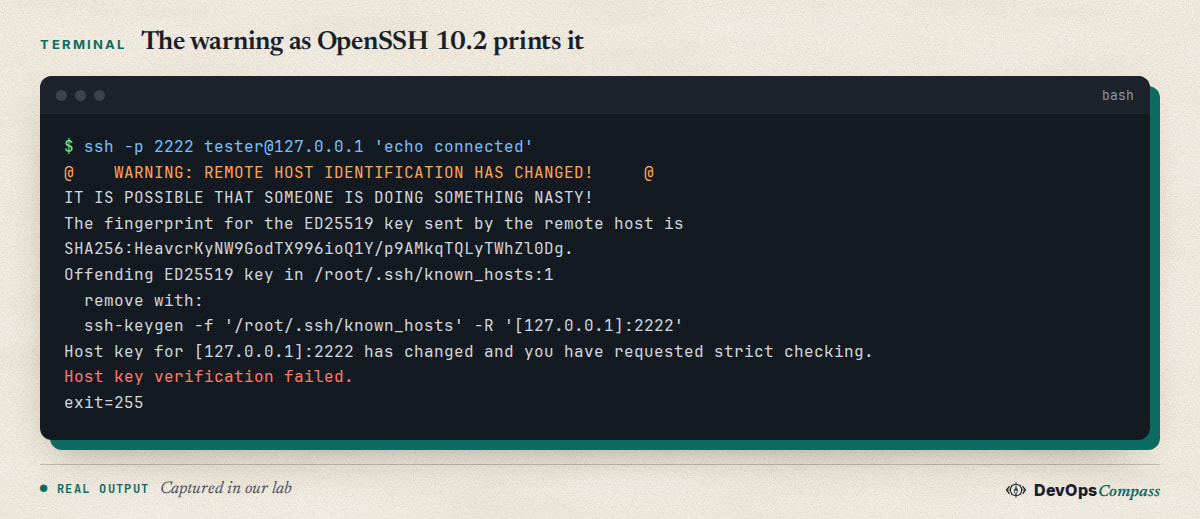
The client compares what the server sends with what it saved the first time. They differ, so it stops with exit code 255. The message already holds the fix: the ssh-keygen -f ... -R '[127.0.0.1]:2222' line, with the port.
Attack or rebuild
Both look identical, so decide before you delete anything. Rebuilt servers, reinstalled operating systems, a new VM on an old IP and a changed load balancer all create new host keys. A man-in-the-middle is rare but is the reason the warning exists. Ask yourself: did anyone touch this server since your last login? If yes, continue. If not, stop and ask the owner.
Compare the fingerprint
The warning prints the fingerprint the server sent now. On the server (console, cloud panel or a trusted colleague) print the real one:
ssh-keygen -lf /etc/ssh/ssh_host_ed25519_key.pub
From your side you can also read what the server offers, without logging in:
ssh-keyscan -p 2222 -t ed25519 web1.lab | ssh-keygen -lf -
In our lab both printed the same SHA256: value. If the value from a trusted channel matches, the key is genuine. If it does not match, do not connect.
Find the line
The message ends with Offending ED25519 key in /root/.ssh/known_hosts:1: file and line number. Our file was hashed (lines start with |1|), so you cannot read host names in it. Use ssh-keygen -F to look a host up instead of grepping:
ssh-keygen -F '[web1.lab]:2222'
It printed the matching lines even though the file was hashed.
ssh-keygen -R needs the port form
This is where the fix fails most often. On a server with a non-default port, known_hosts stores [host]:port. A plain host name matches nothing:
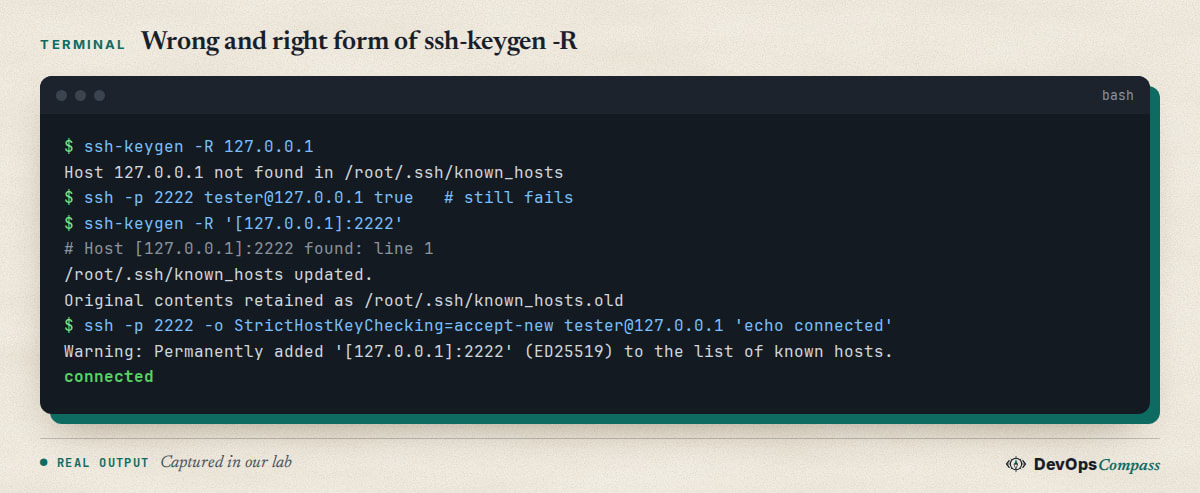
ssh-keygen -R 127.0.0.1 answered "not found" and the warning stayed. The bracket form removed the entries and wrote a backup to known_hosts.old. In our run it removed three lines: the first connection had saved the ED25519, RSA and ECDSA keys. Quote the brackets in bash.
Hostname and IP
If you connect by name sometimes and by IP at other times, each form has its own entry. We connected to web1.lab and to an alias for the same server, and after a rekey the alias entry was stale too. Run ssh-keygen -R once per name you use. If the warning names /etc/ssh/ssh_known_hosts, the stale line is in the system-wide file and you need root to edit it. We saw that path in the message when we put a key there.
Reconnect and save the new key
ssh -o StrictHostKeyChecking=accept-new -p 2222 user@host
accept-new saves the key of a host you have never seen and still refuses a changed key. It printed Permanently added and connected in our test. Without the option ssh asks for yes instead.
StrictHostKeyChecking=no
Many answers suggest -o StrictHostKeyChecking=no. It is not a clean bypass, and it removes the check you wanted:
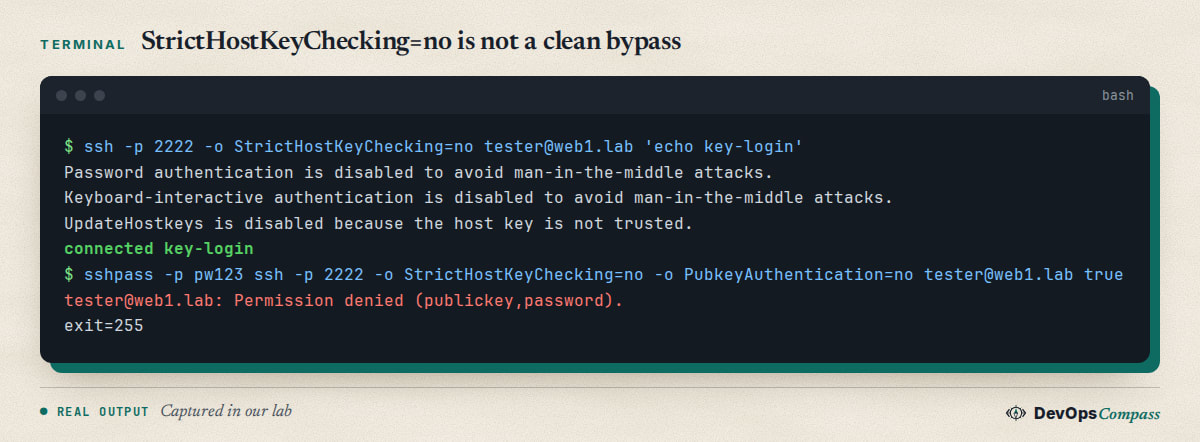
With a changed key ssh still printed the warning, then disabled password and keyboard-interactive login "to avoid man-in-the-middle attacks". Our key login worked; a password-only login failed with Permission denied (publickey,password). People then blame the password. Use it only for a throwaway machine, with -o UserKnownHostsFile=/dev/null so nothing is saved.
Host key verification failed without the warning
You can see Host key verification failed. with no big banner. That happens when the host is unknown, not changed, and ssh cannot ask you: BatchMode=yes, cron, CI, Ansible. We connected with BatchMode=yes to a name never used before and got only that line, exit 255. Test it quickly:
ssh -o BatchMode=yes user@host true
If it fails with this line and not "Permission denied", the problem is the host key, not your login. Add the key once with ssh-keyscan -p PORT host >> ~/.ssh/known_hosts after you checked the fingerprint, or use accept-new in the job.
Keep the host keys on rebuild
If you rebuild the same server often, restore the old keys instead of cleaning every client. Copy /etc/ssh/ssh_host_* from the old system (or your backup) into the new one and restart sshd. In our lab the warning disappeared at once and BatchMode login worked. Keep those private keys as secret as any other key.
Undo
ssh-keygen -R keeps the old file as known_hosts.old. To undo, copy it back over known_hosts. Nothing on the server changes.
FAQ
What does "REMOTE HOST IDENTIFICATION HAS CHANGED" mean?
The host key the server presents is not the one saved for that name and port. Usually the server was rebuilt; rarely someone is intercepting the connection.
Where is the known_hosts file?
For your user it is ~/.ssh/known_hosts on Linux and macOS, and %USERPROFILE%\.ssh\known_hosts for the built-in Windows OpenSSH client. The warning prints the exact path and line.
Why does ssh-keygen -R not remove the entry?
Probably the entry is stored as [host]:port or under another name. Copy the command from the warning, which includes the right form. We reproduced this with port 2222.
Is it safe to disable host key checking?
Not for real servers. We saw ssh switch off password login when the key changed, and you also lose protection against interception.
Why does Ansible or a script say host key verification failed?
They cannot ask you to accept an unknown key. Check with ssh -o BatchMode=yes host true, add the verified key to known_hosts, and avoid turning checking off.
Do I need to restart ssh after removing a known_hosts entry?
No. The change is only in your known_hosts file on the client, and the next connection reads it again. On the server side, new host keys take effect only after sshd restarts.
Related guides
- SSH warning: not using a post-quantum key exchange: the other warning OpenSSH 10 prints.
- Change the SSH port on Ubuntu 26.04: why the
[host]:portform matters. - Fail2ban on Ubuntu 26.04 for SSH: protect the server once you can log in again.
Sources
- Jeff Geerling: Reset a host key when rebuilding servers on the same IP.
- Linuxize: Fix SSH "Host Key Verification Failed" error.
- OneUptime: Fix Ansible known hosts errors (2026).
- MajorsHouse wiki: Ansible host key verification failed on a rebuilt host.
- Google autocomplete for "remote host identification has changed" and "ssh host key verification failed" (12 November 2026).
Last verified: November 2026 (12 November 2026, OpenSSH 10.2p1 on Ubuntu 26.04 in a container). Windows and PuTTY, jump hosts, certificates (SSHFP, CA) and a real remote server were not tested.
Header image: Image: DevOpsCompass.
Comments
Post a Comment