
Rust Coreutils on Ubuntu 26.04: What Breaks and How to Fix
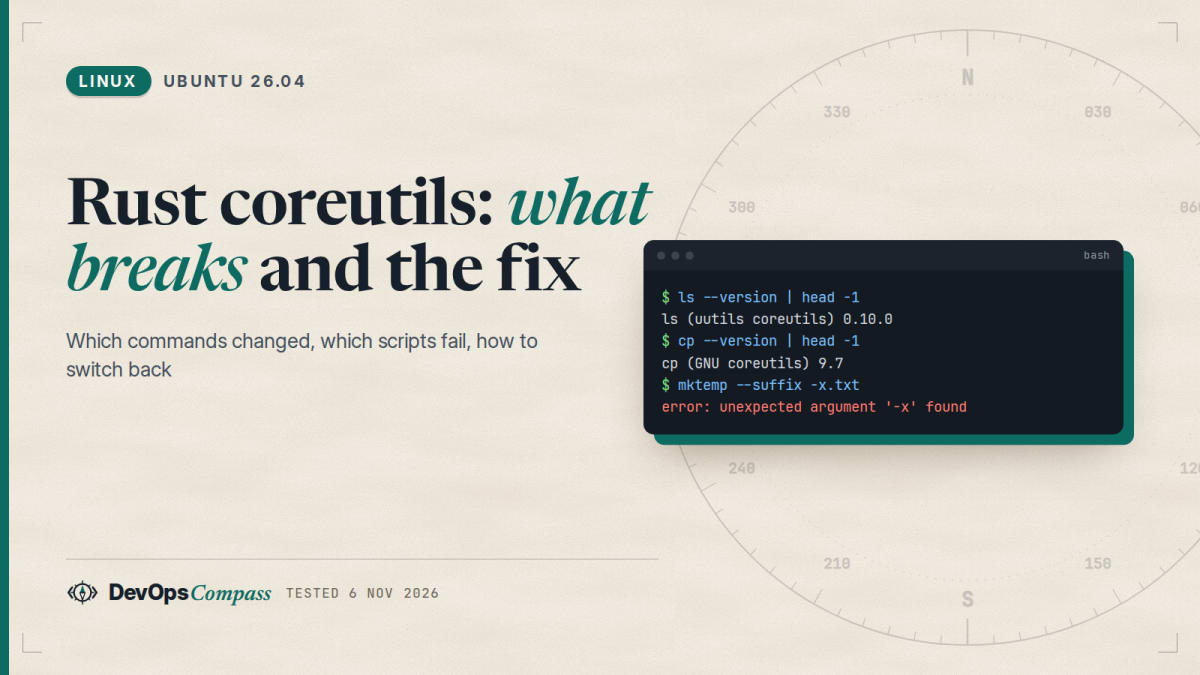
Short answer: Ubuntu 26.04 LTS installs the Rust rewrite of the core utilities (uutils coreutils 0.10.0) as ls, date, sort, cat, chmod, timeout, mktemp and about a hundred more. Only cp, mv, rm and df stay GNU. In our lab most commands matched GNU output, but we found real differences: mktemp --suffix -x fails, timeout -k returns exit code 137 instead of 124, and chown -R -R is rejected. To switch back, run sudo apt-get install --allow-remove-essential coreutils-from-gnu coreutils-from-uutils-. A plain apt install coreutils-from-gnu fails with a conflict.
How this was made: on 6 November 2026 we ran every command below in a throwaway ubuntu:26.04 container (arm64, uutils 0.10.0, GNU coreutils 9.7), compared uutils against the GNU binaries that are installed next to it, and read the public bug reports. We did not test x86-64, a full server install or a reboot.
If your shell script worked on Ubuntu 24.04 and fails on 26.04 with a clap-style error: unexpected argument, or a CI job that was green until ubuntu-latest moved to 26.04 is now red, this is probably the cause. Ubuntu 25.10 introduced the Rust coreutils, and 26.04 LTS is the first long-term release to ship them, so they now reach servers and CI runners.
Which commands are Rust and which are still GNU on Ubuntu 26.04?
Run --version on a few commands. In our lab:
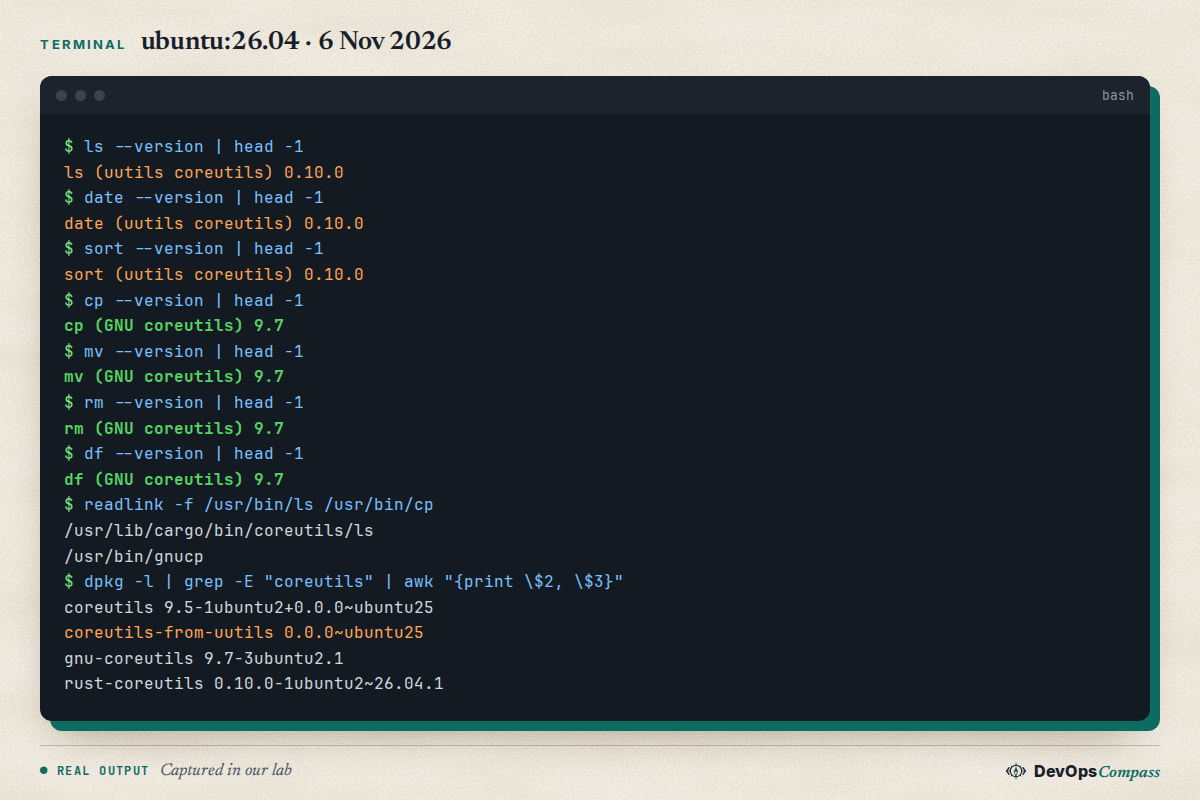
ls, date and sort print (uutils coreutils) 0.10.0. cp, mv, rm and df print (GNU coreutils) 9.7. Four packages are involved:
| Package | Version in our lab | What it does |
|---|---|---|
coreutils-from-uutils |
0.0.0~ubuntu25 | Puts the Rust tools into /usr/bin (symlinks) |
rust-coreutils |
0.10.0-1ubuntu2~26.04.1 | The uutils binary, installed in /usr/lib/cargo/bin/coreutils |
gnu-coreutils |
9.7-3ubuntu2.1 | The GNU tools, installed with a gnu prefix (gnuls, gnudate, gnucp...) |
coreutils |
9.5-1ubuntu2+0.0.0~ubuntu25 | An empty meta package that keeps apt happy |
The gnu prefix is useful: GNU ls is always available as gnuls, and cp, mv, rm and df in /usr/bin are symlinks to gnucp, gnumv, gnurm and gnudf. Ask Ubuntu has the same split explained from the other side: rust-coreutils ships the binaries, and coreutils-from-uutils is the package that puts them on your PATH (Ask Ubuntu 1564348).
To check any machine, run ls --version | head -1 (it says uutils or GNU) and dpkg -l | grep coreutils.
Why are cp, mv and rm still GNU? Per OMG! Ubuntu, they were held back in 26.04 because of time-of-check to time-of-use (TOCTOU) security issues in the uutils versions, and Ubuntu 26.10 is meant to finish the move. So plan for the rest to change in the next release.
What did we compare, and what differed?
We ran about 200 small cases in the container, each one against both implementations: sort flags, date -d phrases, ls -l, stat -c, cut, tr, numfmt, env -S, chmod, install -D, touch, wc, du, seq and more. The great majority gave identical output. The ones that did not are the useful part:
| Command | uutils 0.10.0 | GNU 9.7 |
|---|---|---|
mktemp --suffix -x.txt |
error: unexpected argument '-x' found, exit 1 |
creates /tmp/tmp.XXXXXXXXXX-x.txt |
timeout -k 0.1 0.2 sleep 5; echo $? |
137 |
124 |
chown -R -R root d |
the argument '--recursive' cannot be used multiple times |
accepted |
env nosuchcmd |
error plus an extra line env: use -[v]S to pass options in shebang lines |
only the first line |
chmod u+q d |
invalid operator (expected +, -, or =, but found q) |
invalid mode: 'u+q' |
The last two only change error text, which matters if a script greps stderr. The first three change behaviour. The next sections take them one at a time. One more difference is cosmetic: for ls -l file dir (a file and a directory in one call) GNU pads the size column to the width of the directory's own size, and uutils does not, so the columns line up differently. A single directory listing came out identical. Do not parse ls -l by character position in either case.
A caution about this table: it is what 0.10.0 does on Ubuntu 26.04 today. The upstream project is moving fast (releases 0.11.0 on 31 August and 0.12.0 on 17 September 2026 per GitHub) and one of our findings, chown -R -R, is already closed upstream, so it may be fixed by an Ubuntu update later. Re-run the check on your own machine.
Why does mktemp --suffix with a dash fail on Ubuntu 26.04?
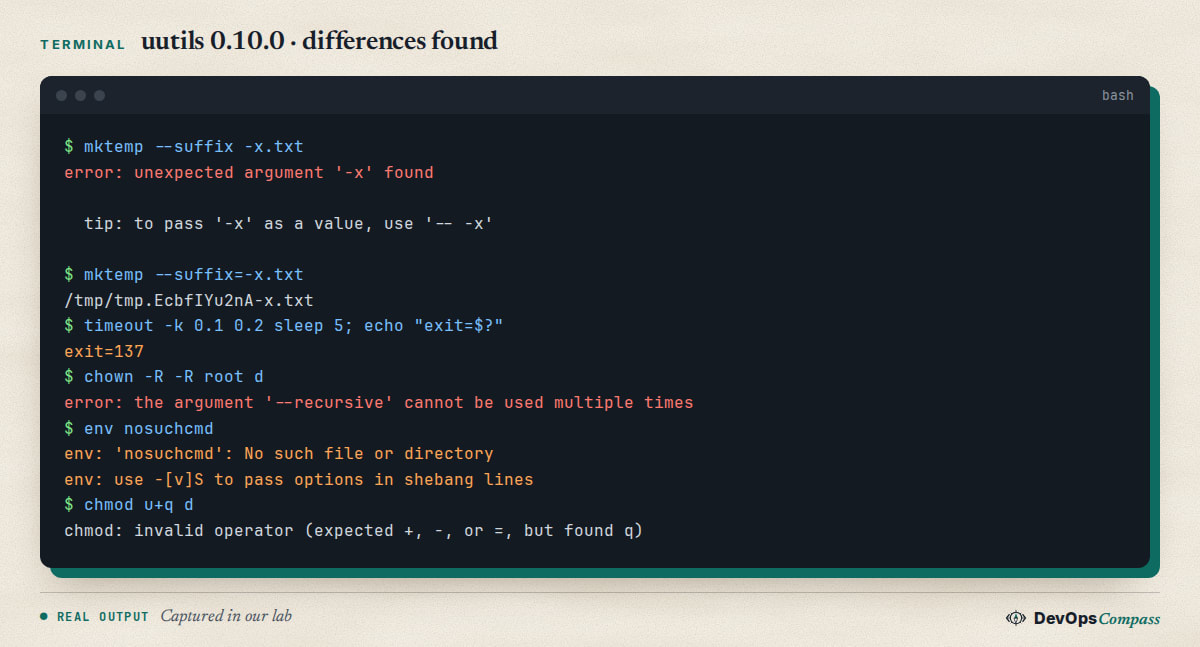
mktemp --suffix -x.txt passes the value as a separate word. GNU mktemp takes -x.txt as the value of --suffix. The Rust version reads it as another option and stops:
$ mktemp --suffix -x.txt
error: unexpected argument '-x' found

  tip: to pass '-x' as a value, use '-- -x'
This is the bug that broke real pipelines. On 4 November 2026 a maintainer of openstack-cron-action reported that its cleanup script, tmpfile=$(mktemp --suffix -openstack-ports.txt), started failing within milliseconds after GitHub's ubuntu-latest runner moved from 24.04 to 26.04 around 30 October (issue 127).
Fix: use the = form, which works on both implementations. We checked it:
mktemp --suffix=-x.txt # works on uutils and on GNU
Search your repository for the pattern with grep -rn -- "--suffix \|-t -\|--prefix \+-" . and fix every hit. The same rule applies to any long option whose value starts with a dash: write --option=value and the problem cannot happen.
Does timeout behave differently?
Yes, in one case we could reproduce. With a kill-after value, GNU timeout returns 124 when the command timed out. In our lab uutils returned 137, the exit code of a process killed by SIGKILL:
$ timeout -k 0.1 0.2 sleep 5; echo "exit=$?"
exit=137
We repeated it with a command that ignores SIGTERM (bash -c 'trap "" TERM; sleep 5') and got 137 from uutils and 124 from GNU in both cases. Without -k, both returned 124. If your script tests [ $? -eq 124 ] to detect a timeout, a -k call can now take another branch.
A related report is open on the uutils tracker: "timeout: -s KILL and -k no longer kill the whole process group" (issue 15768, 25 October 2026). A project that runs commands under timeout, setsid and pkill listed two failing tests after the runner change and suspected this area, but said the cause was not confirmed (capybara-hq/plugins issue 7). We could not reproduce a surviving child process: in our test the background child of the killed command was gone with both implementations. So treat the exit code as confirmed and the process group problem as a report we did not verify.
Fix: accept both codes ([ $rc -eq 124 ] || [ $rc -eq 137 ]), or call the GNU binary explicitly with gnutimeout.
Why did my CI break when ubuntu-latest became 26.04?
GitHub moved the ubuntu-latest label to 26.04 in late October 2026 (the openstack-cron-action report puts it around 30 October, 12:00 UTC). The runner image has the Rust tools as the default, so every script that relied on a GNU quirk is a candidate. The pattern in the public reports we read is the same each time: green on ubuntu-24.04, red on ubuntu-26.04, and the failing line calls a coreutils command.
Three ways to deal with it, from fastest to best:
- Pin the runner to
runs-on: ubuntu-24.04while you fix the scripts. This buys time but 24.04 will not stay forever. - Call the GNU binary when you cannot change the line: on 26.04 it exists as
gnumktemp,gnutimeoutand so on. Checkcommand -v gnumktempfirst so the script still runs on other systems. - Fix the portability bug. Use
--option=value, do not repeat short flags, and do not depend on exact error text. Scripts like that run on both implementations.
If you use GitHub Actions, our guide on pinning Actions to a commit SHA covers a different part of the same hygiene: build steps should not change under you without a diff you can review.
How do I switch back to GNU coreutils on Ubuntu 26.04?
You can swap the implementation with apt. We did it twice in the lab, in both directions. Do it in a test container or a VM first, because these are essential packages.
sudo apt-get install --allow-remove-essential coreutils-from-gnu coreutils-from-uutils-
The trailing - on coreutils-from-uutils- tells apt to remove that package in the same transaction. Afterwards:
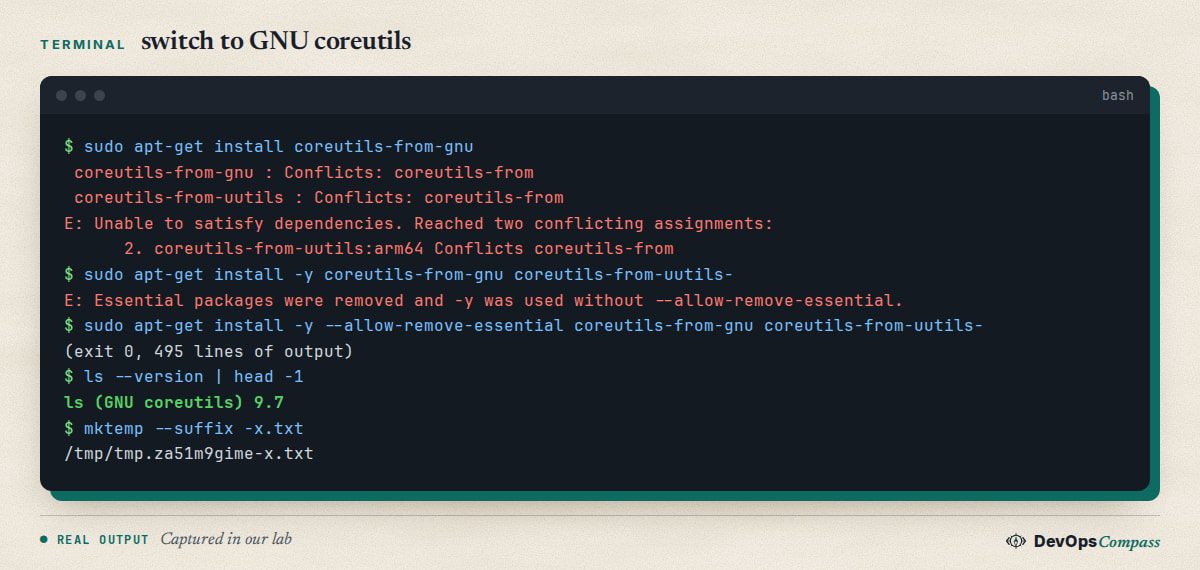
ls --version printed GNU coreutils 9.7, mktemp --suffix -x.txt worked, and timeout -k 0.1 0.2 sleep 5 returned 124. To go back to the Rust tools, we ran sudo apt-get install --allow-remove-essential coreutils-from-uutils coreutils-from-gnu- and ls was uutils 0.10.0 again.
You can also switch for one command instead of the whole system: call gnumktemp, gnusort or gnudate, or put /usr/lib/cargo/bin/coreutils aside. That is the safest option for a single script.
An answer on Ask Ubuntu suggests sudo apt remove coreutils-from-uutils --allow-remove-essential and warns that packages depending on build-essential can make it harder, with a workaround using an equivs package (Ask Ubuntu 1564801). We did not test that route or build-essential; our single-transaction swap is not the same as removing the package alone. Note that Ubuntu may remove the opt-out in a later release; we only know the 26.04 package behaviour.
Why does installing coreutils-from-gnu fail?
The two packages declare Conflicts: coreutils-from, so installing one while the other is installed cannot be solved:
$ sudo apt-get install coreutils-from-gnu
 coreutils-from-gnu : Conflicts: coreutils-from
 coreutils-from-uutils : Conflicts: coreutils-from
E: Unable to satisfy dependencies. Reached two conflicting assignments:
You have to remove the other one in the same command (the - suffix above). Then apt refuses a second time, because coreutils-from-uutils is marked essential:
E: Essential packages were removed and -y was used without --allow-remove-essential.
That is why the working command needs --allow-remove-essential. Without -y, apt asks you to type a confirmation sentence instead; we ran it non-interactively. The swap printed 495 lines of output, mostly coreutils-switch diversion messages, and exited 0.
Why does env say No such file or directory in my script?
A question on Ask Ubuntu (unanswered when we checked) shows a script failing on 26.04 with an env message that looks as if env itself is broken (Ask Ubuntu 1570779). We reproduced the same message and found the usual cause. The minimal ubuntu:26.04 image has no Python, so this shebang fails:
#!/usr/bin/env python3
env: 'python3': No such file or directory
env: use -[v]S to pass options in shebang lines
The first line is the real error: python3 is not installed. The second line is a hint that the Rust env prints for every missing command and GNU env does not print. It is misleading here, because there are no options in this shebang. Install the interpreter (our Python on Ubuntu 26.04 guide covers python3, venv and pip) and the error goes away. We have not seen the exact setup of the asker, so this may not be their cause.
Does sort or ls -v still behave differently?
Two old reports say yes, so we checked on 0.10.0 (package 0.10.0-1ubuntu2~26.04.1).
- Locale sorting. An Ask Ubuntu question from October 2025 says
sorton Ubuntu 25.10 ignored locale rules and sorted by byte value (Ask Ubuntu 1557259). In our lab, withen_US.UTF-8generated, uutils and GNU gave the same order forb B a A à C _x(a A à b B C _x). The same held forsort -fandsort -h. ls -v. On 25 September 2026 the PostgreSQL packaging team reported thatls -1vno longer sortedpg_configpaths by version on Ubuntu resolute, which broke their tests (uutils issue 14859). The Ubuntu package changelog says that version was backported as 0.10.0-1ubuntu2~26.04.1. In our testls -1vreturnedf1 f2 f9 f10, the same as GNU.
So on a current 26.04 these two are fixed. If you see them, your package is probably older: run sudo apt update && sudo apt upgrade.
What else do people report?
These are reports we read and did not reproduce. Treat them as things to test in your own setup, not as facts:
install -Dwas not safe when run in parallel bymake -j2, with intermittent "cannot create directory" errors while building packages for Ubuntu resolute (uutils issue 14862, closed).- A user on Ask Ubuntu said the new
duprinted wrong sizes on Ubuntu 25.10 (Ask Ubuntu 1559396). Ourdu -shanddu -sbcases matched GNU on 26.04. - The upstream tracker has an open issue titled "~180 differences between GNU coreutils and uutils, found by AI fuzzer" (issue 15254, 11 October 2026). We did not go through it. It is a sign that edge cases exist, not a list of things that break normal scripts.
What we did not test
- x86-64 (our host is arm64), a full server install, a desktop, a reboot, or the GitHub runner image itself. The CI part is based on public reports.
- Performance. We make no claim that Rust coreutils are faster or slower.
- About 130 more cases that we had written never ran: we stopped the second comparison batch after 151 of 285 cases because the
sleepandtimeoutcases are slow. A number of differences in its log were mistakes of our script (command order, exit codes of pipes), not of uutils. We only report differences that we re-ran by hand. - Removing
coreutils-from-uutilson its own, thebuild-essentialworkaround, and unattended upgrades after the swap. - The security audit itself. We only know its headline from Hacker News and press titles.
FAQ
Does Ubuntu 26.04 use Rust coreutils?
Yes. Ubuntu 26.04 LTS installs uutils coreutils 0.10.0 for most commands, including ls, date, sort, cat, chmod and mktemp. In our lab cp, mv, rm and df were still GNU coreutils 9.7. Run ls --version | head -1 to check your own system.
How do I check which coreutils my Ubuntu uses?
Run ls --version | head -1: it prints (uutils coreutils) or (GNU coreutils). For the packages, run dpkg -l | grep coreutils. The GNU tools are also installed with a gnu prefix, for example gnuls, so you can compare both on one machine.
How do I switch back to GNU coreutils on Ubuntu 26.04?
Run sudo apt-get install --allow-remove-essential coreutils-from-gnu coreutils-from-uutils-. A plain apt install coreutils-from-gnu fails because both packages conflict. We tested the swap in a container in both directions. Try it in a VM before a production server.
Is the Rust coreutils safe to use after the security audit?
Canonical commissioned a security audit, and Hacker News carried the headline "Ubuntu Rust Coreutils Audit Revealed 113 Issues" in April 2026 (HN discussion). We did not read the audit, so we cannot judge it. The audit is also the reason cp, mv and rm stayed GNU in 26.04, per OMG! Ubuntu.
Will Ubuntu 26.10 move cp, mv and rm to Rust too?
According to OMG! Ubuntu and Phoronix, yes: Ubuntu 26.10 is meant to complete the move and ship all utilities in Rust, after the TOCTOU issues in the uutils versions were fixed upstream. This is press reporting from September 2026. We did not test 26.10.
Why does timeout return 137 instead of 124 on Ubuntu 26.04?
In our test, timeout -k 0.1 0.2 sleep 5 returned 137 with uutils and 124 with GNU. Without -k both returned 124. A related upstream issue about -k and -s KILL is open (issue 15768). Accept both exit codes in scripts, or call gnutimeout.
Related guides
- sudo-rs on Ubuntu 26.04: What Breaks and How to Switch Back: the other Rust replacement in 26.04, with its own switch-back command.
- apt-key: Command Not Found on Ubuntu 26.04 (Fix): another old command that is gone, and the supported way to add repository keys.
- Upgrade Ubuntu 24.04 to 26.04 LTS on a Server: Full Guide: the upgrade path that brings these tools to an existing server.
Sources
- OMG! Ubuntu: Ubuntu 26.10 completes transition to Rust-based coreutils (updated 1 October 2026).
- Hacker News: Ubuntu Rust Coreutils Audit Revealed 113 Issues and Ubuntu 26.10 Moves cp, mv and rm Over To Rust Coreutils.
- Ask Ubuntu: Why did Ubuntu switch from GNU coreutils to uutils, coreutils-from-uutils vs rust-coreutils, sort ignores locale on 25.10, env error on 26.04.
- GitHub: uutils/coreutils issue tracker, openstack-cron-action issue 127 (mktemp --suffix), capybara-hq/plugins issue 7 (timeout on 26.04).
- Google autocomplete for "rust coreutils ubuntu" and "ubuntu 26.04 coreutils" (6 November 2026).
Last verified: November 2026 (6 November 2026, uutils coreutils 0.10.0 and GNU coreutils 9.7 on ubuntu:26.04, arm64, container only). Package versions move with Ubuntu updates; run ls --version on your own system.
Header image: Image: DevOpsCompass.
Comments
Post a Comment