
Pin GitHub Actions to a Commit SHA: Tested Guide (2026)
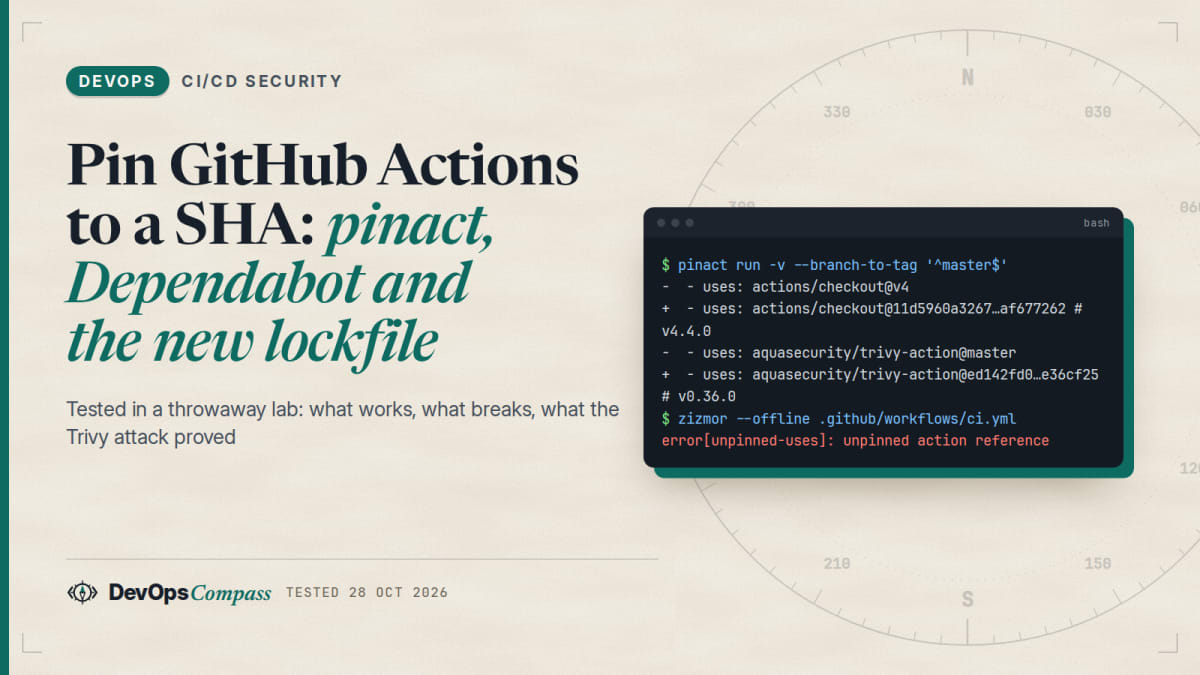
Short answer: replace every uses: owner/action@v4 with the full 40-character commit SHA and a version comment, for example actions/checkout@11d5960a326750d5838078e36cf38b85af677262 # v4.4.0. In our lab, pinact run -v did this for tags in one command, --branch-to-tag handled a @master reference, and pinact run --check -v caught a version comment that did not match its SHA. Then keep the pins fresh with Dependabot or Renovate and enforce them with GitHub's allowed-actions policy. Pinning is not complete protection: users who pinned trivy-action before 2025-04-09 were still exposed through a dependency of that action.
How we tested: pinact 5.0.2 and zizmor 1.31.1 on a sample workflow inside a throwaway python:3.12-slim container on 28 October 2026. We did not run Dependabot, Renovate, GitHub's policy settings or the new lockfile tool: those parts come from official docs and are labelled.
A tag such as @v4 is a label that the action's owner can move. If an attacker takes over the repository, every workflow that uses the tag runs the attacker's code on the next run. A full commit SHA cannot be moved. This guide shows how to switch, how to keep the pins up to date, and where pinning stops helping.
Why tags are the weak point
GitHub's own secure use guide says to pin actions to a full-length commit SHA, and warns that a tag "can be moved or deleted if a bad actor gains access to the repository". It adds that you should check the SHA belongs to the action's repository and not a fork.
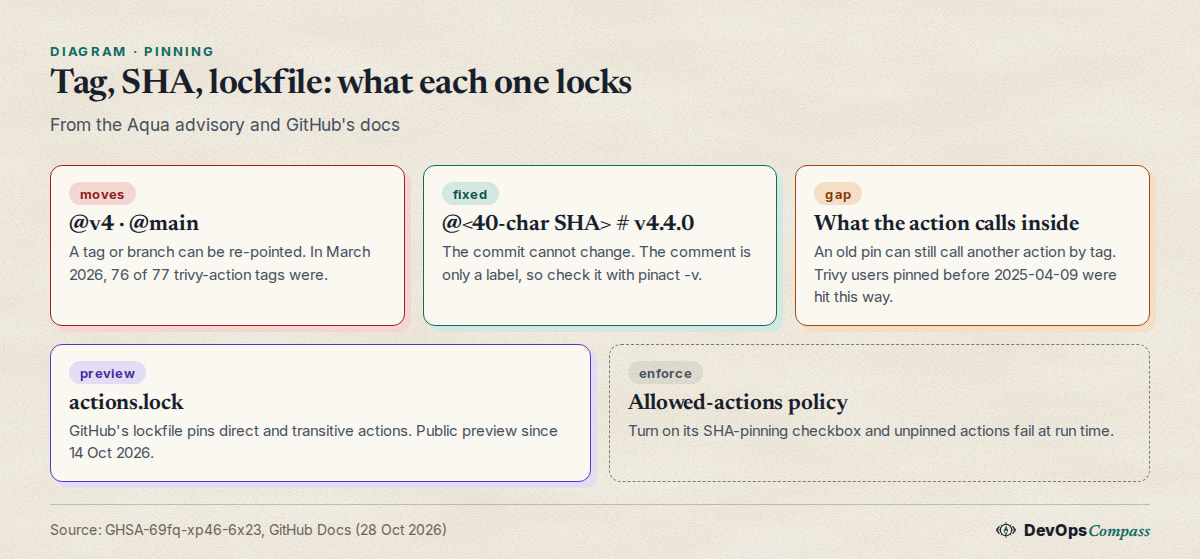
The clearest example is the Trivy incident. According to the Aqua Security advisory (CVE-2026-33634, rated critical), on 19 March 2026 an attacker force-pushed 76 of 77 version tags of aquasecurity/trivy-action to credential-stealing malware and replaced all 7 tags of aquasecurity/setup-trivy. The advisory gives an exposure window of about 12 hours for trivy-action. Workflows that referenced those tags ran the malicious code without any change in their own repository.
How do I pin a GitHub Action to a specific commit SHA?
Every tag points to a commit. You can read it without any tool:
git ls-remote https://github.com/actions/checkout refs/tags/v4 refs/tags/v4.2.2
On 28 October 2026 this printed 11d5960a326750d5838078e36cf38b85af677262 for v4 and 11bd71901bbe5b1630ceea73d27597364c9af683 for v4.2.2. If a tag is annotated, add ^{} to the pattern to get the commit and not the tag object. Then write the SHA in the workflow and keep the version as a comment:
- uses: actions/checkout@11d5960a326750d5838078e36cf38b85af677262 # v4.4.0
The comment is only for humans and update tools. GitHub runs the SHA. Take the SHA from the action's own repository, as GitHub's guide says.
How do I pin all my GitHub Actions automatically?
Doing this by hand across many workflows is slow and error-prone. pinact (v5.0.2, released 25 October 2026) rewrites the files for you. It also works on reusable workflows. Our sample workflow had two jobs with actions/checkout@v4, actions/setup-node@v4 and aquasecurity/trivy-action@master.
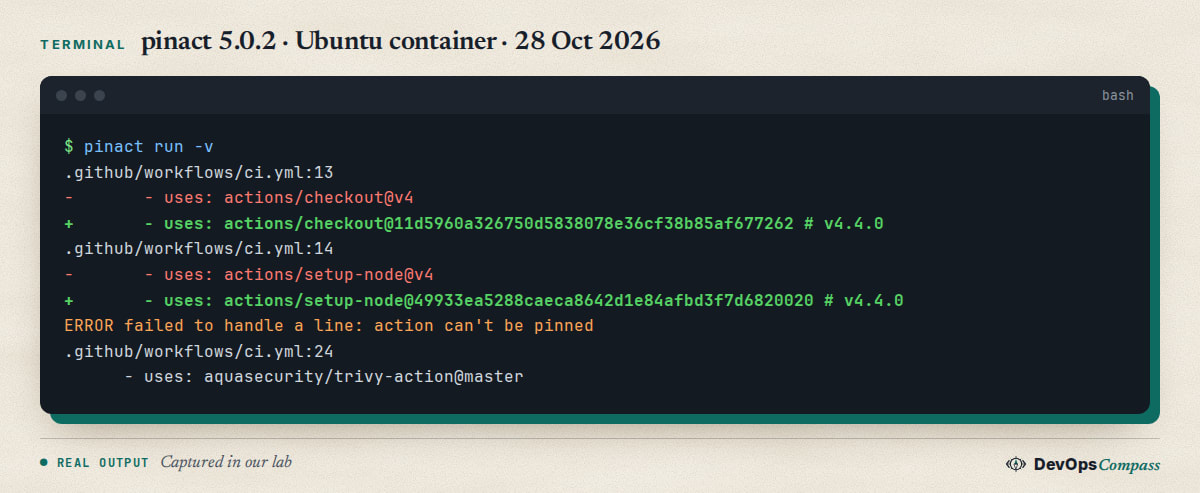
pinact run -v replaced the three tag references with SHAs and a # v4.4.0 comment, printing a diff. It refused the branch reference. The fix is in the next section. We downloaded the pinact binary from its GitHub release and checked its SHA-256 against the published checksums file before running it.
Useful flags from pinact run --help (v5.0.2):
| Flag | What it does |
|---|---|
--check |
Report only, change nothing (use in CI) |
-v, --verify-comment |
Check that the version comment matches the SHA |
-u, --update |
Move pins to the latest versions |
--branch-to-tag |
Turn a branch such as main into the latest stable tag |
-m, --min-age |
Ignore releases younger than N days |
--no-api |
Offline syntax check only; needs --fix=false |
Why does pinact say "action can't be pinned"?
In our run, aquasecurity/trivy-action@master produced ERROR failed to handle a line: action can't be pinned. By default pinact pins tags, not branches. A branch is a moving target, so there is no single "right" SHA to write.
The --branch-to-tag option, added in May 2026 (pinact issue 1529), takes a regular expression. We ran pinact run -v --branch-to-tag '^master$' and the line became aquasecurity/trivy-action@ed142fd0673e97e23eac54620cfb913e5ce36c25 # v0.36.0, the latest release at the time. Check that a release tag is really what you want: a branch reference often means the author never tagged what you need.
How do I find every unpinned action in my repos?
zizmor (v1.31.1, 15 October 2026) is a static analyser for workflow files. It installs with pip install zizmor. Its unpinned-uses audit works offline:
zizmor --offline .github/workflows/
Before pinning, our sample file gave 4 high-severity unpinned-uses errors (summary line: 9 findings, 3 of them suppressed by default). After pinning everything with --branch-to-tag, the high findings were gone and the summary read 5 findings, 2 medium. Those two were artipacked: actions/checkout keeps its token in .git unless you set persist-credentials: false. This is a separate hardening step that pinning does not cover.
Some zizmor audits need a GitHub token and online mode. The impostor-commit audit (a SHA that exists only in a fork of the action) is listed as online-only in zizmor's documentation. We did not run it.
Does the # version comment have to match the SHA?
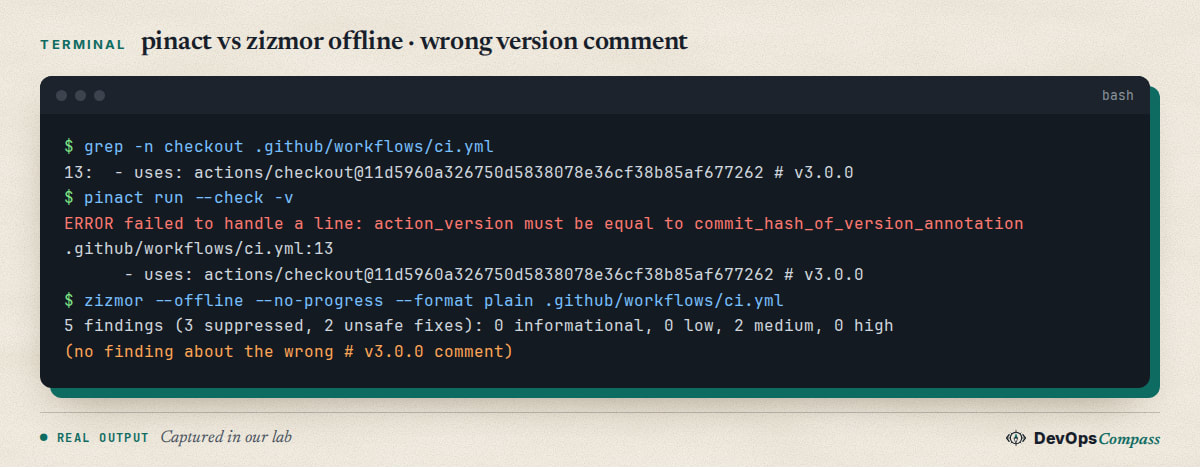
No: GitHub ignores it. That is exactly the risk. Reviewers read the comment, not the SHA. A GitHub issue filed on 22 October 2026 in the ArcadeDB project found that 4 of its 26 pinned actions carried a version comment that did not match their SHA, and that nothing in its CI checked this.
We reproduced the check. After we changed the comment to # v3.0.0 while keeping the same SHA, pinact run --check -v failed with action_version must be equal to commit_hash_of_version_annotation for each line. zizmor in offline mode printed no finding about the wrong comment at all. zizmor's documentation describes a ref-version-mismatch audit and lists it as working offline, yet our offline run stayed silent. We did not test it online. If you rely on comments, run pinact's verification in CI.
How do I keep SHA-pinned actions updated?
A pin that never moves means missing security fixes. Automate the updates.
Dependabot (from GitHub's docs, syntax-checked by us but not run). Add this to .github/dependabot.yml:
version: 2
updates:
  - package-ecosystem: "github-actions"
    directory: "/"
    schedule:
      interval: "weekly"
GitHub's documentation says Dependabot updates the version comment when it is on the same line as the SHA.
Renovate (from its source code, not run). The built-in preset helpers:pinGitHubActionDigests pins digests, and helpers:pinGitHubActionDigestsToSemver converts pinned digests to semver:
{ "extends": ["config:recommended", "helpers:pinGitHubActionDigests"] }
pinact can also update: pinact run -u -v. Be careful. In our lab, starting from a checkout pin whose real version was v4.4.0, -u moved it to v7.0.1, and setup-node from v4.4.0 to v7.1.0. That is several major versions in one step, so read the changelogs and run your tests in a pull request, not on the main branch.
Why is my version comment stale after a Dependabot update?
Two open Dependabot reports describe this. In dependabot-core issue 14716 (April 2026) a SHA was updated to the head of the main branch, which is not a tagged release, and the # v4.31.9 comment stayed. Issue 7912 reports that an incorrect comment is not corrected. A pull request titled "repair stale SHA pin version comments" (#16740) was open on 28 October 2026.
GitHub's docs give the likely cause: if the commit you pinned is not tied to any tag, Dependabot updates the action to the latest commit, which may differ from the latest release. We did not reproduce this. Our advice: pin to commits that carry a release tag, and check comments with pinact run --check -v.
How do I make GitHub reject unpinned actions?
According to GitHub's changelog of 15 August 2025, administrators can enforce SHA pinning in the allowed actions and reusable workflows policy through a checkbox under each selection. The policy checks for a full commit SHA, and a workflow that uses an action that is not pinned fails. The same change lets you block a specific action or version by prefixing it with !.
We did not change any GitHub settings, so this is docs-based. It is the only control on this page that stops a teammate from adding @v4 later.
Did SHA pinning protect users in the Trivy attack?
Mostly yes, with one exception that many guides skip. The Aqua advisory says you were not affected if you pinned to a safe commit of trivy-action after 2025-04-09, or used the 0.35.0 tag, which was protected by GitHub's immutable releases.
You were affected if you pinned trivy-action to a commit before 2025-04-09. According to the advisory, later versions of the action pin their own setup dependency, but older commits did not. Such a pin froze trivy-action itself, yet it still received the replaced setup-trivy if it ran during the exposure window. For setup-trivy, only a SHA pin to a safe commit kept you safe.
The lesson: pinning your own uses: lines does not lock what the action itself calls.
Does a SHA pin cover what the action calls inside?
No. A SHA pin locks the action you reference. An action can still pull in its own dependencies without a pin, as the Trivy case shows, and a Docker action pulls an image. GitHub's Dependabot docs add that docker:// references are not supported by Dependabot version updates, so pin those by image digest yourself.
Check the action.yml of important actions and prefer actions that pin their own dependencies. This is the gap that GitHub's lockfile aims to close.
Does GitHub's new actions.lock replace SHA pinning?
For repositories that adopt it, GitHub says so. The changelog of 14 October 2026 announced workflow dependency lockfiles in public preview. The gh actions-lock CLI extension (v0.4.0 on 23 October 2026) writes .github/workflows/actions.lock, which records the exact commit for every action, including transitive ones, plus the numeric ID of the source repository. GitHub's docs state that for repositories that adopt a lockfile, SHA pinning in the workflow files is "no longer necessary", and that locking does not make a dependency safe.
Limits listed in the project README: reusable workflows called from another repository are not locked, and container images are not locked. It is a preview, so details can change.
We did not run it: it requires an authenticated gh session and we did not use any account for this test. Our advice for now: pin with SHAs today, and trial the lockfile on a non-critical repository.
Test results
| Test (28 Oct 2026, pinact 5.0.2, zizmor 1.31.1) | Result |
|---|---|
pinact run -v on @v4 tags |
Replaced with SHA + # v4.4.0 comment |
@master branch reference |
Refused; fixed with --branch-to-tag '^master$' (pinned to v0.36.0) |
zizmor unpinned-uses before / after |
4 high / 0 high |
| Wrong version comment | pinact --check -v fails; zizmor offline silent |
pinact run -u |
Jumped several major versions in one run |
Dependabot, Renovate, policy, gh actions-lock |
Not run (docs-based) |
Beyond pinning
- Least privilege. Set
permissions: {}at the top of the workflow and grant onlycontents: readwhere a job needs it, as in our sample. This limits what a compromised action can do. The same idea applies to other automation that holds credentials, as in our Terraform MCP server setup guide. - Checkout credentials. Add
persist-credentials: falsetoactions/checkoutunless a later step must push. - Review before updating. A pin freezes whatever you pinned, so look at the diff of an update, as you would for any dependency.
FAQ
Should I pin first-party actions such as actions/checkout?
GitHub's guide says to pin to a tag only if you trust the creator, and notes that even then a tag can be moved if the repository is compromised. Pinning first-party actions costs little once pinact and Dependabot are set up, so we pin all of them.
Is it safe to pin a GitHub Action to a SHA-1 hash?
GitHub's guide says an attacker would need a SHA-1 collision for a valid Git object payload to slip a backdoor behind a pinned SHA. The bigger real-world risks are pinning a commit from a fork or an already malicious commit.
How do I pin a reusable workflow to a commit SHA?
Use the same syntax as for an action: uses: org/repo/.github/workflows/build.yml@<40-char SHA> # v1.2.3. pinact's own description says it pins actions and reusable workflows. Note that GitHub's lockfile preview does not lock reusable workflows called from another repository, so a SHA pin is still the tool for those today.
Can I pin a Docker action?
For docker:// references, pin the image by digest (@sha256:...). GitHub's Dependabot docs say Dependabot does not update docker:// references, so you must refresh the digest yourself.
What does "pin GitHub Actions to a commit SHA" protect against?
It protects against a moved or re-created tag or branch. It does not protect against a malicious commit you pinned on purpose, or against dependencies that the action itself fetches by tag.
Related guides
- Fix the SSH post-quantum key exchange warning: another supply-chain hygiene check for the servers your pipelines deploy to.
- Install Docker on Ubuntu 26.04 Server: a tested setup for self-hosted runners and build hosts.
Sources
- GitHub Advisory Database: GHSA-69fq-xp46-6x23 (Trivy ecosystem supply chain compromise), checked 28 Oct 2026.
- GitHub Docs: Secure use reference, Workflow dependency lockfiles and Keeping your actions up to date with Dependabot.
- GitHub changelog: Policy supports blocking and SHA pinning (15 Aug 2025) and Workflow lockfiles in public preview (14 Oct 2026).
- Tools: pinact releases, zizmor audits, gh-actions-lock and the Renovate helpers preset.
- Community reports: ArcadeDB issue 10602, dependabot-core issue 14716, issue 7912 and Stack Overflow: How do I pin an action to a specific SHA?
- Google autocomplete suggestions for "pin github actions", "dependabot pin github actions" and "zizmor" (28 Oct 2026).
Last verified: October 2026 (28 October 2026, pinact 5.0.2, zizmor 1.31.1). Tool behaviour and GitHub's lockfile preview change quickly; re-check before relying on the details.
Header image: Image: DevOpsCompass.
Comments
Post a Comment