
PostgreSQL 18 on Ubuntu 26.04: Install, Login, Remote

Short answer: sudo apt install postgresql installs PostgreSQL 18 on Ubuntu 26.04 (we got 18.6) and creates a cluster called 18/main on port 5432. Three things trip people up next. psql as a normal user fails with role "..." does not exist because the default login is peer authentication for a role that matches your Linux user, and only postgres exists. Changing listen_addresses needs a restart, not a reload, and the server will still refuse remote clients until you add a host line to pg_hba.conf. And pg_upgradecluster 17 main refuses to run while an empty 18/main exists, so you drop that cluster first.
How this was made: on 11 November 2026 we installed PostgreSQL in throwaway ubuntu:26.04 containers (arm64) and ran every command below, then kept the logs. We did not test a physical server, the systemd units (the containers had no systemd), ufw, replication, backups or tuning.
PostgreSQL on Ubuntu is not one process with one config file. The Debian and Ubuntu packaging wraps it in a "cluster" system (pg_lsclusters, pg_createcluster, pg_upgradecluster) that older guides mention only in passing. On 26.04 the packaged version is 18, which changes a few defaults, and most of the tutorials that rank for this search were written for 16 or earlier. This guide installs it, explains where everything lives, and then goes through the problems in the order you will probably meet them, with the real output from our lab.
How do I install PostgreSQL on Ubuntu 26.04?
Use the package from the Ubuntu archive. No extra repository is needed:
sudo apt update
sudo apt install postgresql
psql --version
The postgresql package is a metapackage that depends on the current supported major version. In our lab it resolved to postgresql 18+290ubuntu1 and postgresql-18 18.6-0ubuntu0.26.04.1, and psql --version printed:
psql (PostgreSQL) 18.6 (Ubuntu 18.6-0ubuntu0.26.04.1)
The post-install script creates a first cluster for you. In the lab you can see it run initdb:
Data page checksums are enabled.

fixing permissions on existing directory /var/lib/postgresql/18/main ... ok
creating subdirectories ... ok
selecting default "max_connections" ... 100
selecting default "shared_buffers" ... 128MB
On a normal server the service starts by itself (sudo systemctl status postgresql). Our containers have no systemd, so the package printed policy-rc.d denied execution of start, and we started the cluster with sudo pg_ctlcluster 18 main start, which is the same wrapper the service uses. One more lab note for anyone testing in Docker: with the default seccomp and AppArmor profiles our first pg_ctlcluster start hung while waiting for the server to accept its first connection (the server itself was running and logged "ready to accept connections"). The second container, started with --security-opt apparmor=unconfined --security-opt seccomp=unconfined, started in a second. This is a container effect that we saw once, not something to expect on a VM or a bare-metal server.
Which PostgreSQL version does Ubuntu 26.04 ship?
PostgreSQL 18. apt-cache policy postgresql-18 showed two candidates, 18.6-0ubuntu0.26.04.1 from the updates and security pockets and the older 18.3-1 from the release pocket, so a fresh apt update gives you the newer one. There is no postgresql-17, postgresql-16 or postgresql-19 in the Ubuntu 26.04 archive.
If you need 17, for example because your application is not certified for 18, use the official PostgreSQL apt repository (PGDG). It publishes a resolute-pgdg suite for 26.04. We used the helper script that ships with postgresql-common:
sudo apt install postgresql-common
sudo /usr/share/postgresql-common/pgdg/apt.postgresql.org.sh -y
apt-cache policy postgresql-17
The script wrote /etc/apt/sources.list.d/pgdg.sources with Suites: resolute-pgdg and the candidate for postgresql-17 was 17.11-1.pgdg26.04+2. postgresql-19 had no candidate on 11 November 2026. Two details matter when you do this on a machine that already has PostgreSQL 18:
- Installing
postgresql-17next to an existing cluster did not create a 17 cluster in our run:pg_lsclustersstill listed only18/main. The packaging creates a default cluster only when none exists. Create it yourself withsudo pg_createcluster 17 main --start, and note that it takes the next free port (5433), because 18 already owns 5432. - Both versions can run side by side. That is exactly what you need for the upgrade section below.
Support dates, from the PostgreSQL project's versioning page (checked 11 November 2026): 18 receives fixes until 14 November 2030 and 17 until 8 November 2029. 14 reaches its end on 12 November 2026, so a server still on 14 should move this week.
Where are the cluster, config and data files?
Everything is per cluster, named <version>/<name>. Start with pg_lsclusters:
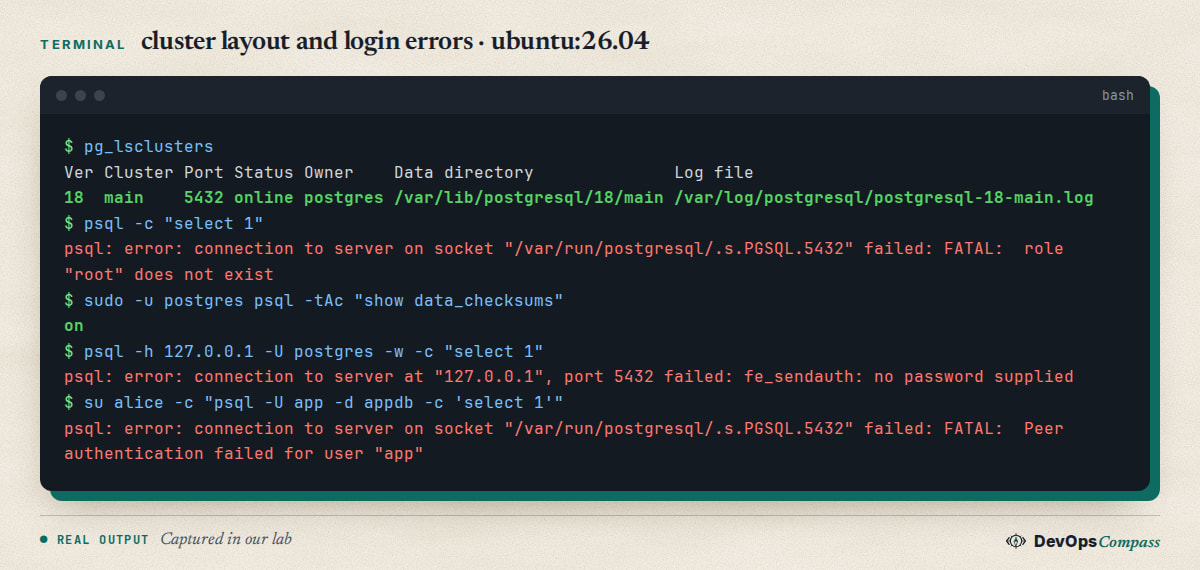
The paths we saw for 18/main:
| What | Path |
|---|---|
| Config directory | /etc/postgresql/18/main/ (postgresql.conf, pg_hba.conf, pg_ident.conf, conf.d/) |
| Data directory | /var/lib/postgresql/18/main |
| Log file | /var/log/postgresql/postgresql-18-main.log |
| Unix socket | /var/run/postgresql/.s.PGSQL.5432 |
postgresql.conf ends with include_dir = 'conf.d', so you can put your own settings in /etc/postgresql/18/main/conf.d/*.conf and leave the packaged file alone. That is the approach we use below, and it survives package upgrades better than editing the main file.
These are the defaults we read back from the running server with show:
| Setting | Value on 18.6 |
|---|---|
listen_addresses |
localhost |
port |
5432 |
password_encryption |
scram-sha-256 |
ssl |
on |
data_checksums |
on |
io_method |
worker |
The default pg_hba.conf has seven active rules: local connections use peer, and TCP connections from 127.0.0.1 and ::1 use scram-sha-256. Nothing allows a remote address. Keep that in mind, because it explains the next three sections.
psql says role "root" does not exist
The first thing most people type is psql. On a fresh install, as root or as a normal user, it fails:
$ psql -c "select 1"
psql: error: connection to server on socket "/var/run/postgresql/.s.PGSQL.5432" failed: FATAL:  role "root" does not exist
psql connects as a database role with the same name as your Linux user. The package creates only one role, postgres, so there is no root and no alice. The rule local all postgres peer lets the Linux user postgres in as the role postgres, which is why the documented first step is:
sudo -u postgres psql
(On 26.04 sudo is sudo-rs; sudo -u postgres works as before.) From there you create a role and a database for yourself. For a Linux user called alice, we ran:
sudo -u postgres createuser alice
sudo -u postgres createdb -O alice alice
su alice -c 'psql -c "select current_user, current_database()"'
 current_user | current_database
--------------+------------------
 alice        | alice
(1 row)
With a role and a database that both match the Linux user, a bare psql works with no password, over the socket. For an application, create a role with a password and a database it owns:
CREATE ROLE app LOGIN PASSWORD 's3cret';
CREATE DATABASE appdb OWNER app;
Use a real secret, not this one. password_encryption is scram-sha-256 by default, so the stored hash starts with SCRAM-SHA-256$.
Peer authentication failed: how do I log in with a password?
Now log in as app from the shell of the Linux user alice:
$ su alice -c "psql -U app -d appdb -c 'select 1'"
psql: error: connection to server on socket "/var/run/postgresql/.s.PGSQL.5432" failed: FATAL:  Peer authentication failed for user "app"
That is the local all all peer rule at work. Over the Unix socket PostgreSQL asks the kernel who is calling and compares the answer with the role you requested. alice is not app, so it stops before it ever asks for a password. You have three options:
- Use TCP.
psql -h 127.0.0.1 -U app -d appdbmatches thehost ... 127.0.0.1/32 scram-sha-256rule and asks for the password. This needs no config change and is what most applications do anyway. - Change the local rule to
scram-sha-256inpg_hba.conf(line 123 on our install), thensudo pg_ctlcluster 18 main reload. We did that and the same command worked:
```text $ su alice -c "PGPASSWORD=s3cret psql -U app -d appdb -c 'select current_user'" current_user
app
(1 row) ```
The side effect is that alice now needs a password for her own psql as well (we saw fe_sendauth: no password supplied with -w). Leave the postgres line on peer, so administration through sudo -u postgres keeps working.
3. Map the user with pg_ident.conf and peer map=... if you want alice to be allowed in as app without a password. We did not test this one.
Password authentication failed with the right password
This one looks impossible: you type the password you just set and get FATAL: password authentication failed for user "app". Before you reset anything, read the server log, because it names the cause. We reproduced the most confusing case, a role that has no password at all:
$ sudo -u postgres psql -c "ALTER ROLE app PASSWORD NULL"
$ PGPASSWORD=s3cret psql -h 127.0.0.1 -U app -d appdb -c "select 1"
psql: error: connection to server at "127.0.0.1", port 5432 failed: FATAL:  password authentication failed for user "app"
The client sees the same message as for a wrong password. In /var/log/postgresql/postgresql-18-main.log the server wrote this:
FATAL:  password authentication failed for user "app"
DETAIL:  User "app" has no password assigned.
    Connection matched file "/etc/postgresql/18/main/pg_hba.conf" line 125: "host    all             all             127.0.0.1/32            scram-sha-256"
In our first lab run the same thing happened without us trying: we ran createuser --pwprompt app with standard input closed, as a script would, and the role was created with no password. The DETAIL line also tells you which pg_hba.conf line matched, which is the fastest way to find out whether you are hitting the rule you think you are. Fix it with ALTER ROLE app PASSWORD '...', or in psql with \password app, which keeps the password out of your shell history.
Why is listen_addresses ignored after a reload?
By default PostgreSQL listens on localhost only, so another machine gets Connection refused:
psql: error: connection to server at "pg1" (172.23.0.2), port 5432 failed: Connection refused
    Is the server running on that host and accepting TCP/IP connections?
We tested with two containers on one Docker network. The change itself is one line in a drop-in file, not in the packaged postgresql.conf:
echo "listen_addresses = '*'" | sudo tee /etc/postgresql/18/main/conf.d/10-listen.conf
sudo pg_ctlcluster 18 main reload
Most tutorials stop there, and the server does not change:
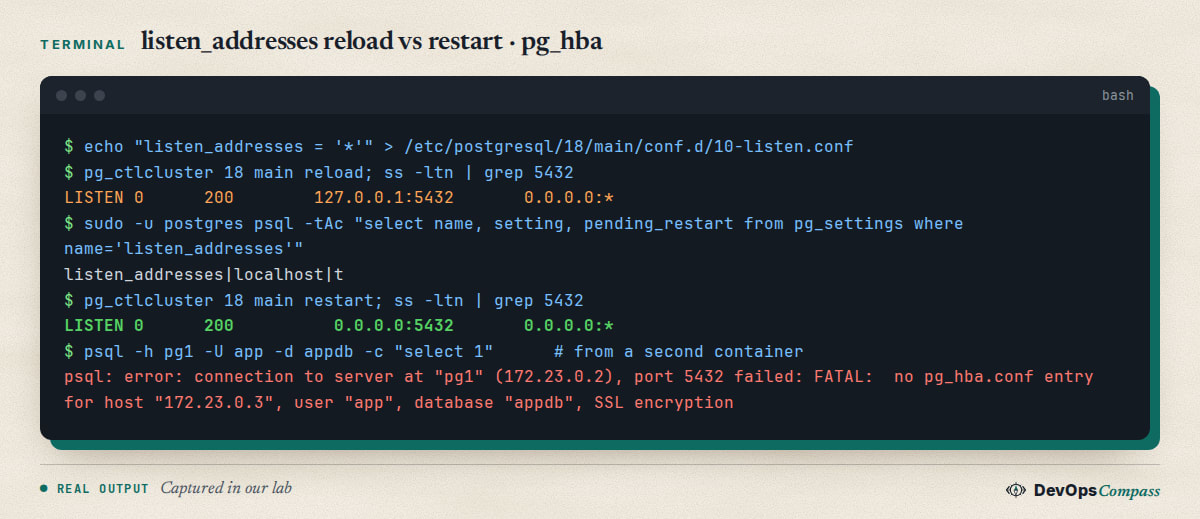
After the reload ss still shows only 127.0.0.1:5432 and [::1]:5432. The view pg_settings explains why: listen_addresses has pending_restart = t. This setting is read when the postmaster starts, so a reload (SIGHUP) cannot apply it. A restart did (0.0.0.0:5432 and [::]:5432), at the cost of dropping every connection, so plan it. You can list every setting that is waiting with select name, setting from pg_settings where pending_restart.
'*' listens on every interface. On a server with a public address, prefer the specific private address, for example listen_addresses = 'localhost,10.0.0.5', and add a firewall rule for the clients. We did not test ufw here. If PostgreSQL runs in a container, read our guide on how Docker bypasses ufw first, because a published port can skip your rules.
What does "no pg_hba.conf entry" mean?
With the server listening, the next error comes from the client, in the lab's exact words:
FATAL: no pg_hba.conf entry for host "172.23.0.3", user "app", database "appdb", SSL encryption
It means no rule matched. pg_hba.conf is read top to bottom, the first matching rule wins, and the packaged file has no rule for any address except loopback. The message tells you everything you need to write the rule: the client address, the role, the database and whether the connection used SSL. (Two lines appear, one with SSL encryption and one with no encryption, because psql tries SSL first and then falls back.) Add a line for your network, using the narrowest address and database you can:
host appdb app 10.0.0.0/24 scram-sha-256
pg_hba.conf changes need only a reload: sudo pg_ctlcluster 18 main reload (or select pg_reload_conf();). After the reload our second container connected, and pg_stat_ssl showed ssl = t, because the packaged server has ssl = on. Encrypted does not mean verified: a client that checks the server's identity needs a certificate you control, which we did not set up. You can check the result of any edit without connecting, using the view that lists how the server parsed the file:
select line_number, type, database, user_name, address, auth_method, error from pg_hba_file_rules;
A typo shows up in the error column instead of locking you out, which is worth doing before every reload.
How do I upgrade PostgreSQL 17 to 18 with pg_upgradecluster?
If a 24.04 server runs PostgreSQL 16 from Ubuntu or 17 from PGDG, the upgrade to 18 uses the same cluster tooling. We created a 17 cluster with a 1,000-row table, with 18 already installed, and ran the upgrade:
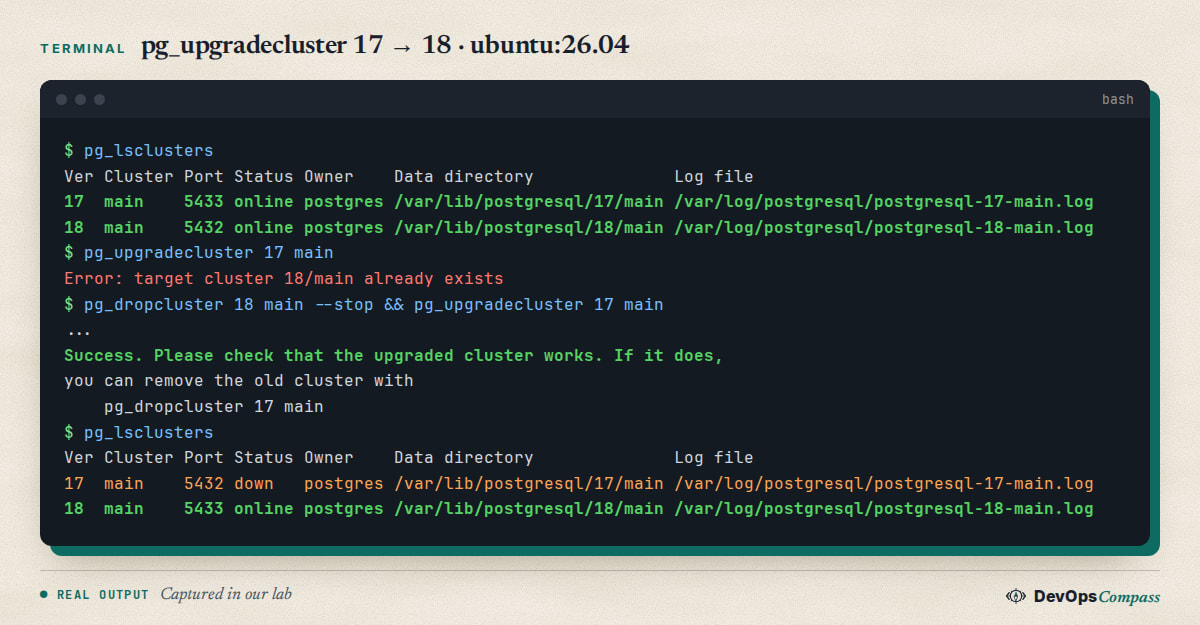
The first attempt failed with Error: target cluster 18/main already exists. That is the empty cluster the postgresql package created. Drop it only if it holds no data you need (pg_dropcluster 18 main --stop), then run pg_upgradecluster 17 main again. Afterwards, select count(*) from t on the new cluster returned 1000, and select version() returned PostgreSQL 18.6.
What happened to the ports surprised us. The new 18 cluster took the old cluster's port (5433 in our lab) and the old 17 cluster was moved to the default port 5432 and left down with automatic start disabled. Applications keep working without a change, which is the point, but a later pg_lsclusters looks swapped. The old cluster is kept until you run the command the tool prints: pg_dropcluster 17 main. Run a few days of real use first.
By default pg_upgradecluster dumps and restores (-m dump). For a large database you can use -m upgrade (the pg_upgrade binary, with --link for hard links). We ran -m upgrade on a tiny 17 cluster and it succeeded. Larger data, --link and replicas were not tested.
Data checksums are on by default in 18
PostgreSQL 18's initdb enables data checksums by default; the release notes list this as an incompatibility and add that pg_upgrade requires matching checksum settings. Our own observations, on a 17 cluster created without checksums (show data_checksums returned off):
- A dump and restore upgrade produced an 18 cluster with
data_checksums = on, as you would expect from a freshinitdb. pg_upgradecluster -m upgradealso succeeded, and the upgraded cluster reporteddata_checksums = off. The Debian wrapper handled the mismatch for us; we did not look at how, so we cannot tell you which flags it passed.
If you call the raw pg_upgrade yourself on a checksum-off cluster, use the new initdb --no-data-checksums option for the target, as the release notes say. Checksums cost a little CPU and protect against silent corruption, so leave them on for new clusters.
PostgreSQL 18 in Docker: the volume path changed
This is not an Ubuntu package issue, but people searching for PostgreSQL 18 meet it in the same week. The official postgres:18 image changed its layout. The Dockerfile now says that PGDATA was changed to match the pg_ctlcluster structure and the volume moved:
ENV PGDATA /var/lib/postgresql/18/docker
VOLUME /var/lib/postgresql
So a Compose file that mounts a volume at /var/lib/postgresql/data, the historical location, no longer holds the data. Two public issues show the consequences: docker-library/postgres #1370 (October 2025), where mounting at the old path failed at container start with a runc error, and #1400 (February 2026), where data under data/18/docker was not detected and the container recreated an empty database in an anonymous volume. Both are closed. The safe change for 18 is to mount /var/lib/postgresql and keep your data one level below it. We read the Dockerfile and the issues; we did not pull the image, because our lab rules do not allow large images.
Common errors
psql: error: ... FATAL: role "root" does not exist. Create a role that matches your Linux user, or use sudo -u postgres psql.
FATAL: Peer authentication failed for user "app". You used the socket as a different Linux user. Connect with -h 127.0.0.1, or change the local all all rule.
fe_sendauth: no password supplied. The rule needs a password and psql was told not to prompt (-w) or has no terminal. Set PGPASSWORD or use ~/.pgpass.
FATAL: password authentication failed for user "app". Read the server log: has no password assigned or a different pg_hba.conf line than you expected.
Connection refused from another host. The server listens on localhost. Set listen_addresses and restart; check ss -ltn | grep 5432.
no pg_hba.conf entry for host .... Add a host line for that address, role and database, then reload.
Error: target cluster 18/main already exists. Drop the empty default cluster before pg_upgradecluster.
pg_lsclusters shows two clusters on swapped ports after an upgrade. Normal: the new cluster has the old port, the old one is down on 5432.
Container start hangs in pg_ctlcluster. In our lab, relaxing seccomp and AppArmor for the throwaway container fixed it; do not do this on production hosts.
What we did not test
- No physical server and no x86-64: the lab was arm64 containers, one with seccomp and AppArmor relaxed. The systemd unit
postgresql@18-mainwas never run. - No
ufwornftablesrules, no cloud firewall, and no remote client outside one Docker network. - No
pg_ident.confmapping, no client certificates, nosslmode=verify-full. pg_upgradeclusterwas tested on a tiny database only, not with--link, large data, extensions or replicas. PGDG upgrades from 16 were not tested.- The
postgres:18image was read, not run. - Only 18.6 (Ubuntu) and 17.11 (PGDG) were used. Later package revisions may behave differently.
FAQ
How do I install PostgreSQL on Ubuntu 26.04?
Run sudo apt update && sudo apt install postgresql. You get PostgreSQL 18 (18.6 in our lab) and a cluster 18/main on port 5432. Open a shell with sudo -u postgres psql, and check the cluster with pg_lsclusters. The service name on a normal server is postgresql.
Which PostgreSQL version does Ubuntu 26.04 have?
PostgreSQL 18, packaged as postgresql-18 (18.6-0ubuntu0.26.04.1 in our lab). The archive has no 17 or 16. For 17, add the official PGDG repository with the resolute-pgdg suite, which offered 17.11 on 11 November 2026.
Why does psql say role "root" does not exist?
PostgreSQL logs you in as a role named after your Linux user, and a fresh install has only the postgres role. Run sudo -u postgres createuser alice and sudo -u postgres createdb -O alice alice for your user, or use sudo -u postgres psql for administration.
Why is PostgreSQL still on localhost after I set listen_addresses?
listen_addresses is only read at start-up. A reload leaves pending_restart = t in pg_settings and the server keeps listening on 127.0.0.1. Restart the cluster with sudo pg_ctlcluster 18 main restart, which drops open connections, then check with ss -ltn.
What does "no pg_hba.conf entry for host" mean?
No rule in pg_hba.conf matched the client's address, role, database and SSL state. The error prints all four. Add a host line for your network and reload, and use pg_hba_file_rules to check the file before you reload.
How do I upgrade PostgreSQL 17 to 18 on Ubuntu?
Install both versions, drop the empty 18/main cluster, then run sudo pg_upgradecluster 17 main. The new cluster takes the old port and the old one stays down until you run pg_dropcluster 17 main. Test the new cluster first and keep a backup.
Are data checksums on in PostgreSQL 18?
Yes for new clusters: initdb enables them by default in 18, and show data_checksums returned on on our fresh install. A cluster upgraded with pg_upgradecluster -m upgrade from a 17 cluster without checksums stayed off in our test. The release notes mention --no-data-checksums.
Related guides
- MySQL 8.4 on Ubuntu 26.04: Install, Root Login, Remote: the same first-hour problems for the other popular database.
- Unattended Upgrades on Ubuntu 26.04: Setup, Reboot, Logs: how PostgreSQL security updates arrive and when the service restarts.
- Docker Bypasses ufw: 4 Fixes Tested on Ubuntu 26.04: read this before you publish port 5432 from a container.
- Upgrade Ubuntu 24.04 to 26.04 LTS on a Server: Full Guide: the operating system steps that come before a PostgreSQL upgrade.
- Fail2ban on Ubuntu 26.04: SSH Setup, Unban, Tested Fixes: protect the server that hosts your database.
Sources
- PostgreSQL documentation: PostgreSQL 18 release notes (checksums by default,
--no-data-checksums; checked 11 November 2026). - PostgreSQL project: Versioning policy and support dates (checked 11 November 2026).
- PostgreSQL apt repository: apt.postgresql.org wiki and the resolute-pgdg Release file.
- Docker Official Image: 18 Dockerfile, issues #1370 and #1400.
- Ask Ubuntu: Unable to connect to Postgres 17 on Ubuntu 24.04 localhost and password authentication failed on a new install.
- Server Fault: Remote PostgreSQL connections don't work with proper listen address and pg_hba line. Stack Overflow: Retaining statistics when upgrading Postgres 16 to 18.
- Google autocomplete for "install postgresql ubuntu 26.04", "postgresql 18 ubuntu 26.04" and "postgresql 17 ubuntu 26.04" (11 November 2026).
- Our lab files for this guide:
postgresql-18 18.6-0ubuntu0.26.04.1andpostgresql-17 17.11-1.pgdg26.04+2onubuntu:26.04(arm64, containers).
Last verified: November 2026 (11 November 2026, postgresql-18 18.6-0ubuntu0.26.04.1 on ubuntu:26.04, arm64, containers only). Package versions move; run psql --version and pg_lsclusters on your own system.
Header image: Image: DevOpsCompass.
Comments
Post a Comment