
Unattended Upgrades on Ubuntu 26.04: Setup, Reboot, Logs
Short answer: Ubuntu 26.04 installs security updates by itself, once a day, and it does not reboot. In our lab the stock config allowed only the release and -security pockets (plus ESM), so a package that exists only in -updates stayed at its old version. To change that, add the -updates origin in a file under /etc/apt/apt.conf.d/. To reboot, set Unattended-Upgrade::Automatic-Reboot "true" and a time, otherwise a reboot happens now. To turn it all off, set APT::Periodic::Unattended-Upgrade "0". Always try changes with sudo unattended-upgrade --dry-run -v first.
How this was made: on 9 November 2026 we used a throwaway ubuntu:26.04.1 container (arm64) with systemd as PID 1, unattended-upgrades 2.12ubuntu9 and needrestart 3.11. We ran real upgrades inside it and read the logs. We did not test a physical server, a real kernel update, or real mail delivery.
Most Ubuntu servers already run this tool without anyone having touched it. That is good news until something goes wrong: a service that stops after a library update, a server that reboots in the middle of the morning, a package that never updates, or a mail report that never arrives. The Ubuntu documentation explains the options. It does not show what they do on a current system, so we ran each one in the lab and kept the output.
Is unattended-upgrades on by default in Ubuntu 26.04?
Yes. The Ubuntu Server documentation says security updates are applied automatically through the unattended-upgrades package, which is installed by default, and that it runs once per day. In our container we installed the package ourselves, and the defaults came out the same way. Three files matter:
| File | What it controls |
|---|---|
/etc/apt/apt.conf.d/20auto-upgrades |
On or off, and how often (days) |
/etc/apt/apt.conf.d/50unattended-upgrades |
Which origins, blacklist, reboot, mail |
/var/log/unattended-upgrades/ |
What every run did |
The first file contained exactly two lines in our lab:
APT::Periodic::Update-Package-Lists "1";
APT::Periodic::Unattended-Upgrade "1";
The second file has the origin list. Without comments it was:
Unattended-Upgrade::Allowed-Origins {
    "${distro_id}:${distro_codename}";
    "${distro_id}:${distro_codename}-security";
    "${distro_id}ESMApps:${distro_codename}-apps-security";
    "${distro_id}ESM:${distro_codename}-infra-security";
};
Read it carefully: the plain release pocket and the security pocket are in. -updates is not. That one fact explains the most common "it does not work" report, and it is the subject of the section on held packages below.
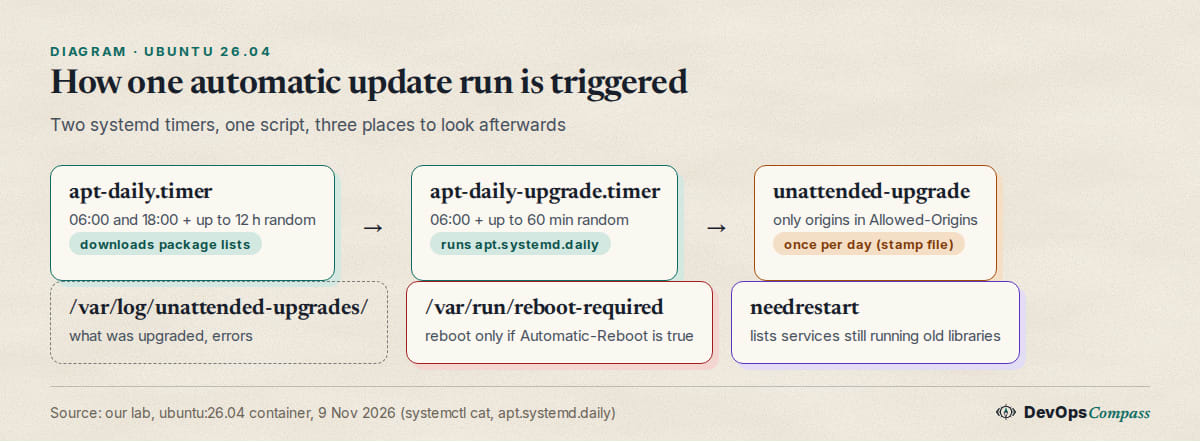
Two systemd timers start a run. This is what they looked like (systemctl cat):
How do I check it works and run a dry run?
You do not need to wait until tomorrow morning. A dry run downloads the packages but installs nothing:
sudo apt update
sudo unattended-upgrade --dry-run -v
Without -v it prints nothing when all is well. With -v it shows the allowed origins and either the packages it would upgrade or the line No packages found that can be upgraded unattended and no pending auto-removals. With -d you get a lot more, including every Marking not allowed line for a pocket that is not in your list. In our lab the dry run named four packages (apt, libapt-pkg7.0, libpcre2-8-0, zlib1g) and said "development release" in the debug output, which looks alarming on an LTS and is not (see Common errors).
To check the timers that start it:
systemctl list-timers 'apt-daily*' --all
systemctl is-enabled unattended-upgrades.service apt-daily.timer apt-daily-upgrade.timer
All three printed enabled in our lab. If you removed the package, install it again with sudo apt install unattended-upgrades. To make sure the two options are on, read the effective values rather than the file: apt-config dump APT::Periodic. A later file in apt.conf.d wins over an earlier one, so 20auto-upgrades alone does not tell you the truth.
Why are some updates not installed automatically?
Because their only source is not on the allowed list. We listed what was waiting in the container:
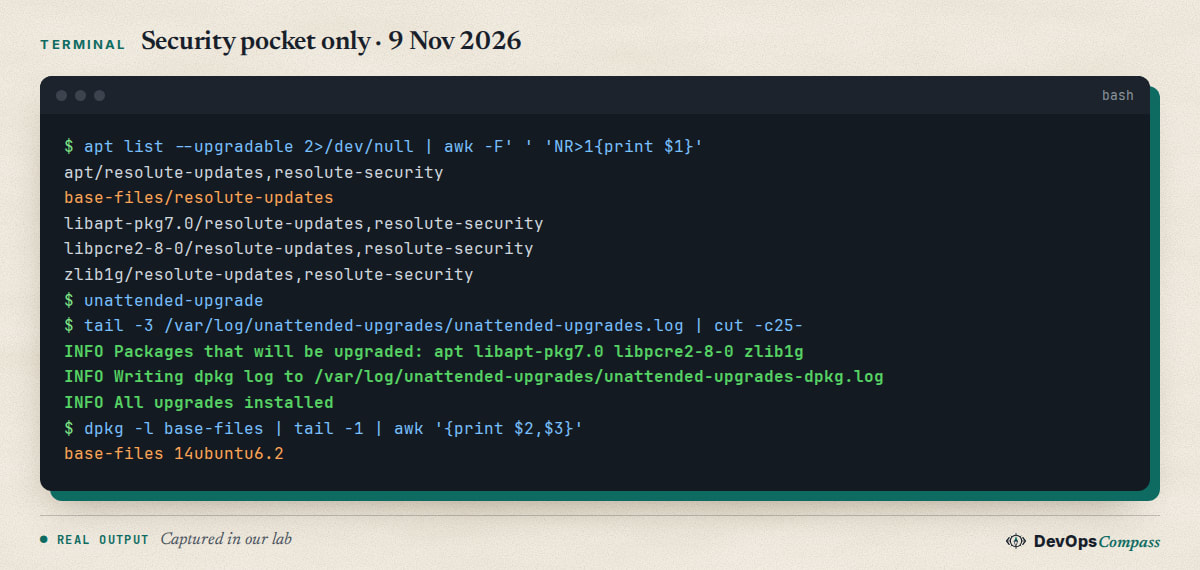
Four of the five packages exist in both resolute-updates and resolute-security, and those were upgraded. base-files exists only in resolute-updates. The debug output showed the tool "adjusting candidate" back to the installed version, and after the run base-files was still 14ubuntu6.2. Nothing was wrong. Ubuntu's policy is that the default is security fixes only, and regular bug-fix updates wait for you.
To let -updates in, put a new file after the stock one. We used /etc/apt/apt.conf.d/52local.conf:
Unattended-Upgrade::Allowed-Origins:: "${distro_id}:${distro_codename}-updates";
Two details we confirmed with apt-config dump. First, this adds to the stock list; it does not replace it. We got the same result with the block form Unattended-Upgrade::Allowed-Origins { ... }; in a later file. Second, with the origin added, base-files 14ubuntu6.3 was installed by the next run. You can also edit 50unattended-upgrades directly and uncomment the -updates line, but then a package update of the tool may ask you about the changed file. A separate file avoids that.
Third-party repositories behave the same way. The Ubuntu docs warn that just adding a repository will not make unattended-upgrades consider it. You need its Origin and Archive from the InRelease file. For Ubuntu itself that file says Origin: Ubuntu and Suite: resolute-updates (we read it in /var/lib/apt/lists/). A PPA uses LP-PPA-<user>-<name> as the origin, according to the documentation; we did not test a PPA.
When does unattended-upgrades run, and how do I change it?
Not at a fixed time, and that surprises people who look at the clock. Our timers:
| Timer | OnCalendar |
Random delay | Job |
|---|---|---|---|
apt-daily.timer |
*-*-* 6,18:00 |
up to 12 h | refresh package lists |
apt-daily-upgrade.timer |
*-*-* 6:00 |
up to 60 min | run apt.systemd.daily install |
Both have Persistent=true: if the machine was off at that time, the job runs shortly after the next boot. In our container the next upgrade run was shown as 06:33 on the following day, and as 06:42 after we started the service by hand: the delay is drawn again each time. The Ubuntu docs describe the boot-time catch-up and suggest Persistent=false if it gets in the way; we did not test that setting.
How long does a run take? In our lab a run that installed one package took about 10 seconds, a run with nothing to do about 1.5 seconds. On a server with a slow mirror and a hundred packages expect minutes, and expect apt to be locked meanwhile.
To pick your own time, override the timer. The empty OnCalendar= line clears the stock value; without it systemd keeps both:
sudo mkdir -p /etc/systemd/system/apt-daily-upgrade.timer.d
printf '[Timer]\nOnCalendar=\nOnCalendar=*-*-* 03:30\nRandomizedDelaySec=0\n' | sudo tee /etc/systemd/system/apt-daily-upgrade.timer.d/override.conf
sudo systemctl daemon-reload && sudo systemctl restart apt-daily-upgrade.timer
systemctl list-timers 'apt-daily*'
In the lab the list then showed Tue 2026-11-10 03:30:00 UTC for apt-daily-upgrade.timer. Note that apt-daily.timer (the list refresh) still runs on its own schedule. If your window is narrow, move it too, and keep it before the upgrade timer.
How do I make Ubuntu reboot automatically after updates?
By default it never reboots. A kernel or libc update leaves the file /var/run/reboot-required, and the server just keeps it until you reboot. The options sit in 50unattended-upgrades. We created the flag file by hand (we did not install a real kernel) and ran the tool with three configurations. The real shutdown command was replaced by a script that only records its arguments, so the container never rebooted:
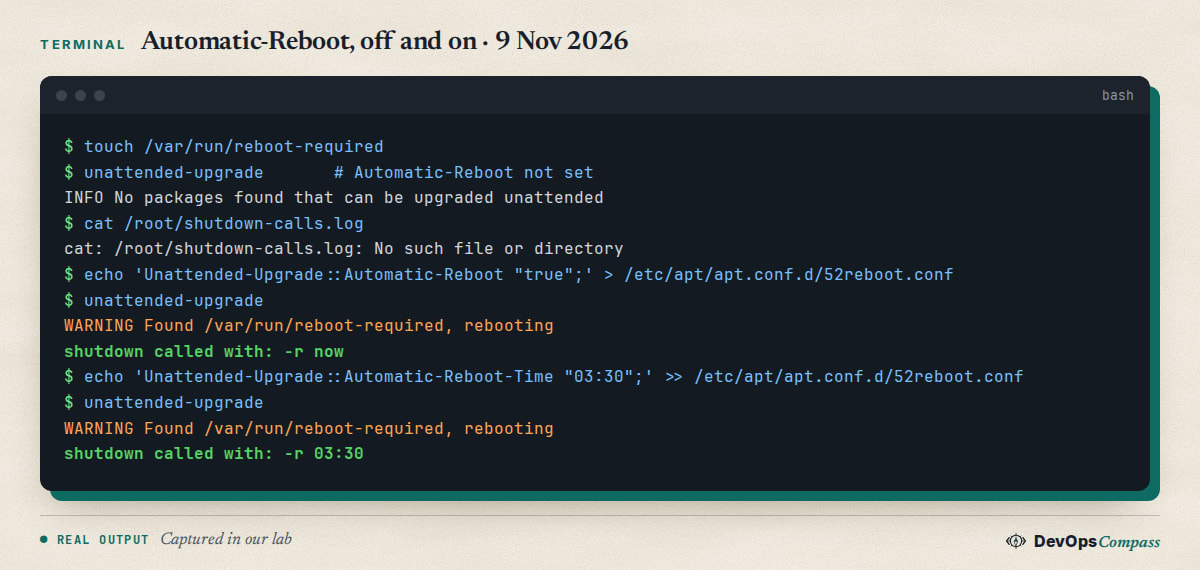
What this shows:
- No setting: no reboot, no log line. The flag just waits.
Automatic-Reboot "true":shutdown -r now. The server reboots right after the run, which is somewhere around 06:00 to 07:00 with the default timers. This is the setting that bites people.Automatic-Reboot-Time "03:30":shutdown -r 03:30. The run still happens in the morning, but the reboot waits for the next 03:30 (the same value can also be a relative time such as+7, which we tested the same way).
So a quiet-hours setup needs two things: the timer at night (previous section) and an explicit reboot time. The stock file also has Automatic-Reboot-WithUsers; we did not test logged-in users. Do not enable automatic reboot on a server that cannot tolerate a restart, such as a single database host without a maintenance window. For clusters, use a coordinated tool and not a per-node timer.
Do services restart after an automatic update?
Not necessarily, and this is the part the documentation barely mentions. A library update replaces files on disk, but running programs keep the old library in memory. The tool that finds such services is needrestart (we installed it in the lab; check with dpkg -l needrestart on your server). In our lab the run upgraded libpcre2-8-0, zlib1g and apt. Afterwards:
$ needrestart -b
NEEDRESTART-VER: 3.11
NEEDRESTART-SVC: dbus.service
NEEDRESTART-SVC: systemd-logind.service
NEEDRESTART-SVC: unattended-upgrades.service
Three services were still running with old libraries and had not been restarted by the run. The package ships a hook (/etc/apt/apt.conf.d/99needrestart) that calls it after each dpkg run, but a run started by a timer has no terminal, and the default mode in needrestart.conf is the commented 'i' (interactive). The file documents the automatic mode 'a'; we did not test it, so try it on a staging box before you rely on it. Until then, check after the updates:
sudo needrestart -r l
-r l only lists. On a server where a missed restart matters (a web server after an OpenSSL update, for example) schedule sudo needrestart -r a in your maintenance window instead. It is the same trap as with any patched service: the fix is on disk, the old process still runs.
Can I get email reports without a mail server?
Yes, but the setting alone does nothing. Unattended-Upgrade::Mail "you@example.com" needs a program that accepts mail. The Ask Ubuntu question Unattended Upgrade Emails with msmtp asks exactly this: the poster symlinked sendmail and mail to msmtp and got no mail.
What we tested. With the option set and neither /usr/sbin/sendmail nor /usr/bin/mail present, the log said:
ERROR No /usr/bin/mail or /usr/sbin/sendmail, can not send mail. You probably want to install the mailx package.
Then we installed msmtp-mta (1.8.32). It provides /usr/sbin/sendmail as a link to /usr/bin/msmtp, which is the path the tool looks for first, and it needs no mail server. With a config pointing at a host that does not exist, msmtp's own message showed that the tool had called it with the right recipient: recipients=admin@example.com ... exitcode=EX_NOHOST. So the hand-off works; what we did not test is delivery through a real SMTP account, so put your relay in /etc/msmtprc and check with MailReport "always":
Unattended-Upgrade::Mail "you@example.com";
Unattended-Upgrade::MailReport "always";
The accepted values, from the tool's own code, are always, only-on-error and on-change (the default when mail is set).
How do I read the unattended-upgrades logs?
Three places, from most to least useful:
sudo less /var/log/unattended-upgrades/unattended-upgrades.log
sudo grep -h 'Packages that will be upgraded' /var/log/unattended-upgrades/unattended-upgrades.log*
journalctl -u apt-daily-upgrade.service --no-pager | tail
The first file has one block per run: the allowed origins, then Packages that will be upgraded: ..., then All upgrades installed, or an error. The second command gives a quick history across rotated files; logrotate rotates it monthly and keeps six copies on this release (/etc/logrotate.d/unattended-upgrades). The journal only shows that the service started and how long it used CPU. For the exact versions, /var/log/apt/history.log marks the run with Commandline: /usr/bin/unattended-upgrade and lists Upgrade: base-files:arm64 (14ubuntu6.2, 14ubuntu6.3). There are also unattended-upgrades-dpkg.log (the dpkg output) and unattended-upgrades-shutdown.log.
How do I turn it off or hold back one package?
To stop everything, set the two options to 0 (Ubuntu docs). We tested the second one: with a file that sets APT::Periodic::Unattended-Upgrade "0" the service apt-daily-upgrade.service finished in about two seconds and nothing was installed. After we removed the file, the next start installed the pending package:
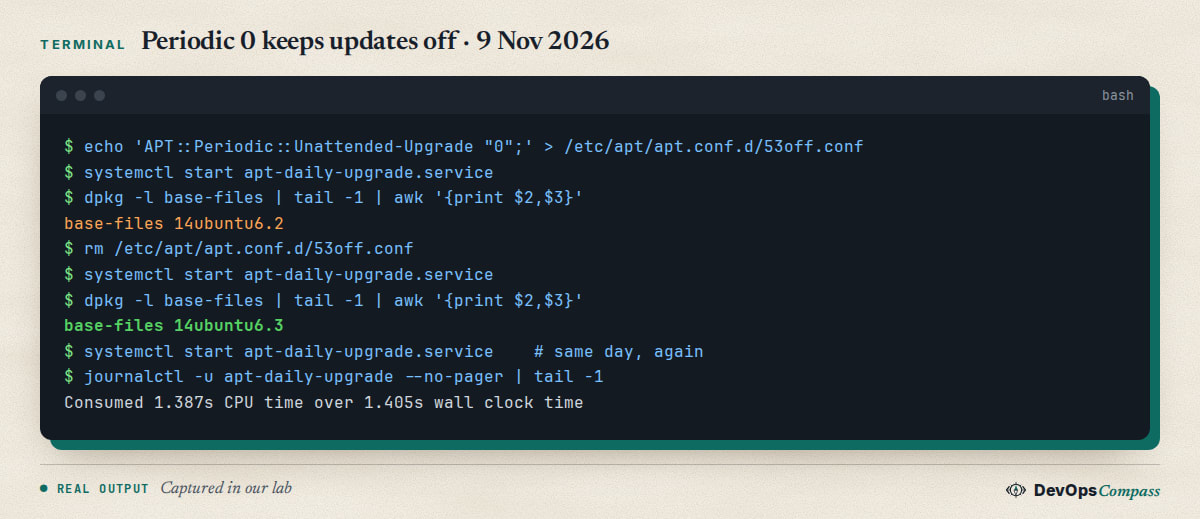
Remember that the files in apt.conf.d are read in name order, and a later file wins: a 0 in 20auto-upgrades loses against a 1 in 52local.conf. Use apt-config dump APT::Periodic to see the final value.
Often you do not want to turn everything off, only to hold one package. That is what Package-Blacklist is for. With our base-files example in the list, the dry run answered No packages found that can be upgraded unattended. The stock file says the entries are Python regular expressions, and warns that "libc6" without a $ matches all libc6* packages, so write "libc6$".
Why would you want that? A real case from this week: on 4 November 2026 a Hacker News post, Ubuntu unattended-upgrades installs HAProxy version with a major regression, pointed to Launchpad bug 2172897. The report says haproxy 2.4.30-0ubuntu0.22.04.3 (jammy-security, USN-8972-1) caused intermittent 502 errors for chunked responses, and that the previous revision .2 worked. That is 22.04, not 26.04, and we did not reproduce it, but it is the pattern: a security update can break one service. The best defence is not "switch it off". Blacklist the service, watch the mail report, and keep a way to go back to the earlier revision.
What does it not touch? Snap applications are updated by snapd, not by this tool (Ask Ubuntu 1565467 asks the same). We did not test snaps in the container.
Why does the timer show no next run?
A reader on Ask Ubuntu (question 1569939) reported that on a 22.04 server both timers were enabled but showed Trigger: n/a and active (running) instead of active (waiting), and that upgrades had stopped for about six months. The question had one answer and none accepted when we checked on 9 November 2026. We did not reproduce it: in our 26.04 container both timers always showed a NEXT time. What we can offer is the check that separates the cases:
systemctl list-timers 'apt-daily*' --all
systemctl status apt-daily-upgrade.timer
sudo systemctl daemon-reload && sudo systemctl restart apt-daily.timer apt-daily-upgrade.timer
systemctl list-timers 'apt-daily*' --all
If NEXT is empty before the restart and filled afterwards, the timer was stuck and the restart fixed it; then run sudo unattended-upgrade -v once by hand and read the log. If it stays empty, look at the journal of the timer (journalctl -u apt-daily-upgrade.timer) for a unit error. Also check unattended-upgrades.service, which is a separate unit (it handles the shutdown hook).
Common errors
Running on the development release in debug output. It appears on 26.04.1 with -d. The code only skips a run when your series is the current development series. The data in distro-info-data (version 2026.10.12) lists 26.10 and 27.04 as newer, so the tool continues. It is a harmless debug line.
No packages found that can be upgraded unattended while apt list --upgradable shows packages. They are not in an allowed origin, or they are blacklisted. Compare the Allowed origins are: line with the origin of the package (apt-cache policy <pkg>).
ERROR No /usr/bin/mail or /usr/sbin/sendmail, can not send mail. Mail is set but nothing provides sendmail. Install msmtp-mta or another MTA; the mail section shows the test.
Cache lock can not be acquired, exiting. Another apt or dpkg is running, often the update that the timer started at boot. Wait, or check with ps aux | grep -E 'apt|dpkg'.
Traceback with module 'apt_pkg' has no attribute 'Warning'. Reported on Ask Ubuntu after an in-place upgrade from 22.04 to 24.04 (question 1563717, accepted answer). It points to a mix of old and new python3-apt files; we did not see it on a clean 26.04. If you came through our upgrade guide from 24.04 to 26.04, run the dry run once afterwards.
Server rebooted at 06:30. Automatic-Reboot is true and no Automatic-Reboot-Time is set, so it reboots now. Set the time or turn it off.
Changes in 50unattended-upgrades disappear or ask a question during a package update. Put your settings in a separate file such as 52local.conf, as shown above.
What we did not test
- No physical server, no x86-64: the lab was an arm64 container with systemd and a shared host kernel.
- No real kernel update. The reboot flag file was created by hand and
shutdownwas a recording stub. - No real mail delivery. We only proved that
msmtp-mtais called with the right recipient. needrestartautomatic mode ('a'),Persistent=false,InstallOnShutdown, PPA origins and snaps were not tested.- The HAProxy regression (Launchpad 2172897) and the
Trigger: n/atimer problem are third-party reports for 22.04; we did not reproduce them. - Exact times change with each machine because of the random delays; ours are from one container on 9 November 2026.
FAQ
How do I enable unattended upgrades on Ubuntu 26.04?
It is normally on already. Check with apt-config dump APT::Periodic that both Update-Package-Lists and Unattended-Upgrade are 1, and that apt-daily-upgrade.timer is enabled. If the package is missing, run sudo apt install unattended-upgrades and then a dry run with -v.
How do I disable unattended upgrades on Ubuntu 26.04?
Set APT::Periodic::Unattended-Upgrade "0" in a file under /etc/apt/apt.conf.d/ and check the effective value with apt-config dump APT::Periodic. In our lab the daily service then finished in about two seconds and installed nothing. To keep it on but hold one package, use Package-Blacklist instead.
Does unattended-upgrades install all updates or only security updates?
Only the allowed origins: by default the release pocket, -security and ESM. Packages that exist only in -updates stay held back (our base-files stayed at 14ubuntu6.2 until we added the -updates origin in a separate file). Other repositories and PPAs are ignored until you add their origin.
Does unattended-upgrades reboot the server?
Not unless you set Unattended-Upgrade::Automatic-Reboot "true". Then it runs shutdown -r now right after the upgrade, or shutdown -r 03:30 if you also set Automatic-Reboot-Time "03:30". We tested both with a stub for shutdown, not with a real reboot.
How do I test unattended-upgrades with a dry run?
Run sudo unattended-upgrade --dry-run -v. It downloads the packages and prints what it would install without installing anything. Use -d for the long version with every origin check. Nothing was installed by our dry runs, and the package version stayed the same.
Where are the unattended-upgrades logs?
In /var/log/unattended-upgrades/ (unattended-upgrades.log is the main one), plus /var/log/apt/history.log for the exact version changes and journalctl -u apt-daily-upgrade.service for start and stop times. The files rotate monthly.
Related guides
- Upgrade Ubuntu 24.04 to 26.04 LTS on a Server: Full Guide: what to check after an in-place upgrade, including the update tooling.
- Change SSH Port on Ubuntu 26.04: Why Restart Fails (Fix): another service whose config only takes effect after the right unit is restarted.
- Fail2ban on Ubuntu 26.04: SSH Setup, Unban, Tested Fixes: the next hardening step after automatic patching.
- Docker Bypasses ufw: 4 Fixes Tested on Ubuntu 26.04: another default that behaves differently from what most people expect.
Sources
- Ubuntu Server documentation: Automatic updates (checked 9 November 2026).
- Ask Ubuntu: Unattended Upgrade Emails with msmtp, timers stuck on Trigger n/a, Automatically install security updates only from PPAs.
- Hacker News: HAProxy regression via unattended-upgrades and Launchpad: bug 2172897 (4 November 2026).
- Google autocomplete for "unattended upgrades", "unattended-upgrades automatic reboot" and "ubuntu 26.04 unattended upgrades" (9 November 2026).
- Our lab files for this guide:
unattended-upgrades 2.12ubuntu9,needrestart 3.11,msmtp-mta 1.8.32onubuntu:26.04.1(arm64, container).
Last verified: November 2026 (9 November 2026, unattended-upgrades 2.12ubuntu9 on ubuntu:26.04.1, arm64, container only). Package versions and timer delays move; run apt-config dump APT::Periodic on your own system.
Header image: Image: DevOpsCompass.
Comments
Post a Comment