
MySQL 8.4 on Ubuntu 26.04: Install, Root Login, Remote
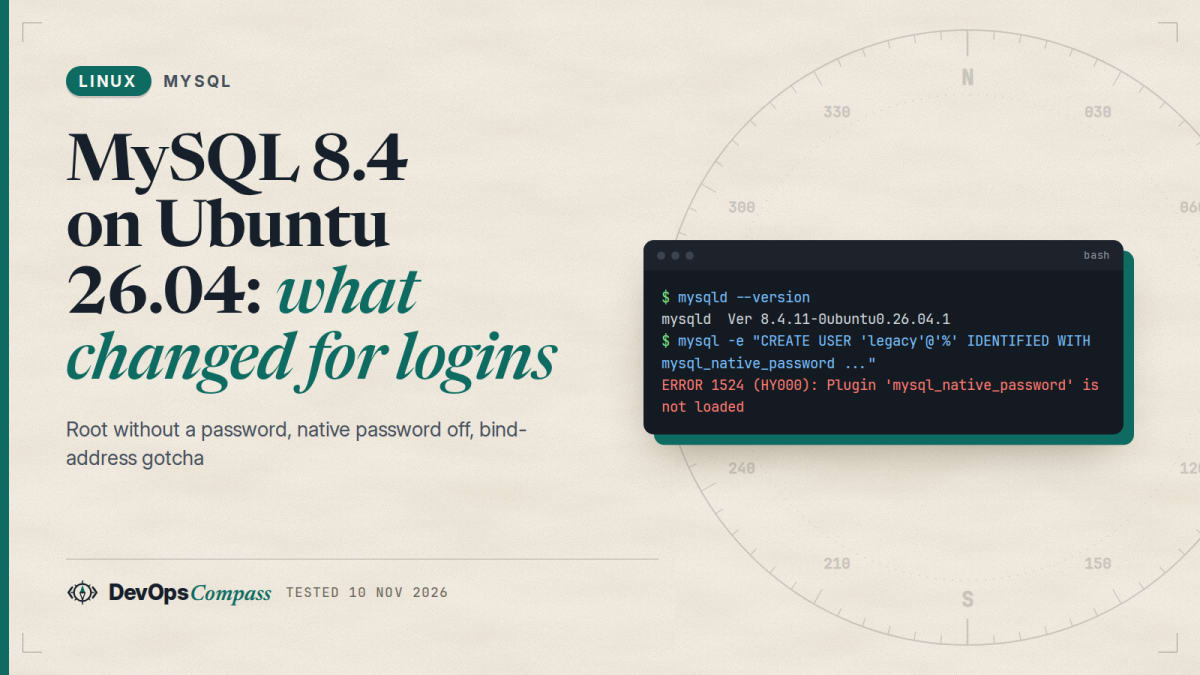
Short answer: sudo apt install mysql-server gives you MySQL 8.4 LTS on Ubuntu 26.04 (we got 8.4.11), listening on 127.0.0.1 only. The root account uses auth_socket, so sudo mysql works without a password and a wrong password is simply ignored. Three things bite people next: mysql_native_password is disabled by default in 8.4 (turn it on with mysql_native_password=ON only if an old client needs it), the option default-authentication-plugin no longer exists and stops the server from starting, and a bind-address drop-in named 99-remote.cnf is silently overridden by the packaged mysqld.cnf. Name it zz-remote.cnf instead.
How this was made: on 10 November 2026 we installed mysql-server in a throwaway ubuntu:26.04 container (arm64) and ran every command below, then kept the output in our lab. We did not test a physical server, the systemd unit start-up (the container had no systemd, so we started mysqld_safe by hand), real remote clients over a network, or an upgrade from 24.04.
MySQL is one of the first packages people install on a fresh Ubuntu server, and the 26.04 version behaves differently from the 22.04 and 24.04 tutorials that still rank on search results. The server is a newer major version, the legacy password plugin is switched off, and one configuration option that older guides recommend now aborts start-up. This guide installs it, then walks through each problem in the order you will probably meet it, with the real output from our lab.
How do I install MySQL on Ubuntu 26.04?
Use the package from the Ubuntu archive. No extra repository is needed:
sudo apt update
sudo apt install mysql-server
mysqld --version
In our lab the last command printed this:
/usr/sbin/mysqld Ver 8.4.11-0ubuntu0.26.04.1 for Linux on aarch64 ((Ubuntu))
On a normal server the package starts the service through systemd (sudo systemctl status mysql). The unit runs /usr/sbin/mysqld as the mysql user, restarts on failure, and creates /run/mysqld with mode 755. The data directory is /var/lib/mysql and the log is /var/log/mysql/error.log. Our container had no systemd, so we started the server with mysqld_safe for the tests; the files and the behaviour of the server itself are the same.
One lab note that may save you time if you test in Docker: with the default seccomp and AppArmor profiles the package installation hung for more than six minutes while the post-install script was initialising the data directory (mysqld --initialize-insecure finished its work but never exited). We reproduced it twice. Running the throwaway container with --security-opt apparmor=unconfined --security-opt seccomp=unconfined installed it in about two minutes. This is a container effect, not something you will see on a VM or a bare-metal server.
The packaged configuration is small. These are the active lines of /etc/mysql/mysql.conf.d/mysqld.cnf:
[mysqld]
user            = mysql
bind-address            = 127.0.0.1
mysqlx-bind-address     = 127.0.0.1
key_buffer_size         = 16M
myisam-recover-options  = BACKUP
log_error = /var/log/mysql/error.log
max_binlog_size   = 100M
Both the classic port (3306) and the X protocol port (33060) listen on the loopback address only. We confirmed it with ss -ltn. That is a safe default: nothing outside the machine can reach the database until you change it on purpose (see the bind-address section below).
The server defaults we saw were utf8mb4 with the utf8mb4_0900_ai_ci collation and a strict sql_mode (ONLY_FULL_GROUP_BY, STRICT_TRANS_TABLES, and others). Applications written for old MySQL 5.7 behaviour sometimes fail on those, so test your queries before you switch production.
Which MySQL version does Ubuntu 26.04 ship?
MySQL 8.4 LTS. apt-cache policy mysql-server listed two versions on 26.04 in our lab: 8.4.8-0ubuntu1 from the release pocket and 8.4.11-0ubuntu0.26.04.1 from -updates and -security, which is what apt installs. MariaDB is a separate package (mariadb-server, 11.8.6 in the same list). Do not mix them: both want the same socket and data directory.
The package version is Ubuntu's own build of an upstream release, so it can trail upstream. At the time of writing the upstream project's latest 8.4 release was 8.4.13 (30 September 2026, per endoflife.date), while Ubuntu had 8.4.11. Security fixes are backported by Ubuntu, so compare the Ubuntu changelog before assuming a CVE is open.
The support dates are the reason many teams must move now. endoflife.date lists MySQL 8.0 as end of life in April 2026 (Extended Support ended 30 April 2026). MySQL 8.4 has Premier Support until 30 April 2029 and Extended Support until 30 April 2032. If you are still on 8.0 on Ubuntu 24.04, plan the move, and read the upgrade section below.
Why does root log in without a password?
Because on Ubuntu the MySQL root account does not use a password. The package creates root@localhost with the auth_socket plugin: the server asks the kernel which Linux user is on the other end of the Unix socket, and lets in the account with the same name. We checked both accounts the package creates:
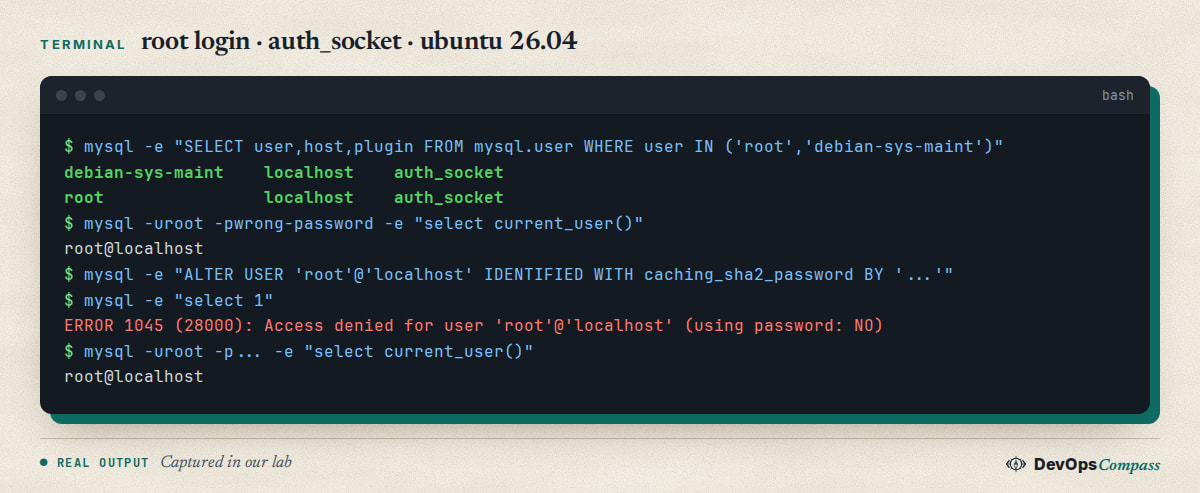
Two things in that capture surprise people. First, sudo mysql works with no password at all, because sudo makes you the Linux user root. Second, a wrong password is accepted: with auth_socket the password is never checked. We ran mysql -uroot -pwrong-password as the Linux root user and it logged in as root@localhost. By design a normal Linux user is refused, because the plugin compares names; we could not show that in the lab, since in our container the socket directory blocked a normal user before authentication started.
This design is good for a single-admin server: there is no root password to steal. It is bad for tools that connect over TCP and need a password, such as a GUI client or a web panel. Do not set a root password to please a tool. Create a separate account, as shown next:
CREATE DATABASE appdb;
CREATE USER 'app'@'localhost' IDENTIFIED BY 'a-long-random-password';
GRANT ALL ON appdb.* TO 'app'@'localhost';
We created app and the plugin came out as caching_sha2_password, the new default for new accounts. A TCP connection with mysql -h127.0.0.1 -uapp -p appdb worked.
Access denied after setting a root password
This is the classic follow-up. You run ALTER USER 'root'@'localhost' IDENTIFIED WITH caching_sha2_password BY '...', and from then on sudo mysql fails:
ERROR 1045 (28000): Access denied for user 'root'@'localhost' (using password: NO)
Nothing is broken. You replaced auth_socket with a password, so the server now wants one. mysql -uroot -p works. In our lab the old behaviour came back after:
ALTER USER 'root'@'localhost' IDENTIFIED WITH auth_socket;
Keep one way in that does not depend on a password until you have tested the other. If you lock yourself out, use the recovery steps further down.
Plugin 'mysql_native_password' is not loaded
MySQL 8.4 switched this plugin off. The 8.4 manual says it is "deprecated as of MySQL 8.0.34, disabled by default in MySQL 8.4, and removed as of MySQL 9.0.0" (native pluggable authentication, MySQL 8.4 manual). In our lab the plugin list on a fresh install looked like this, and creating a user with the old plugin failed with error 1524:
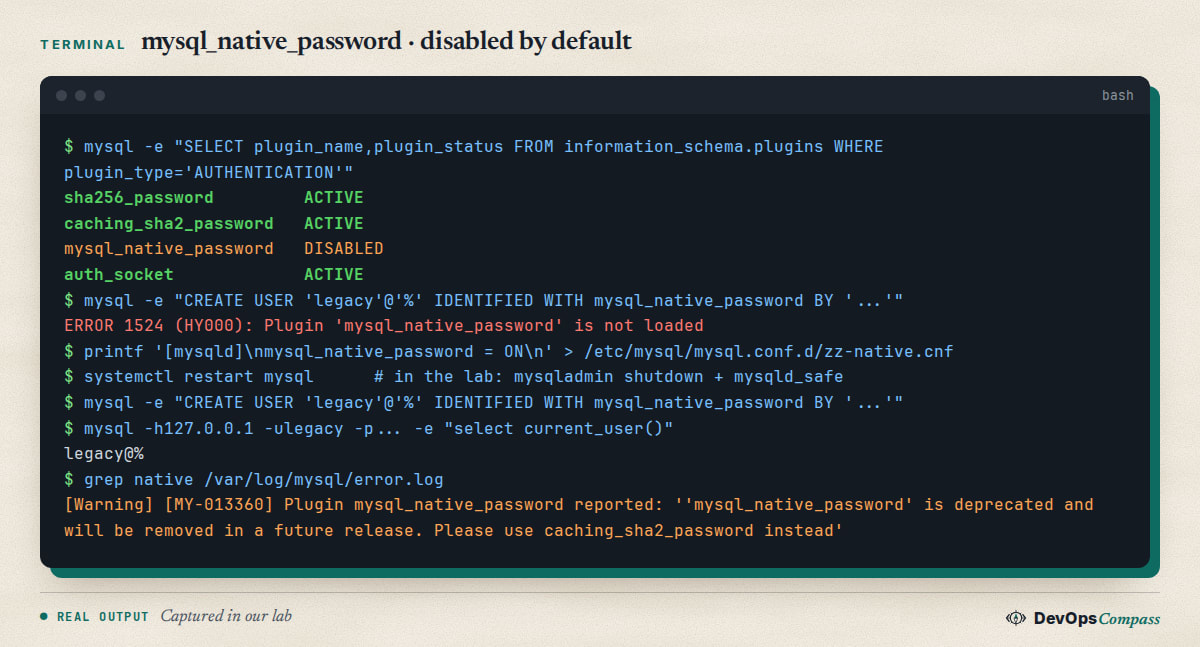
If you meet this error, the account or the application is asking for the old plugin. There are two real fixes, in order of preference:
- Move the account to
caching_sha2_password.ALTER USER 'user'@'host' IDENTIFIED WITH caching_sha2_password BY '...'. Most current drivers (MySQL Connector, PyMySQL withcryptography, Go, JDBC 8+) support it. - Turn the plugin back on if a client cannot be updated. The next section shows how, and the price: the plugin is deprecated and MySQL 9.0 removes it.
The error also appears on the other side: a client library that only knows the old plugin. A Stack Overflow question from 2026 asks whether PHP 5.6 can connect to 8.4 (question 79883831), and another one about compiling PHP against a libmysqlclient for 8.x without the disabled plugin (question 79771761). The short answer is that clients must speak caching_sha2_password, or you enable the old plugin and accept the risk. Over a connection without TLS, caching_sha2_password also needs either a cached entry or an RSA key exchange, which very old or minimal drivers do not implement; check your driver's documentation.
How do I enable mysql_native_password again?
Add the option to the [mysqld] section in a file in /etc/mysql/mysql.conf.d/ and restart the server. The 8.4 manual gives the option as mysql_native_password=ON. We used this file:
[mysqld]
mysql_native_password = ON
After a restart the plugin was ACTIVE and CREATE USER ... IDENTIFIED WITH mysql_native_password worked. The server also wrote a warning to the error log on every login with that account (see the capture above): 'mysql_native_password' is deprecated and will be removed in a future release. That is your reminder to schedule the migration.
A related Stack Overflow question reports unknown variable 'mysql-native-password=ON' (question 78722072). We could not reproduce it on 8.4.11: the option was accepted. A server that does not know the variable would be one older than 8.4, where the plugin is on by default and the variable does not exist, or a typo in the file; check mysqld --version and the section header first. We only tested 8.4.11.
unknown variable 'default-authentication-plugin'
Many 8.0-era guides say to put default-authentication-plugin=mysql_native_password in mysqld.cnf. On 8.4 the server refuses to start with it. We put the line in a drop-in file and ran mysqld:
[ERROR] [MY-000067] [Server] unknown variable 'default-authentication-plugin=mysql_native_password'.
[ERROR] [MY-010119] [Server] Aborting
The process exited with code 1. The same error is the subject of a Stack Overflow question from May 2024 and it is the reason a server fails to start after copying an old config. Remove the line. If you need new accounts to use the old plugin, set it per account with IDENTIFIED WITH, after enabling the plugin as above. The replacement system variable is authentication_policy, which shows *,, by default on 26.04: the first factor can use any plugin and the account decides.
If the server will not start after a config change, sudo journalctl -u mysql -e or /var/log/mysql/error.log shows the exact line. Delete the new drop-in file, start the server, and then add settings back one at a time.
Why is my bind-address change ignored?
This one cost us a few minutes. To allow connections from another machine, many guides say "edit bind-address". The package stores the default in mysqld.cnf in /etc/mysql/mysql.conf.d/. A neat way is to leave that file alone and add a drop-in. But the name of the drop-in decides whether it works:
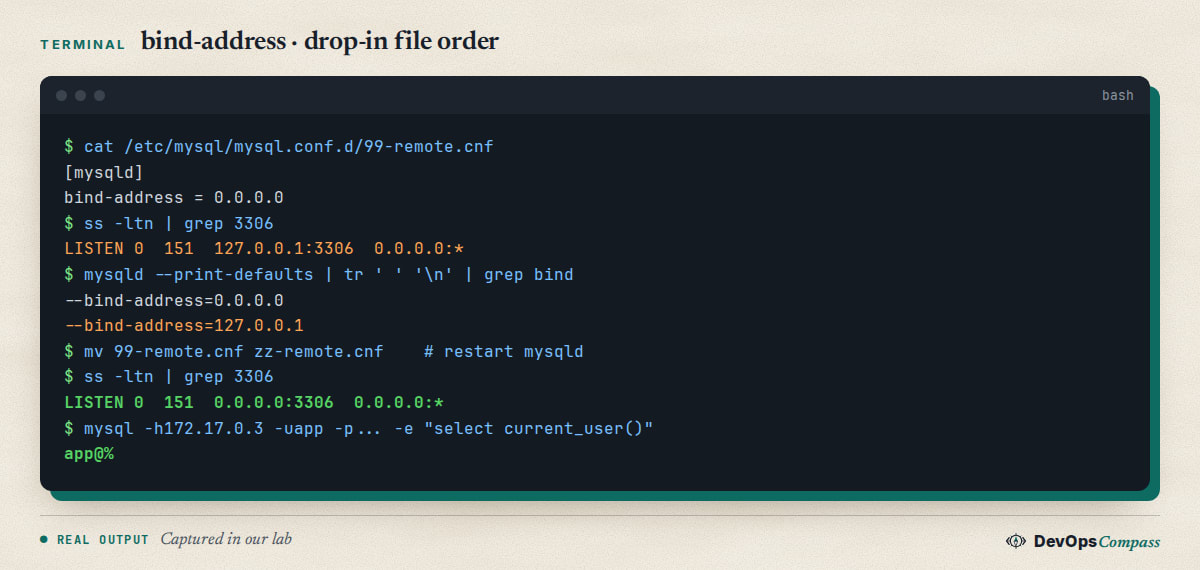
/etc/mysql/my.cnf includes /etc/mysql/conf.d/ and /etc/mysql/mysql.conf.d/. Files in an !includedir directory are read in alphabetical order and the last value wins. 99-remote.cnf sorts before mysqld.cnf (digits come before letters), so mysqld.cnf is read last and its 127.0.0.1 wins. No error, no warning. mysqld --print-defaults shows both values, in reading order, which is the fastest way to see it. Renaming the file to zz-remote.cnf fixed it: the socket changed to 0.0.0.0:3306 after a restart, and a TCP connection from the container's own address worked.
Opening the port is only half of the job. Three things to do before you do it on a real server:
- Do not use
0.0.0.0if one interface is enough.bind-address = 10.0.0.5(a private address) limits the exposure. - Limit the account's host.
CREATE USER 'lan'@'172.17.%'worked from that network and'loc'@'10.9.%'was refused withAccess denied for user 'loc'@'<hostname>'. Note that the error shows the client's resolved name, which is why you see a container ID there. - Close the port in the firewall for everyone else.
ufw allow from 10.0.0.0/24 to any port 3306 proto tcp. If MySQL runs in a container, see our guide on how Docker bypasses ufw.
The X protocol port 33060 has its own setting, mysqlx-bind-address. It stayed on 127.0.0.1 in our test, which is what you want unless you use the X protocol.
How do I reset the root password?
If you set a root password and lost it, stop the service, start the server without the grant tables and without networking, and set a new one. We ran exactly this in the lab (with mysqld_safe; on a normal server use sudo systemctl stop mysql and the mysqld_safe command, or the documented systemd override for --skip-grant-tables):
sudo mysqld_safe --skip-grant-tables --skip-networking &
mysql -e "ALTER USER 'root'@'localhost' IDENTIFIED BY 'New-Pass-1234'"
The second command failed:
ERROR 1290 (HY000): The MySQL server is running with the --skip-grant-tables option so it cannot execute this statement
You must load the grant tables first. The sequence that worked:
FLUSH PRIVILEGES;
ALTER USER 'root'@'localhost' IDENTIFIED BY 'Another!234';
FLUSH PRIVILEGES turns the permission system back on, so from this moment the server is no longer open. That is why mysqladmin shutdown without a password then returned Access denied. Stop it with mysqladmin -uroot -p shutdown, start the service normally, and log in with the new password. We tested the whole path and the last login printed root@localhost. If you want sudo mysql to work again afterwards, switch the account back to auth_socket as shown above.
Do not leave the server running with --skip-grant-tables and networking on: anyone who can reach the port is then an administrator. The --skip-networking flag is what protects you during the reset.
Your password does not satisfy the current policy requirements
Error 1819 comes from the validate_password component. It is not installed by default on a fresh Ubuntu 26.04 MySQL (mysql.component was empty in our lab), so you will only see this if someone installed it, or if you installed it yourself:
INSTALL COMPONENT 'file://component_validate_password';
CREATE USER 'weak'@'localhost' IDENTIFIED BY 'abc';
ERROR 1819 (HY000): Your password does not satisfy the current policy requirements
The defaults after the component was installed were policy MEDIUM, length 8, at least one number, one mixed-case pair and one special character (SHOW VARIABLES LIKE 'validate_password%'). A 12+ character random password passes all of them. If an application with a fixed password gets this error, change the application password instead of lowering the policy.
Upgrading from MySQL 8.0 on Ubuntu 24.04
Ubuntu 24.04 ships MySQL 8.0, so a server that moves to 26.04 jumps to 8.4. A GitHub issue for the CloudPanel project asks for supported in-place migration after exactly this Ubuntu upgrade (cloudpanel-ce issue 834), and another team notes that 8.0 is end of life in their infrastructure backlog (k8s-infrastructure issue 110). We did not test an in-place upgrade. What our lab tests suggest you check before you try it, on a copy of the server:
- Every account that uses
mysql_native_password:SELECT user,host,plugin FROM mysql.user;. On 8.4 these logins fail unless you enable the plugin. - Every config file for
default-authentication-pluginand for options removed in 8.4. The server will not start with an unknown variable. - A full
mysqldumpand a copy of/var/lib/mysqlbefore the upgrade. Rolling back a data directory after MySQL has upgraded it in place is not supported.
Our guide to upgrading Ubuntu 24.04 to 26.04 covers the operating system side. For the database side, read the official MySQL upgrade notes for 8.4 before you start, and keep the old server's data until the new one has been used for a few days.
Common errors
ERROR 1524 (HY000): Plugin 'mysql_native_password' is not loaded. The account or the client needs the legacy plugin. Move the account to caching_sha2_password, or enable the plugin with mysql_native_password=ON.
unknown variable 'default-authentication-plugin=...' and the service will not start. The option does not exist in 8.4. Delete the line from every file under /etc/mysql/; grep -r default-authentication /etc/mysql/ finds it.
ERROR 1045 (28000): Access denied for user 'root'@'localhost' (using password: NO). root has a password now. Use -p, or switch the account back to auth_socket.
ERROR 1045 for a TCP login from another host. Check the account's host part. 'app'@'localhost' does not match a connection from 10.0.0.7. The Access denied for user ... @'<name>' line shows what the server saw.
ERROR 2003 (HY000): Can't connect to MySQL server on '...:3306' (111). Nothing is listening on that address. Run ss -ltn | grep 3306; 127.0.0.1:3306 means the bind-address change did not apply. Check mysqld --print-defaults for the last --bind-address.
ERROR 1290 ... --skip-grant-tables while resetting the password. Run FLUSH PRIVILEGES first, then ALTER USER.
ERROR 1819 ... policy requirements. validate_password is active. Use a longer password.
The package install hangs in a container. See the install section: relax seccomp and AppArmor for a throwaway test container, or use a VM.
What we did not test
- No physical server and no x86-64: the lab was an arm64 container started with seccomp and AppArmor relaxed. The systemd unit was only read, not run.
- No remote client over a real network. The TCP tests came from the container's own address.
- No in-place upgrade from MySQL 8.0, no replication, no backups and no performance tuning.
- No TLS configuration and no
mysql_secure_installation. The package already uses a Unix socket forroot, so the script's main prompts overlap with defaults we describe here. - Only 8.4.11 was tested. Behaviour of other 8.4 releases, 9.x innovation releases or MariaDB may differ.
FAQ
How do I install MySQL on Ubuntu 26.04?
Run sudo apt update && sudo apt install mysql-server. The package is MySQL 8.4 LTS (8.4.11 in our lab) and it listens on 127.0.0.1. Check with mysqld --version and sudo systemctl status mysql, then use sudo mysql to open a root session without a password.
Which MySQL version does Ubuntu 26.04 have?
MySQL 8.4 LTS. Our lab showed 8.4.11-0ubuntu0.26.04.1 from the updates pocket. MySQL 8.0 reached end of life in April 2026, so 26.04 is the point where servers on 24.04 should plan the move to 8.4. MariaDB is a different package with its own version, 11.8 in the archive.
Why does mysql say access denied for user root@localhost on Ubuntu?
Either you ran mysql as a normal user (the auth_socket plugin only lets the Linux user root in) or you set a password and now forgot -p. Use sudo mysql, or mysql -uroot -p if you set one. The using password: NO text in the error tells you which case you are in.
How do I fix mysql_native_password is not loaded on MySQL 8.4?
Move the account to caching_sha2_password with ALTER USER ... IDENTIFIED WITH caching_sha2_password BY '...'. If a client cannot do that, add mysql_native_password=ON to the [mysqld] section, restart, and plan to migrate, because MySQL 9.0 removes the plugin.
How do I allow remote access to MySQL on Ubuntu 26.04?
Set bind-address in a drop-in file whose name sorts after mysqld.cnf, such as zz-remote.cnf, restart the server, create an account limited to your network, and open port 3306 in the firewall only for that network. A file named 99-remote.cnf is overridden silently.
How do I reset the MySQL root password on Ubuntu?
Start the server with --skip-grant-tables --skip-networking, run FLUSH PRIVILEGES, then ALTER USER 'root'@'localhost' IDENTIFIED BY '...'. Shut down with mysqladmin -uroot -p shutdown and start the service normally. Running ALTER USER before FLUSH PRIVILEGES fails with error 1290.
What does "your password does not satisfy the current policy requirements" mean?
The validate_password component rejected the password. It is not installed by default on Ubuntu 26.04; if it is active, the default policy wants at least 8 characters with a number, mixed case and a special character. A long random password passes. Do not lower the policy to fit a weak password.
Related guides
- Upgrade Ubuntu 24.04 to 26.04 LTS on a Server: Full Guide: the operating system steps that come before a MySQL 8.0 to 8.4 move.
- Unattended Upgrades on Ubuntu 26.04: Setup, Reboot, Logs: how security updates for
mysql-serverarrive and how to control the restart. - Docker Bypasses ufw: 4 Fixes Tested on Ubuntu 26.04: what to know before you publish port 3306 from a container.
- sudo-rs on Ubuntu 26.04: What Breaks and How to Switch Back: the
sudoon 26.04 is the Rust one, which matters forsudo mysqlin scripts.
Sources
- MySQL 8.4 Reference Manual: Native pluggable authentication (checked 10 November 2026).
- endoflife.date: MySQL release and support dates (page updated 31 October 2026, checked 10 November 2026).
- Stack Overflow: Plugin 'mysql_native_password' is not loaded, unknown variable default-authentication-plugin, unknown variable mysql-native-password=ON.
- GitHub: CloudPanel in-place migration after Ubuntu 24.04 to 26.04 and MySQL 8.0 end of life in an infrastructure backlog.
- Google autocomplete for "how to install mysql on ubuntu 26.04", "reset mysql root password ubuntu" and "mysql access denied for user root@localhost ubuntu" (10 November 2026).
- Our lab files for this guide:
mysql-server 8.4.11-0ubuntu0.26.04.1onubuntu:26.04(arm64, container).
Last verified: November 2026 (10 November 2026, mysql-server 8.4.11-0ubuntu0.26.04.1 on ubuntu:26.04, arm64, container only). Package versions move; run mysqld --version and mysql -e "SHOW PLUGINS" on your own system.
Header image: Image: DevOpsCompass.
Comments
Post a Comment