
PHP on Ubuntu 26.04: Install 8.3 or 8.4 (PPA 404 Fix)
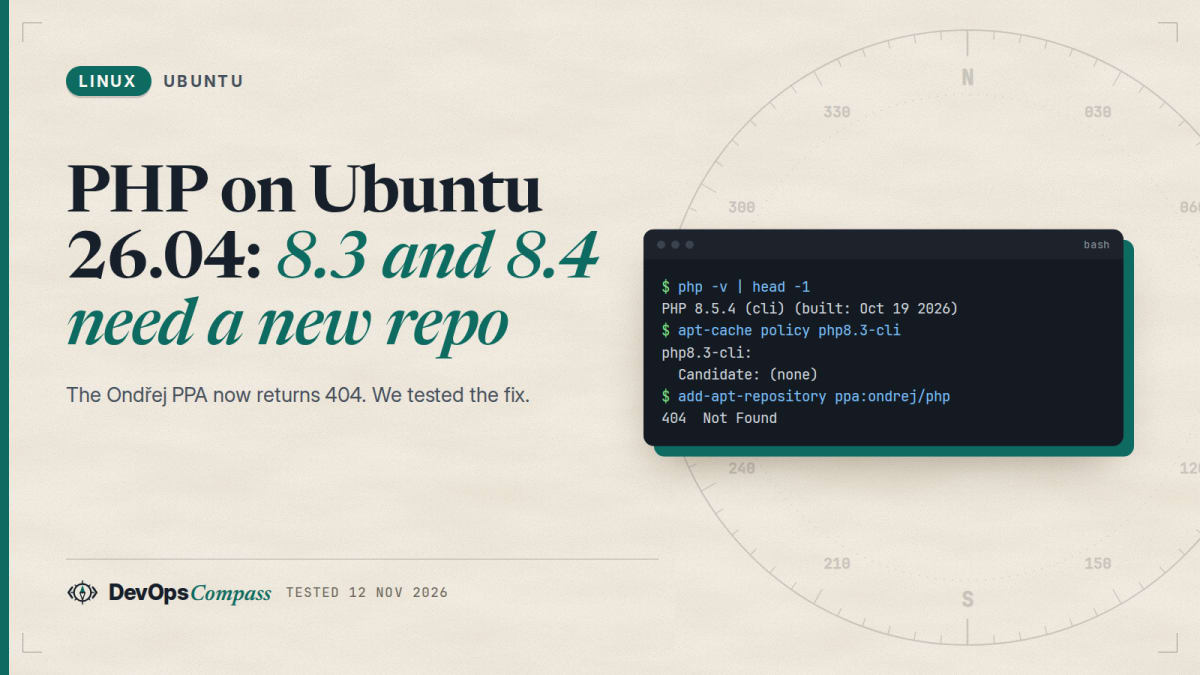
Short answer: Ubuntu 26.04 ships exactly one PHP, 8.5 (8.5.4 in our lab), and no php8.3, php8.4 or php7.4 packages. The usual fix from older guides, add-apt-repository ppa:ondrej/php, now ends in 404 Not Found because that PPA has no 26.04 (resolute) packages. Its maintainer moved 26.04 to packages.sury.org, and that repository does have 7.4, 8.2, 8.3, 8.4 and 8.5. We added it, ran 8.3 next to 8.5, served two sites with two PHP versions from one Apache, and found a trap: the repository also carries PHP 8.5 (8.5.12), and apt prefers it over Ubuntu's 8.5.4 unless you pin it.
How this was made: on 12 November 2026 we ran every command below in throwaway ubuntu:26.04 containers (arm64, Apache 2.4.66) and kept the logs. We did not test a physical server, systemd units, nginx, Laravel or WordPress, or any production workload.
If you are moving a PHP application to a fresh Ubuntu 26.04 server, the first surprise is not in your code. It is that the PHP version you ran on 24.04 is not in the package list any more, and the repository every tutorial tells you to add has changed. This guide shows what the archive offers, what to do when you need an older version, and how to keep Apache and PHP predictable afterwards.
Which PHP version does Ubuntu 26.04 ship?
PHP 8.5. The php metapackage resolves to 2:8.5+99ubuntu1, and the real packages are php8.5-*. In our lab apt-cache policy php8.5 showed 8.5.4-0ubuntu1.5 from the updates and security pockets and 8.5.4-0ubuntu1 from the release pocket, and php -v printed:
PHP 8.5.4 (cli) (built: Oct 19 2026 14:35:18) (NTS)
Built by Ubuntu
Zend Engine v4.5.4
Ubuntu backports security fixes into that 8.5.4 build, so the version number stays put while fixes arrive. php.net lists 8.5 with security support until 31 December 2029, which is why Ubuntu can carry it for a long time. The same table shows PHP 8.2 reaching the end of security support on 31 December 2026, 8.3 on 31 December 2027 and 8.4 on 31 December 2028, so staying on an old branch is a decision with a date on it (php.net supported versions, checked 12 November 2026).
Apache is 2.4.66-2ubuntu2.7 in the updates pocket; the server banner says Apache/2.4.66 (Ubuntu).
How do I install Apache with PHP on Ubuntu 26.04?
Two packages do the job, and no extra repository is needed:
sudo apt update
sudo apt install apache2 php libapache2-mod-php
php -v
The install pulled mpm_prefork and the php_module into mods-enabled (php8.5.conf and php8.5.load). We started Apache, dropped a file with echo PHP_VERSION, " ", php_sapi_name() into /var/www/html, and the answer was 8.5.4 apache2handler. That is classic mod_php: PHP runs inside the Apache worker.
Install the extensions your application needs by their versioned names, because the Ubuntu archive carries a long list for 8.5. We saw php8.5-mysql, -gd, -mbstring, -curl, -xml, -zip, -intl, -pgsql, -sqlite3, -redis, -apcu, -imagick, -memcached, -xdebug and even -mcrypt in apt-cache search. Config lives in /etc/php/8.5/apache2/php.ini for Apache and /etc/php/8.5/cli/php.ini for the command line, and php --ini shows which one the CLI loads. If you later add php-fpm, it has its own /etc/php/8.5/fpm/php.ini, and changing the Apache file will not affect it.
Can I install PHP 8.3, 8.4 or 7.4 on Ubuntu 26.04?
Not from Ubuntu's own archive. The Ask Ubuntu thread "Ubuntu 26.04 LTS support for old php versions" gets the reason right: Debian and Ubuntu drop old PHP branches when a release ships, by design. In our lab the archive had no candidate for any older branch:
$ apt-cache policy php8.4-common php8.3-common
php8.4-common:
  Candidate: (none)
php8.3-common:
  Candidate: (none)
Your real options are these, in the order we would try them:
- Move the application to 8.5. Read the migration guides on php.net and run your test suite on 8.5. This is the only option that Ubuntu security updates cover.
- Use a third-party repository that packages several branches side by side. That is the next two sections.
- Use a container such as the official
php:8.3-apacheimage and keep the host clean. We did not test that here.
Why does ppa:ondrej/php fail with 404 on 26.04?
Because the PPA has nothing for Ubuntu 26.04 ("resolute"). add-apt-repository itself succeeds, prints a notice, writes the source file, and the failure only shows up on the next apt update:
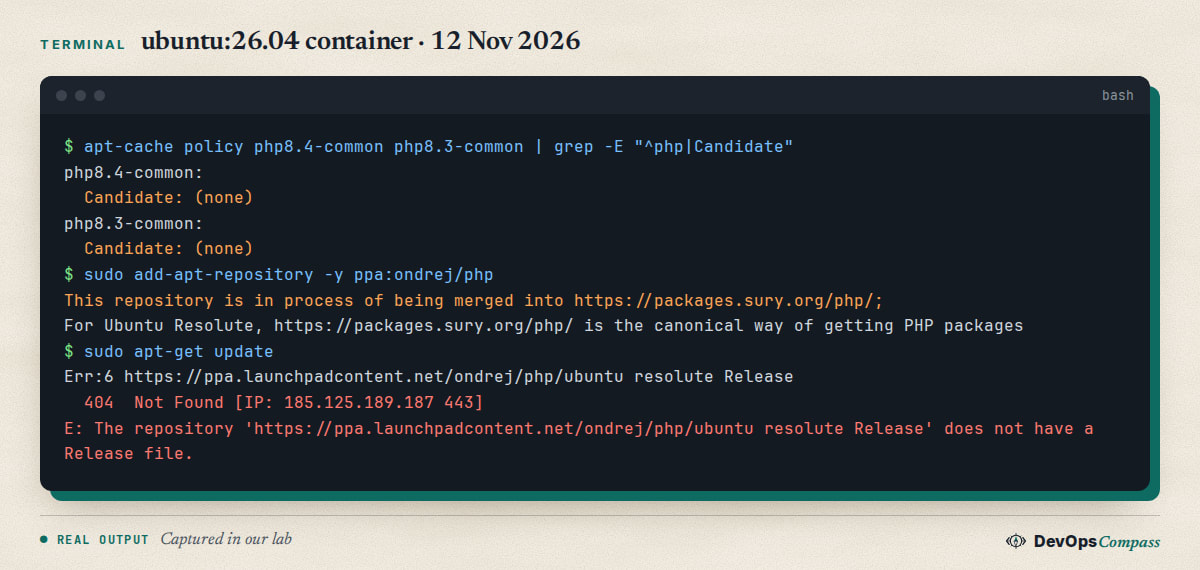
The notice says the repository is being merged into packages.sury.org/php and that for Ubuntu Resolute that is the canonical source. The Launchpad API agrees: for 12 November 2026 it listed php8.3, php8.4, php8.5 and php7.4 sources for noble and jammy only. The same breakage hit CI systems when GitHub moved ubuntu-latest to 26.04: the Silverstripe project's issue #187 and the fix in pull request #190 describe ppa:ondrej/php and ppa:ondrej/apache2 returning 404 and the switch to packages.sury.org.
The bad part is that the failed source stays in /etc/apt/sources.list.d/, and every later apt update prints the error and, in a script, exits non-zero. Remove it:
sudo rm /etc/apt/sources.list.d/ondrej-ubuntu-php-resolute.sources
sudo apt update
After that apt update was clean again in our lab.
How do I add the packages.sury.org repository?
The repository's own README.txt gives a script that installs a keyring package and writes the source line. We did the same two steps by hand in a minimal container, with the key from apt.gpg and an explicit signed-by:
sudo apt install ca-certificates curl
sudo curl -sSLo /usr/share/keyrings/deb.sury.org-php.gpg https://packages.sury.org/php/apt.gpg
echo "deb [signed-by=/usr/share/keyrings/deb.sury.org-php.gpg] https://packages.sury.org/php/ resolute main" \
  | sudo tee /etc/apt/sources.list.d/php.list
sudo apt update
If apt-key complaints come to mind, our guide on apt-key: Command Not Found on Ubuntu 26.04 explains why signed-by with a file in /usr/share/keyrings is the right way. The repository is third-party: you are trusting its maintainer with root on your server, so check the project page before you add it.
The suite for resolute worked immediately:
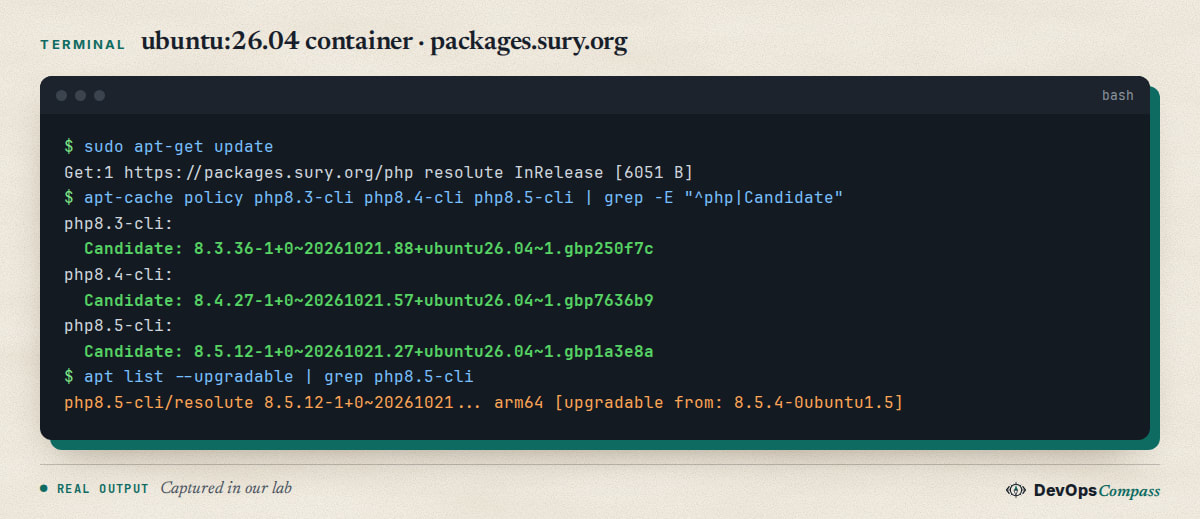
We saw php8.3 8.3.36, php8.4 8.4.27, php8.5 8.5.12, plus 8.2.35 and 7.4.33, all with build stamp 20261021. The 7.4 package is end-of-life upstream; it exists for legacy applications and gets no security fixes from php.net.
Installing an older branch is then ordinary:
sudo apt install php8.3-cli php8.3-mysql php8.3-fpm
php8.3 -v
We got PHP 8.3.36 (cli) next to PHP 8.5 and the plain php command stayed on 8.5, because update-alternatives runs in auto mode with php.default at priority 100 and php8.3 at 83. Use sudo update-alternatives --config php if you want the default CLI changed, or call php8.3 explicitly in scripts and cron jobs.
Why did apt replace Ubuntu's PHP 8.5, and how do I pin it?
This is the part no tutorial mentioned. The sury repository also publishes PHP 8.5, version 8.5.12-1+0~20261021..., and its priority is the same 500 as Ubuntu's. apt takes the higher version number, so right after adding the repository we saw the Ubuntu packages listed as upgradable:
php8.5-cli/resolute 8.5.12-1+0~20261021.27+ubuntu26.04~1.gbp1a3e8a arm64 [upgradable from: 8.5.4-0ubuntu1.5]
php-common/resolute 2:101+0~20261021.78+ubuntu26.04~1.gbp53f25f all [upgradable from: 2:99ubuntu1]
Installing php8.3-fpm also upgraded php-common and libapache2-mod-php8.5 to the sury build. That may be fine, but it means your 8.5 no longer comes from Ubuntu's security team. If you want Ubuntu's PHP 8.5 and sury only for the older branches, pin the repository. The obvious pin does not work, and we tried it:
# /etc/apt/preferences.d/sury  (first attempt, only this block)
Package: *
Pin: release o=deb.sury.org
Pin-Priority: 100
With this alone, apt install php8.3-cli failed with php-common:arm64=2:99ubuntu1 Breaks php8.3-common, because the 8.3 packages need the newer php-common that only sury has. The pin that worked gives the old branches and php-common a higher priority:
Package: *
Pin: release o=deb.sury.org
Pin-Priority: 100

Package: php-common php8.3* php8.4*
Pin: release o=deb.sury.org
Pin-Priority: 600
In a fresh container with this file, apt install php8.5-cli php8.3-cli php8.3-mysql installed Ubuntu's php8.5-cli 8.5.4-0ubuntu1.5, sury's php8.3-cli 8.3.36 and php-common 2:101. apt-cache policy php8.5-cli kept the Ubuntu candidate, and apt-get -s upgrade listed only Ubuntu packages. Add php8.2* or php7.4* to the 600 block if you use those. php-common coming from sury while the rest of 8.5 comes from Ubuntu was fine in our test, but it is a mixed state, so run your tests.
How do I run two PHP versions side by side?
Use php-fpm, one pool per version, and tell Apache which socket each site uses. mod_php cannot do this: only one php_module can be loaded, and it needs mpm_prefork. When we installed libapache2-mod-php8.3 next to 8.5 on an mpm_event server, apt installed it but did not enable it, and a2enmod php8.3 answered with Considering conflict mpm_event for mpm_prefork, meaning it wants to swap the MPM. With php-fpm you switch to mpm_event and proxy_fcgi instead:
sudo apt install php8.3-fpm php8.5-fpm
sudo a2dismod php8.5 mpm_prefork
sudo a2enmod mpm_event proxy_fcgi setenvif
Installing php8.3-fpm already runs a2enconf php8.3-fpm, which routes every .php file on every site to the 8.3 pool. That is the global default. Override it per site in the virtual host:
<VirtualHost *:80>
  ServerName a.test
  DocumentRoot /var/www/a
  <FilesMatch \.php$>
    SetHandler "proxy:unix:/run/php/php8.3-fpm.sock|fcgi://localhost"
  </FilesMatch>
</VirtualHost>
<VirtualHost *:80>
  ServerName b.test
  DocumentRoot /var/www/b
  <FilesMatch \.php$>
    SetHandler "proxy:unix:/run/php/php8.5-fpm.sock|fcgi://localhost"
  </FilesMatch>
</VirtualHost>
Our two test sites answered with the right versions:
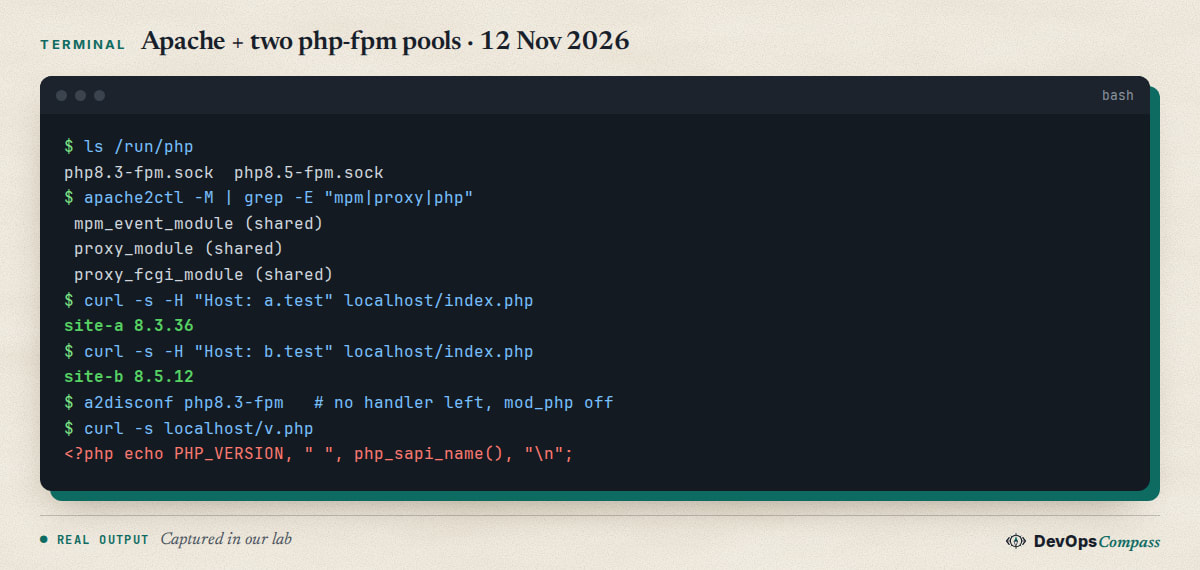
site-a 8.3.36 and site-b 8.5.12 came from one Apache. If you also need a different php.ini per site, each pool has its own config in /etc/php/<version>/fpm/pool.d/, and you can run several pools of the same version with different sockets. On a real server the units are php8.3-fpm.service and php8.5-fpm.service; our container had no systemd, so we started php-fpm8.3 -D and php-fpm8.5 -D by hand and did not test the units. If you run Apache in a container, see our notes on Docker bypassing ufw before you publish port 80.
Why does Apache show PHP source instead of running it?
Because no handler claims .php files, Apache serves them as plain files. It happens after you disable php_module or remove an fpm handler and forget to enable the other. We reproduced it by running a2disconf php8.3-fpm with mod_php off, and curl localhost/v.php printed the file itself:
<?php echo PHP_VERSION, " ", php_sapi_name(), "\n";
This is also a security problem, because the source can contain database passwords. The old Stack Overflow question PHP code returned, instead of displaying the correct output from 2015 is still unanswered. The check is quick: apache2ctl -M | grep php for mod_php, or apache2ctl -S and the conf in conf-enabled for fpm. Exactly one of them must be active for each site, and test with curl after each a2enmod or a2enconf change.
Unable to locate package php8.3-memcached
That is the same root cause, seen in a CI job: sudo apt-get install php8.3-memcached fails with E: Unable to locate package php8.3-memcached on the ubuntu-26.04 runner, as in the Silverstripe issue #184. On 24.04 the package came from the Ondřej PPA that the job added later. On 26.04 the Ubuntu archive has no 8.3 packages at all, so every php8.3-* name fails until the sury repository is added before the install step. In our lab, after adding it, apt-cache policy php8.3-memcached showed 3.4.0-1+0~20260710.79+ubuntu26.04~1.gbp3fb0c0. The same ordering rule applies to cloud-init, Dockerfiles and Ansible roles: add the repository first, run apt update, then install.
Where did php-imap, mysqli and other extensions go?
Extensions are separate packages, and a few are not in Ubuntu's 8.5 set. php8.5-imap is one of them: it is not in the Ubuntu archive, but the sury repository has it (3:1.0.3), and in our pinned lab apt install php8.5-imap loaded the imap module. The php-imap extension was moved out of PHP's core to PECL, which is why distributions no longer ship it in the main package. Check with apt-cache policy php8.5-imap on your own system.
The classic error from a missing extension is Call to undefined function mysqli_connect(). We reproduced it on a bare php8.5-cli: PHP says Uncaught Error: Call to undefined function mysqli_connect(). The fix is sudo apt install php8.5-mysql (or php8.3-mysql for the older branch) and a restart of Apache or php-fpm, as described on the PHP manual page for mysqli. Our MySQL guide covers the server side: MySQL 8.4 on Ubuntu 26.04: Install, Root Login, Remote.
phpMyAdmin has a candidate in the Ubuntu archive (4:5.2.3+dfsg-1), but we did not install it, so we cannot say how it behaves.
Common errors
404 Not Found for ppa.launchpadcontent.net/ondrej/php/ubuntu resolute. The PPA has no 26.04 packages. Delete ondrej-ubuntu-php-resolute.sources and use packages.sury.org.
E: Unable to locate package php8.3-.... The archive has only 8.5. Add the sury repository and run apt update first.
php-common ... Breaks php8.3-common. Your pin is too strict. Raise the priority of php-common and the branch you want from the sury repository.
Ubuntu's PHP 8.5 became 8.5.12 after apt upgrade. The sury build outranks Ubuntu's. Pin the repository at 100 and raise only the packages you need.
Apache downloads or prints PHP source. No active handler: enable php_module with mpm_prefork, or proxy_fcgi with an fpm handler, and test.
Considering conflict mpm_event for mpm_prefork. mod_php wants prefork. Choose either mod_php or mpm_event with php-fpm.
Call to undefined function mysqli_connect(). Install the extension package for that PHP version and restart the service.
Apache kill: Permission denied in a container. In our lab, root could not signal Apache until we relaxed the container's AppArmor and seccomp profiles. This is a test-container quirk, not a server issue.
What we did not test
- No physical server, no x86-64: the lab was arm64 containers (one pair with AppArmor and seccomp relaxed). The systemd units for Apache and php-fpm never ran.
- nginx with php-fpm, Laravel, WordPress, Composer, phpMyAdmin and Xdebug were not tested.
- Upgrading from PHP 8.3 on 24.04 to 8.5 on 26.04 was not tested: no application migration, no
do-release-upgrade. See our full 24.04 to 26.04 upgrade guide for the operating system side. - PHP 7.4 was only checked for availability, not installed. 8.4 was checked for availability only.
- Only the sury packages of 21 October 2026 were used. We did not audit the repository's contents or its signing practice.
FAQ
Which PHP version does Ubuntu 26.04 have?
PHP 8.5, packaged as php8.5 (8.5.4-0ubuntu1.5 in our lab). The php metapackage points to it. The archive has no 8.4, 8.3 or 7.4 packages, so older versions need a third-party repository or a container.
How do I install PHP 8.3 on Ubuntu 26.04?
Add the repository at packages.sury.org/php for resolute, run sudo apt update, then sudo apt install php8.3-cli php8.3-fpm. The Ondřej PPA does not work on 26.04 and returns a 404. In our lab this installed 8.3.36 next to Ubuntu's 8.5.
Why does add-apt-repository ppa:ondrej/php fail on Ubuntu 26.04?
The PPA has no packages for 26.04. add-apt-repository succeeds but the next apt update prints 404 Not Found for the resolute Release file. Remove the ondrej-ubuntu-php-resolute.sources file and add packages.sury.org instead.
Can I install PHP 7.4 on Ubuntu 26.04?
The sury repository offered php7.4-cli 7.4.33 for resolute in our lab, but we did not install it. PHP 7.4 has been end-of-life upstream for years, so it gets no security fixes from php.net. Use it only for a legacy app behind other protections.
How do I run PHP 8.3 and 8.5 on the same Apache server?
Use php-fpm for both, switch Apache to mpm_event with proxy_fcgi, and set a SetHandler "proxy:unix:/run/php/php8.3-fpm.sock|fcgi://localhost" in each virtual host. mod_php can load only one version, so it cannot do this.
Is php-imap available on Ubuntu 26.04?
Not in the Ubuntu archive for 8.5. The sury repository has php8.5-imap and php8.3-imap, and the module loaded in our lab. Check apt-cache policy php8.5-imap on your own server.
Related guides
- apt-key: Command Not Found on Ubuntu 26.04 (Fix): how to add a third-party repository key the supported way before you add sury.
- MySQL 8.4 on Ubuntu 26.04: Install, Root Login, Remote: the database side of a LAMP server on 26.04.
- PostgreSQL 18 on Ubuntu 26.04: Install, Login, Remote: if your PHP app uses PostgreSQL instead.
- nginx CVEs on Ubuntu 26.04: Is 1.28.3 Still Vulnerable?: how Ubuntu backports fixes without changing the version number, which also applies to PHP 8.5.4.
- Upgrade Ubuntu 24.04 to 26.04 LTS on a Server: Full Guide: what happens to third-party PHP repositories during an upgrade.
Sources
- PHP project: Supported versions and the release feed for 8.5 (8.5.12 on 21 October 2026; checked 12 November 2026).
- packages.sury.org: PHP repository index and its README script.
- Launchpad: Ondřej Surý's PHP PPA, including the notice about the move for Ubuntu Resolute.
- GitHub: Silverstripe gha-ci issue #184, issue #187 and pull request #190.
- Ask Ubuntu: Ubuntu 26.04 LTS support for old php versions. Stack Overflow: PHP code returned, instead of displaying the correct output.
- PHP manual: mysqli installation.
- Google autocomplete for "ubuntu 26.04 php", "php 8.5 ubuntu 26.04", "ubuntu 26.04 php imap" and "ubuntu 26.04 apache php" (12 November 2026).
- Our lab files for this guide:
php8.5 8.5.4-0ubuntu1.5,apache2 2.4.66-2ubuntu2.7and the sury packagesphp8.3 8.3.36,php8.5 8.5.12onubuntu:26.04(arm64, containers).
Last verified: November 2026 (12 November 2026, php8.5 8.5.4-0ubuntu1.5 and packages.sury.org builds of 21 October 2026 on ubuntu:26.04, arm64, containers only). Repository contents move; run apt-cache policy php8.3-cli on your own system.
Header image: Image: DevOpsCompass.
Comments
Post a Comment