
nginx CVEs on Ubuntu 26.04: Is 1.28.3 Still Vulnerable?
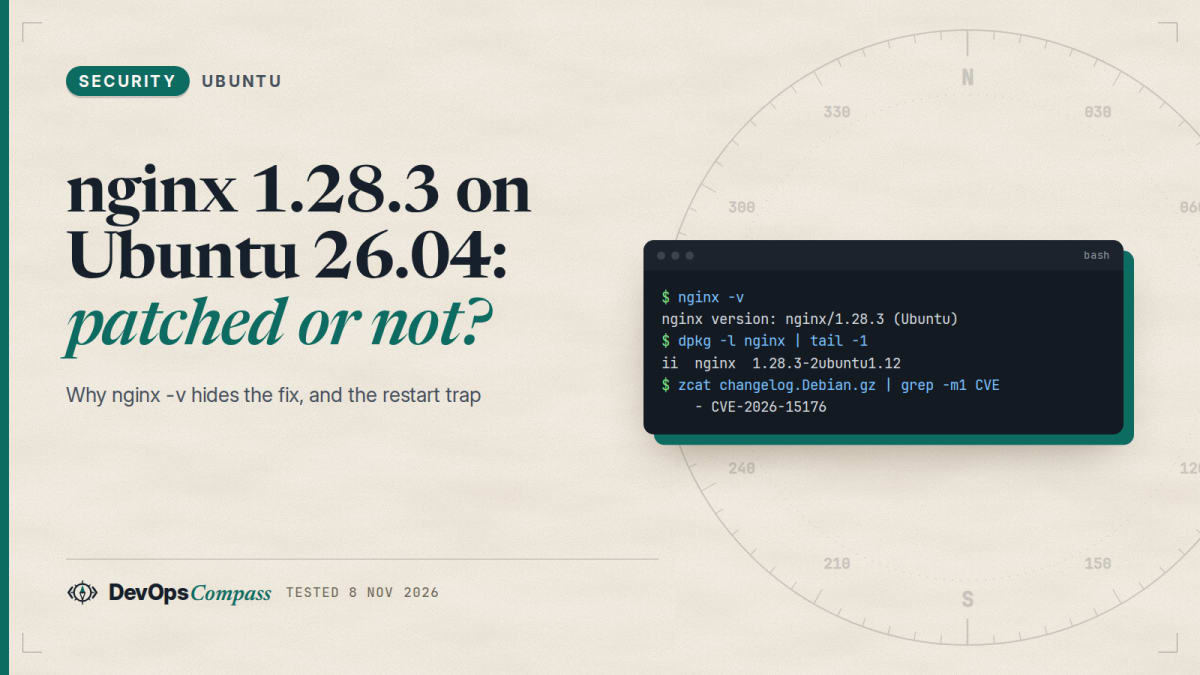
Short answer: Yes, you can be patched while nginx -v still prints 1.28.3. Ubuntu 26.04 keeps nginx 1.28.3 and backports the security fixes: the changelog of package 1.28.3-2ubuntu1.12 (24 October 2026) lists all 15 CVE-2026 advisories that nginx.org marks as affecting 1.28.3. Upstream fixed them in 1.30.6 (14 October 2026). The trap is the restart: in our lab a package update left the old binary running (/usr/sbin/nginx (deleted)) and nginx -s reload did not replace it. Only a full stop and start did. Check with dpkg -l nginx and ls -l /proc/$(cat /run/nginx.pid)/exe.
How this was made: on 8 November 2026 we used a throwaway ubuntu:26.04 container (arm64) and the nginx.org repository, read the package changelog, parsed the nginx.org advisory page and compared the two. We did not run any exploit, test x86-64, or test a real server with systemd.
The advisory page on nginx.org lists a long run of 2026 security issues, and most of them say "not vulnerable: 1.30.6+". Ubuntu 26.04 installs nginx 1.28.3. If you read both side by side, it looks as if every Ubuntu server is unpatched. It is not that simple, and the real risks are somewhere else: which package revision you run, whether the process was restarted, and whether a backported fix changed your config's behaviour.
Is the nginx 1.28.3 in Ubuntu 26.04 vulnerable?
Not if the package is current. Ubuntu does not move to a newer nginx inside a release. It copies the fix into the old version and raises the package revision, the part after 1.28.3-. In our lab the current revision was:
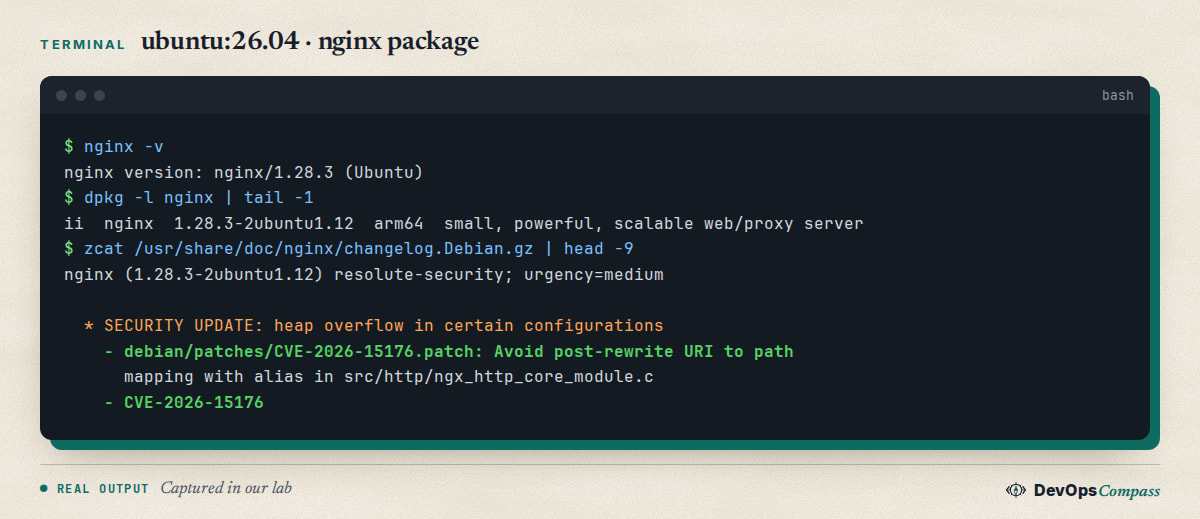
We wanted more than "trust the number", so we compared the two lists:
- We downloaded the nginx.org security advisories and read each entry's "Vulnerable" and "Not vulnerable" ranges. Entries whose range contains 1.28.3 and which were not already fixed by the 1.28.3 release (24 March 2026) count as affecting Ubuntu's base version. That gave 15 CVE-2026 advisories.
- We extracted every CVE id from the Ubuntu package changelog. It contains 18 CVE-2026 ids.
- We compared both lists. All 15 are in the Ubuntu changelog. The three extra ids are CVE-2026-1642 (upstream says fixed in 1.28.3 itself), CVE-2026-49975 (a
max_headersfix that is not on the nginx.org page) and CVE-2026-93479 (nginx.org lists 1.30.0-1.30.5 and 1.31.2-1.31.6 as vulnerable, but Ubuntu patched 1.28.3 as well, which is the safe side).
The 15 advisories, with the severity that nginx.org gives them:
| CVE | Severity | What |
|---|---|---|
| CVE-2026-42533 | major | Buffer overflow with map and regex |
| CVE-2026-15176 | medium | Buffer overflow with alias after rewrite |
| CVE-2026-9256, CVE-2026-42945 | medium | Buffer overflow in the rewrite module |
| CVE-2026-95101 | medium | HTTP/3 request body injection |
| CVE-2026-40460 | medium | HTTP/3 address spoofing |
| CVE-2026-97629 | medium | TLS session ticket forgery |
| CVE-2026-97205 | medium | Use-after-free with AIO |
| CVE-2026-56434 | medium | Use-after-free with SSI |
| CVE-2026-60005 | medium | Memory disclosure with the slice module |
| CVE-2026-42055 | medium | Overflow in the proxy v2 and grpc modules |
| CVE-2026-42946 | medium | Over-read in scgi and uwsgi |
| CVE-2026-40701 | medium | Use-after-free in OCSP resolver |
| CVE-2026-42934, CVE-2026-48142 | low | Over-read in the charset module |
Two limits of this check. First, it is a version-range comparison done by a script we wrote (parse.py in our lab folder), not the vendor's own data, so treat it as a cross-check. For a single CVE the authoritative answer is the Ubuntu CVE page, for example CVE-2026-42533, which lists the fixed revision for Ubuntu 26.04 (1.28.3-2ubuntu1.11). Second, nothing here proves that your server is safe: a fix in a package is worth nothing if the old process is still running. That is the next section.
Why does nginx -v still say 1.28.3 after the update?
nginx -v prints the upstream version that the binary was built from. The Ubuntu revision (-2ubuntu1.12) is not part of that string. So nginx/1.28.3 (Ubuntu) before and after the security update look identical. Use the package manager instead:
dpkg -l nginx | tail -1
apt-cache policy nginx | head -4
In our lab, Installed was 1.28.3-2ubuntu1.12, which was also the candidate. If the installed revision is older than the candidate, you are behind. The same applies to the HTTP Server: header, which says nginx/1.28.3 for every revision. Scanners that read only that header will keep reporting the 2026 CVEs on a patched Ubuntu server. That is a false positive, but also the reason to confirm the revision yourself instead of arguing with the scanner.
How do I check which CVEs my nginx package fixes?
The package carries its own changelog. It lists every CVE with the patch that fixes it:
zcat /usr/share/doc/nginx/changelog.Debian.gz | grep -oE 'CVE-[0-9]{4}-[0-9]+' | sort -u
zcat /usr/share/doc/nginx/changelog.Debian.gz | head -20
On a server without the package files in that path, use apt changelog nginx, which downloads it. Filtered for CVE-2026, the first command printed 18 ids in our lab. To test one CVE, replace the pattern with the id and run grep -n CVE-2026-15176. It prints the changelog line, and the lines around it show the revision that introduced the patch.
One trap: a changelog line is not always proof of a fix. The next section shows a case where the patch was listed and then turned off in a later revision.
Did the CVE-2026-42533 patch break my site?
This is the most serious advisory of the year (nginx.org: "major"), and it is the one that went wrong. In Ubuntu 26.04, the changelog shows five revisions in six weeks:
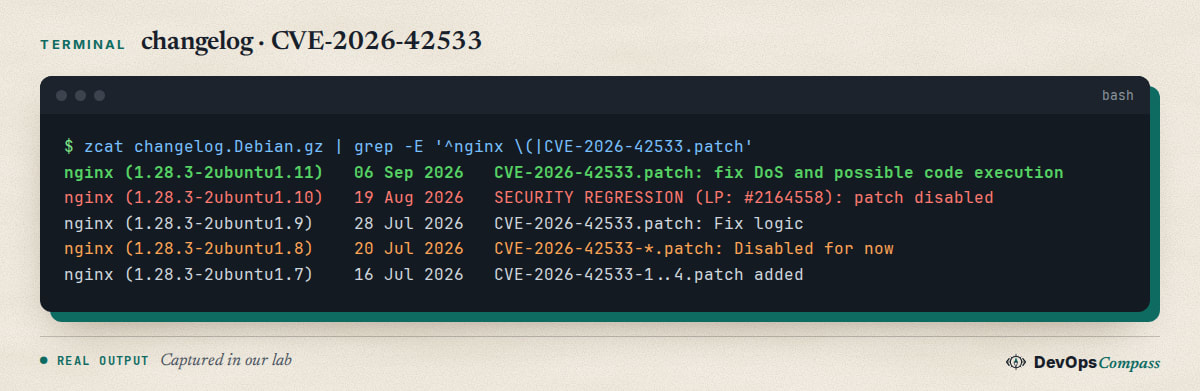
In short: 1.28.3-2ubuntu1.7 (16 July) added the fix, .8 (20 July) disabled it, .9 (28 July) turned it on again, .10 (19 August) disabled it with the note "SECURITY REGRESSION: no buffer space in script copy (LP: #2164558)", and .11 (6 September) fixed it again. If you stayed on .8 or .10, the CVE was not fixed even though the package was "up to date" at that time. Today .12 is the current revision and includes the fix from .11.
What did users see? On Ubuntu 22.04, the Mail-in-a-Box project reported that nginx 1.18.0-6ubuntu14.19 returned File not found for its Nextcloud path, because numbered regex captures ($1, $2) in rewrite, fastcgi_param and proxy_pass values were no longer reliable (Mail-in-a-Box issue 2597). The maintainer closed it on 21 August 2026 with "Ubuntu has fixed this upstream". We did not reproduce this on 26.04.
Another public lab report on the same advisory describes an HTTP 500 and the log line no buffer space in script copy when a regex map capture is longer than the location capture (damonblog pull request 24). It is a third-party report, we did not verify it. What you can do cheaply:
- Search your error log for the message:
grep -c "no buffer space in script copy" /var/log/nginx/error.log. - If you use
$1or$2after amaporrewrite, switch to named captures with unique names ((?<page>...)). This is the workaround the Mail-in-a-Box fix used. - Run
nginx -tafter each update and test your real routes withcurl, not only the start page.
Do I need to restart nginx after an apt update?
Yes, and this was the most useful finding of our test. nginx keeps running the binary it started with. When dpkg replaces /usr/sbin/nginx, the running master and workers keep the old file open. We started nginx in the container, reinstalled the package (the same file replacement as an update) and looked at /proc:
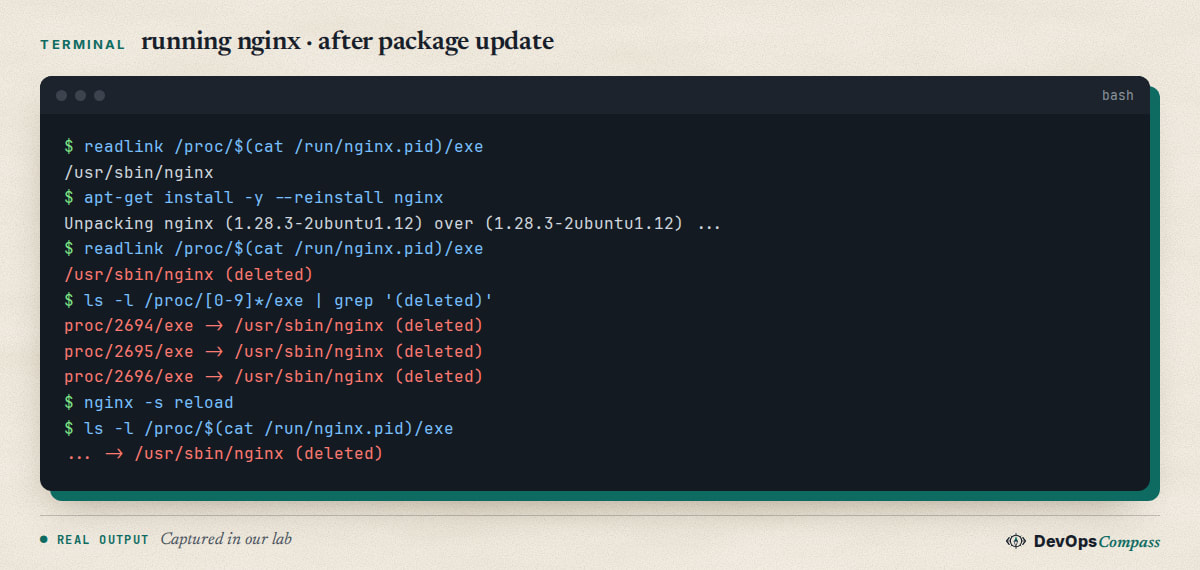
All five processes now point at a deleted file. They still run the code from before the update, so the fix is on disk but not active. We then ran nginx -s reload. The master process still showed (deleted). This matches the nginx documentation: a reload re-reads the configuration, and replacing the executable needs the "upgrade on the fly" procedure (a USR2 signal to the master) or a restart.
Check any server in one line:
ls -l /proc/[0-9]*/exe 2>/dev/null | grep nginx | grep deleted
No output means the processes run the current binary. If it prints lines, restart: sudo systemctl restart nginx. We stopped and started nginx in the container and the check came back clean. A restart drops open connections for a moment; for a busy server use the USR2 procedure from the documentation, which we did not test.
What about the package itself? On a normal Ubuntu server the package scripts normally restart or reload the service, and the needrestart tool can list stale services. We could not test this: our container has no systemd, so the post-install script did not start or stop anything. Do not assume either way; run the one-line check after every nginx update.
Which nginx settings expose me?
The advisories only matter for the features you use. The nginx.org page names the module in each title. You can see which of them are active with:
sudo nginx -T 2>/dev/null | grep -nE '(^|[;{])\s*(alias|rewrite|map|ssi|slice|mp4|dav_methods|aio|ssl_session_ticket_key|resolver|listen [^;]*quic)(\s|;)'
For a test config with map, rewrite, alias, slice, ssi, dav_methods, mp4 and aio threads, the command printed each matching line with its number in the combined config. (Our first, simpler pattern missed directives that sit inside location { ... } on one line, so use the one above.) In our Ubuntu build the modules for HTTP/3, slice, mp4, dav and threads were compiled in (nginx -V shows --with-http_v3_module, --with-http_slice_module, --with-http_mp4_module, --with-http_dav_module, --with-threads), but they only run when your config uses their directives. Our own rough mapping, not an official one:
| If your config has | Advisory to read first |
|---|---|
map plus a regex, or $1 captures |
CVE-2026-42533 |
alias combined with rewrite |
CVE-2026-15176 |
listen ... quic / http3 on |
CVE-2026-95101, CVE-2026-40460 |
ssl_session_ticket_key |
CVE-2026-97629 |
aio threads with ssi |
CVE-2026-97205, CVE-2026-56434 |
slice |
CVE-2026-60005 |
A default site that only serves static files uses almost none of this. A reverse proxy in front of an app (see our Ollama behind Nginx guide) usually uses proxy_pass and sometimes rewrite. We did not test whether any of these CVEs can be exploited, and we did not run exploit code. This table only tells you where to read first.
Should I switch to the nginx.org repository?
Only if you need a feature or fix that the Ubuntu package does not have. The nginx.org repository for Ubuntu 26.04 (resolute) serves 1.30.6, the stable branch, and keeps the older 1.30.x versions available. Third parties moved the same way after these advisories: the AWS deep-learning-containers project replaced distro nginx by the nginx.org package for CVE-2026-42533 (pull request 6702), and another project moved its images to 1.30.6 (pull request 1177).
On a server, think first. We added the nginx.org repository to a container that already had the Ubuntu package and installed nginx=1.30.6-1~resolute:
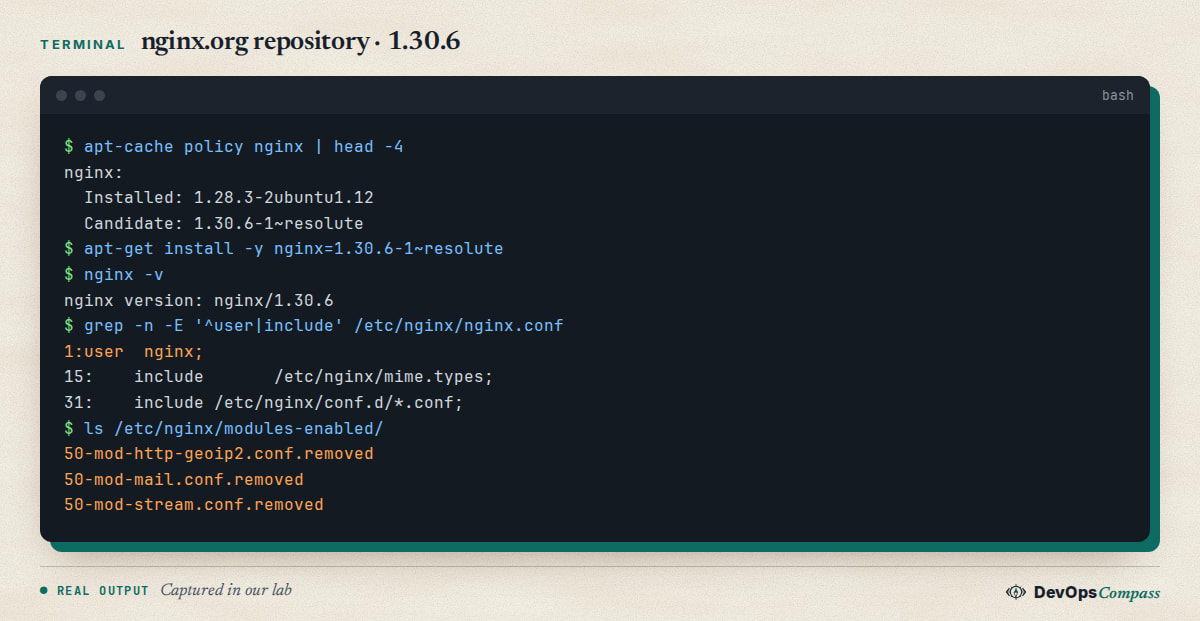
Three things changed that the install did not warn about:
- The user.
nginx.confnow starts withuser nginx;, while the Ubuntu package usedwww-data. Files that onlywww-datacan read (an app folder, a socket, upload directories) become unreadable. - The include. The new
nginx.confincludes only/etc/nginx/conf.d/*.conf. The Ubuntu layout withsites-enabledis not included, so site files in that folder are silently ignored. Our emptysites-enabledfolder was still there. - The modules. The Ubuntu
libnginx-mod-*packages (mail, stream, geoip2, image filter) stay installed as 1.28.3 files, but their config inmodules-enabledwas renamed to*.conf.removed. Anything that needsstreamstops loading.
We tested the package switch in a container with default config; we did not test a production config, certificates, or a rollback. If you decide to switch, try it on a copy of the server, run sudo nginx -t, and keep the Ubuntu config files. For most servers the simpler route is to stay on the Ubuntu package, install updates and restart. If you are in the middle of moving to 26.04, our Ubuntu 24.04 to 26.04 upgrade guide shows what else changes on the way.
What is the latest stable nginx version?
On 8 November 2026 the download page lists 1.30.6 as the stable version and 1.31.8 as mainline. The advisory page names 1.30.6+ and 1.31.7+ as not vulnerable to the five issues that were fixed on 14 October. If you run 1.30.5 or earlier from nginx.org, five advisories still apply (CVE-2026-15176, 93479, 95101, 97205 and 97629) by the page's own ranges. Update with sudo apt update && sudo apt install nginx and restart.
Common errors
nginx: [emerg] unknown directive or a module error after switching repositories. The Ubuntu libnginx-mod-* files do not match the 1.30.6 binary and their config is disabled. Remove those packages or install the nginx.org module packages; do not re-enable the .removed files.
404 for a site that worked before the switch. The site file is in sites-enabled, which the nginx.org nginx.conf does not include. Move it to conf.d/ with a .conf suffix, or add the include line yourself.
Permission denied on a socket or upload folder after the switch. The worker user changed from www-data to nginx. Either set user www-data; in nginx.conf or change the ownership.
A scanner still reports old CVEs. It reads Server: nginx/1.28.3. Show it the changelog evidence instead, or confirm the revision with dpkg -l nginx.
File not found or HTTP 500 from PHP-FPM or a proxy right after an update. See the regression section: look for no buffer space in script copy and replace numbered captures by named ones. This was reported on 22.04 and with a different revision; we did not reproduce it on 26.04.
bind() to 0.0.0.0:80 failed (98: Address already in use) when restarting. An old master is still running. In our lab this happened when we started nginx a second time without stopping the first one. Stop the old process (nginx -s quit) first, then start.
What we did not test
- No exploit code was run, and we do not say that any of these CVEs is exploitable in your setup.
- We did not test x86-64, a real server with systemd,
needrestart, unattended upgrades, or theUSR2binary upgrade. - The comparison of nginx.org ranges with the Ubuntu changelog is our script. It matches CVE ids, not patch contents.
- The CVE-2026-42533 regression is read from the changelog and from public reports. We did not reproduce the 500 error ourselves.
- The nginx.org switch was tested in a container with a default config, not with real sites or certificates.
- Debian, Red Hat and Docker image tags may differ from Ubuntu's choices.
FAQ
Is nginx 1.28.3 on Ubuntu 26.04 vulnerable to the 2026 CVEs?
Not when the package is current. Ubuntu backports fixes into 1.28.3, and revision 1.28.3-2ubuntu1.12 lists all 15 CVE-2026 advisories that nginx.org marks as affecting 1.28.3. Check the revision with dpkg, and restart nginx so the fixed binary runs.
What nginx version does Ubuntu 26.04 install?
In our lab apt installed nginx 1.28.3 as package revision 1.28.3-2ubuntu1.12 (arm64). The version number stays the same inside the release while the revision grows with each security update. The nginx.org repository offers 1.30.6 instead.
How do I install nginx on Ubuntu 26.04?
Run sudo apt update && sudo apt install nginx. That gives you the Ubuntu package, 1.28.3 with backported fixes. Then run dpkg -l nginx and sudo nginx -t. Only add the nginx.org repository if you need the newer stable branch, and read the switching section first.
Is nginx 1.30.5 or 1.30.4 vulnerable?
Yes, by the nginx.org ranges. Version 1.30.5 is still listed for five issues fixed in 1.30.6, and 1.30.4 for six advisories. Both are older than the current stable 1.30.6, so update the nginx.org package to 1.30.6 or later and restart.
Does nginx -s reload apply a security update?
No. In our lab a reload re-read the configuration, but the master process still ran the deleted old binary. After an update of the package, stop and start nginx (or restart the service), then check the processes with the /proc command above.
Is my running nginx version patched for the 2026 CVEs?
Run ls -l /proc/[0-9]*/exe | grep nginx | grep deleted. No output means every nginx process runs the file that is on disk now. Output with (deleted) means the process started before the package update and needs a restart.
Related guides
- Ollama Behind Nginx With an API Key: Safe Setup: a reverse proxy configuration that uses the directives discussed here.
- Upgrade Ubuntu 24.04 to 26.04 LTS on a Server: Full Guide: what changes in packages and services on the way to 26.04.
- Fail2ban on Ubuntu 26.04: SSH Setup, Unban, Tested Fixes: another hardening step for a public server.
- 47-Day TLS Certificates: Does Certbot Renew Them?: the certificate side of an nginx server.
Sources
- nginx.org: security advisories, CHANGES-1.30, download page and controlling nginx (checked 8 November 2026).
- Ubuntu: CVE-2026-42533 status page and the nginx package changelog (
changelog.Debian.gz, revision 1.28.3-2ubuntu1.12). - GitHub: Mail-in-a-Box issue 2597, damonblog pull request 24, aws/deep-learning-containers pull request 6702, evenfire pull request 1177.
- Google autocomplete for "nginx 1.30.4", "nginx cve 2026" and "nginx ubuntu 26.04" (8 November 2026).
Last verified: November 2026 (8 November 2026, nginx 1.28.3-2ubuntu1.12 on ubuntu:26.04 and nginx.org 1.30.6, arm64, container only). Package revisions move with Ubuntu updates; run dpkg -l nginx on your own system.
Header image: Image: DevOpsCompass.
Comments
Post a Comment