
47-Day TLS Certificates: Does Certbot Renew Them? (Tested)
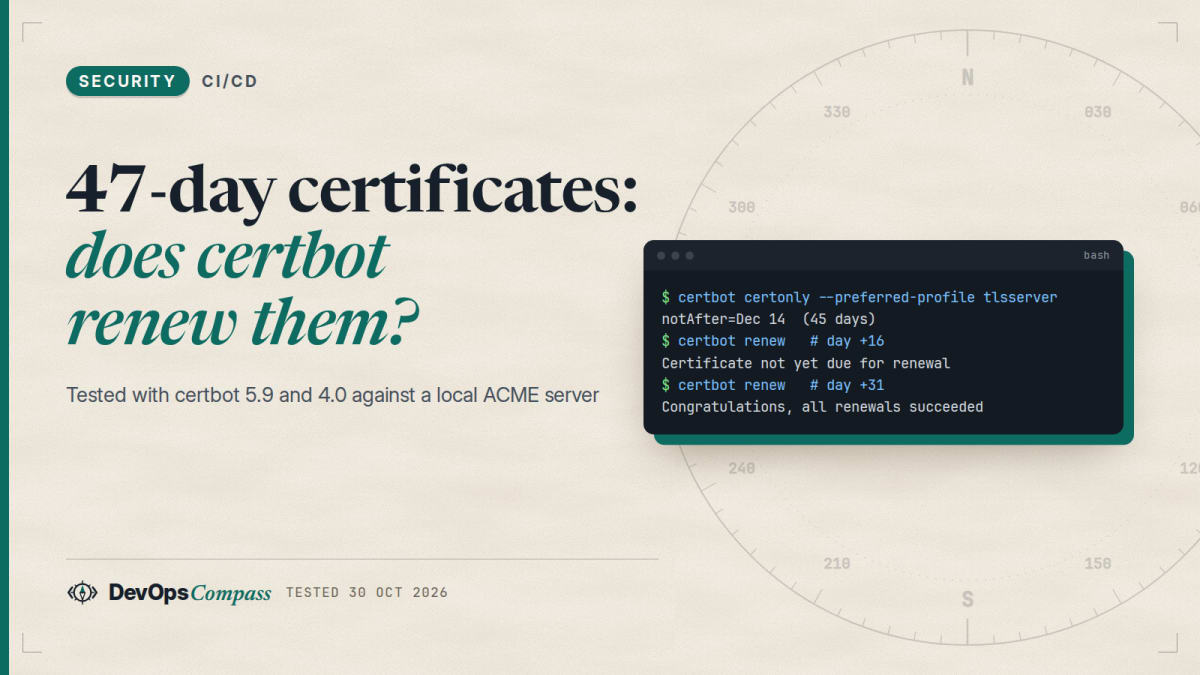
Short answer: if certbot renews your certificates through its normal timer, a 45-day certificate needs no new cron job. In our lab, certbot 5.9.0 skipped a 45-day certificate until day 31 and then renewed it, following the renewal window the ACME server suggested (ARI). Without that window it renews at two thirds of the lifetime (day 30), and the apt version on Ubuntu 26.04 (certbot 4.0.0) renewed at 30 days before expiry (day 15). The things that break are fixed intervals such as "every 60 days", manual renewals, and monitoring that only starts alerting at 14 days.
How we tested: certbot 5.9.0 and 4.0.0 against a local Pebble test ACME server (version 2.10.1) with 90-day, 45-day and 6-day profiles, on 30 October 2026, with certbot's clock moved forward. It was not the real Let's Encrypt, so its ARI window is Pebble's choice, and we did not test nginx, Apache or DNS-01.
You may have seen "47-day certificates" in a vendor email, then checked your own server and found a plain certbot renew timer. This guide answers the practical question: what happens to that timer, which settings still matter, and what to change before the limits get tight.
When do 47-day certificates start, and what does Let's Encrypt do before then?
The 47 days come from the CA/Browser Forum Baseline Requirements, the rulebook all public certificate authorities follow. Their effective-date table sets the maximum validity of a certificate at 200 days from 15 March 2026, 100 days from 15 March 2027 and 47 days from 15 March 2029. The time a CA may reuse a domain validation shrinks in step: 200 days, 100 days, then 10 days. The reason is simple: a stolen key or a wrong certificate can be used for a shorter time, and revocation checking (OCSP) is being phased out.
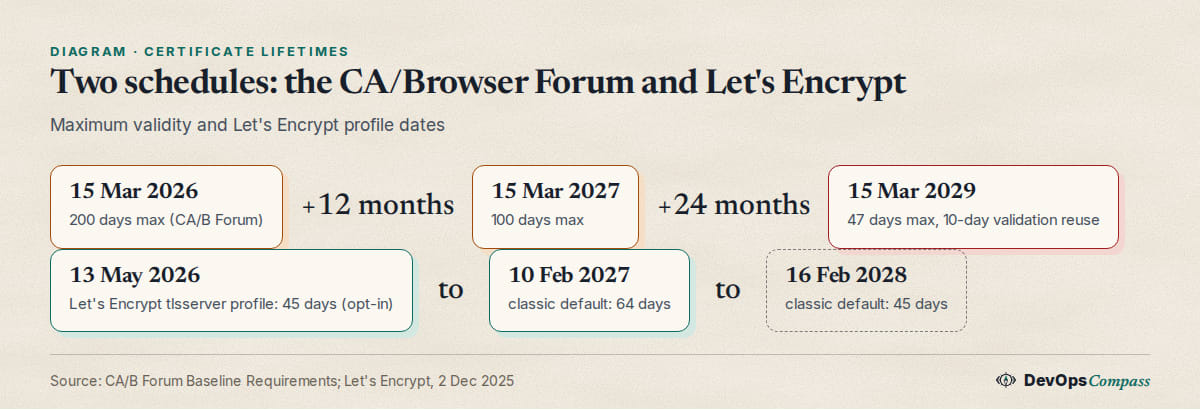
Let's Encrypt, the free CA most self-hosters use, goes faster than the minimum. In its announcement of 2 December 2025 it lists these steps:
- 13 May 2026: the opt-in
tlsserverprofile issues 45-day certificates. - 10 February 2027: the default
classicprofile moves to 64 days (with a 10-day authorization reuse period). - 16 February 2028:
classicmoves to 45 days (7-hour reuse). - A 6-day
shortlivedprofile also exists.
Today (30 October 2026) the default is still 90 days. Nothing changes for you until February 2027 unless you opt in. The rest of this guide is about being ready, and about testing 45 days now, on a non-critical host.
How do I get a 45-day certificate with certbot?
Ask for the tlsserver profile. Certbot 4.0.0 added the flags for it:
sudo certbot certonly --standalone -d example.com --preferred-profile tlsserver
--preferred-profile asks for the profile and falls back to the CA's default if the CA does not offer it, so renewals keep working if a profile is renamed. --required-profile fails instead of falling back. We confirmed both descriptions in certbot --help all on 5.9.0. Since certbot 4.1.0 the profile is stored in the renewal config, and our lab did the same: /etc/letsencrypt/renewal/p45.conf contained preferred_profile = tlsserver, so renewals ask for it again.
In our lab the new certificate had notBefore 30 Oct 14:01 and notAfter 14 Dec 14:01, which is 45 days. Your existing certificate does not change until its next renewal, so run sudo certbot renew --force-renewal --cert-name example.com once if you want to switch now, and then leave it to the timer.
When does certbot renew a 45-day certificate?
This is the question the vendor pages do not answer. Certbot has three rules, and we measured each one. Days are counted from issue.
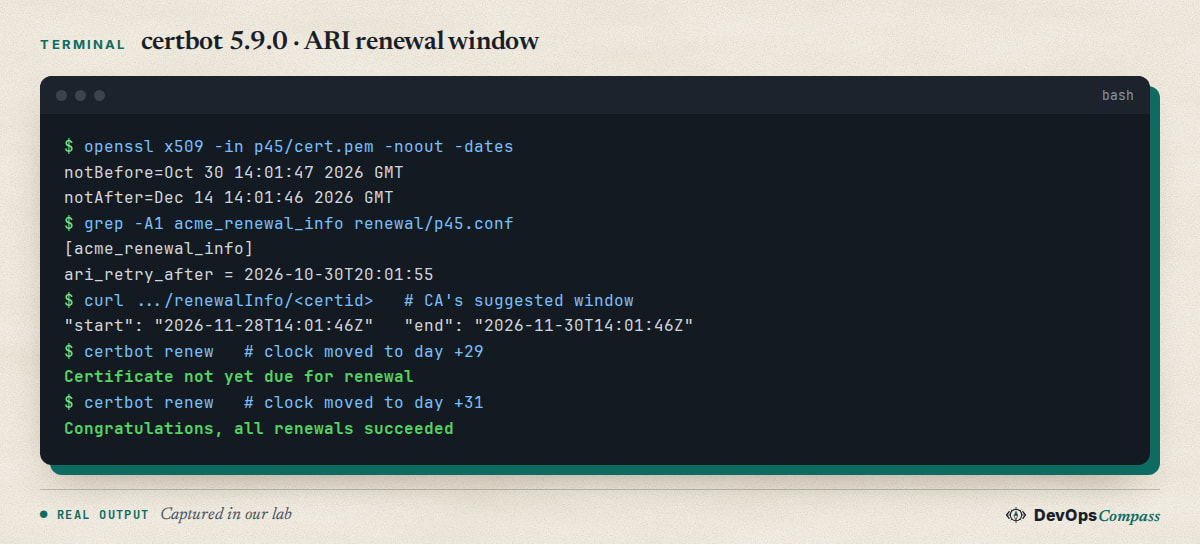
- ARI (certbot 4.1.0 and later).
certbot renewasks the CA's ACME Renewal Information endpoint when it wants the certificate renewed. Certbot's changelog says that for Let's Encrypt this is typically around two thirds of the lifetime. In our lab, Pebble answered with a window from day 29 to day 31. Certbot did nothing on days 0 to 29 and renewed on day 31. It also stores the server'sRetry-Aftervalue in the renewal file (ari_retry_after), so it does not ask on every run. - No ARI available: two thirds of the lifetime. We forced certbot to skip the ARI check. The 90-day certificate renewed on day 60, the 45-day one on day 30.
renew_before_expiryset: see the next section.
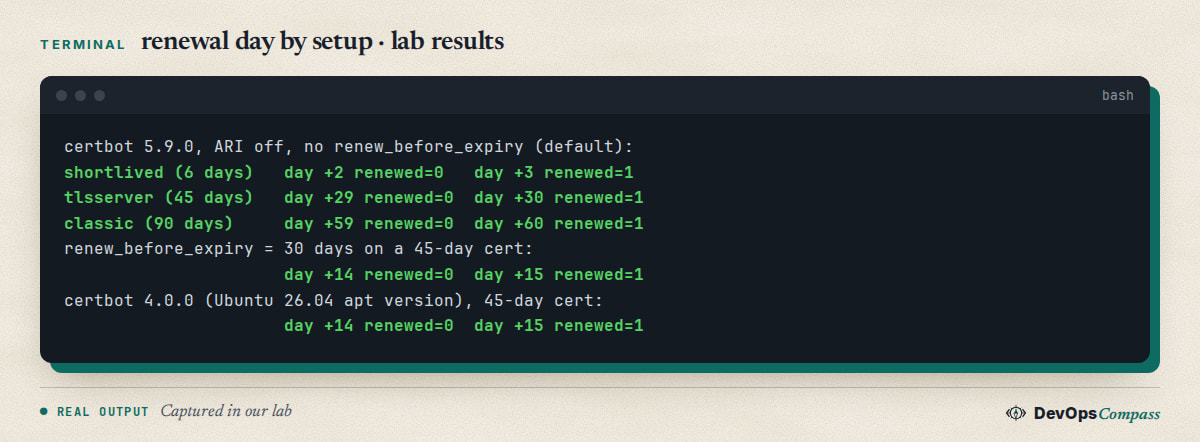
So a 45-day certificate is renewed in the second half of its life, with 15 days of slack if the first attempt fails. That slack is the number to watch: it was 30 days on a 90-day certificate and is 15 on a 45-day one, and it stays at one third of the lifetime as lifetimes shrink.
Does the certbot from Ubuntu 26.04 handle 45-day certificates?
Yes, with a different timing. The certbot package in ubuntu:26.04 is 4.0.0-4 (Debian 12 has 2.1.0-4, Ubuntu 24.04 has 2.9.0-1; we read these from apt-cache policy). Version 4.0.0 predates ARI, which arrived in 4.1.0. We installed certbot 4.0.0 from PyPI, requested a 45-day certificate with --preferred-profile tlsserver (the flag exists there), and moved its clock: no renewal on day 14, renewal on day 15, so at 30 days before expiry. The apt package may carry distribution patches; we ran the renewal test with the upstream 4.0.0 and read only the version and timer file from the Ubuntu package.
Two practical results:
- Version 4.0.0 renews earlier than the newer certbot, so 45 days works, with more renewals than needed.
- The 2.x versions in Debian 12 and Ubuntu 24.04 do not have
--preferred-profileat all, so they cannot opt in to 45 days today. They will work on 64 days in 2027 because that comes through the default profile. The apt package is not the only way: the certbot snap and pip give you a current version.
The packaged timer helps: on Ubuntu 26.04 certbot.timer runs at 00:00 and 12:00 with a random delay of up to 12 hours (/usr/lib/systemd/system/certbot.timer). That is twice a day, which is what Let's Encrypt staff recommend instead of forced renewals.
Does renew_before_expiry still work?
Yes, with one catch. Certbot's changelog says: if the server gives no ARI answer, renew_before_expiry overrides certbot's default; if the server does give an early ARI answer, the early answer wins over a later renew_before_expiry. The reason given is revocation: a CA that needs a certificate replaced can say so through ARI.
Our test matches the first half. With renew_before_expiry = 30 days at the top of the renewal file and ARI skipped, a 45-day certificate renewed on day 15, not day 30. The setting is top-level in the file, above [renewalparams], and our first try, which put it lower, was ignored. If you want later renewals than ARI suggests, certbot's changelog says to replace its timer with your own schedule. We would not: a later renewal leaves less slack and saves nothing.
Will a cron job that renews every 60 days break?
Yes. A 45-day certificate expires before day 60, so a calendar-based job leaves it expired for two weeks. Let's Encrypt says the same: "renewing at a hardcoded interval of 60 days will no longer be sufficient", and it advises against manual renewal because it is needed more often.
Check your own setup in this order:
systemctl list-timers | grep certbotorcat /etc/cron.d/certbot: the job should run at least daily and callcertbot renew, which decides by itself.- Search scripts for
--force-renewaland fixed intervals. Let's Encrypt staff advise against forcing renewals on a schedule, since a failed forced run is not retried until the next one. - Check the reload hook: nginx or Apache must reload after every renewal, now twice as often (
--deploy-hook "systemctl reload nginx").
What changes with 6-day certificates?
Less than the number suggests, if the timer runs twice a day. The shortlived profile is a 6-day certificate. Certbot renews certificates shorter than 10 days at half of the lifetime. In our lab a 6-day certificate renewed on day 3 and not on day 2.
The margin is the problem: half of six days is three days. A server that is switched off for a weekend, or a renewal that fails twice on a Friday, ends with an expired certificate. Use 6-day certificates only where the renewal path has been watched for a while. They are mainly useful for IP address certificates; certbot 5.3.0 added --ip-address, and Let's Encrypt's implementation also needs --preferred-profile shortlived, according to the changelog.
How do I get alerted before a certificate expires?
Alert on remaining time, relative to the lifetime. A threshold of 14 days was fine for a 90-day certificate and is too late for a 45-day one, because the renewal window opens at day 30. A check that needs only OpenSSL:
openssl x509 -in /etc/letsencrypt/live/example.com/cert.pem -noout -checkend $((21*86400)) \
  || echo "ALERT: less than 21 days left"
-checkend exits with 0 when the certificate is still valid after that many seconds. We ran it with the clock moved on our 45-day lab certificate: at day 0 and day 20 it printed OK, at day 40 it printed the alert. For a remote server, use openssl s_client -connect host:443 -servername host and pipe the certificate into the same command. Let's Encrypt itself tells subscribers to set up alerts for certificates that fail to renew on schedule.
The check should compare to the renewal point and not only to expiry. A good rule: alert when less than a third of the lifetime is left, because by then certbot has already been trying for a while.
What we did not test
- The real Let's Encrypt production or staging service: our ARI window (day 29 to 31) is Pebble's, not theirs.
- nginx, Apache, Caddy, Traefik, cert-manager or acme.sh. Their renewal rules differ; check each tool's docs for ARI and profiles.
- DNS-01 with provider plugins, rate limits, and a real power-off.
- The packaged
certbot 4.0.0-4binary's renewal timing: we tested upstream 4.0.0.
FAQ
Why are 47 day certificates coming?
The CA/Browser Forum voted to shorten the maximum lifetime step by step, reaching 47 days on 15 March 2029. Shorter certificates limit the damage of a leaked key and make revocation less important. The price is that renewal has to be automatic.
Is it OK to run certbot --force-renewal every month?
It works, but it is the wrong tool. Let's Encrypt staff point out that a forced run which fails is not retried until the next scheduled run. Forcing also asks for a new certificate on every run, which is wasteful. Run certbot renew twice a day and let it decide.
How do I handle 47 day certificate renewal on internal devices, IoT or DNS-01?
Move the ACME client to a place that can reach the CA, and push the certificate to the device. On Hacker News, one commenter (Snakes3727) said that handling renewals for many devices is the painful part, and another (maxgashkov) said the one failure left is the API key used to change DNS records. Both are reports, not tested results.
Do rate limits matter more with shorter certificates?
They can. Twice as many renewals means twice as many orders, and a user on Hacker News (parliament32) said this is hard with many subdomains. Use a wildcard or one certificate for several names where it is acceptable, and check the current limits page of your CA.
Do I need to do anything for Let's Encrypt 45 day certificates before 2027?
Not if certbot renews on a timer: check the timer, the reload hook and the monitoring, as above. Optionally test --preferred-profile tlsserver on a spare host to see the renewal flow before the default changes in February 2027.
Related guides
- Install Docker on Ubuntu 26.04 Server: the same release the certbot 4.0.0 package ships with.
- Fix the SSH post-quantum key exchange warning: another hardening change that arrives with newer software.
Sources
- Let's Encrypt: Decreasing certificate lifetimes to 45 days (2 December 2025), checked 30 Oct 2026.
- CA/Browser Forum: Baseline Requirements, effective-date table (sections 4.2.1 and 6.3.2).
- Certbot: changelog (4.0.0, 4.1.0, 5.0.0, 5.3.0, 5.9.0).
- Let's Encrypt community: force-renewal thread; Hacker News: discussion of the 45-day change.
- Pebble: letsencrypt/pebble (test ACME server, v2.10.1).
- Google autocomplete suggestions for "47 day certificates", "certbot 47 days" and "why 47 day certificates" (30 Oct 2026).
Last verified: October 2026 (30 October 2026, certbot 5.9.0 and 4.0.0, Pebble 2.10.1). Dates in the schedules can change; check Let's Encrypt's announcements before relying on them.
Header image: Image: DevOpsCompass.
Comments
Post a Comment