
host.docker.internal Not Working on Linux? Tested Fixes
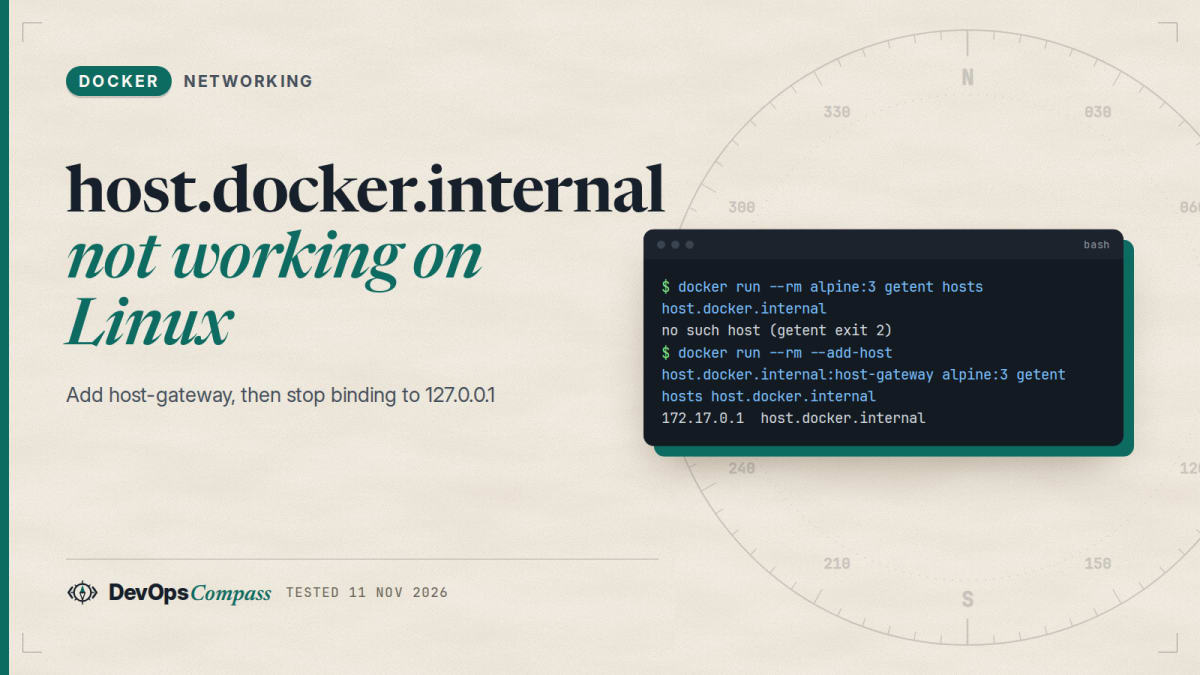
Short answer: On Linux, host.docker.internal does not exist unless you create it. Add --add-host host.docker.internal:host-gateway (Compose: extra_hosts: ["host.docker.internal:host-gateway"]). That only fixes the name. If you then get "Connection refused", your host service listens on 127.0.0.1, which a container can never reach. Bind it to 0.0.0.0, or, safer, to the docker0 address 172.17.0.1. In our lab the docker0 bind worked from the container and was refused on the LAN address.
How this was made: on 11 November 2026 we ran nine small checks with Docker 29.9.3 and Compose 5.7.0 on an Ubuntu 22.04 arm64 host, using alpine:3 containers and a throwaway Python web server on port 18931. The scripts and raw logs are in our lab folder. Rootless Docker, Docker Desktop and ufw were not tested.
Two different things break when a container calls a service that runs on the Docker host, and the error message tells you which one. "Bad address" or "could not resolve host" means the name host.docker.internal is missing. "Connection refused" means the name works but the service is not listening where the container looks. This guide separates the two, shows the real output for each case, and ends with the less common traps: user-defined networks, a custom host-gateway-ip, rootless Docker and a URL without http://.
Why does host.docker.internal not resolve on Linux?
Docker Desktop (macOS and Windows) adds the name for you. The Docker Desktop networking page lists host.docker.internal as a built-in name that "resolves to the internal IP address of your host". Docker Engine on Linux has no such built-in entry. A plain container on a Linux server gets this:
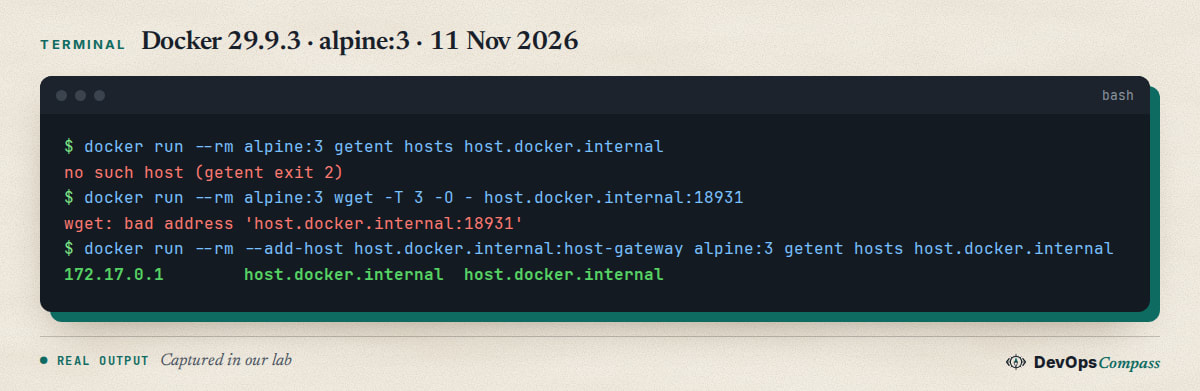
The first block of that capture is the missing name. Inside alpine:3, getent hosts host.docker.internal prints nothing and exits with status 2, and wget reports bad address. Nothing is wrong with your network; the name simply was never defined.
The fix is a mapping to the special value host-gateway, which the Docker daemon replaces with an address of the host:
docker run --rm --add-host host.docker.internal:host-gateway alpine:3 \
  getent hosts host.docker.internal
On our host this printed 172.17.0.1 host.docker.internal, and /etc/hosts inside the container contained the same line. --add-host host.docker.internal=host-gateway (with an equals sign) gave the identical result, so use whichever form your tooling prefers.
One spelling trap is worth checking before anything else. The reporter of docker/compose issue 13172 defined host.docker.internal but the application error names docker.host.internal, the same words in the other order. The name in your app configuration has to match the name in extra_hosts exactly.
How do I add host.docker.internal in Docker Compose?
Use extra_hosts on every service that needs the host. We ran this file:
services:
  app:
    image: alpine:3
    extra_hosts:
      - "host.docker.internal:host-gateway"
    command: ["sh", "-c", "wget -q -T 3 -O - http://host.docker.internal:18931/ || echo FAILED"]
docker compose config normalised the entry to host.docker.internal=host-gateway, and docker compose up printed hello from the host from our test server. Compose passes the keyword to the daemon unchanged, so it behaves exactly like docker run --add-host. The setting is per service, not global: a second service without the line has no such name.
Why do I get connection refused even though the name resolves?
This is the case behind most of the recent questions. Our test server listened on 127.0.0.1:18931 and we called it from a container that had the mapping:
$ ss -ltn | grep :18931
LISTEN 0   5   127.0.0.1:18931   0.0.0.0:*
Connecting to host.docker.internal:18931 (172.17.0.1:18931)
wget: can't connect to remote host (172.17.0.1): Connection refused
(from the host itself:)
hello from the host
The name resolved to 172.17.0.1, and the connection was refused. From the host the same server answered normally. The reason is that 127.0.0.1 is the loopback address of one network namespace. Your host has one, and each container has its own. A server bound to host loopback only accepts connections that arrive on host loopback; a container arrives on the docker0 bridge address instead.
Real projects hit this all the time. In aminrj/owasp-asi-reference issue 6 (4 August 2026) a quickstart pointed containers at http://host.docker.internal:11434/v1 and failed with [Errno 111] Connection refused, because Ollama binds to 127.0.0.1 by default. In Osmantic/ODS issue 8197 a user's curl http://host.docker.internal:8080/v1 printed Connection refused against 172.18.0.1, and a maintainer wrote on 10 November 2026 that localhost inside a container is the container itself.
Should the host service listen on 0.0.0.0 or on the docker0 address?
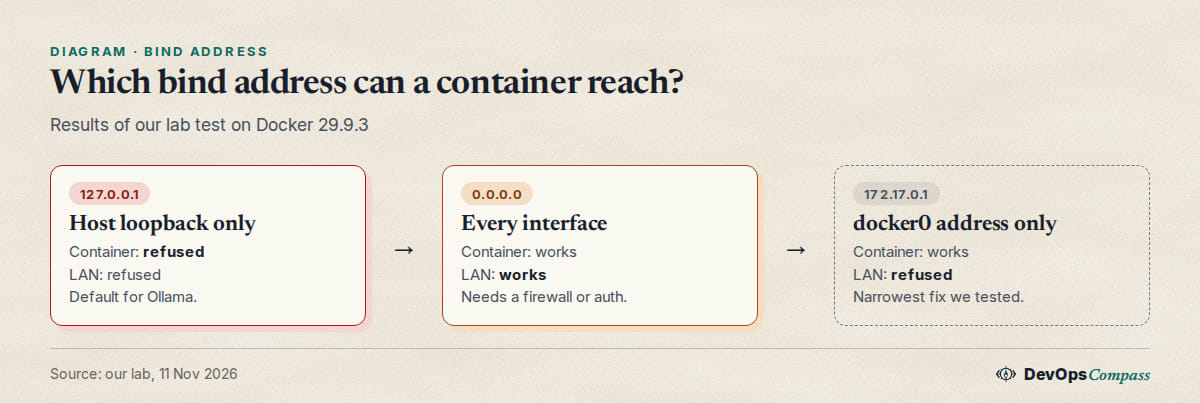
You have three options, and our lab covered all of them:
| Host service listens on | Container via host-gateway | From the LAN address 10.0.0.139 |
|---|---|---|
127.0.0.1 |
refused | refused |
0.0.0.0 |
works | works |
172.17.0.1 (docker0 only) |
works | refused |
The 0.0.0.0 row is the quick fix and also the risky one: the service is now reachable from every network the host is on. If the host has a public address and no firewall in front of it, an unauthenticated service such as Ollama is open to the internet. Our guide on putting Ollama behind nginx with an API key covers that case.
The docker0 row is the narrow fix. The server listened on 172.17.0.1:18931 only, the container reached it, and a request to the LAN address was refused (curl exit 7). Two cautions. The address must exist when the service starts, so a systemd unit that binds to it should start after docker.service. And on a host with a changed bip or a different default bridge, use the address your own bridge has: ip -4 -br addr show docker0 prints it.
A third route is to leave the service on loopback and put a small proxy in front of it. That is more moving parts, so we only mention it for services that cannot change their bind address.
How do I make Ollama reachable from a container?
Ollama is the most common case in the questions we found. The Ollama FAQ says it binds 127.0.0.1 port 11434 by default and that OLLAMA_HOST changes the bind address. For the systemd service, run systemctl edit ollama.service and add:
[Service]
Environment="OLLAMA_HOST=172.17.0.1:11434"
Then run systemctl daemon-reload and systemctl restart ollama. The FAQ example uses 0.0.0.0:11434; the 172.17.0.1 value is our narrower variant of the same setting, and we did not run Ollama itself, only the equivalent bind test above. Containers then call http://host.docker.internal:11434. For client code and the OpenAI-compatible path, see our Ollama API guide.
Which IP does host-gateway resolve to, and does it change per network?
The dockerd reference says --host-gateway-ip sets the addresses that host-gateway resolves to and that it "defaults to the IP addresses of the default bridge". We checked what that means on a user-defined network:
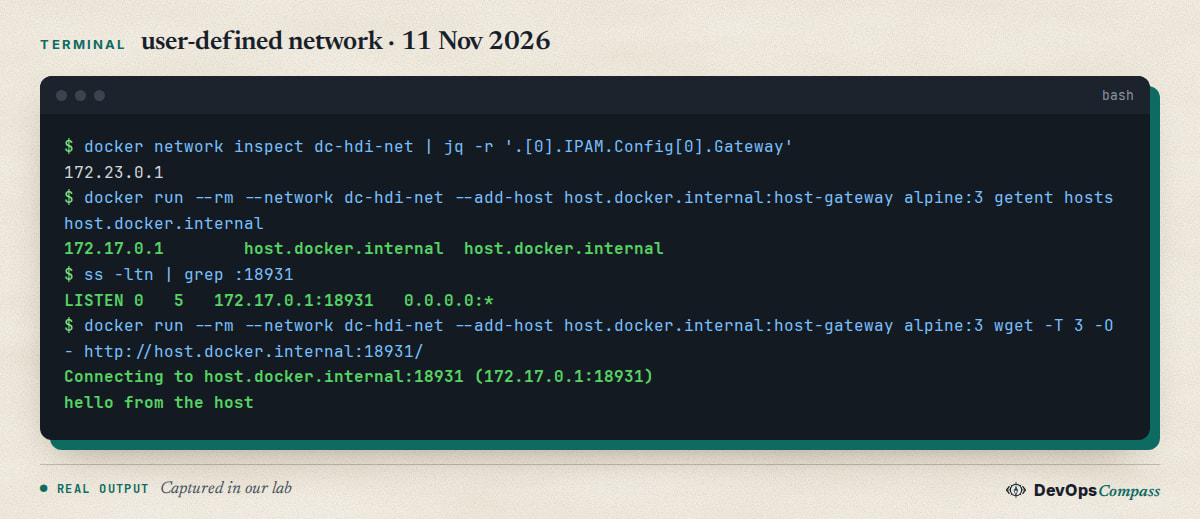
The user-defined network dc-hdi-net had its own gateway, 172.23.0.1. A container on it still got 172.17.0.1, the default bridge address, for host.docker.internal. With our listener bound only to 172.17.0.1, the call from that container worked. So you can bind once to the docker0 address and serve containers on every bridge network of the host.
Do not expect the address to match the gateway of your Compose network. The ODS user in the issue above saw 172.18.0.1; our default setup gives 172.17.0.1. If the number differs from what you expect, look at /etc/docker/daemon.json for a host-gateway-ip setting before you suspect a bug.
How do I change what host-gateway points to?
Set host-gateway-ip in /etc/docker/daemon.json and restart the daemon. Before restarting, validate the file; dockerd --validate works without root:
$ dockerd --validate --config-file /tmp/dj-ok.json     # {"host-gateway-ip":"10.0.0.139"}
configuration OK
$ dockerd --validate --config-file /tmp/dj-bad.json    # {"host-gateway-ip":"not-an-ip"}
unable to configure the Docker daemon with file /tmp/dj-bad.json: invalid JSON: invalid IP address: not-an-ip
We only validated the file; we did not restart the host's daemon, because that stops every container on it unless live-restore is on. A user in issue 13172 reported (15 September 2025, Docker 28.3.3 on Arch Linux) that docker run --add-host host.docker.internal=host-gateway failed with could not parse extra host IP invalid IP until they set host-gateway-ip in daemon.json. The same thread has a later comment (23 December 2025) saying this does not help people who run several Docker networks and want a different answer per network. As far as we could find, there is no per-network setting; the workaround is an explicit IP in --add-host.
Why is host-gateway wrong with rootless Docker?
We did not test rootless mode, so this section is what the Docker maintainers wrote in moby/moby issue 47684. With rootless Docker, host-gateway still resolves to the bridge address 172.17.0.1, but the daemon runs in its own user namespace and that address is not the host. A user reported that the host is reachable at 10.0.2.2 and only when the daemon is started with DOCKERD_ROOTLESS_ROOTLESSKIT_DISABLE_HOST_LOOPBACK=false. On 13 June 2024 a maintainer pointed to the daemon configuration option, and the config file for rootless mode is ~/.config/docker/daemon.json instead of /etc/docker/daemon.json. On 8 December 2025 another maintainer confirmed that 10.0.2.2 is the address slirp4netns gives the host by default, and that Docker does not set host-gateway to it automatically. Treat this as reported, not verified by us.
Can I use network_mode host instead?
On Linux, yes. A container started with --network host shares the host network namespace, so 127.0.0.1 inside the container is the host's loopback. In our lab a server bound to 127.0.0.1:18931 answered hello from the host to a --network host container.
The price is that you lose network isolation and port mapping. Every port the container opens is a host port, and the container sees all host interfaces. It is fine for a quick local test. For a service you keep, the host-gateway mapping plus a narrow bind keeps containers separated. The option also does not work the same on Docker Desktop, where the "host" is a virtual machine; see the Docker Desktop section below.
Why does my app say unsupported protocol scheme?
Some clients want a full URL, not host:port. In LLocalSearch issue 92 the setting OLLAMA_HOST=host.docker.internal:11434 produced unsupported protocol scheme 'host.docker.internal', and a commenter on 19 April 2024 fixed it by writing http://host.docker.internal:11434. Our wget accepted the bare form (host.docker.internal:18931), but that report shows not every client does. When a library complains about a scheme, add http://; when the host is on the same machine there is no TLS, so do not use https://.
The same applies to localhost. In our lab wget http://localhost:18931/ inside the container tried [::1]:18931 and was refused, because it called the container itself. Never put localhost in a container's configuration for a service that runs on the host.
Why does the container time out instead of refusing?
The two failures look different on the wire. A refusal comes back at once: nothing listens on that address and port. A timeout means packets were dropped on the way, usually by a firewall rule on the host. Container-to-host traffic arrives on the host's input path through the docker0 or a br- interface, and a default-deny firewall such as ufw can drop it even when the service is bound correctly. Users asking why a container "can't reach database server" on the host, like this Stack Overflow question about Prisma and Postgres, may be seeing this, though the question does not say.
We did not test it, because our lab host has no sudo and we did not change its firewall. The quick way to tell the cases apart is to run curl -m 3 -v http://host.docker.internal:PORT/ in the container: Connection refused is the bind problem from this guide, timed out points to the firewall. If the host uses ufw, read our post on how Docker interacts with ufw first, and open the port only for the Docker subnet, never for everyone.
Does it work on Docker Desktop and Rancher Desktop?
On Docker Desktop the name is built in, so no extra_hosts line is needed. Keep it anyway if the same Compose file also runs on Linux; the line is harmless there. Rancher Desktop on macOS is different: the same issue 6 notes that containers run inside a Lima virtual machine, so host.docker.internal resolves to the VM, not to your Mac, and the author's suggestion is to use the Mac's LAN IP instead. We did not test either desktop product.
Common errors
| What you see | Cause | Fix |
|---|---|---|
bad address 'host.docker.internal', Could not resolve host |
The Linux engine has no built-in name | Add host.docker.internal:host-gateway as --add-host or extra_hosts |
Connection refused on 172.17.0.1:PORT |
Service listens on 127.0.0.1 only |
Bind to 0.0.0.0 or to 172.17.0.1 |
Connection timed out |
Host firewall drops container traffic | Allow the Docker subnet to the port (not tested here) |
could not parse extra host IP invalid IP |
Reported on Docker 28.3.3 | Set host-gateway-ip in daemon.json, validate with dockerd --validate |
unsupported protocol scheme |
URL without http:// |
Write the full URL |
ENOTFOUND docker.host.internal |
Words in the wrong order | Use host.docker.internal |
| Works in Docker Desktop, fails on a server | The name is built in only on Desktop | Add extra_hosts |
| Rootless Docker reaches the wrong host | host-gateway is the bridge address |
Use 10.0.2.2 as reported, see the rootless section |
FAQ
Is host.docker.internal available on Linux?
Not by default. Docker Desktop adds it. On Docker Engine for Linux you create it with --add-host host.docker.internal:host-gateway or the Compose extra_hosts equivalent, and it then points to the default bridge address, 172.17.0.1 on our host.
Why is host.docker.internal not working in Docker Compose?
Check three things in order: the service has an extra_hosts entry with host-gateway, the name in your app matches it exactly, and the host service listens on an address other than 127.0.0.1. getent hosts host.docker.internal inside the container tells you the first two in one command.
What is host-gateway in Docker?
It is a special value the daemon replaces with a host address when it writes the container's /etc/hosts. The dockerd reference says it defaults to the IP addresses of the default bridge and can be set with --host-gateway-ip.
Is it safe to bind a service to 0.0.0.0?
Only behind a firewall or on a private network. In our lab, binding to 172.17.0.1 gave container access while the LAN address was refused, so prefer that when the service is only for containers.
Can I use 172.17.0.1 directly instead of host.docker.internal?
It works on a default setup because that is the docker0 address. It breaks if the bridge uses another subnet, so the named mapping is easier to keep correct. A fixed IP in --add-host is also fine.
How do I reach a service on the host from a Compose network on Linux?
Add extra_hosts with host-gateway, bind the host service to the docker0 address or 0.0.0.0, and call http://host.docker.internal:PORT. In our test the same address worked from the default bridge and from a user-defined network.
What we did not test
We did not test rootless Docker, Docker Desktop, Rancher Desktop, Podman, Docker Swarm or an x86-64 host. We did not change the host's firewall, so the timeout section relies on general behaviour and the linked reports, not on our own run. We validated a host-gateway-ip file but never restarted the daemon with it. We did not run Ollama; the Ollama bind setting is from its documentation and the narrower 172.17.0.1 variant is our own application of the same option. IPv6 was not tested.
Related guides
- Ollama API Guide: curl, Python, OpenAI Endpoint, Embeddings: what to call once the container reaches Ollama.
- Ollama Behind Nginx With an API Key: Safe Setup: protect the service if you must listen on more than loopback.
- Docker Bypasses ufw: 4 Fixes Tested on Ubuntu 26.04: how Docker and the host firewall interact.
- Open WebUI + Ollama with Docker Compose: Safe Setup (2026): a Compose stack where the model service is a container instead.
Sources
- Docker docs: Docker Desktop networking how-tos and the dockerd reference (
--host-gateway-ip). - Ollama docs: FAQ, exposing Ollama on the network.
- GitHub: moby/moby 47684, docker/compose 13172, aminrj/owasp-asi-reference 6, Osmantic/ODS 8197 and nilsherzig/LLocalSearch 92.
- Stack Overflow: question 79830520.
- Google autocomplete for "host.docker.internal", "docker host docker internal not working linux" and "host gateway docker" (11 November 2026).
Last verified: November 2026 (11 November 2026, Docker 29.9.3, Compose 5.7.0, Ubuntu 22.04 arm64, alpine:3). Rootless Docker, Docker Desktop, Rancher Desktop, Podman, ufw and x86-64 hosts were not tested.
Header image: Image: DevOpsCompass.
Comments
Post a Comment