
Podman 6 Breaking Changes: What to Check Before Upgrading
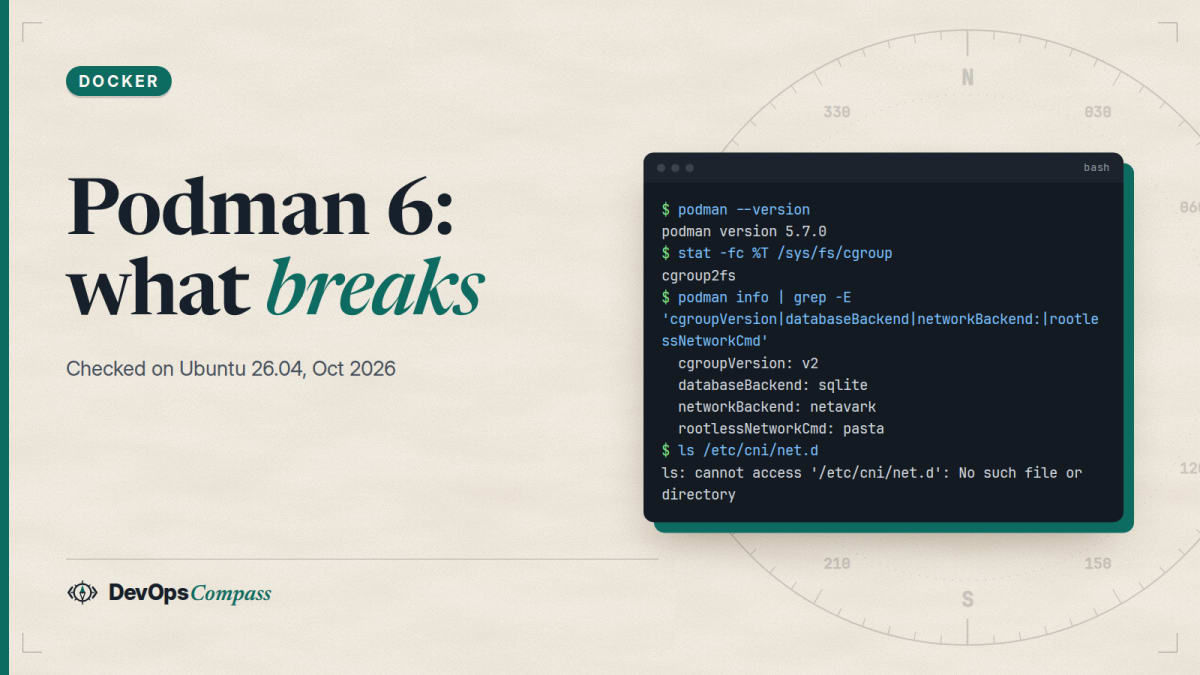
Short answer: Podman 6.0.0 (24 June 2026) removed support for cgroups v1, iptables, CNI networking, slirp4netns and the old BoltDB database, and changed how podman volume prune, label filters and containers.conf behave. Ubuntu 26.04 still ships Podman 5.7.0, so a normal apt upgrade will not move you to 6. If you install 6.x another way, check four things first: cgroups v2, an SQLite database, Netavark and pasta networking, and no slirp4netns or CNI leftovers in your containers, Quadlets and config files.
How this was made: the breaking changes come from the official 6.0.0 release notes. We ran the readiness checks and the old behaviours on Podman 5.7.0 in an ubuntu:26.04 container on 31 October 2026. We did not run Podman 6 itself, so every "after" behaviour below is from the release notes, and error messages quoted from a third-party blog are marked as such.
If you use Podman on a server, the release notes of 6.0.0 are a long list that mixes things that only matter on Mac and Windows with things that can stop a rootless service on Linux. This guide keeps the Linux server part, shows how to check each item in one minute, and says what we could and could not confirm.
What are the breaking changes in Podman 6?
Podman 6.0.0 came out on 24 June 2026, after a delay announced in May. Its release notes list these removals and changes that matter on a Linux host:
| Change in 6.0.0 | What it means for you |
|---|---|
| cgroups v1 support removed | the host must run cgroups v2 |
| iptables support removed | use nftables (Netavark's firewall driver) |
| CNI networking removed | networks must be Netavark networks |
slirp4netns removed, --network-cmd-path removed |
rootless networking is pasta only |
| BoltDB database removed | Podman tries an automatic migration to SQLite on start |
| Config file parsing rewritten | drop-in files can override the main containers.conf |
| Network isolation on by default | closer to Docker, may change which containers reach each other |
podman volume prune only prunes unused anonymous volumes |
add --all for the old behaviour |
label!= and volume list filters combine with AND |
scripts with several filters can return different results |
the JSON label output of podman ps, podman pod ps and podman volume ls becomes key=value pairs, not a JSON map |
scripts that parse it as JSON break |
podman commit pauses the container |
use --pause=false for the old behaviour |
Quadlets installed with podman quadlet install live in subdirectories |
the old .app tracking file is gone |
Podman 6 also has to be used with matching tools: Buildah 1.44.0, Skopeo 1.23, Netavark and Aardvark DNS 2.0.0, and the configuration files from container-libs common/v0.68.0. Mixing a new Podman with old helpers is the quickest way to get strange errors, so upgrade them together.
The latest releases at the time of writing are 6.1.4 (12 October 2026) and 6.2.0-rc1 (26 October 2026); 6.0.1 and 6.0.2 were bug-fix releases, and the 5.8 line (5.8.9 on 12 October) still gets fixes.
Which Podman version do Ubuntu 26.04 and Debian ship?
Not Podman 6. In a fresh ubuntu:26.04 container, apt-cache policy shows podman 5.7.0+ds2-3build1, with netavark 1.16.1, aardvark-dns 1.16.0, buildah 1.42.1 and skopeo 1.21.0~pre1. The older tools are still packaged too (slirp4netns 1.3.3, containernetworking-plugins 1.1.1), which is why a host can look fine and still carry leftovers. For comparison, ubuntu:24.04 offers 4.9.3 and debian:13 offers 5.4.2.
So the upgrade to 6 is a deliberate step on these systems: a newer package from a third-party repository, a container image, or a build from source. It does not arrive by surprise with apt upgrade. The risk is higher on Fedora, where the Podman 6 change page targets Fedora 45; a related report on the Podman issue tracker comes from a Fedora 44 to 45 upgrade.
If you also run Docker on the same host, the Docker install guide for Ubuntu 26.04 covers the firewall interaction that matters for both engines.
How do I check my host before upgrading to Podman 6?
Run these on the 5.x host, as the user that runs your containers (root and each rootless user have their own state). We ran the same commands on Podman 5.7.0:
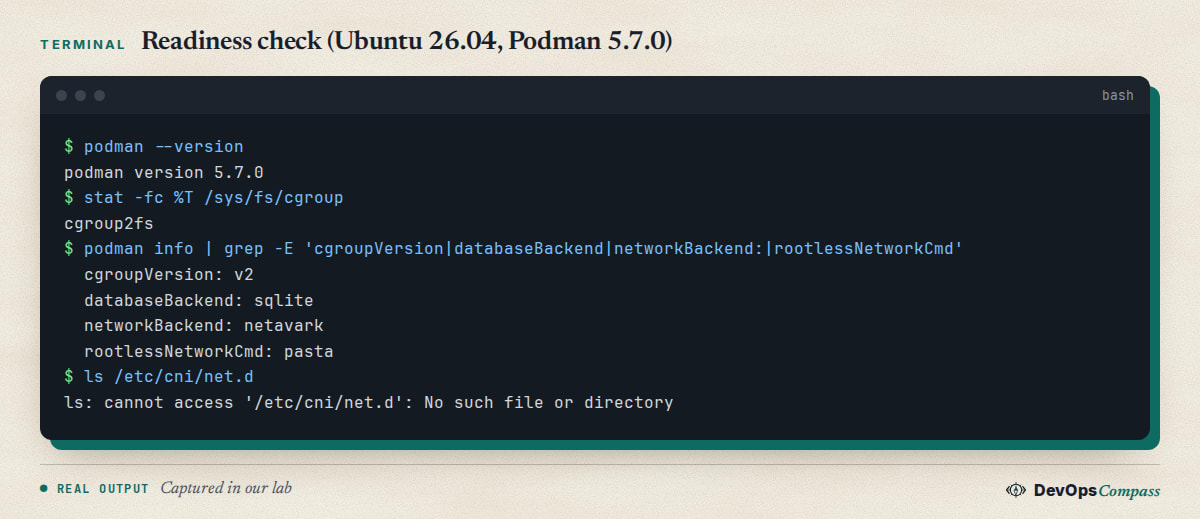
podman --version
stat -fc %T /sys/fs/cgroup
podman info | grep -E 'cgroupVersion|databaseBackend|networkBackend:|rootlessNetworkCmd'
ls /etc/cni/net.d /usr/libexec/cni
What you want to see:
cgroup2fsfromstat. Anything else means a cgroups v1 boot.cgroupVersion: v2,databaseBackend: sqlite,networkBackend: netavarkandrootlessNetworkCmd: pasta. Our Ubuntu 26.04 lab printed exactly this;lsreported that/etc/cni/net.ddoes not exist, which is the good answer.- For existing rootless containers,
podman inspect NAME | grep -i networkmodeshould not sayslirp4netns. A third-party guide showspastaas the healthy value; we did not test a rootless container ourselves.
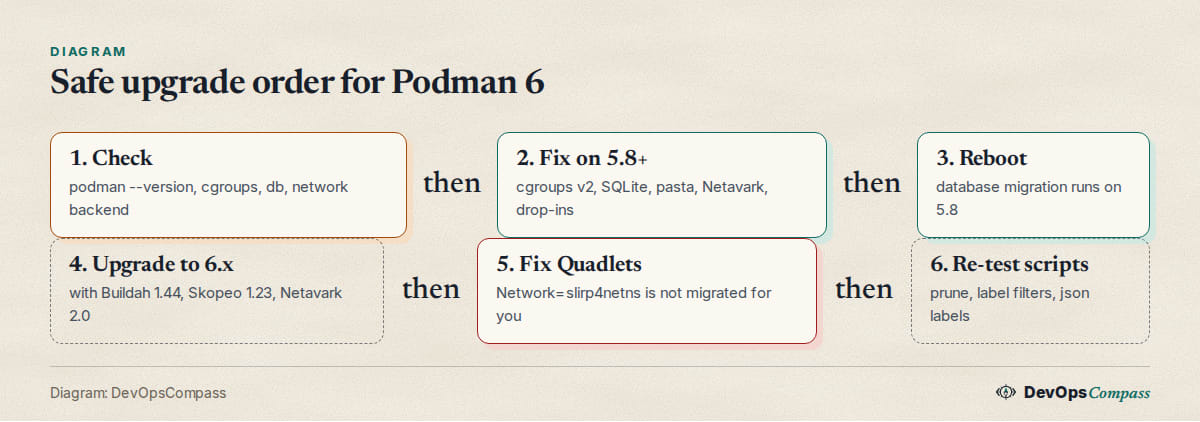
The Fedora change page and the Podman 6 guides agree on the order: upgrade to 5.8 first, reboot, then go to 6, because the 5.8 start-up migrates the database. Also grep your config for leftovers, including drop-ins:
grep -rniE 'slirp4netns|cni|iptables|database_backend|runtime' \
  /etc/containers ~/.config/containers 2>/dev/null
Does Podman 6 run on cgroups v1?
No. The release notes say: "Support for running on cgroups v1 systems has been removed. Please update your system to use cgroups v2." Check with stat -fc %T /sys/fs/cgroup: cgroup2fs means v2; any other answer means the host is not on v2. Ubuntu 26.04 boots with v2, and our container reported cgroupVersion: v2. The risk is an old host kept on v1 with a kernel command-line option such as systemd.unified_cgroup_hierarchy=0; remove it and reboot before upgrading. We did not test a v1 host, so we cannot quote Podman 6's exact error.
One related report: a Podman 6.2 development build failed on a WSL machine with "controller pids is not available" because no cgroup controllers were delegated (issue 29909). It was closed as fixed in October 2026. We saw a similar message on our own lab container when we ran a container without delegated controllers, and --cgroups=disabled let it run; treat that only as a lab workaround.
Why does Podman say "slirp4netns support has been removed"?
Because rootless containers created on Podman 5 with slirp4netns keep that network mode in their stored configuration, and Podman 6 refuses to start them. A write-up of a Fedora 44 to 45 upgrade (Podman 6.1.1) quotes two messages, which we did not reproduce:
- for an existing container:
slirp4netns support has been removed, run podman system migrate to update this container to use pasta - for a new container or a Quadlet:
slirp4netns support has been removed, use --network=pasta instead
The fix for existing containers is podman system migrate as the affected user. That blog adds that it stops that user's running containers first, so do not run it on a host that is serving traffic. For Quadlets, migrate does not help, because the unit file passes the network flag again at every start: edit the Network= line to pasta, then run systemctl --user daemon-reload and systemctl --user reset-failed UNIT. Also remove default_rootless_network_cmd = "slirp4netns" from containers.conf and its drop-ins, and replace the old allow_host_loopback=true option with pasta's --map-host-loopback form, which needs a recreated container.
Ubuntu 26.04's Podman 5.7.0 reports pasta as the rootless network command (rootlessNetworkCmd: pasta in our lab; we ran it as root), so a fresh install has nothing to change. The risk is old containers and old config files carried over from earlier releases.
How do I migrate Podman from BoltDB to SQLite?
On the 5.8 line, start Podman once after the upgrade and reboot; the Fedora change page tells users to "upgrade to Podman 5.8 first and reboot before upgrading to Podman 6 to ensure migration". The Podman 6 guides also name an explicit command, podman system migrate --migrate-db, which renames the old file to bolt_state.db-old. That flag does not exist in Ubuntu's 5.7.0: podman system migrate --help there lists only --new-runtime. Our fresh 26.04 container already reported databaseBackend: sqlite, so there was nothing to migrate.
If database_backend is set in containers.conf, one guide reports that Podman 6 will not start until you comment that line out. Keep the -old file until all containers have started under the new version.
Does podman volume prune still delete named volumes?
Before 6.0, yes. After 6.0, a plain podman volume prune removes only unused anonymous volumes, like Docker; --all gives the old behaviour. On Podman 5.7.0 we created an unused volume and a volume with a label, ran podman volume prune -f, and both were removed. There is no --all flag in 5.7.0.
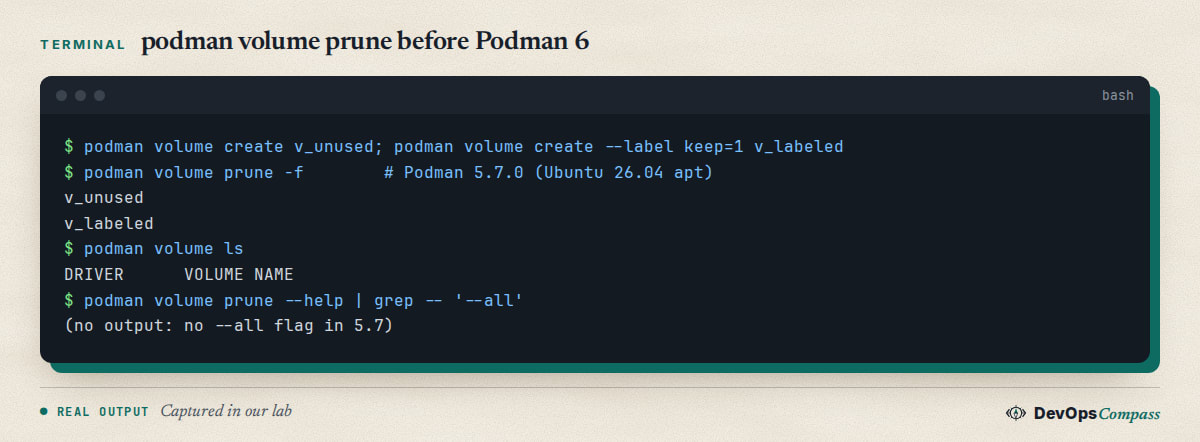
This matters in two directions. A cleanup cron job that relied on the old behaviour will leave named volumes behind (disk fills slowly). A script that was written with --all in mind will fail on any 5.x host that lacks the flag. Check podman volume prune --help and write the command per version.
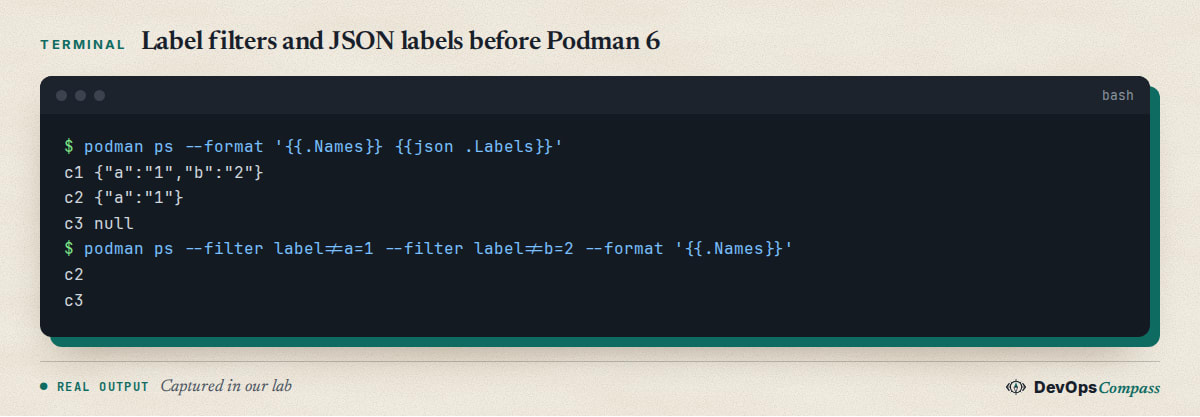
The label filters change in the same way. On 5.7.0 we ran three containers with labels and podman ps --filter label!=a=1 --filter label!=b=2; it printed c2 and c3, meaning the two filters were combined with OR. In 6.0 they are combined with AND, so that command would print only the container that has neither label. The JSON label output (--format json .Labels) also changes from {"a":"1","b":"2"} (what we saw on 5.7.0) to comma-separated key=value pairs.
Why does Podman 6 ignore my containers.conf setting?
Because the configuration parser was rewritten and drop-in files now win over the main file. In issue 29970, a user on Fedora 45 with Podman 6.1.3 set runtime = "runsc" in containers.conf and found containers still ran with crun. The reason, according to a maintainer, was a distribution-provided drop-in that sets crun and ranks above the main file. The issue was closed as not planned on 14 October 2026; the maintainers' advice is to use your own drop-in with a later filename, for example ~/.config/containers/containers.conf.d/99-user-runtime.conf.
Check what Podman actually uses with podman info (look at the ociRuntime block for the runtime name). A setting that "does nothing" after the upgrade is almost always overridden by a drop-in. The detailed rules are in the upstream config-file parsing design document linked from the release notes.
What we did not test
- Podman 6.x itself. We had no package for it on Ubuntu 26.04, so every change on this page is from the release notes, the Fedora page or third-party reports, and our own runs are the 5.7.0 "before" state.
- Rootless containers, slirp4netns migration, Quadlets (they need systemd, which our container did not run),
podman machineand Mac or Windows. - Real cgroups v1 and BoltDB hosts, and the exact error text of Podman 6 on them.
FAQ
Does Podman 6 still support CNI networks?
No. The 6.0.0 release notes say CNI support has been removed and Netavark must be used. If you still have files under /etc/cni/net.d, recreate those networks with podman network create on the 5.x host and test connectivity before upgrading.
Do Quadlets need changes for Podman 6?
Only if they use removed options. podman quadlet install now puts a Quadlet and its extra files into a subdirectory instead of tracking them with a .app file, which should make manual cleanup easier. A Network=slirp4netns line must be changed to pasta by hand, as described above.
Did the Podman 6 release get delayed, and which version should I use?
Yes: a May 2026 post on the Podman blog announced a delay, and 6.0.0 shipped on 24 June 2026. For production servers the safer pick is the newest 6.1.x release (6.1.4 at the time of writing) after a test on a copy of your setup, or stay on 5.8.x, which still receives fixes, until your checks are green.
Is Podman better than Docker in 2026?
It depends on what you run. Podman runs rootless without a daemon and integrates with systemd through Quadlets; Docker has the bigger ecosystem and tooling. Podman 6 moves closer to Docker (isolated networks by default, Docker-style volume prune), which makes switching between the two easier, but this guide did not benchmark either one.
Will apt upgrade move my Ubuntu 26.04 server to Podman 6?
No. The Ubuntu 26.04 repository we checked offers Podman 5.7.0, so a normal apt upgrade stays on the 5.x line. Podman 6 only arrives if you add another repository or install it yourself, so you decide when to take the upgrade.
Related guides
- Install Docker on Ubuntu 26.04 Server: the other container engine on the same release, with the ufw and nftables details.
- Upgrade Ubuntu 24.04 to 26.04 on a Server: what else changes when a host moves to a new release.
Sources
- Podman: v6.0.0 release notes (24 June 2026) and the releases list (6.0.1, 6.0.2, 6.1.0 to 6.1.4, 6.2.0-rc1), checked 31 Oct 2026.
- Fedora Project: Changes/Podman6 (page updated 11 March 2026).
- Podman issue tracker: issue 29970 (drop-ins override containers.conf) and issue 29909 (pids limit without delegated cgroup controllers).
- ComputingForGeeks: Podman 6 breaking changes and upgrade and fix Podman after a Fedora upgrade (third-party; error texts not reproduced by us).
- Hacker News: thread on the Podman 6 machine post, which links the May 2026 delay announcement.
- Google autocomplete suggestions for "podman 6", "podman cgroups v1", "podman volume prune" and "podman slirp4netns" (31 Oct 2026).
Last verified: October 2026 (31 October 2026, Podman 5.7.0 on ubuntu:26.04; Podman 6 release notes up to 6.2.0-rc1). Versions and behaviour change quickly; check the Podman release notes before upgrading production hosts.
Header image: Image: DevOpsCompass.
Comments
Post a Comment