
Samba on Ubuntu 26.04: Files Not Showing in Windows (Fix)
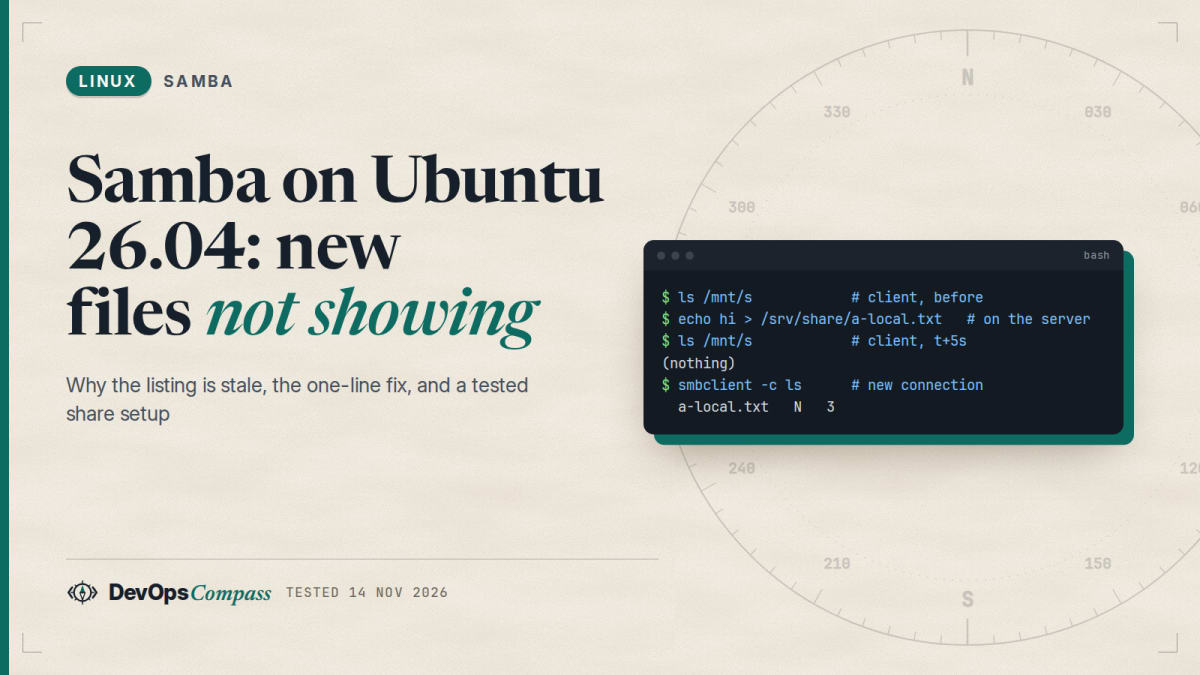
Short answer: Ubuntu 26.04 ships Samba 4.23.6, and since Samba 4.22 the server hands out SMB3 directory leases by default. A client that holds a lease keeps its folder listing in cache and is told about changes only when they pass through smbd. A file you create on the server's disk with cp, a script or another service is invisible to that client until the cache expires or smbd restarts. The fix is one line in [global]: smb3 directory leases = no. We reproduced the problem and the fix in a lab, then tested a share setup, a persistent mount and six common errors.
How this was made: on 14 November 2026 we ran every command below in throwaway ubuntu:26.04 containers (arm64) with Samba 4.23.6, and kept the logs. Our client was the Linux kernel CIFS client, not Windows. The lease mechanism is the same for any SMB3 client, but we could not test Windows 11 itself. Where the Windows side comes from public reports, we say so.
You install Samba on a fresh Ubuntu 26.04 server, share a folder, connect from Windows, and everything works. Then a backup script, a download tool or an app writes new files into that folder and Windows does not show them. Restarting smbd "fixes" it for a moment. That is not a Windows bug and not a broken install: it is a new Samba default. This guide explains it, shows the fix we tested, and then covers the setup and the other errors people hit with Samba on 26.04.
Why do new files not show up in Windows until I restart smbd?
Ubuntu 24.04 ships Samba 4.19.5. Ubuntu 26.04 ships 4.23.6 (apt-cache policy samba in our two containers). Between them is Samba 4.22, whose release notes introduce SMB3 Directory Leases: a new global option, smb3 directory leases, that is enabled by default on a normal (non-clustered) server. The notes explain the benefit in one line: clients can cache directory listings, which cuts the number of requests.
The catch is in how a lease works. The client keeps its cached listing until the server says the folder changed. smbd can only say that when it sees the change. If the file arrives through SMB, smbd notices and breaks the lease. If the file is written directly into the shared directory by a local process, smbd never sees it, and the client is never told.
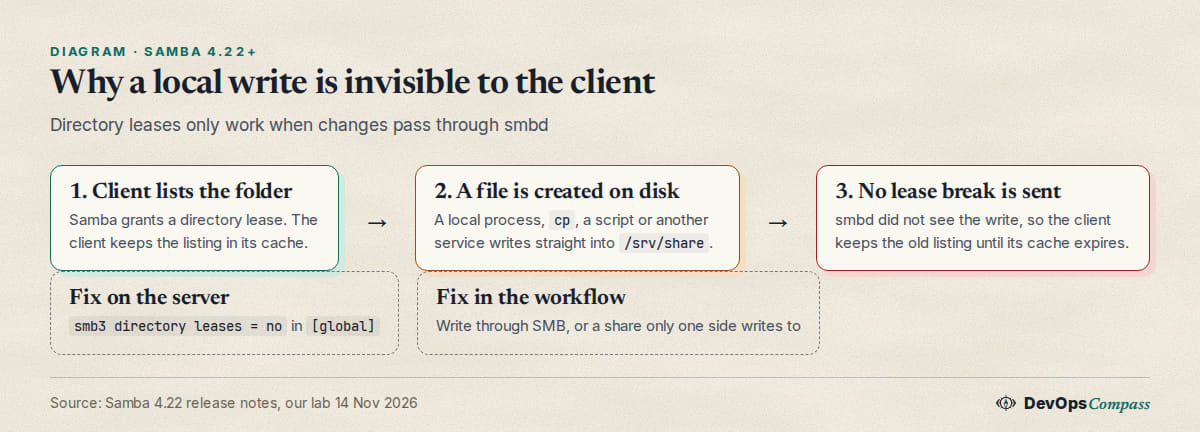
An Ask Ubuntu question from May 2026 describes exactly this on a 26.04 virtual machine with a Windows 11 host: a file created in Ubuntu does not appear in Windows, and systemctl restart smbd makes it appear. The top answer there points at directory leases after the 4.19 to 4.23 jump. We reproduced the effect with a Linux client:
smbd --version
testparm -sv --parameter-name="smb3 directory leases"
Version 4.23.6-Ubuntu-4.23.6+dfsg-1ubuntu2.2
Auto
Auto means on for a standalone server. We mounted the share on a second container with the kernel client (vers=3.1.1), listed it (0 entries), and then wrote a file straight into /srv/share on the server:
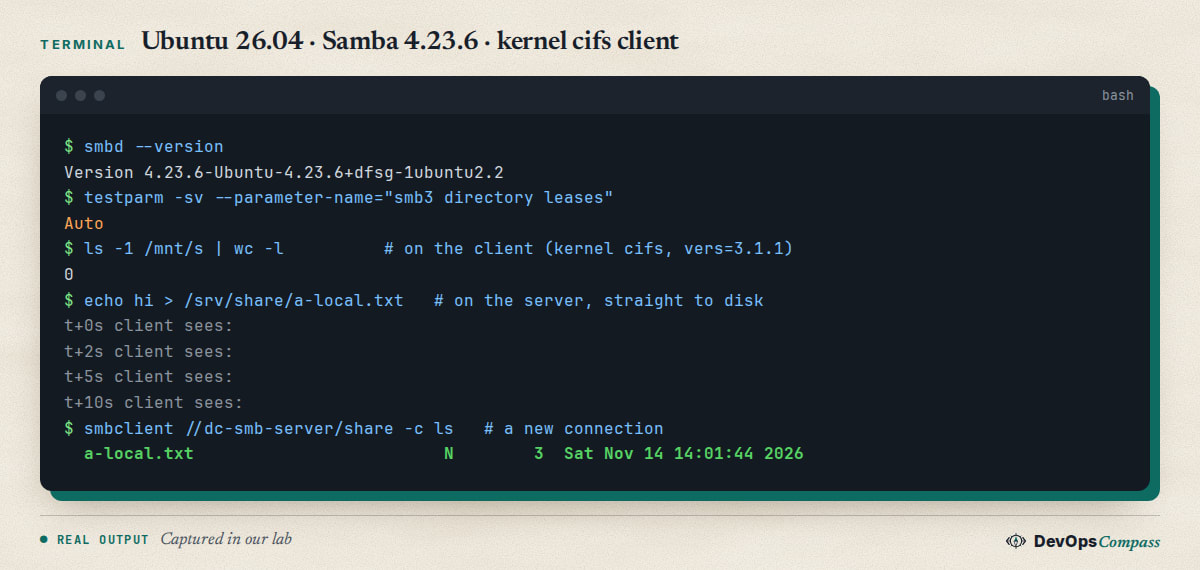
The client listing stayed empty at 0, 2, 5 and 10 seconds. A brand-new smbclient connection listed the file immediately, which proves the file was on the share the whole time and that the stale view belongs to the client's cached state.
Which clients see stale listings, and for how long?
Any client that asks for and keeps a directory lease. In our lab the Linux kernel client showed the file after about 40 seconds. The host kernel's cifs module has a dir_cache_timeout parameter, and it was 30 seconds (/sys/module/cifs/parameters/dir_cache_timeout), which fits what we saw. We do not know Windows's cache lifetime for a leased listing, and public reports describe it lasting much longer, up to a restart of smbd. Treat our "30 to 40 seconds" as a Linux number only.
It is also not limited to file managers. A GitHub pull request from 14 November 2026 against the nexplorer Android app describes an SMB library (smbj 0.15) that kept a leased listing even after the app's own mkdir, so a new folder did not appear, against Samba 4.22 and later. The authors' CI runners had just moved from Ubuntu 24.04 to 26.04. If you run automated tests or sync tools against a Samba 4.22+ server, the same trap applies.
How do I turn off SMB3 directory leases?
Add one line to the [global] section of /etc/samba/smb.conf, check it, and restart:
[global]
   smb3 directory leases = no
testparm -sv --parameter-name="smb3 directory leases"   # should print: No
sudo systemctl restart smbd
We ran the same test with six setups. Each started a fresh smbd and a fresh mount, wrote one file directly into the share, and listed the share from the client:
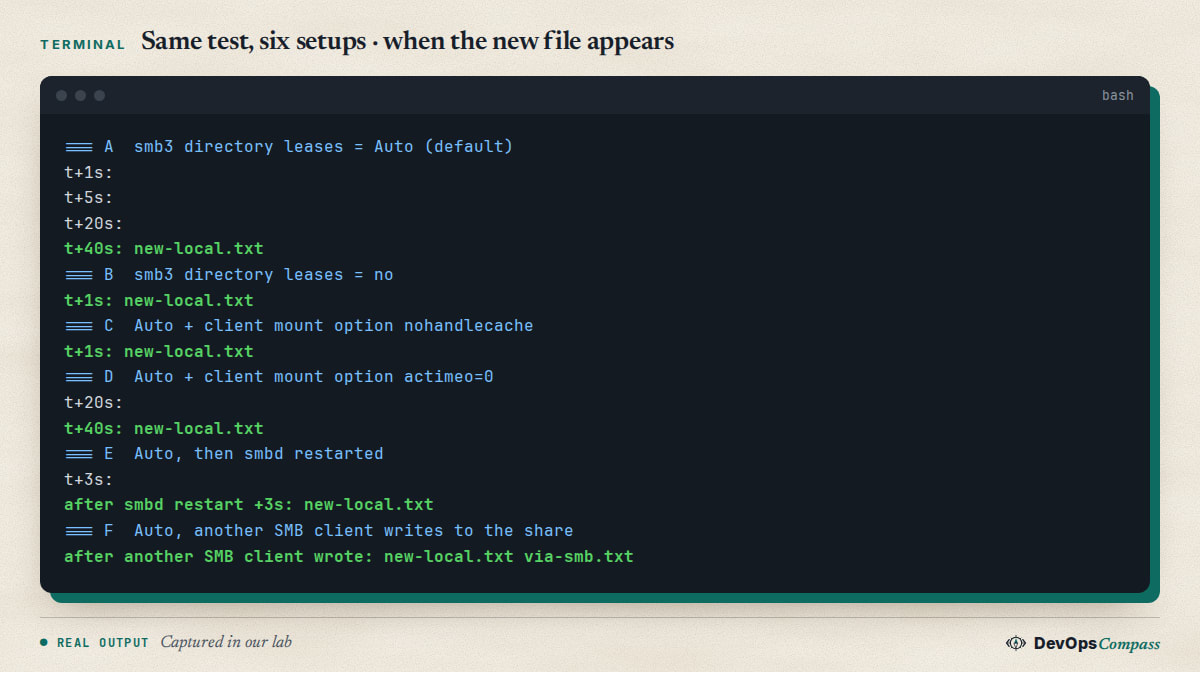
What the matrix shows:
- Default (
Auto): stale for about 40 seconds. smb3 directory leases = no: the file appeared at the first listing, 1 second after the write, and stayed visible.- Client option
nohandlecache(Linux mount option): also fixed it. That is a client-side switch and does not help your Windows users. actimeo=0: did not help. People reach for it first because it is the usual "disable attribute caching" option; here it changed nothing.- Restarting
smbd: the listing was correct within 3 seconds, which is why the restart "fixes" it. It breaks every lease, but the next write will go stale again. - A second SMB client writing into the share: that write broke the lease, and the client then saw both files, including the one that had been written locally. Mixed workloads can look random for this reason: the stale view ends the moment anyone changes the folder through SMB.
The trade-off is more requests. Without leases, a client asks the server for the listing more often, as it did before 4.22. On a home or small-office server that cost is small. If your files are written only through SMB, you can keep the default.
If you cannot change the server, make the writer use SMB too: copy files in over a mount of the share, or have the app write through Samba, and not into the directory behind it.
Can I fix stale listings on the Windows side instead?
Possibly. One answer on the same Ask Ubuntu thread suggests an admin PowerShell session with:
Set-SmbClientConfiguration -DirectoryCacheLifetime 0 -FileInfoCacheLifetime 0 -FileNotFoundCacheLifetime 0
Microsoft's documentation for Set-SmbClientConfiguration lists those three parameters. We did not run this, and it has to be done on every Windows PC, so the server-side option is the better first fix. A third answer on that thread recommends installing wsd; it most likely means wsdd (see the network discovery section below), which helps Windows find the server and has nothing to do with stale listings.
How do I set up a Samba share on Ubuntu 26.04?
This is the minimal setup we tested, with one user and one share:
sudo apt update
sudo apt install samba
sudo mkdir -p /srv/share
sudo groupadd -f sambashare
sudo chown alice:sambashare /srv/share
sudo chmod 2775 /srv/share
Replace alice with an existing Linux user. Then edit /etc/samba/smb.conf. We replaced the stock file with a short one:
[global]
   workgroup = WORKGROUP
   server role = standalone server
   map to guest = never
   log file = /var/log/samba/log.%m
   logging = file
   smb3 directory leases = no

[share]
   path = /srv/share
   read only = no
   valid users = alice
testparm -s accepted it ("Loaded services file OK", "Server role: ROLE_STANDALONE"). smbclient -L localhost -U alice then listed share and IPC$, and the banner showed Samba 4.23.6-Ubuntu-4.23.6+dfsg-1ubuntu2.2. On a real server, enable and restart the service with sudo systemctl enable --now smbd; the package ships smbd.service and nmbd.service. Our containers have no systemd, so we ran smbd --foreground instead.
How do I add a Samba user and password?
Samba keeps its own password database. A Linux account is not enough. Add the user to Samba with a password for SMB logins:
sudo smbpasswd -a alice
sudo pdbedit -L
We proved the difference with a second account. bob had a Linux password and no Samba entry. smbclient -U bob%linuxpw failed with NT_STATUS_LOGON_FAILURE, and pdbedit -L listed only alice. After smbpasswd -a bob the same login worked. We ran these as root in containers. On a real 26.04 server the sudo is sudo-rs; if a script of yours relies on environment variables, see our guide to what changes with sudo-rs.
How do I mount a Samba share on Ubuntu 26.04?
Install cifs-utils (we tested 2:7.4) and mount with an explicit protocol version:
sudo apt install cifs-utils
sudo mkdir -p /mnt/s
sudo mount -t cifs //server/share /mnt/s -o username=alice,vers=3.1.1
For a persistent mount, keep the password out of /etc/fstab in a credentials file that only root can read:
printf 'username=alice\npassword=S3cret-example\n' | sudo tee /root/.smbcred >/dev/null
sudo chmod 600 /root/.smbcred
echo '//server/share /mnt/s cifs credentials=/root/.smbcred,vers=3.1.1,uid=1000,gid=1000,file_mode=0664,dir_mode=0775,_netdev,nofail,x-systemd.automount 0 0' | sudo tee -a /etc/fstab
sudo mount -a
findmnt /mnt/s
In our lab the same line (with uid=0,gid=0) mounted with mount -a (return code 0) and findmnt showed type cifs. Without uid and gid, files from the share appear as root:root with mode 0755 on the client, because the server's owner means nothing on the client; set them to the user who should own the files. We did not reboot, so the boot-time behaviour of _netdev, nofail and x-systemd.automount is from the mount documentation, not from our test.
Why does Samba say "The user name could not be found"?
An Ask Ubuntu thread from July 2026 shows this error from Windows against a guest share, with a log line about usershares and a permission problem. The asker later wrote that the cause was a line copied from a tutorial: force user = username. That is a placeholder, not an account.
We reproduced the server side. A share with guest ok = yes and force user = username (no such Linux user) refuses the connection after the anonymous login:
Anonymous login successful
tree connect failed: NT_STATUS_NO_SUCH_USER
Remove the force user line, or put an account that exists. We could not reproduce the exact Windows dialog because we have no Windows client, but the status code and the cause match the thread. Check testparm -s for leftovers from copied examples before you debug anything else.
Why can a guest read the share but not write?
With map to guest = bad user and guest ok = yes, an anonymous client runs as the Linux user nobody. Listing works. Writing fails if the directory belongs to someone else:
NT_STATUS_ACCESS_DENIED opening remote file \g.txt
In our test the folder was alice:sambashare with mode 0775, and nobody is "other", which has no write bit. Two honest fixes: make the folder writable for the account the guest runs as (we ran chown nobody:nogroup /srv/pub and the upload worked, the file landed owned by nobody), or stop using guest access and give each person a Samba account. Guest write access on a LAN server is rarely worth it.
What do mount error(13), (95) and (2) mean?
These come from mount.cifs. We triggered each one on purpose:
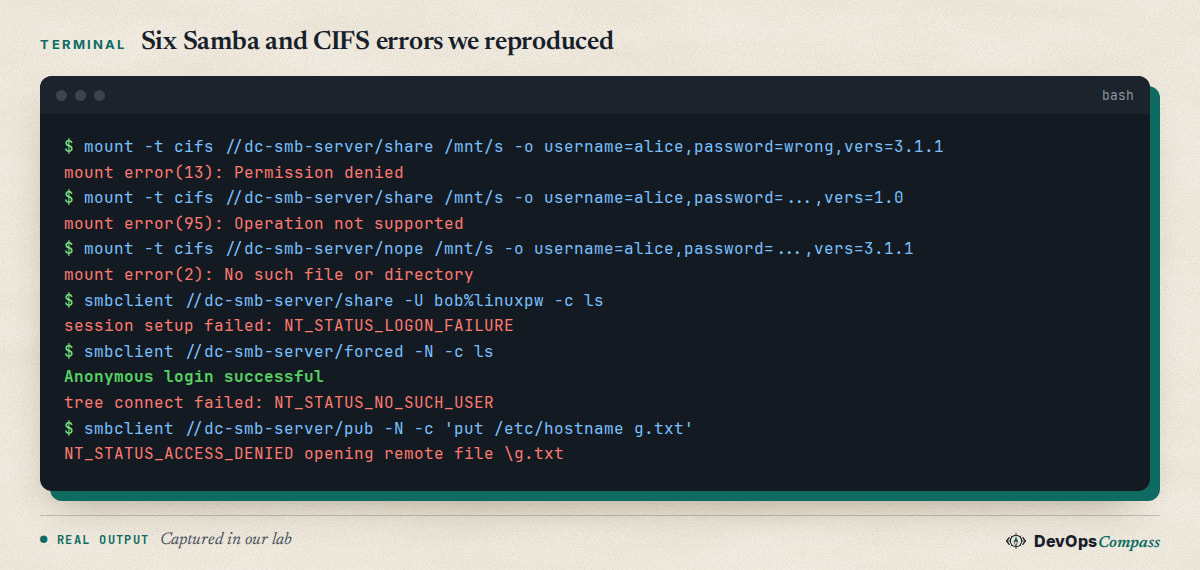
| Message | What caused it in our lab | Fix |
|---|---|---|
mount error(13): Permission denied |
wrong password (dmesg: Send error in SessSetup = -13), or an unknown user |
correct the credentials; confirm the user is in pdbedit -L |
mount error(95): Operation not supported |
vers=1.0 against a server that no longer speaks SMB1 |
use vers=3.1.1 (or 3.0) |
mount error(2): No such file or directory |
share name that does not exist | check smbclient -L server -U user for the exact name |
Run dmesg | tail after a failed mount; the kernel line tells you whether the failure is in the session setup or the share connect.
Does Samba on 26.04 still allow SMB1?
No. In our lab testparm -sv showed server min protocol = SMB2_02 and client min protocol = SMB2_02, and smbclient -m NT1 stopped with Max protocol NT1 is less than min protocol SMB2_02. Mounting with vers=1.0 gave mount error(95). Old devices that speak only SMB1 (some printers, scanners and NAS boxes) will not connect. Raising the minimum protocol back to NT1 is possible in smb.conf, but SMB1 is insecure and we did not test it; look for a firmware update or a newer client first. A related Ask Ubuntu thread about Samba 4.23 and a Windows Server 2008 domain shows the same kind of break on the Active Directory side, which we did not test.
Which ports does Samba need?
The ufw package includes an application profile named Samba. In our container ufw app info Samba listed 137,138/udp and 139,445/tcp. Modern Windows, macOS and Linux clients use SMB over 445/tcp only; the NetBIOS ports are for legacy name lookup. To allow Samba from your LAN only:
sudo ufw allow from 192.168.1.0/24 to any app Samba
Replace the subnet with yours; we did not run this command. We checked the profile content but did not enforce a firewall in the containers. Never expose port 445 to the internet. For the Docker side of ufw behaviour on 26.04, read how Docker bypasses ufw.
Why is my server missing from Windows Network?
The wsdd package description says it announces Linux hosts to Windows 7+ computers for network browsing, using the Web Services Discovery protocol. The 26.04 archive has wsdd and wsdd-server (2:0.8-5ubuntu1) and wsdd2 (1.8.7). We confirmed the packages exist and did not test discovery, because we have no Windows machine. You do not need discovery to use a share: \\server-name\share or \\192.168.1.10\share in the Explorer address bar works without it.
Common errors
| What you see | Why | Fix |
|---|---|---|
New file missing in the client listing, shows after smbd restart |
SMB3 directory lease, file written outside SMB | smb3 directory leases = no, or write through SMB |
NT_STATUS_LOGON_FAILURE |
Linux user has no Samba password | sudo smbpasswd -a USER |
tree connect failed: NT_STATUS_NO_SUCH_USER |
force user names an account that does not exist |
remove it or use a real user |
NT_STATUS_ACCESS_DENIED opening remote file as guest |
folder not writable by nobody |
change the owner or stop using guest writes |
mount error(13): Permission denied |
wrong password or unknown user | fix credentials |
mount error(95): Operation not supported |
vers=1.0 and SMB1 is off |
vers=3.1.1 |
mount error(2): No such file or directory |
wrong share name | list shares with smbclient -L |
Max protocol NT1 is less than min protocol SMB2_02 |
tried SMB1 | use SMB2 or SMB3 |
Upgrading from 24.04? Check testparm -s against your old config, and read our guide to upgrading Ubuntu 24.04 to 26.04 on a server for the other changes that arrive at the same time.
What we tested and what we did not
Tested on 14 November 2026 in containers on an arm64 host: Samba 4.23.6 install and version, a standalone share with one and then two users, the smb3 directory leases default and the stale-listing effect with the kernel CIFS client, six variants of the fix, smbpasswd and pdbedit, a missing force user account, guest write denial and the owner fix, three mount.cifs errors, a credentials-file fstab line with mount -a, the SMB1 minimum protocol, and the ufw profile text. Not tested: Windows 10 or 11, macOS, Android or other clients, Windows's own cache lifetime, Samba as an Active Directory member or domain controller, vfs_shadowcopy2, a reboot with the fstab line, firewall enforcement, wsdd discovery, SELinux (Ubuntu uses AppArmor), and real network performance. Our containers used smbd --foreground, not the systemd unit.
FAQ
How do I share a folder with Samba on Ubuntu 26.04?
Install samba, create the folder, add a [share] section with path and valid users to /etc/samba/smb.conf, add the user with smbpasswd -a, and restart smbd. Our two-container test listed the share with smbclient -L and completed logins as alice and bob.
Why are new files not showing in my Samba share in Windows?
Samba 4.22 and later give clients directory leases by default, and a file written directly to the disk does not break the lease, so the cached listing stays stale. Setting smb3 directory leases = no in [global] fixed it in our lab, with a Linux client.
Do I need a separate Samba password on Ubuntu 26.04?
Yes. Samba stores SMB passwords in its own database, apart from /etc/shadow. A Linux user without a Samba entry got NT_STATUS_LOGON_FAILURE in our test; after sudo smbpasswd -a bob the same login worked and pdbedit -L listed both users.
How do I mount a Samba share on Ubuntu 26.04 permanently?
Install cifs-utils, put the credentials in a root-only file, and add a cifs line with credentials=, vers=3.1.1, uid and gid to /etc/fstab. mount -a mounted our line correctly. We did not reboot, so the boot-time options are untested.
Does Ubuntu 26.04 Samba support SMB1?
No, not by default. The minimum protocol is SMB2_02 on both server and client, smbclient -m NT1 is refused, and a vers=1.0 mount fails with error 95. Old printers and NAS boxes that only speak SMB1 need newer firmware or a client change.
Which ports does Samba use, and what does the ufw Samba profile open?
The Samba ufw profile covers 137,138/udp and 139,445/tcp. Current clients need only 445/tcp, so allow that, restricted to your LAN subnet. We read the profile in the package but did not enforce a firewall in the lab.
Related guides
- Upgrade Ubuntu 24.04 to 26.04 LTS on a Server: Full Guide: the Samba 4.19 to 4.23 jump arrives with the release upgrade.
- Docker Bypasses ufw: 4 Fixes Tested on Ubuntu 26.04: how ufw rules behave on the same release.
- sudo-rs on Ubuntu 26.04: What Breaks and How to Switch Back: the sudo that runs the commands above on 26.04.
- Fail2ban on Ubuntu 26.04: SSH Setup, Unban, Tested Fixes: harden the server that hosts your share.
Sources
- Samba: the Samba 4.22.0 release notes (SMB3 Directory Leases and the
smb3 directory leasesparameter; checked 14 November 2026). - Ask Ubuntu: Ubuntu 26.04 Samba does not work, new files are not showing up in Windows client (May 2026) and "The user name could not be found" error when connecting with Samba (July 2026).
- GitHub: nexplorer pull request 95, turn off directory leases so listings show changes (14 November 2026).
- Ask Ubuntu: Samba 4.23 and Windows Server 2008 Active Directory and auto mounting SMB/CIFS shares on reboot.
- Microsoft: Set-SmbClientConfiguration reference (cache lifetime parameters; not run by us).
- Google autocomplete for "ubuntu 26.04 samba share", "ubuntu 26.04 mount samba share" and "ubuntu 26.04 samba server" (14 November 2026).
- Our lab files:
samba 4.23.6+dfsg-1ubuntu2.2,cifs-utils 7.4and the Ubuntu 24.04 package query, onubuntu:26.04(arm64, containers).
Last verified: November 2026 (14 November 2026, Samba 4.23.6 on ubuntu:26.04, arm64, containers; Linux kernel CIFS client only, no Windows client). Check testparm -sv --parameter-name="smb3 directory leases" and your own Windows behaviour on a real network.
Header image: Image: DevOpsCompass.
Comments
Post a Comment