
Netplan Static IP on Ubuntu 26.04: Tested Config and Fixes
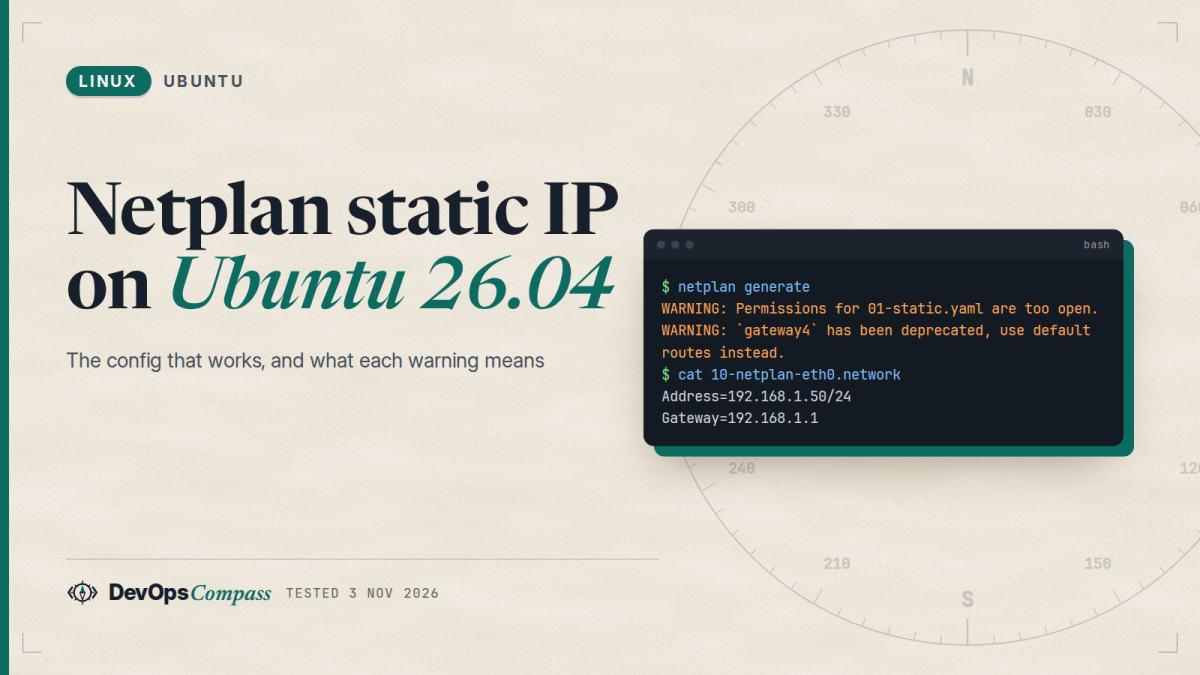
Short answer: on Ubuntu 26.04 (netplan 1.2) put one YAML file in /etc/netplan/ with dhcp4: false, an addresses: list that includes the prefix (192.168.1.50/24), a routes: entry with to: default and via:, and nameservers:. Make it root-only with sudo chmod 600, check it with sudo netplan generate, and apply it with sudo netplan try. Do not use gateway4: it is deprecated. If DHCP comes back, a 50-cloud-init.yaml file is probably merged after yours.
How this was made: we ran every netplan command below on 3 November 2026 in an ubuntu:26.04 container with netplan 1.2-1ubuntu5.1. A container has no systemd, so we tested what netplan generates, not a live network. We did not run netplan apply or netplan try.
You edited a netplan file, and now you see a warning, a YAML error, or a server that kept DHCP. This page gives the working file first, then each message and what it means, using the exact text netplan printed in our lab.
How do I set a static IP with netplan on Ubuntu 26.04?
Find the interface name first with ip -br link (it may be ens3, enp1s0 or eth0, not always eth0). Then write the file. We used /etc/netplan/01-static.yaml:
network:
  version: 2
  renderer: networkd
  ethernets:
    eth0:
      dhcp4: false
      addresses: [192.168.1.50/24]
      routes:
        - to: default
          via: 192.168.1.1
      nameservers:
        addresses: [1.1.1.1, 9.9.9.9]
Then lock the file down, check it and apply it:
sudo chmod 600 /etc/netplan/01-static.yaml
sudo netplan generate
sudo netplan try
In our lab netplan generate turned this into a systemd-networkd file with the address, both DNS servers and a default route to 0.0.0.0/0 via 192.168.1.1:
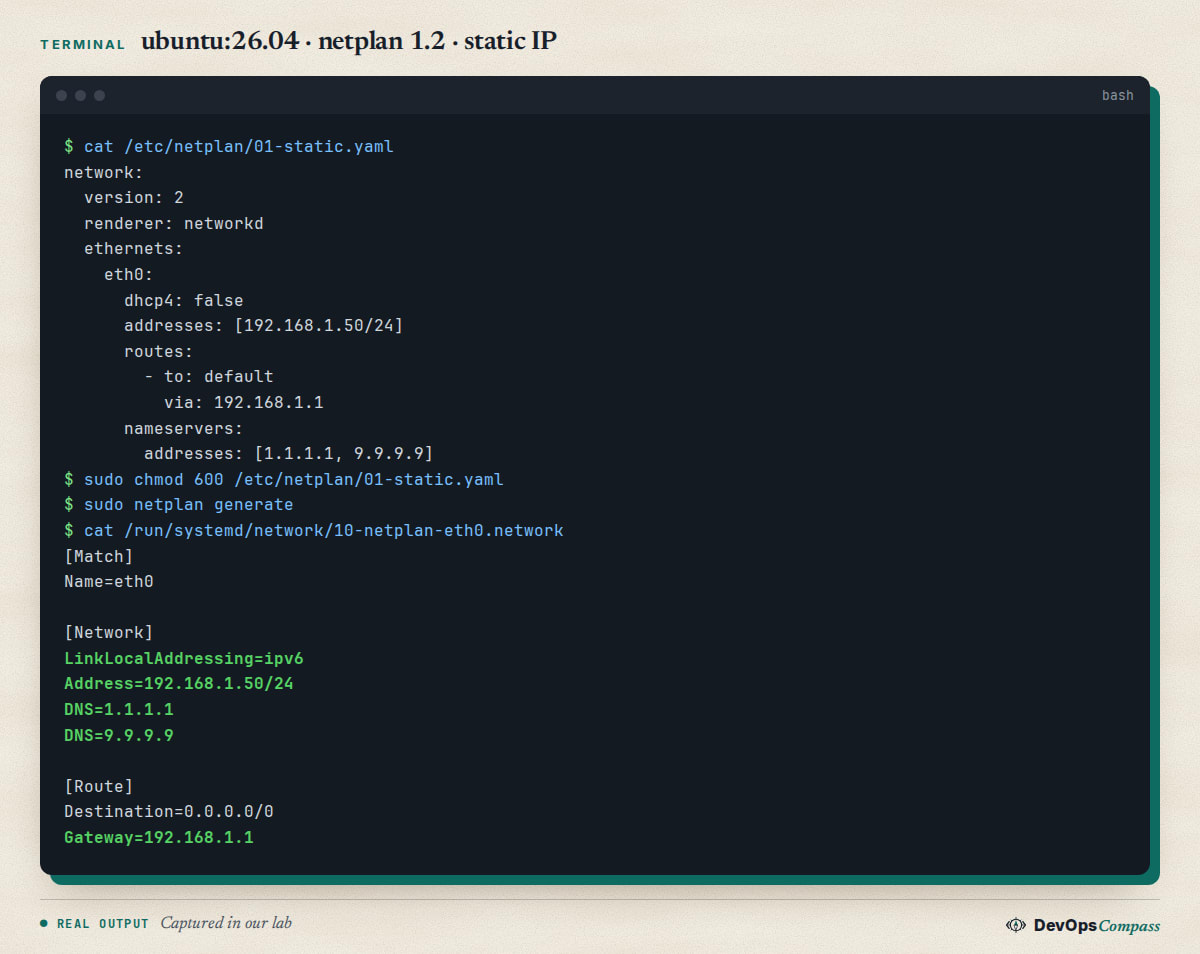
Three details matter. The address needs its prefix length (/24), the default route is written to: default, and nameservers: sits inside the interface block. Spaces only: YAML does not allow tabs.
Why does netplan say the permissions are too open?
Because the file can be read by other users, and netplan files can hold Wi-Fi passwords. In our test, modes 644 and 664 both printed:
Permissions for /etc/netplan/01-static.yaml are too open. Netplan configuration should NOT be accessible by others.
It is a warning only: the generate step still finished with exit code 0 and wrote the output. The fix is one command:
sudo chmod 600 /etc/netplan/*.yaml
Files created with sudo netplan set came out as mode 0600 owned by root in our test, so the warning mostly appears with files you made by hand or copied from a guide.
What replaces gateway4 in netplan?
A routes: entry with to: default. With the old key netplan printed "gateway4 has been deprecated, use default routes instead." and still generated Gateway=192.168.1.1, so old files keep working, but the key can disappear in a later release. Change this:
gateway4: 192.168.1.1
to this:
      routes:
        - to: default
          via: 192.168.1.1
A forum answer on a bond with two addresses (Ask Ubuntu question 1567489) reached the same conclusion and added that netplan still generates the file when two default routes are defined, even though one default is enough (Ask Ubuntu answer).
Two details from our test: an IPv6 gateway needs its own IPv6 route (to: default with an IPv6 via generated ::/0), and putting an IPv6 via under to: 0.0.0.0/0 is refused. If the gateway is outside your subnet (for example a /32 address on a VPS), add on-link: true to the route; netplan then adds GatewayOnLink=true. We checked the generated text, not whether a real host routes with it.
What do the netplan error messages mean?
netplan generate is the safe place to find mistakes, because it only reads your files and writes the backend config. These are the messages we triggered on purpose:
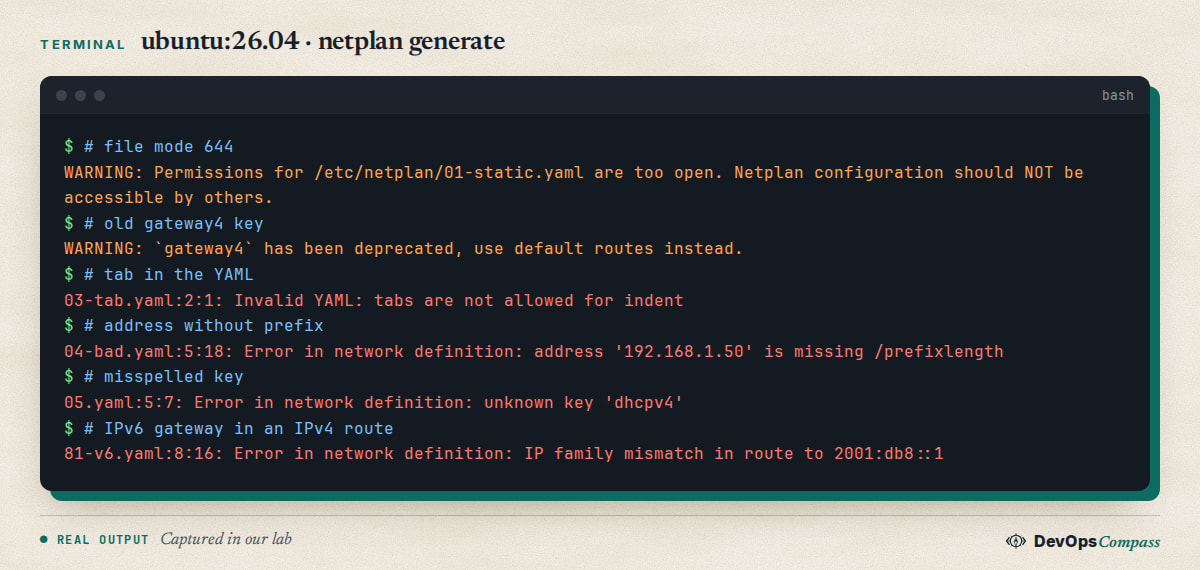
| Message | Cause | Fix |
|---|---|---|
Invalid YAML: tabs are not allowed for indent |
a tab character | use two spaces per level |
address '192.168.1.50' is missing /prefixlength |
no prefix on the address | write 192.168.1.50/24 |
unknown key 'dhcpv4' |
misspelled key | the key is dhcp4 |
IP family mismatch in route to 2001:db8::1 |
IPv6 gateway in an IPv4 route | use an IPv6 to: or an IPv4 via: |
Exit code was 1 for these four, so a script can stop on them. The warnings about permissions and gateway4 return 0, which is why they are easy to ignore.
Also note that only files ending in .yaml are read. A copy named 83.yml generated nothing in our test.
Does netplan merge several YAML files, and which one wins?
Yes. Netplan reads every /etc/netplan/*.yaml file in alphabetical order and merges them. In our test, single values such as dhcp4 were taken from the later file, while lists such as addresses were combined: two files each adding one address produced both addresses on the interface. sudo netplan get all prints the merged result, which is the quickest way to see what you really have.
Why did my static IP come back as DHCP?
On cloud images, cloud-init writes /etc/netplan/50-cloud-init.yaml with dhcp4: true. If your own file is named 01-static.yaml, it sorts before that one, so the cloud-init file is merged last and turns DHCP on again. We reproduced it:
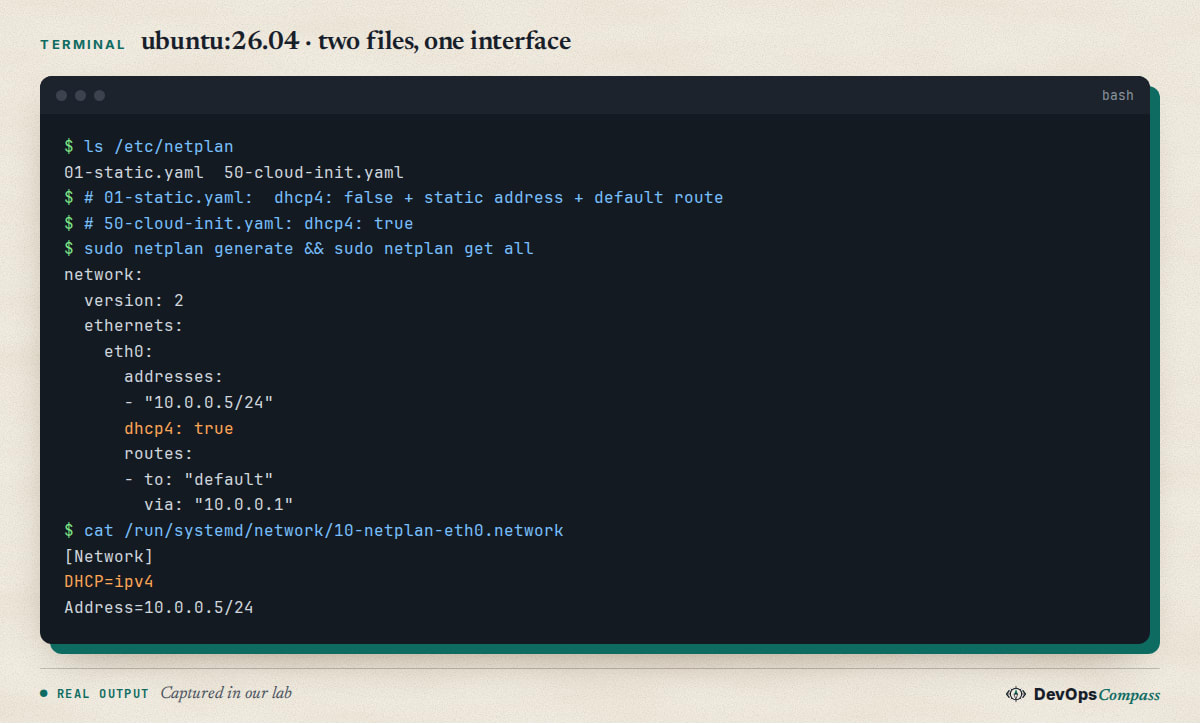
With the same two files, naming yours 99-static.yaml produced a static-only result in our lab, because the later file wins.
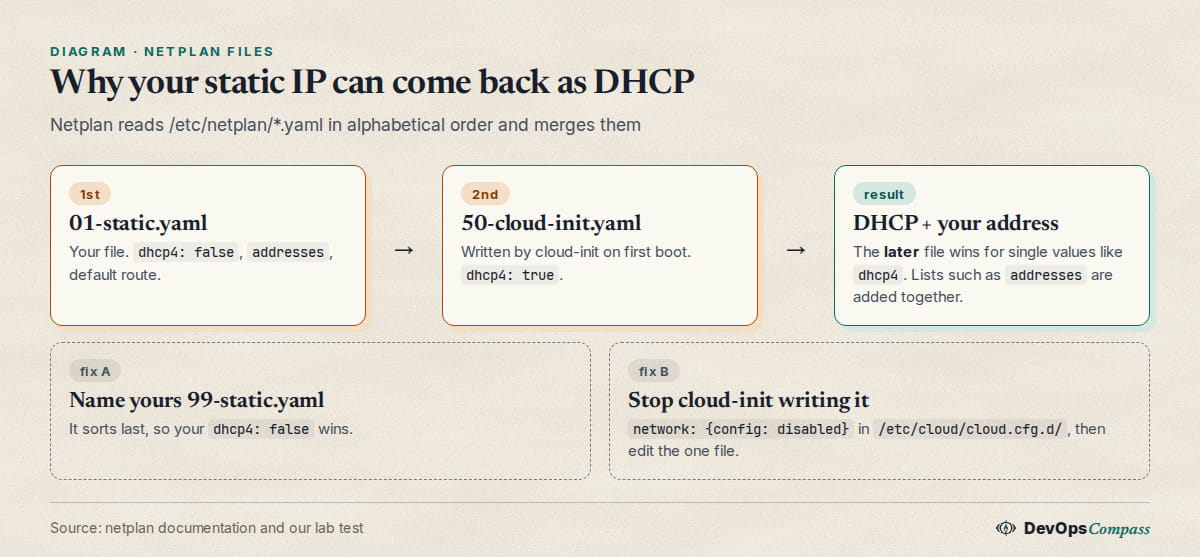
You have two ways out:
- Rename yours so it sorts after
50-cloud-init.yaml(for example99-static.yaml). Quick, but cloud-init can still rewrite its own file. - Stop cloud-init managing the network. The cloud-init documentation says to set
network: {config: disabled}in a file under/etc/cloud/cloud.cfg.d/, or to boot withnetwork-config=disabled. Then edit a single file. We took this from the docs and did not run cloud-init in our container.
Do this before you rely on the static address after a reboot, not after.
Why does name resolution fail after I set a static IP?
This is an open question on Ask Ubuntu (question 1569941, 30 September 2026, no answers when we checked). The asker set a static IP and nameservers on two VirtualBox VMs running 26.04, saw both servers in resolvectl status, could ping them, but got name errors in wget and apt (the Ask Ubuntu question).
We could not reproduce it: our container has no systemd-resolved, so we cannot say what the cause was. These are the checks we would run, in order, and they are our inference, not a verified fix:
resolvectl status                      # are the DNS servers attached to the right link?
resolvectl query example.com           # does the local resolver answer?
dig @1.1.1.1 example.com               # does the server answer directly?
ls -l /etc/resolv.conf                 # should point to the systemd-resolved stub
ip route                               # is there exactly one sensible default route?
If dig @1.1.1.1 works but resolvectl query does not, the problem is local (the resolver or /etc/resolv.conf). If neither works, look at routing and firewalls. Also check sudo netplan get all: a second file may be overriding your nameservers.
Why does my 26.04 server boot with no network?
One documented cause comes from the Nextcloud VM project. After the 35.0.x VM images moved to Ubuntu 26.04, users booted with the interface down and no address (issue 2872). A maintainer explained that the image build ran cloud-init clean, which on 26.04 also removed the DHCP netplan file, so /etc/netplan was empty; later images keep that file.
If you ever see an empty /etc/netplan on a machine of your own, the fix is to create a file yourself from the console. Use the static example above or a DHCP file:
network:
  version: 2
  ethernets:
    eth0:
      dhcp4: true
We did not run that VM image; this is the maintainer's explanation as written in the issue.
How do I test a netplan change without locking myself out?
Use sudo netplan try. According to the netplan documentation it applies the configuration and rolls it back unless you confirm within a time limit, 120 seconds by default (--timeout changes it). That is what protects an SSH session when you change the address you are connected to.
Two cautions. First, the same page lists a known issue: if netplan try times out or is cancelled, check that the network really went back, and verify the file on disk before you reboot. Searches such as "netplan try not reverting" show people hit this. Second, we could not run try in a container, so we have no output of our own for it. For a remote server, keep a second way in (provider console, KVM) before you touch the address you are logged in on.
The safest order is: netplan generate (syntax and warnings), netplan get all (merged result), netplan try, then confirm.
What we did not test
netplan applyandnetplan tryon a live system: containers have no systemd-networkd, so we tested the generated files only.- DNS and resolver behaviour (
systemd-resolved), and any VirtualBox or cloud-provider network. - cloud-init itself: the
network: {config: disabled}setting comes from its documentation. - Bridges, bonds, VLANs and Wi-Fi (the NetworkManager renderer only generated
.nmconnectionfiles in our test). - The Ubuntu desktop network settings, and upgrades from 24.04.
- Hardware: our lab host is arm64.
FAQ
How do I set a static IP address on Ubuntu 26.04?
Create /etc/netplan/01-static.yaml with dhcp4: false, an address with prefix, a to: default route and nameservers. Run sudo chmod 600 on the file, then sudo netplan generate and sudo netplan try. We tested the file generation on netplan 1.2.
Is gateway4 still supported in netplan?
It still worked in our test on netplan 1.2: the key produced a deprecation warning and a Gateway= line. Replace it with routes: and to: default with via: now, because deprecated keys can be removed in a later release.
Why does netplan say permissions are too open?
The YAML file can be read by other users. Netplan warns for modes such as 644 and 664 but still generates the configuration. Run sudo chmod 600 /etc/netplan/*.yaml to remove the warning and keep any passwords private.
Why do I have to run netplan apply after every reboot?
Users have reported this for bridges that stay down until netplan apply runs, for example Ask Ubuntu question 1540696, where an answer suggested a post-up command. We did not test it. Check the merged result with netplan get all and the journal for networkd errors first.
Does netplan read more than one YAML file?
Yes. It reads every /etc/netplan/*.yaml file in alphabetical order and merges them. In our test the later file won for single values such as dhcp4, and addresses from different files were combined. Files ending in .yml were ignored.
How do I stop cloud-init from changing my netplan configuration?
The cloud-init documentation says to set network: {config: disabled} in a file under /etc/cloud/cloud.cfg.d/. After that, edit your own netplan file. We did not run cloud-init in our lab, so test it on a spare machine first.
Related guides
- Upgrade Ubuntu 24.04 to 26.04 on a Server: the upgrade steps and other changes you will meet on 26.04.
- Install Docker on Ubuntu 26.04 Server: what to do next once the server has its fixed address.
- Change SSH Port on Ubuntu 26.04: another small change that can lock you out if you skip the checks.
Sources
- Netplan documentation: netplan-try (rollback, default 120 seconds, known issues), checked 3 November 2026.
- cloud-init documentation: Network configuration, disabling.
- Nextcloud VM: issue 2872, no network on 26.04.
- Ask Ubuntu: name resolution after editing netplan on 26.04, gateway4 deprecation message, netplan apply after every reboot.
- Google autocomplete for "netplan static ip ubuntu 26.04", "netplan permissions too open", "netplan try not reverting" and "netplan 50-cloud-init.yaml" (3 November 2026).
Last verified: November 2026 (3 November 2026, netplan 1.2-1ubuntu5.1 on ubuntu:26.04, arm64, generator output only). Interface names and cloud-init behaviour differ by provider; check the generated files on your own server.
Header image: Image: DevOpsCompass.
Comments
Post a Comment