
Gemma 4 and Qwen3.6 by RAM: What Fits in 8, 16, 32 GB
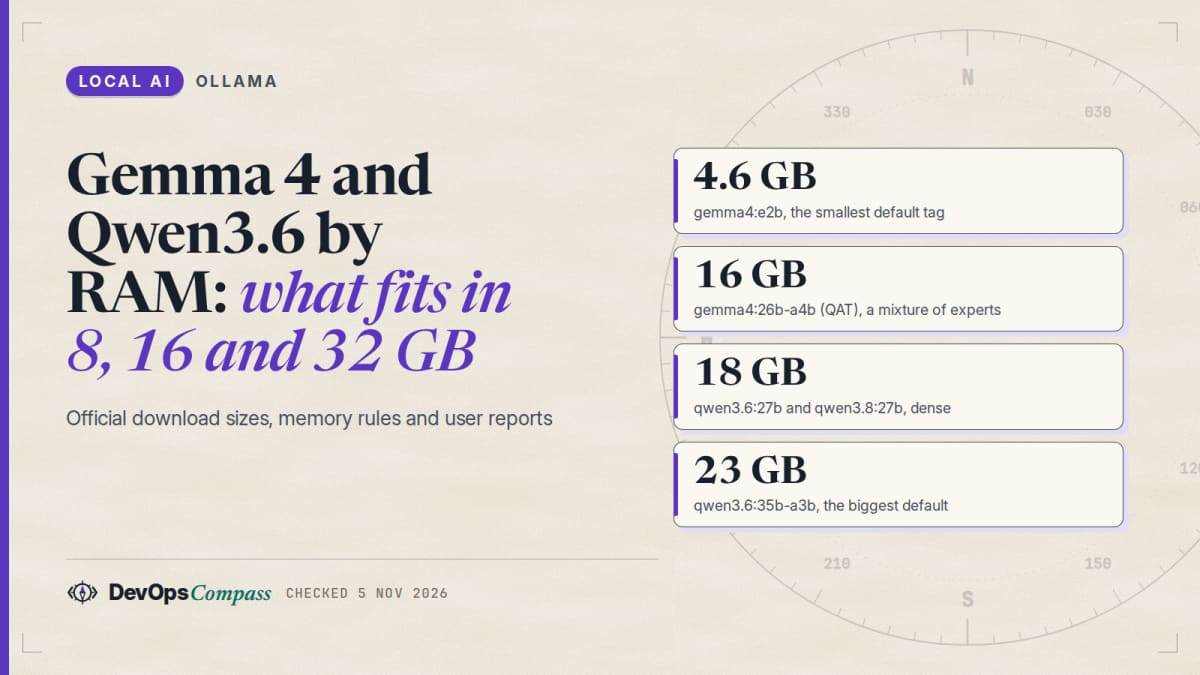
Short answer: start from the download size on the model's Ollama tag page, then leave room for the context and the operating system. By that rule, 8 GB fits gemma4:e2b (4.6 GB). 16 GB fits gemma4:e4b (6.6 GB) and gemma4:12b (7.7 to 8.0 GB). 32 GB fits the 16 to 19 GB tier: gemma4:26b, qwen3.6:27b and gemma4:31b. The 23 GB qwen3.6:35b-a3b is a stretch at 32 GB and comfortable at 64 GB. The headroom rule is our opinion; the sizes are official.
How this article was made: a compilation of the Ollama library pages and docs, GitHub issues and Hacker News comments, read on 5 November 2026. We did not download or run any model for it. Speeds below are attributed to the people who reported them.
If you searched "how much RAM do I need for Gemma 4" or "Qwen3.6 35B RAM requirements", you want one number. The official pages give you file sizes, and the rest is rules about context and a few confusing displays. This guide turns the sizes into tiers and then covers the cases where Ollama's own numbers mislead.
Official facts
What sizes do Gemma 4, Qwen3.6 and Qwen3.8 come in?
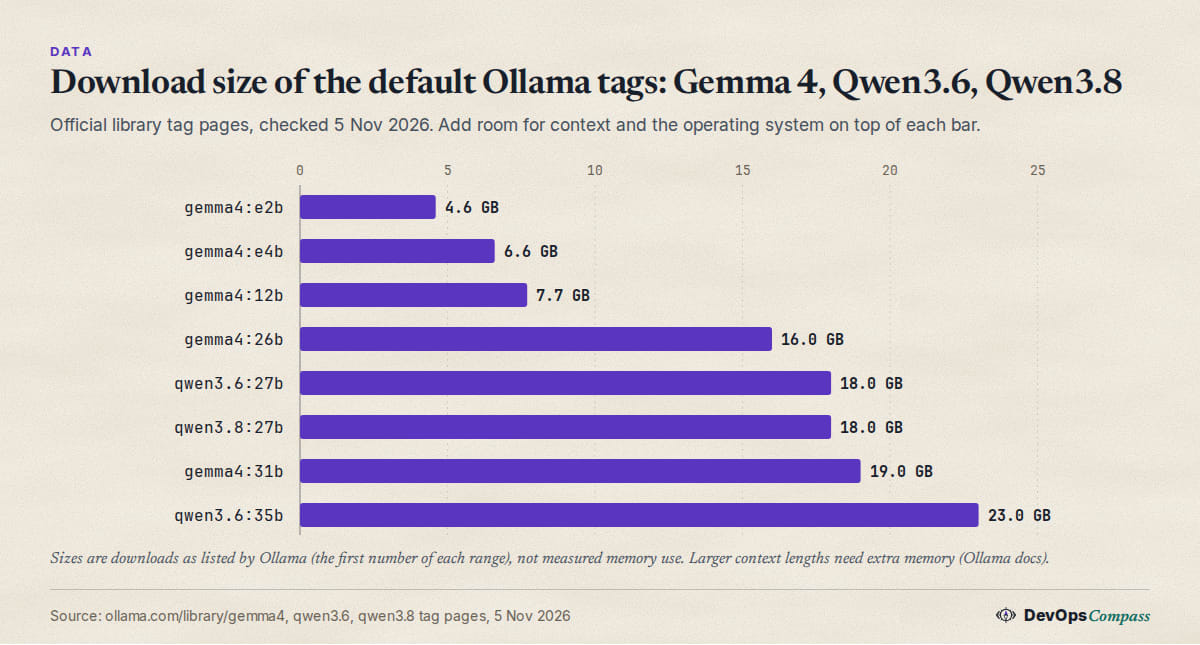
These are the default tags on the Ollama library pages for gemma4, qwen3.6 and qwen3.8, read on 5 November 2026:
| Tag | Download size | Context | Notes |
|---|---|---|---|
gemma4:e2b |
4.6 GB | 128K | "effective" 2B, for edge devices; -it-qat is 4.3 GB |
gemma4:e4b (also latest) |
6.6 GB | 128K | "effective" 4B; -it-qat is 6.1 GB |
gemma4:12b |
7.7 to 8.0 GB | 256K | -it-qat is 7.2 GB, -it-q4_K_M is 8.0 GB |
gemma4:26b |
16 to 19 GB | 256K | mixture of experts with 4B active parameters; -it-qat 16 GB, -it-q4_K_M 18 GB |
gemma4:31b |
19 to 20 GB | 256K | dense; -it-qat is 19 GB |
qwen3.6:27b |
18 to 19 GB | 256K | dense; 27b-q4_K_M is 17 GB |
qwen3.6:35b (also latest) |
23 GB | 256K | 35b-a3b, a mixture of experts; q4_K_M is 24 GB |
qwen3.8:27b (also latest) |
18 GB | 256K | dense; added more recently than qwen3.6 |
All of them take text and image input. Two reading notes from the Gemma 4 page: the "E" in E2B and E4B stands for "effective" parameters and the page says these are made for edge devices, and the 26B model is a mixture of experts model with 4B active parameters. That matters for speed (fewer weights are used per token) but not for memory: all experts still have to be stored somewhere, which is why the 26B file is 16 GB and not 4 GB.
The size ranges (for example 16 to 19 GB) are the spread between the quantisation variants listed for that size. If you want the smaller one, pull the tag explicitly, such as gemma4:26b-a4b-it-qat.
How much RAM does Gemma 4 26B need?
The honest answer from official sources is: the file is 16 GB for the QAT tag and 18 GB for q4_K_M, and Ollama's pages publish no RAM requirement beyond that. Add the context. The Ollama docs say a larger context length "will increase the amount of memory required", and that coding and agent tools should be set to at least 64000 tokens. So a 16 GB file plus a 64K context plus the operating system will not fit a 16 GB machine, and is realistic on 32 GB.
The 28 GB gemma4:26b-a4b-it-q8_0 and the 52 GB bf16 tag exist, but those are for 48 GB and above.
Can 16 or 32 GB run Qwen3.6 35B-A3B?
qwen3.6:35b-a3b is 23 GB at its default tag, 24 GB as q4_K_M, 39 GB as q8_0 and 72 GB as bf16. The Ollama page has no RAM figure. From the size alone:
- 16 GB: the file does not fit in memory, so it would stream from disk or split with a GPU. We would not plan around it.
- 32 GB: the file fits with about 9 GB left for the context and the system. That is workable for a short context and tight for a 64K one.
- 64 GB: comfortable, including the 39 GB
q8_0tag for short contexts.
A Hacker News commenter says the same model "runs well on ~32gb combined ram at q4" if you offload most experts to the CPU; see the reports below.
Does a bigger context use more memory?
Yes. The docs give the defaults by VRAM: under 24 GiB of VRAM the default is 4k, 24 to 48 GiB is 32k, and 48 GiB or more is 256k. Raise it with OLLAMA_CONTEXT_LENGTH=64000 ollama serve, or with the slider in the app. The docs describe VRAM; we found no separate rule for Macs with unified memory or for CPU-only machines, so treat the table as a hint there. Our Ollama context length guide goes through it.
You can shrink the K/V cache with OLLAMA_KV_CACHE_TYPE. Per the FAQ, the default is f16, q8_0 "uses approximately 1/2 the memory", and q4_0 about 1/4, with a small to medium loss in precision. It is a global setting for all models.
How do I see what Ollama actually loaded?
Run ollama ps. The Processor column shows 100% GPU, 100% CPU, or a split such as 48%/52% CPU/GPU. Models stay loaded for 5 minutes after the last request; ollama stop <model> unloads one at once. Whether the number in that column is reliable is the next section.
Why does ollama ps show a different size than the real memory use?
This is a gap: the docs say what the column means, but not when it is wrong. Two open or recent GitHub reports show it being wrong for Gemma 4, in opposite directions.
- It can count the same weights twice. In issue 16637 (June 2026, closed), a user ran a Gemma 4 26B-A4B GGUF on one 16 GB GPU.
ollama psshowed 28 GB and a 50% CPU / 50% GPU split, whilenvidia-smishowed about 15.5 GiB used on the GPU and generation ran at about 100 tokens per second. Withuse_mmapoff it showed 15 GB and 94% GPU at the same speed. The reporter's reading: the memory-mapped file pages were counted into the size. - It can predict far more than the model uses. In issue 19357 (28 October 2026, open), a user says the scheduler predicts 8.1 to 12.2 GiB for
gemma4:e4b, while the GPU actually holds 3.12 GiB. About 5.9 GiB of the weights stayed in CPU-mapped memory. The effect they describe: other models are evicted even though they would fit next to it.
What to do with that: if ollama ps shows a CPU share but generation is fast, check with nvidia-smi (or Activity Monitor on a Mac) before you buy RAM. For the other direction, a real offload, see our Ollama not using GPU checklist.
Why can a model get slower after an update without a RAM change?
Issue 17099 (9 July 2026, open) is the clearest example of a model sitting on the edge of a tier. A user ran gemma4:31b with num_ctx 65536 on a 24 GB card. After updating from Ollama 0.31.1 to 0.31.2 the size shown went from 18.8 to 20.0 GiB, the split went from 100% GPU to 90% GPU / 10% CPU, and generation fell from 33.8 to 4.7 tokens per second. The reporter suspects a change in how vision-model memory is estimated.
The lesson for tiers: a model that "just fits" can fall off a cliff when an estimate moves by a gigabyte. Leave margin, and write down your ollama ps output before you update.
What are the tiers?
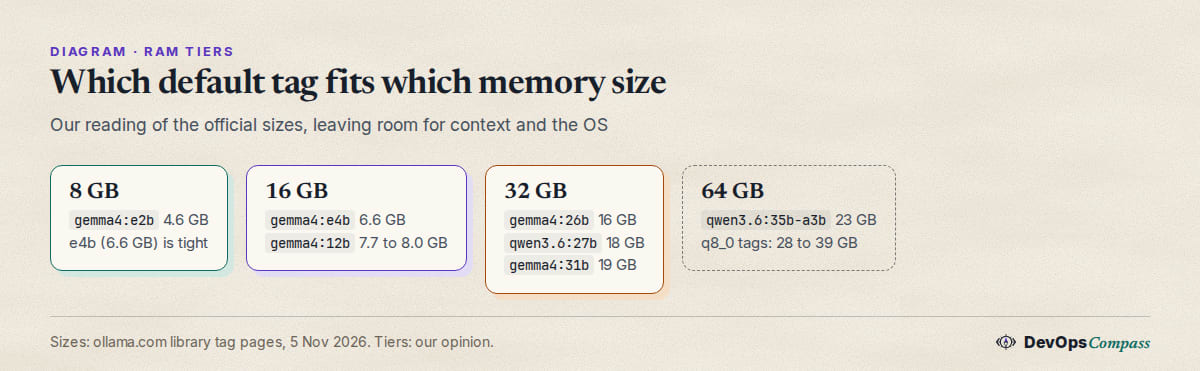
This is our reading of the sizes in the table above. It is opinion, not a benchmark.
8 GB: gemma4:e2b, and only a short context
gemma4:e2b is 4.6 GB (4.3 GB as QAT). That leaves 3 to 4 GB for the system and context on an 8 GB machine. gemma4:e4b at 6.6 GB leaves very little. There is a report of the tight case on a board: issue 19115 (18 October 2026, open) says gemma4:e4b-it-qat could not load at num_ctx 16384 on a Jetson Orin Nano with 8 GB, and ran at about 2 tokens per second at 8192 on Ollama 0.40.5, while 0.35.1 had loaded it at 14 to 15 tokens per second.
16 GB: gemma4:e4b or gemma4:12b
Both fit with room. gemma4:12b is 7.7 to 8.0 GB and gemma4:e4b is 6.6 GB. No GPU is needed for these in principle: they run in system memory, slower than on a GPU. On the question "which is better, E4B or 12B", the Ollama page lists MMLU Pro scores for the models: E4B 69.4% and E2B 60.0%, against 82.6% for the 26B-A4B and 85.2% for the 31B (instruction-tuned, as reported on the model page; the 12B has no row in that table). Size buys quality, at the cost of memory.
32 GB: the 16 to 19 GB tier
gemma4:26b (16 GB QAT), qwen3.6:27b (18 GB), qwen3.8:27b (18 GB) and gemma4:31b (19 GB QAT) all fit, with 10 GB or more for context and system. The mixture of experts 26B uses 4B active parameters per token, so it should generate faster than the dense 27B and 31B models on the same hardware. That is a consequence of the architecture the page describes, not a number we have.
64 GB: qwen3.6:35b-a3b and the q8_0 tags
At 64 GB you can keep qwen3.6:35b-a3b (23 GB) with a long context, or take the q8_0 tags: 28 GB for the Gemma 26B, 34 GB for the 31B, 30 GB for the 27B models and 39 GB for the 35B. The bf16 tags (52 to 72 GB) do not leave a safe margin.
What happens when a model is larger than my VRAM?
Ollama loads as many layers as fit on the GPU and runs the rest on the CPU from system memory; the FAQ's 48%/52% CPU/GPU example is exactly that. It works, but it is slower, and the split can be large: in the 17099 report above, a 10% CPU share came with a drop from 33.8 to 4.7 tokens per second. If the model does not fit in total memory either, it cannot run well at all. For a mixture of experts model, users report that moving the experts to the CPU hurts less than for a dense model (see below).
What users report
These are attributed reports, read on 5 November 2026. We did not verify them, and speeds depend on hardware, quantisation and context.
- A Mac sizing rule of thumb. On Hacker News on 26 October 2026, pancomplex wrote that their tool picks "8 GB Mac: Gemma 4 E2B", "16 to 18 GB Mac: Gemma 4 E4B", "24 to 64 GB Mac: Gemma 4 26B A4B", and for "an RTX 3060 or 4070 (12 GB) and 32 GB RAM: Gemma 4 26B, split between the GPU and system memory" (comment). It matches our tiers, with a smaller step at 24 GB.
- Speeds on a 48 GB MacBook Pro. fy20 reported on 15 April 2026: "Gemma 4 31B Q6: 9tok/s" and "Gemma 4 26B A4B Q4: 50tok/s", and called the 31B "slow" but "good for coding" (comment). The gap is the mixture of experts effect.
- Offloading experts on a small GPU. eyegor wrote on 15 October 2026 that "qwen3.6 35b-a3b runs well on ~32gb combined ram at q4", and that with limited VRAM you can "offload most of the experts to cpu/ram", which "doesn't hurt performance too much" for mixture of experts models (comment).
- A 24 GB Mac in practice. felineflock ran 4-bit models from 4B to 35B on an M4 Pro with 24 GB in LM Studio, at "3 to 40 tokens/second" depending on the model, and found Gemma 4 E4B the best summariser in their test while a large Qwen was the best at hard code reading, at "~5 tok/s" (comment, 23 August 2026).
- Unified memory is not always visible to Ollama. Issue 19519 (4 November 2026, open) describes a 128 GB unified-memory laptop under WSL2 where Ollama capped the GPU at the VM's free RAM (22.7 GiB).
qwen3.8:27b-q8_0loaded 37 of 66 layers at 0.53 tokens per second; with a patched memory budget it loaded 66 of 66 at 7.72. It is one setup, but it shows that "how much memory the machine has" and "how much Ollama will use" can differ.
Our take
This is opinion, based on the sizes and reports above:
- Plan for file size plus 30 to 50%. The extra covers the system and a 16K to 64K context. This is a rule of thumb, not an official figure. Check it with
ollama pson your machine. - Pick
gemma4:12bon 16 GB, not the 26B. The 26B QAT file is 16 GB, so it cannot sit in 16 GB of RAM with anything else running. - On 32 GB, prefer the mixture of experts models for speed.
gemma4:26bandqwen3.6:35b-a3bactivate 4B and 3B parameters per token, per their names and pages, while the 27B and 31B dense models use all weights. If quality matters more than speed, try the dense ones. - Do not buy RAM because of the Processor column alone. Two of the issues above show it misreporting. Compare with
nvidia-smior Activity Monitor and with the real tokens per second. - Pin your Ollama version for a model on the edge. A 1 GiB estimate change cost one user a 7x slowdown. If you are at 90% of your memory, move down a tier.
- Use a smaller K/V cache before a smaller model.
OLLAMA_KV_CACHE_TYPE=q8_0halves cache memory per the FAQ, which can be the difference at 64K context. - For coding models specifically, see our Ollama coding models by VRAM guide; it covers the same tags with a coding focus and the older Qwen coder family.
What we did not test
- We did not download or run Gemma 4, Qwen3.6 or Qwen3.8, so every "fits" statement is arithmetic on published file sizes, not a load test.
- We did not check RAM use, context cost per token, or speed. All speeds are quoted from named users and depend on their hardware.
- The 30 to 50% headroom is our rule of thumb; Ollama publishes no such figure.
- GitHub issues are user reports: 16637 is closed, 17099, 19115, 19357 and 19519 were open when we read them. Newer Ollama versions may have changed the behaviour.
- We did not compare quality between the models beyond the benchmark table on the Gemma 4 model page, which is the vendor's own.
FAQ
How much RAM do I need for Gemma 4?
It depends on the size. gemma4:e2b is a 4.6 GB download, e4b 6.6 GB, 12b 7.7 to 8.0 GB, 26b 16 to 19 GB and 31b 19 to 20 GB. Add room for context and the system: about 8 GB for E2B, 16 GB for E4B and 12B, and 32 GB for the 26B and 31B.
Can Gemma 4 run on CPU only?
Yes. Ollama runs models from system memory when there is no GPU, at lower speed. The E2B and E4B models are made for edge devices, so they are the practical CPU choices. See our CPU-only Docker guide for the setup.
What is the difference between Gemma 4 E4B and 12B?
E4B is a 6.6 GB "effective 4B" edge model with a 128K context. The 12B is 7.7 to 8.0 GB with a 256K context. E4B needs less memory; the 12B is the larger model. We did not compare their answers.
How much RAM does Qwen3.6 35B need?
The default tag qwen3.6:35b-a3b is a 23 GB download (24 GB as q4_K_M). Plan for 32 GB with a short context, or 64 GB for a long one. A user reports it runs well on about 32 GB combined RAM at q4 with experts offloaded to the CPU.
Does a longer context use more RAM in Ollama?
Yes. Ollama's docs say a larger context length increases memory use, and that agent and coding tools should use at least 64000 tokens. You can set the cache to q8_0 with OLLAMA_KV_CACHE_TYPE to use about half the cache memory.
What happens if the model is bigger than my VRAM?
Ollama puts the layers that fit on the GPU and the rest on the CPU, which ollama ps shows as a split such as 48%/52% CPU/GPU. It runs, but slower, sometimes much slower. One user saw a 10% CPU share cost a factor of 7.
Why does ollama ps show a CPU share when my GPU is fast?
Reports say the memory-mapped weights can be counted twice for some mixture of experts models, so the split can be wrong. Check nvidia-smi and your real speed before you change anything.
Related guides
- Ollama models for coding: what fits in 8, 16 and 24 GB VRAM
- Ollama context length: default, num_ctx and how to change it
- Ollama not using the GPU: checklist for NVIDIA, AMD and Docker
- Run Ollama without a GPU: CPU-only Docker setup
Sources
- Ollama library: gemma4 tags and model page
- Ollama library: qwen3.6 tags
- Ollama library: qwen3.8 tags
- Ollama docs: context length
- Ollama docs: FAQ
- GitHub issue 16637: ollama ps size and CPU split
- GitHub issue 19357: gemma4:e4b memory estimate
- GitHub issue 17099: gemma4:31b slowdown after 0.31.2
- GitHub issue 19115: gemma4:e4b on an 8 GB Jetson
- GitHub issue 19519: unified memory under WSL2
- Hacker News comments: 50252050, 47778287, 50099500, 49410310
Last verified: November 2026. Ollama library pages and docs read on 5 November 2026.
Header image: Image: DevOpsCompass.
Comments
Post a Comment