
Docker: Bind Failed, Port Is Already Allocated (Fix)
Short answer: another container already publishes that host port. Find it with docker ps --filter publish=8080, then either stop it or publish yours on a free host port, for example -p 8081:80. If docker ps shows nothing, a program on the host holds the port: Docker then prints address already in use instead.
How this was made: on 8 November 2026 we reproduced every message below with tiny alpine:3 containers on Docker Engine 29.9.3 and Compose v5.7.0 (arm64). We used ports 18081 to 18088 only.
The error as Docker prints it
Start a second container on a host port that the first one already publishes, and docker run stops:
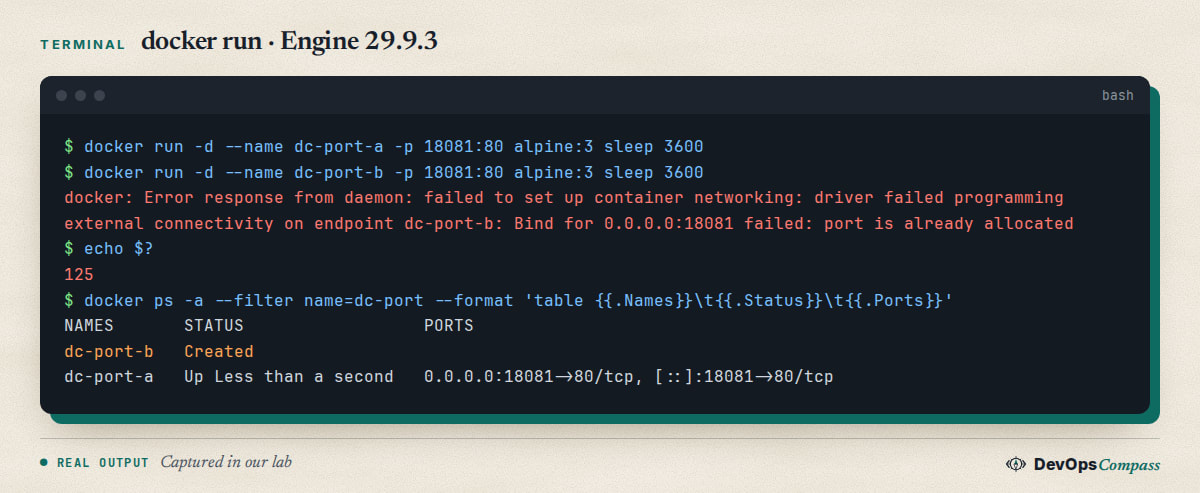
The exit code is 125. The message is the same whether the second container comes from docker run or from docker compose up.
What "port is already allocated" means
A host port can be published by one container at a time. Docker checks this when the container starts, which is why the container exists but never runs. The fix is always one of two moves: free the port, or publish a different host port. The container side, the 80 in -p 18081:80, can stay the same in every container.
How to find what holds the port
Ask Docker first:
docker ps --filter publish=18081
docker port dc-port-a
In our lab the first command listed dc-port-a with 0.0.0.0:18081->80/tcp, [::]:18081->80/tcp. If it prints nothing, ask the host with ss -ltnp | grep 18081. Run it with sudo to see process names: as a normal user we saw the listener but no name for Docker's own socket.
Fix 1: change the host port
Keep the old container and move the new one:
docker run -d --name web2 -p 18091:80 your-image
In Compose, make the host port a variable so each copy of the project can differ. This is also the answer when a self-hosted stack such as Supabase wants a port you already use:
ports:
  - "${HOST_PORT:-18084}:80"
Then run HOST_PORT=18085 docker compose up -d. It worked in our test and docker compose ps showed 0.0.0.0:18085->80/tcp.
If you do not care which port you get, leave the host side out: -p 80 gave us 32768, and -p 127.0.0.1::80 gave 127.0.0.1:32769. Read the result with docker port.
Fix 2: stop or remove the old container
If the old container is the one you no longer want, remove it and run yours again:
docker rm -f dc-port-a
For a Compose project, run docker compose down in its folder. It frees the port and removes the network too.
Two Compose projects with the same port
Compose names a project after its folder. Copy a project into a second folder and both want the same host port. The second docker compose up -d failed with exit 1 and left proj2-web-1 in Created state. To see who owns the port, run docker ps --filter publish=18084 and then docker compose ls, which prints the folder of each project's compose file.
Then run docker compose down in that folder, or use the HOST_PORT variable above. After down in the first folder, up -d in the second one succeeded on 18084.
Why docker start works but publishes nothing
This is the trap. After the error, the failed container is still there in Created state. In our test, docker ps -a showed dc-port-q Created and nothing else.
Starting it by hand looks like a success:
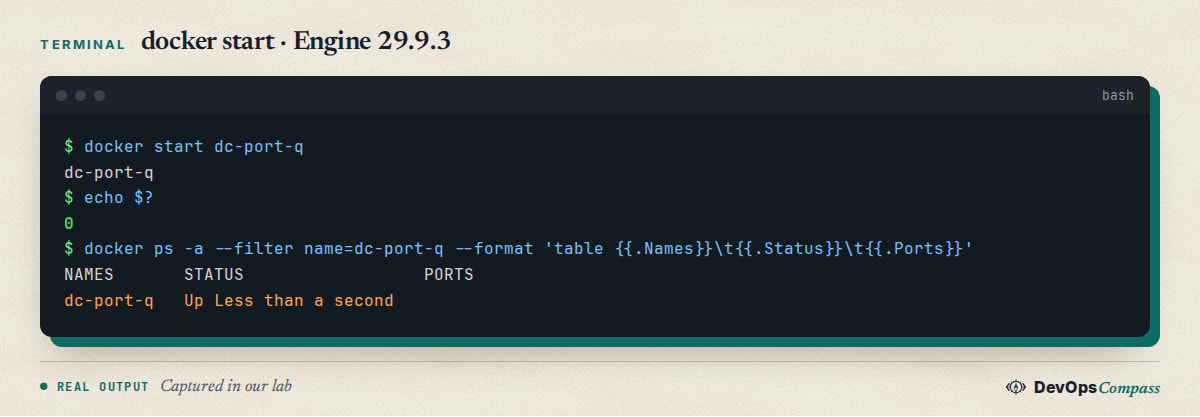
docker start exited 0 and the status said Up, but the PORTS column was empty: nothing was published. It stayed empty after we freed the port, too. Moby issue #51758 describes the same behaviour and is marked closed, yet we saw it on Engine 29.9.3. The cure is to remove the leftover and create a fresh container.
The leftover also causes the next error. Running the same docker run --name dc-port-m again prints Conflict. The container name "/dc-port-m" is already in use. Remove it first with docker rm dc-port-m, or list leftovers with docker ps -a --filter status=created.
Port is already allocated or address already in use?
The two messages come from different places:
| Message | Who holds the port | How to find it |
|---|---|---|
Bind for 0.0.0.0:18081 failed: port is already allocated |
another Docker container | docker ps --filter publish=18081 |
failed to bind host port 0.0.0.0:18082/tcp: address already in use |
a program on the host | ss -ltnp \| grep 18082 |
We got the second message when a Python web server held 18082. An IPv6-only listener on 18086 blocked us as well, with failed to bind host port [::]:18086/tcp. Docker publishes on IPv4 and IPv6 by default.
Port is already allocated but no container uses it
Check the host with ss -ltnp | grep PORT first: a program outside Docker is the usual answer, and docker ps -a rarely explains it, as the next section shows.
There is one rarer cause. Moby issue #52092 reports that after an unclean removal, such as a power cut, docker-proxy kept listening on the port after the daemon restarted. The issue is still open and we did not reproduce it. If ss shows a docker-proxy for a container that no longer exists, restarting the Docker service is the first thing to try, and it interrupts all running containers.
Does a stopped container block the port?
No. We tested a stopped container and a container that was only created with docker create. Neither held port 18083, and a second container started on it.
Does binding 127.0.0.1 avoid the conflict?
No. With dc-port-a on 0.0.0.0:18081, a second container on 127.0.0.1:18081 failed with the same error. The reverse order failed too, with an error that names 127.0.0.1. A different protocol is the exception: -p 18081:80/udp started fine next to the TCP one.
How to undo
Nothing here changes the host. Remove the lab containers with docker rm -f and delete the proj1 and proj2 folders. See our guides to Docker and ufw before you publish a port to the internet, and to Compose healthcheck guide if the next problem is startup order.
FAQ
Can a stopped container block a port?
No. In our test a stopped container did not hold port 18083, and a second container started on it. Only running containers publish ports.
Can two containers use the same port number?
Yes, on different protocols. In our test -p 18081:80/udp started next to a TCP mapping on the same number. A 127.0.0.1 bind does not get around a 0.0.0.0 bind.
Should I kill the process that uses the port?
Only if you know what it is. Check with ss -ltnp first; changing the host port is safer than killing something you do not recognise, such as a system web server.
Why does the error say 0.0.0.0 when I did not set it?
If you write -p 8080:80 without an address, Docker publishes on all IPv4 addresses, which is 0.0.0.0, and on IPv6. Add 127.0.0.1: in front if only the host should reach it, as the Docker docs explain.
Do I need to restart Docker to free a port?
Not for the normal case. Remove the container that holds it. A restart only becomes an idea in the rare leftover-proxy case from issue 52092.
Does the same error happen on Docker Desktop?
Google autocomplete shows that people search for it with Docker Desktop too. We only tested Docker Engine on Linux, so we cannot say how Desktop's networking layer changes the message.
Related guides
- Docker Compose healthcheck + depends_on: wait for a healthy service.
- Docker Bypasses ufw: why a published port ignores your firewall.
- Install Docker on Ubuntu 26.04 Server: the tested Engine and Compose setup.
Sources
- Docker docs: Port publishing and mapping.
- Docker docs: Compose file reference, ports.
- Moby: docker start ignores conflicting ports for created containers, #51758.
- Moby: port is already allocated with no container occupying it, #52092.
- Stack Overflow: Bind for 0.0.0.0:4000 failed: port is already allocated.
- Google autocomplete for "docker port is already allocated" and "docker address already in use" (8 November 2026).
Last verified: November 2026 (8 November 2026, Docker Engine 29.9.3, Compose v5.7.0, alpine:3, arm64). Docker Desktop, rootless Docker and the stale docker-proxy case were not tested.
Header image: Image: DevOpsCompass.
Comments
Post a Comment